Geekzone: technology news, blogs, forums
Guest
Welcome Guest.
You haven't logged in yet. If you don't have an account you can register now.


UncleArthur

197 posts

Master Geek
+1 received by user: 65


#301947 17-Oct-2022 21:25
Send private message

Just wondering if anyone else is experiencing this?
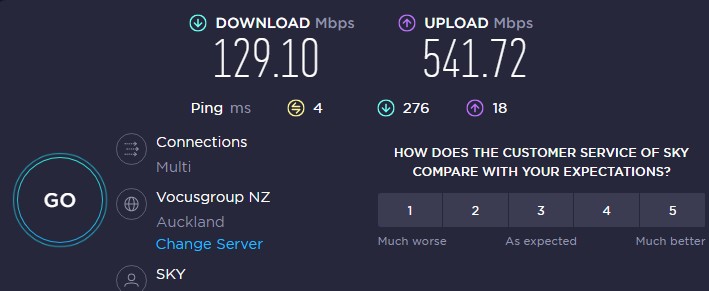


Been good for a couple of months, with typical speeds around 800/500.... but as you can see, the download has dived. (not on wifi FYI)


Done the usual, reboot router etc... just wondering if anyone else is experiencing this?


Thanks,


Homer: "Son, you tried and you failed....the lesson is...never try"


View this topic in a long page with up to 500 replies per page Create new topic
 1 | 2
vexxxboy
4336 posts

Uber Geek
+1 received by user: 2072


  #2984025 17-Oct-2022 21:36
Send private message

Mine is fine


Common sense is not as common as you think.


nztim
4012 posts

Uber Geek
+1 received by user: 2710

ID Verified
Trusted
TEAMnetwork
Subscriber

  #2984027 17-Oct-2022 21:37
Send private message

On Sky, Not having any issues, and if there were it would be affecting all other Vocus Brands

Are you testing on ethernet or wiifi?


Any views expressed on these forums are my own and don't necessarily reflect those of my employer. 


Linux
12173 posts

Uber Geek
+1 received by user: 8469

Trusted
Lifetime subscriber

  #2984030 17-Oct-2022 21:47
Send private message

You need to ask other Sky subscribers in your location


UncleArthur

197 posts

Master Geek
+1 received by user: 65


  #2984032 17-Oct-2022 21:50
Send private message

Thanks for the replies.


I'm in Hamilton.


On ethernet. 


Homer: "Son, you tried and you failed....the lesson is...never try"


stick
357 posts

Ultimate Geek
+1 received by user: 113


  #2984034 17-Oct-2022 21:53
Send private message

Have you tried a speed test through the Speedtest app?

nztim
4012 posts

Uber Geek
+1 received by user: 2710

ID Verified
Trusted
TEAMnetwork
Subscriber

  #2984046 17-Oct-2022 22:08
Send private message

Any one in Hamilton watching this thread on any Vocus ISP that could do comps for this guy?

Could be an issue with the UFF handover to Vocus (unlikely tho)


Any views expressed on these forums are my own and don't necessarily reflect those of my employer. 


Shop now on AliExpress (affiliate link).
michaelmurfy
meow
13579 posts

Uber Geek
+1 received by user: 10910

Moderator
ID Verified
Trusted
Lifetime subscriber

  #2984054 17-Oct-2022 22:24
Send private message

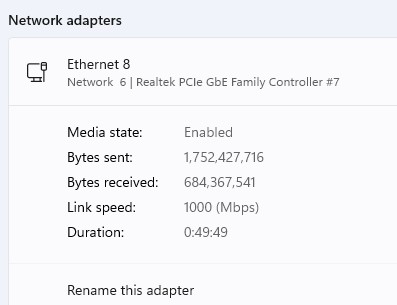
Realtek Ethernet on Windows. I think that'll be your answer.


Try booting into Linux (like from an Ubuntu boot disk) and try that. You'll find it'll work totally fine. Also try from another device.


Also, try this:


Open up the Command Prompt or Powershell under Administrator mode and type the following:


netsh int tcp set global autotuninglevel=normal


Then reboot - see if this improves your speed.


Michael Murphy | https://murfy.nz
Referral Links: Quic Broadband (use R122101E7CV7Q for free setup)

Are you happy with what you get from Geekzone? Please consider supporting us by subscribing.
Opinions are my own and not the views of my employer.


vexxxboy
4336 posts

Uber Geek
+1 received by user: 2072


  #2984059 17-Oct-2022 22:55
Send private message

michaelmurfy:


Realtek Ethernet on Windows. I think that'll be your answer.


Try booting into Linux (like from an Ubuntu boot disk) and try that. You'll find it'll work totally fine. Also try from another device.


Also, try this:


Open up the Command Prompt or Powershell under Administrator mode and type the following:


netsh int tcp set global autotuninglevel=normal


Then reboot - see if this improves your speed.


i have the same Realtek controller   , no problems


Common sense is not as common as you think.


michaelmurfy
meow
13579 posts

Uber Geek
+1 received by user: 10910

Moderator
ID Verified
Trusted
Lifetime subscriber

  #2984061 17-Oct-2022 22:59
Send private message

vexxxboy:


i have the same Realtek controller   , no problems


There is no rhyme or reason what causes it. I have the same Realtek controller and have problems, so much that I popped in an Intel card. Worked fine under Linux.


I also know many others who have had the same problem and it has been also mentioned on here multiple times too.


Michael Murphy | https://murfy.nz
Referral Links: Quic Broadband (use R122101E7CV7Q for free setup)

Are you happy with what you get from Geekzone? Please consider supporting us by subscribing.
Opinions are my own and not the views of my employer.


UncleArthur

197 posts

Master Geek
+1 received by user: 65


  #2984109 17-Oct-2022 23:09
Send private message

vexxxboy:


michaelmurfy:


Realtek Ethernet on Windows. I think that'll be your answer.


Try booting into Linux (like from an Ubuntu boot disk) and try that. You'll find it'll work totally fine. Also try from another device.


Also, try this:


Open up the Command Prompt or Powershell under Administrator mode and type the following:


netsh int tcp set global autotuninglevel=normal


Then reboot - see if this improves your speed.


i have the same Realtek controller   , no problems


Thanks, although to be fair, I have 3 laptops in the house, 2 PC's, and 2 HPDL380p Gen 8 ESXi hosts....


All have the same issue. It's not a local PC issue.


I've just reset my router to factory defaults, and reset it up... no change.


I'll give Sky a call in the morning.


Homer: "Son, you tried and you failed....the lesson is...never try"


AidanP
76 posts

Master Geek
+1 received by user: 10


  #2984296 18-Oct-2022 17:44
Send private message

Am in the Waikato (Te Awamutu) and am getting identical speeds 130down/540up, international speed tests are also yield similar results. Tested on multiple devices, wifi and ethernet with the same results


You're not the only one with issues. 


Shop now for Dell laptops and other devices (affiliate link).
nztim
4012 posts

Uber Geek
+1 received by user: 2710

ID Verified
Trusted
TEAMnetwork
Subscriber

  #2984323 18-Oct-2022 20:20
Send private message

AidanP:

Am in the Waikato (Te Awamutu) and am getting identical speeds 130down/540up, international speed tests are also yield similar results. Tested on multiple devices, wifi and ethernet with the same results


You're not the only one with issues. 


What ISP?


Any views expressed on these forums are my own and don't necessarily reflect those of my employer. 


AidanP
76 posts

Master Geek
+1 received by user: 10


  #2984324 18-Oct-2022 20:23
Send private message

nztim:
AidanP:

Am in the Waikato (Te Awamutu) and am getting identical speeds 130down/540up, international speed tests are also yield similar results. Tested on multiple devices, wifi and ethernet with the same results


You're not the only one with issues. 


What ISP?


Ops I forgot to mention, I am with Sky broadband too.

nztim
4012 posts

Uber Geek
+1 received by user: 2710

ID Verified
Trusted
TEAMnetwork
Subscriber

  #2984327 18-Oct-2022 20:49
Send private message

I think this issue reported here is related ti this

https://www.geekzone.co.nz/forums.asp?forumid=81&topicid=301946

Pinging @sounddude


Any views expressed on these forums are my own and don't necessarily reflect those of my employer. 


UncleArthur

197 posts

Master Geek
+1 received by user: 65


  #2984332 18-Oct-2022 21:21
Send private message

nztim: I think this issue reported here is related ti this

https://www.geekzone.co.nz/forums.asp?forumid=81&topicid=301946

Pinging @sounddude


Thanks interesting to note, I ran out of time to call them today, but between this and their price increases next month, I thought flag it, so I've signed up to another ISP partly because it's cheaper, and also just to see if it makes a difference.


Homer: "Son, you tried and you failed....the lesson is...never try"


 1 | 2
View this topic in a long page with up to 500 replies per page Create new topic


Geekzone Live »

Try automatic live updates from Geekzone directly in your browser, without refreshing the page, with Geekzone Live now.


Are you subscribed to our RSS feed? You can download the latest headlines and summaries from our stories directly to your computer or smartphone by using a feed reader.