Geekzone: technology news, blogs, forums
Guest
Welcome Guest.
You haven't logged in yet. If you don't have an account you can register now.


xpd

xpd

Geek of Coastguard
14115 posts

Uber Geek
+1 received by user: 4574

Retired Mod
ID Verified
Trusted
Lifetime subscriber

#304570 16-May-2023 08:24
Send private message

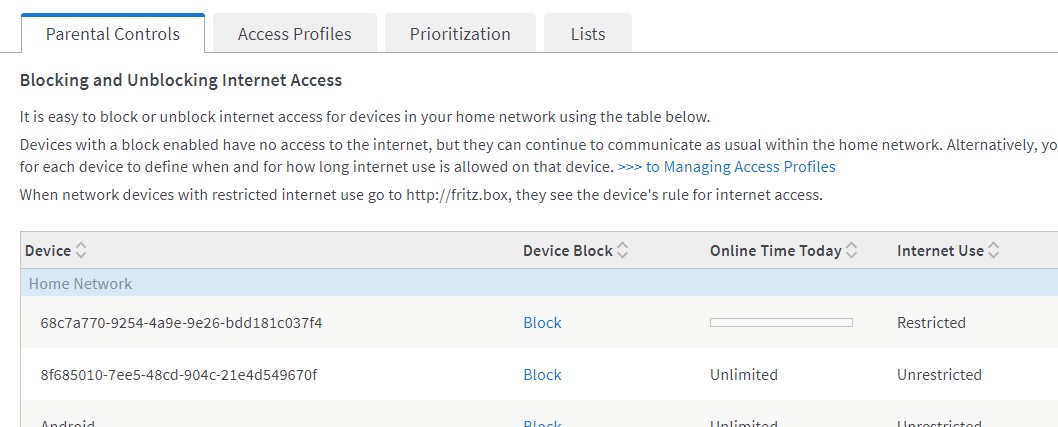
Using the 2D supplied Fritzbox 7590 and implemented its parental options....  Im trying to lock down one of the kids Apple iPhones from being used overnight etc.


Found the iPhone, and set the time profile as I wanted it etc, which seemed to be working well.


Today though, I notice theres now another iPhone looking device thats appeared on the network. 


Is it possible they've found a way around the block......  or would this be a completely different device ? We only have one Apple device in the house, all others are Android and accounted for by looking at the connected device list.....


XPD / Gavin


LinkTree


View this topic in a long page with up to 500 replies per page Create new topic
 1 | 2
stick
357 posts

Ultimate Geek
+1 received by user: 113


  #3076580 16-May-2023 08:30
Send private message

Have you turned off random MAC addresses on the iPhone?


xpd

xpd

Geek of Coastguard
14115 posts

Uber Geek
+1 received by user: 4574

Retired Mod
ID Verified
Trusted
Lifetime subscriber

  #3076583 16-May-2023 08:39
Send private message

stick: Have you turned off random MAC addresses on the iPhone?


Didnt know it had such a thing :D Im not an Apple user ;) Will check into it, thanks :)


XPD / Gavin


LinkTree


stick
357 posts

Ultimate Geek
+1 received by user: 113


  #3076586 16-May-2023 08:48
Send private message

xpd:

stick: Have you turned off random MAC addresses on the iPhone?


Im not an Apple user ;)


Yeah same here, I just assumed tbh lol
Apparently you need to disable "Private Address" in the info page of the wifi network on the phone


Linux
12173 posts

Uber Geek
+1 received by user: 8469

Trusted
Lifetime subscriber

  #3076587 16-May-2023 08:53
Send private message

The kid will just use mobile data if WiFi is blocked

Linux
12173 posts

Uber Geek
+1 received by user: 8469

Trusted
Lifetime subscriber

  #3076588 16-May-2023 08:54
Send private message

xpd:

stick: Have you turned off random MAC addresses on the iPhone?


Didnt know it had such a thing :D Im not an Apple user ;) Will check into it, thanks :)


Not just iPhone related also Android

Wombat1
586 posts

Ultimate Geek
+1 received by user: 409
Inactive user


  #3076595 16-May-2023 09:11
Send private message

You will also need to tick the "Do not allow any new wireless devices" setting in the Wifi Security settings page. Its best to add new devices manually going forward and to let anybody connecting to your wifi know that they need to make sure they switch off Private Wi-Fi Addressing in their wifi settings on their device. 


Then go delete all those network devices on your fritzbox with those random addresses so that they cannot connect again.


Its getting harder and harder to administer your own network these days. 


Shop now for Lenovo laptops and other devices (affiliate link).

xpd

xpd

Geek of Coastguard
14115 posts

Uber Geek
+1 received by user: 4574

Retired Mod
ID Verified
Trusted
Lifetime subscriber

  #3076642 16-May-2023 09:18
Send private message

Linux: The kid will just use mobile data if WiFi is blocked


Not if they dont have mobile data - its a prepay. 


XPD / Gavin


LinkTree


xpd

xpd

Geek of Coastguard
14115 posts

Uber Geek
+1 received by user: 4574

Retired Mod
ID Verified
Trusted
Lifetime subscriber

  #3076643 16-May-2023 09:19
Send private message

Wombat1:


You will also need to tick the "Do not allow any new wireless devices" setting in the Wifi Security settings page. Its best to add new devices manually going forward and to let anybody connecting to your wifi know that they need to make sure they switch off Private Wi-Fi Addressing in their wifi settings on their device. 


Then go delete all those network devices on your fritzbox with those random addresses so that they cannot connect again.


Its getting harder and harder to administer your own network these days. 


Yeah, might have to start doing that.....  and setup guest network for visitors. Cheers


XPD / Gavin


LinkTree


Linux
12173 posts

Uber Geek
+1 received by user: 8469

Trusted
Lifetime subscriber

  #3076645 16-May-2023 09:20
Send private message

xpd:

Linux: The kid will just use mobile data if WiFi is blocked


Not if they dont have mobile data - its a prepay. 


Data clock?

Wombat1
586 posts

Ultimate Geek
+1 received by user: 409
Inactive user


  #3076654 16-May-2023 09:51
Send private message

xpd:


Wombat1:


You will also need to tick the "Do not allow any new wireless devices" setting in the Wifi Security settings page. Its best to add new devices manually going forward and to let anybody connecting to your wifi know that they need to make sure they switch off Private Wi-Fi Addressing in their wifi settings on their device. 


Then go delete all those network devices on your fritzbox with those random addresses so that they cannot connect again.


Its getting harder and harder to administer your own network these days. 


Yeah, might have to start doing that.....  and setup guest network for visitors. Cheers


You cant setup a guest network for your visitors if you are trying to control certain devices on your main network. The devices you trying to control will just enable private wifi and jump to the guest network. I tried it, kids will find a way. 


xpd

xpd

Geek of Coastguard
14115 posts

Uber Geek
+1 received by user: 4574

Retired Mod
ID Verified
Trusted
Lifetime subscriber

  #3076657 16-May-2023 09:56
Send private message

Linux: 

Data clock?


Nope, not on 2D :)


XPD / Gavin


LinkTree


Stream your favourite shows now on Apple TV (affiliate link).

xpd

xpd

Geek of Coastguard
14115 posts

Uber Geek
+1 received by user: 4574

Retired Mod
ID Verified
Trusted
Lifetime subscriber

  #3076658 16-May-2023 09:58
Send private message

Wombat1:


You cant setup a guest network for your visitors if you are trying to control certain devices on your main network. The devices you trying to control will just enable private wifi and jump to the guest network. I tried it, kids will find a way. 


The Fritz has an option that if a MAC is on the main network it cant join the guest one.


So long as I fix her MAC on the phone, shes stuck - can also probably set times the guest network is available.... will have a play later :)


XPD / Gavin


LinkTree


Wombat1
586 posts

Ultimate Geek
+1 received by user: 409
Inactive user


  #3076661 16-May-2023 10:04
Send private message

xpd:


Wombat1:


You cant setup a guest network for your visitors if you are trying to control certain devices on your main network. The devices you trying to control will just enable private wifi and jump to the guest network. I tried it, kids will find a way. 


The Fritz has an option that if a MAC is on the main network it cant join the guest one.


So long as I fix her MAC on the phone, shes stuck - can also probably set times the guest network is available.... will have a play later :)


My kid quickly worked out that if you "forget the wifi network" in wifi settings you can rejoin the guest network. Private wifi addrsssing is on by default. Just a heads up .....


michaelmurfy
meow
13579 posts

Uber Geek
+1 received by user: 10910

Moderator
ID Verified
Trusted
Lifetime subscriber

  #3076662 16-May-2023 10:05
Send private message

One other thing you can do is use NextDNS and set up an Apple Profile on their phone (using their configuration generator). From there you can set up controls within NextDNS itself.


Michael Murphy | https://murfy.nz
Referral Links: Quic Broadband (use R122101E7CV7Q for free setup)

Are you happy with what you get from Geekzone? Please consider supporting us by subscribing.
Opinions are my own and not the views of my employer.


Wombat1
586 posts

Ultimate Geek
+1 received by user: 409
Inactive user


  #3076665 16-May-2023 10:10
Send private message

michaelmurfy:


One other thing you can do is use NextDNS and set up an Apple Profile on their phone (using their configuration generator). From there you can set up controls within NextDNS itself.


Pihole is also useful to do this. Though one has to wonder for how longs its still going to be workable. DNS over https (DoH) is becoming a big thing and making it impossible to read and manipulate the DNS requests. Chrome is already supporting DoH and one has to wonder how long it will be before each app on your phone does the same thing. 


 1 | 2
View this topic in a long page with up to 500 replies per page Create new topic


Geekzone Live »

Try automatic live updates from Geekzone directly in your browser, without refreshing the page, with Geekzone Live now.


Are you subscribed to our RSS feed? You can download the latest headlines and summaries from our stories directly to your computer or smartphone by using a feed reader.
