Geekzone: technology news, blogs, forums
Guest
Welcome Guest.
You haven't logged in yet. If you don't have an account you can register now.


freitasm

BDFL - Memuneh
80944 posts

Uber Geek
+1 received by user: 41698

Administrator
ID Verified
Trusted
Geekzone
Lifetime subscriber

#312337 8-Apr-2024 08:39
Send private message

Press release:


The Commerce Commission has today released its first “RealSpeed” report alongside its regular quarterly Measuring Broadband New Zealand (MBNZ) results – providing new insights into broadband performance in Kiwi homes.


Telecommunications Commissioner, Tristan Gilbertson, says MBNZ tests broadband performance to the router, while RealSpeed measures performance from the router to devices being used in the home – such as laptops, TVs, tablets and phones.


The results of the report show that, across all broadband technologies, speeds naturally drop between the router and devices being used in the home – but this drop is greater on faster plans, like Fibre and HFC (Hybrid Fibre-Coaxial), which drop more than 60%.


“While the top-tier plans delivered faster overall speeds to devices – and can support more bandwidth-hungry users in the same household – Wi-Fi performance can be responsible for much of the speed consumers are paying for being lost,” Mr Gilbertson says.


“It doesn’t matter how fast your connection is if your Wi-Fi set up isn’t up to scratch or if you’re being slowed down by an older device. You don’t want to buy a Ferrari-level of broadband and find yourself stuck in second gear –  so consider the location of your Wi-Fi router or investing in a new mesh system to unlock the potential of your plan.” 


Mr Gilbertson says it is also worth considering what you use your broadband connection for as well as the number of users and devices you have at home – “Our results show that paying a premium price isn’t always necessary to get the speeds you need.” 


The RealSpeed report can be viewed here for further insights on how to make the most of your home broadband – including information on the speed limits of some of the most commonly-used devices.  


Consumers can also sign up to become an MBNZ volunteer and get their own RealSpeed results by going to https://measuringbroadbandnewzealand.com/sign-up


Mr Gilbertson says the Commission is working with Consumer NZ to test the performance of different routers available on the market. This will compare devices supplied by service providers as well as common off-the-shelf options available for purchase in New Zealand. 


The results of Consumer NZ’s router testing are expected to be released later this year.



Referral links: Quic Broadband (free setup code: R587125ERQ6VE) | Samsung | AliExpress | Wise | Sharesies 


Support Geekzone by subscribing (browse ads-free), or making a one-off or recurring donation through PressPatron.


View this topic in a long page with up to 500 replies per page Create new topic
 1 | 2
freitasm

BDFL - Memuneh
80944 posts

Uber Geek
+1 received by user: 41698

Administrator
ID Verified
Trusted
Geekzone
Lifetime subscriber

  #3215433 8-Apr-2024 08:40
Send private message

freitasm:


The results of the report show that, across all broadband technologies, speeds naturally drop between the router and devices being used in the home – but this drop is greater on faster plans, like Fibre and HFC (Hybrid Fibre-Coaxial), which drop more than 60%.


“While the top-tier plans delivered faster overall speeds to devices – and can support more bandwidth-hungry users in the same household – Wi-Fi performance can be responsible for much of the speed consumers are paying for being lost,” Mr Gilbertson says.


“It doesn’t matter how fast your connection is if your Wi-Fi set up isn’t up to scratch or if you’re being slowed down by an older device. You don’t want to buy a Ferrari-level of broadband and find yourself stuck in second gear –  so consider the location of your Wi-Fi router or investing in a new mesh system to unlock the potential of your plan.” 


People here on Geekzone always say that the first thing people need to check when complaining about speed is inside their home.


Referral links: Quic Broadband (free setup code: R587125ERQ6VE) | Samsung | AliExpress | Wise | Sharesies 


Support Geekzone by subscribing (browse ads-free), or making a one-off or recurring donation through PressPatron.


nztim
4069 posts

Uber Geek
+1 received by user: 2782

ID Verified
Trusted
TEAMnetwork
Subscriber

  #3215447 8-Apr-2024 08:55
Send private message

freitasm:


People here on Geekzone always say that the first thing people need to check when complaining about speed is inside their home.


"I am paying for gigabit but testing over Wi-Fi on a laptop with only an 802.11n adapter"


Any views expressed on these forums are my own and don't necessarily reflect those of my employer. 


cddt
2050 posts

Uber Geek
+1 received by user: 1982


  #3215515 8-Apr-2024 11:21
Send private message

Very relatable. Far too often I hear people complain that they upgraded from ADSL to fibre but it's no faster or more reliable, therefore the country should have stuck with copper and not wasted money on the fibre rollout... 


My referral links: BigPipeMercury


mrgsm021
1568 posts

Uber Geek
+1 received by user: 321

ID Verified
Trusted

  #3215519 8-Apr-2024 11:31
Send private message

Or in my brother's case, he is on 300/100 fibre and complains about the speed over wifi on his deco x20 mesh set up on wireless backhaul. 


He has Ethernet ports around the house for Ethernet backhaul but he couldn't be bothered/no time to figure out which port goes where.


freitasm

BDFL - Memuneh
80944 posts

Uber Geek
+1 received by user: 41698

Administrator
ID Verified
Trusted
Geekzone
Lifetime subscriber

  #3215521 8-Apr-2024 11:32
Send private message

And probably the backhaul decided to use a 2.4 GHz channel.


Referral links: Quic Broadband (free setup code: R587125ERQ6VE) | Samsung | AliExpress | Wise | Sharesies 


Support Geekzone by subscribing (browse ads-free), or making a one-off or recurring donation through PressPatron.


Chills
175 posts

Master Geek
+1 received by user: 99

Subscriber

  #3215522 8-Apr-2024 11:34
Send private message


The results of the report show that, across all broadband technologies, speeds naturally drop between the router and devices being used in the home – but this drop is greater on faster plans, like Fibre and HFC (Hybrid Fibre-Coaxial), which drop more than 60%.


“While the top-tier plans delivered faster overall speeds to devices – and can support more bandwidth-hungry users in the same household – Wi-Fi performance can be responsible for much of the speed consumers are paying for being lost,” Mr Gilbertson says.


“It doesn’t matter how fast your connection is if your Wi-Fi set up isn’t up to scratch or if you’re being slowed down by an older device. You don’t want to buy a Ferrari-level of broadband and find yourself stuck in second gear –  so consider the location of your Wi-Fi router or investing in a new mesh system to unlock the potential of your plan.” 


Mr Gilbertson says it is also worth considering what you use your broadband connection for as well as the number of users and devices you have at home – “Our results show that paying a premium price isn’t always necessary to get the speeds you need.” 


I may have to request that instead of hold music for our Tech Support queue, we just put someone reading this snippet and see how many people hang up.


Shop now for Lego sets and other gifts (affiliate link).
MikeAqua
8203 posts

Uber Geek
+1 received by user: 3957


  #3215612 8-Apr-2024 12:37
Send private message

cddt:


Very relatable. Far too often I hear people complain that they upgraded from ADSL to fibre but it's no faster or more reliable, therefore the country should have stuck with copper and not wasted money on the fibre rollout... 


That actually happened to use, despite new modem-router and a CAT 5 cabled connection to the router.  It turned out that our new UFB connection wasn't provisioned properly.  When we (out of sheer frustration) went to a lower speed UFB plan, speed and usability improved because it was reprovisioned at the correct speed. 


Mike


nzkc
1638 posts

Uber Geek
+1 received by user: 1043


  #3215664 8-Apr-2024 12:50
Send private message

freitasm:


People here on Geekzone always say that the first thing people need to check when complaining about speed is inside their home.


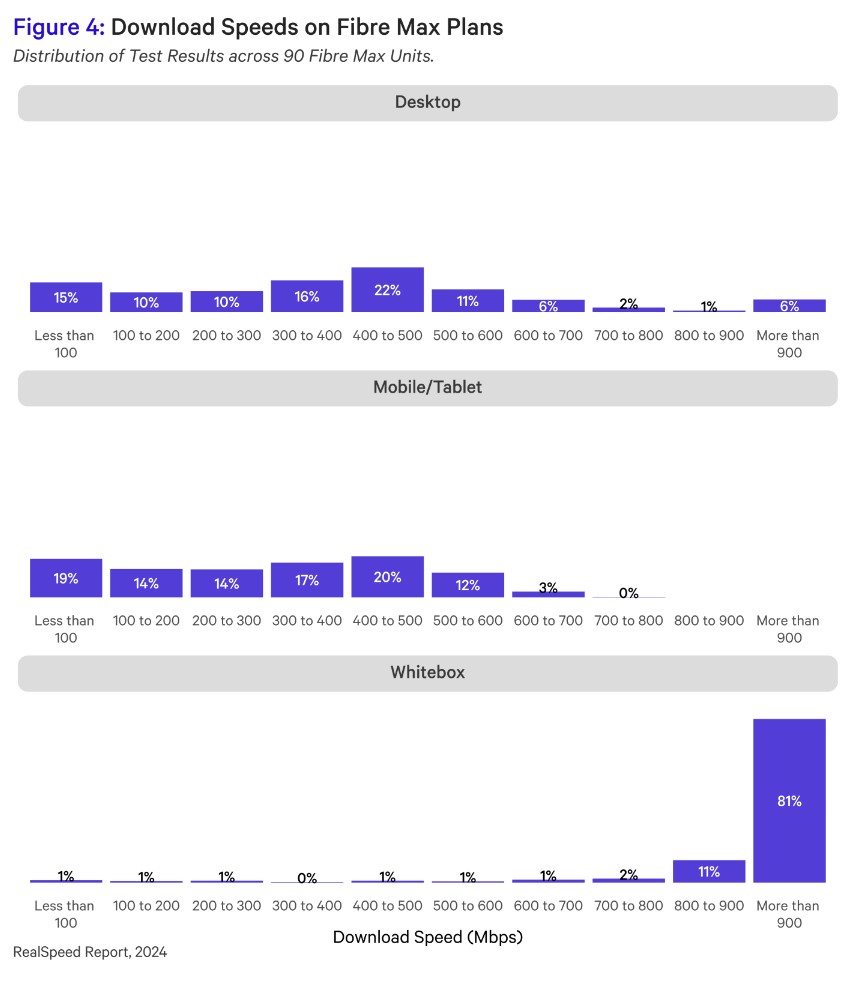
To sum it up in an image... taken from Page 8 of the April 2024 report


Although I dont think 90 units is a great number for tests. Even so... clearly "its your wifi" is main reason!


Talkiet
4822 posts

Uber Geek
+1 received by user: 3941

Trusted

  #3215666 8-Apr-2024 12:52
Send private message

My own dad simply can't stop himself signing up for BB with whoever turns up at the door and says they have the best deal ever and recently got signed up to Sky... He of course called me to figure out how to setup the Sky router when it turned up and to figure out if he was already being served by Sky I got him to run a speedtest and see what the website reported as his ISP (It was Sky)...


His result was 70 down / 104 up... I think we all know where this is going right? He was sold a 300/100 plan and his only PC is an old wifi connected PC upstairs with no inwall wiring.


But yeah - absolutely limited by in-home networking. This would make up 90% of the performance fault calls for fibre I'd say, maybe more.


Cheers - N


Please note all comments are from my own brain and don't necessarily represent the position or opinions of my employer, previous employers, colleagues, friends or pets.


Talkiet
4822 posts

Uber Geek
+1 received by user: 3941

Trusted

  #3215669 8-Apr-2024 12:56
Send private message

nzkc:


freitasm:


People here on Geekzone always say that the first thing people need to check when complaining about speed is inside their home.


To sum it up in an image... taken from Page 8 of the April 2024 report


Although I dont think 90 units is a great number for tests. Even so... clearly "its your wifi" is main reason!


I'm actually surprised at the 19% below the 900 level for the Whitebox. I have a very strong reason to believe that even that number is being pessimistic and probably relates to non-optimal whitebox setup and the busy line detection not always working perfectly. I'd expect the "more than 900" category to be closer to 97-98%


Cheers - N


Please note all comments are from my own brain and don't necessarily represent the position or opinions of my employer, previous employers, colleagues, friends or pets.


Chills
175 posts

Master Geek
+1 received by user: 99

Subscriber

  #3215670 8-Apr-2024 13:00
Send private message

mrgsm021:


Or in my brother's case, he is on 300/100 fibre and complains about the speed over wifi on his deco x20 mesh set up on wireless backhaul. 


He has Ethernet ports around the house for Ethernet backhaul but he couldn't be bothered/no time to figure out which port goes where.


My Ethernet Backhaul X20s getting 820Mbps Download and 480Mbps Upload to my PC (I do have a Wi-Fi 6 NIC with very wide channel antennas) but if he were to set it up properly he'd easily get his plan rated speeds. 


Want to support Geekzone and browse the site without the ads? Subscribe to Geekzone now (monthly, annual and lifetime options).
MikeB4
MikeB4
18814 posts

Uber Geek
+1 received by user: 12850

ID Verified
Trusted
Subscriber

  #3215677 8-Apr-2024 13:38
Send private message

The easiest way to remedy upload and download speed concerns on Fibre, HFC or wireless is to delete the Speed test Apps and bookmarks


Here is a crazy notion, lets give peace a chance.


cruxis
514 posts

Ultimate Geek
+1 received by user: 349


  #3215698 8-Apr-2024 15:21
Send private message

Been to a few new build houses and asked where the agent/developer where is the ethernet for all the rooms? Get the usual response there is a spot in the lounge hook for your WIFI router, that is all you need these days.


How much does it add to a newbuild anyways? $500-1000


mrgsm021
1568 posts

Uber Geek
+1 received by user: 321

ID Verified
Trusted

  #3215700 8-Apr-2024 15:25
Send private message

Chills:


My Ethernet Backhaul X20s getting 820Mbps Download and 480Mbps Upload to my PC (I do have a Wi-Fi 6 NIC with very wide channel antennas) but if he were to set it up properly he'd easily get his plan rated speeds. 


Yep, the X20 can easily achieve 300/100 no problems and I told him to spend sometime to trace the ports to the patch but he doesn't listen. 🤷‍♂️


nztim
4069 posts

Uber Geek
+1 received by user: 2782

ID Verified
Trusted
TEAMnetwork
Subscriber

  #3215833 8-Apr-2024 18:47
Send private message

Talkiet:


My own dad simply can't stop himself signing up for BB with whoever turns up at the door and says they have the best deal ever and recently got signed up to Sky... He of course called me to figure out how to setup the Sky router when it turned up and to figure out if he was already being served by Sky I got him to run a speedtest and see what the website reported as his ISP (It was Sky)...


His result was 70 down / 104 up... I think we all know where this is going right? He was sold a 300/100 plan and his only PC is an old wifi connected PC upstairs with no inwall wiring.


But yeah - absolutely limited by in-home networking. This would make up 90% of the performance fault calls for fibre I'd say, maybe more.


Cheers - N


Your dad wouldn't need anything more than Home Fiber Starter probably. 


Any views expressed on these forums are my own and don't necessarily reflect those of my employer. 


 1 | 2
View this topic in a long page with up to 500 replies per page Create new topic


Geekzone Live »

Try automatic live updates from Geekzone directly in your browser, without refreshing the page, with Geekzone Live now.


Are you subscribed to our RSS feed? You can download the latest headlines and summaries from our stories directly to your computer or smartphone by using a feed reader.