Geekzone: technology news, blogs, forums
Guest
Welcome Guest.
You haven't logged in yet. If you don't have an account you can register now.


Lias

5655 posts

Uber Geek
+1 received by user: 3978

ID Verified
Trusted
Lifetime subscriber

#312704 10-May-2024 12:20
Send private message

I've been asked for some assistance by a relative, and I just want to sanity check this before I pass it on to them because i've not had to deal with Starlink stuff before and not sure if there's any gotcha's beyond it not having built in ethernet.


Background:


  • They have a rural property in canterbury, only a few km from Rolleston but appears to be in a DSL dead spot. 
  • They have just constructed a second residence on the property, and as part of that fibre was run from the primary residence to the new secondary residence.
  • They have also just upgraded from 4g RBI to Starlink in the main residence (secondary is now using the 4gb RBI, they can tolerate the speeds but data caps are a real problem).
  • Starlink router is a UTR 211 without ethernet

They want to ditch the RBI and have both residences using the starlink connection. 


Because they have the fibre run between the two buildings, I figure it makes sense to make use of that. I'm thinking they are just going to need to buy the Starlink ethernet adapter, and then either media converters (or cheap switches with appropriate SFP's) and something to go on the far end, either an AP or a wifi router of some sort.


Starlink ethernet adapter -> Switch/Media Converter -> existing fibre run -> Switch/Media Converter -> AP/router in secondary residence


Does anyone familiar with how the Starlink's work see any issue with that?


Can anyone recommend a coffeebaron equivalent in Canterbury who I could suggest they hire (Relative was muttering about getting an electrician to sort it out and I gently explained most of them only deal with the physical wiring side rather than the networking and even then can be pretty hit and miss as to understanding of data stuff)



I'm a geek, a gamer, a dad, a Quic user, and an IT Professional. I have a full rack home lab, size 15 feet, an epic beard and Asperger's. I'm a bit of a Cypherpunk, who believes information wants to be free and the Net interprets censorship as damage and routes around it. If you use my Quic signup you can also use the code R570394EKGIZ8 for free setup. Opinions are my own and not the views of my employer.


Create new topic
nztim
4013 posts

Uber Geek
+1 received by user: 2711

ID Verified
Trusted
TEAMnetwork
Subscriber

  #3228646 10-May-2024 12:28
Send private message

Yup that would work - I would put the starlink router in bridge mode and get a proper router/ap solution but that is just me


Nice one for running the fiber between the two dwellings, makes things so much easier


Any views expressed on these forums are my own and don't necessarily reflect those of my employer. 


coffeebaron
6304 posts

Uber Geek
+1 received by user: 3567

Trusted
Lifetime subscriber

  #3228701 10-May-2024 12:38
Send private message

Yes, that would work fine. Ideally use a differnt router and put the second connection on a different subnet, but likewise sharing the same network is probably fine too. I do have a contact that can install stuff on my behave, but would really depend on what kind of budget etc you have and whether the fibre is already terminated.


Rural IT and Broadband support.


Broadband troubleshooting and master filter installs.
Starlink installer - one month free: https://www.starlink.com/?referral=RC-32845-88860-71 
Wi-Fi and networking
Cel-Fi supply and installer - boost your mobile phone coverage legally


Need help in Auckland, Waikato or BoP? Click my email button, or email me direct: [my user name] at geekzonemail dot com


nztim
4013 posts

Uber Geek
+1 received by user: 2711

ID Verified
Trusted
TEAMnetwork
Subscriber

  #3228703 10-May-2024 12:39
Send private message

Also last time I got a xDSL filter done in Canterbury I used a guy called Ashley Martin from Unifone, no idea if he still works there.


Any views expressed on these forums are my own and don't necessarily reflect those of my employer. 


Lias

5655 posts

Uber Geek
+1 received by user: 3978

ID Verified
Trusted
Lifetime subscriber

  #3228716 10-May-2024 13:04
Send private message

Both residences are the same family just different generations so I suspect they are fine with sharing the network, and they jointly operate a charitable trust/business from the location which is part of why they are struggling with the RBI data caps, so there's probably some non gold plated budget available.


I've messaged off and asked for a picture of either end of the fibre to confirm if/how it's terminated, and a rough idea on what they're willing to budget.


I'm a geek, a gamer, a dad, a Quic user, and an IT Professional. I have a full rack home lab, size 15 feet, an epic beard and Asperger's. I'm a bit of a Cypherpunk, who believes information wants to be free and the Net interprets censorship as damage and routes around it. If you use my Quic signup you can also use the code R570394EKGIZ8 for free setup. Opinions are my own and not the views of my employer.


nztim
4013 posts

Uber Geek
+1 received by user: 2711

ID Verified
Trusted
TEAMnetwork
Subscriber

  #3228719 10-May-2024 13:11
Send private message

I would also VLAN the two dwellings, so you are not casting each other's TVs even if you are family :)


Starlink > Ethernet Adapter > Router with VLAN support > Switch > AP At First Dwelling + Fibre  to Second Dwelling > AP at Second Dwelling on different VLAN


Any views expressed on these forums are my own and don't necessarily reflect those of my employer. 


ArcticSilver
731 posts

Ultimate Geek
+1 received by user: 148


  #3228746 10-May-2024 14:24
Send private message

What nztim has said is what I would do.


Starlink (in bypass mode) -> router with 2 VLANs, one to each property.


I'm Christchurch based and can help with this if you need a hand, I have done this for multiple out of town clients. I'll send you a PM with my details in case you want to get in touch. Also happy to provide some free advice via a quick phone call.


Support Geekzone with one-off or recurring donations Donate via PressPatron.
ANglEAUT
altered-ego
2436 posts

Uber Geek
+1 received by user: 842

Trusted
Lifetime subscriber

  #3228769 10-May-2024 15:22
Send private message

Lias: ... They want to ditch the RBI and have both residences using the Starlink connection. ...


Lias: ... operate a charitable trust/business from the location which is part of why they are struggling with the RBI data caps, ...


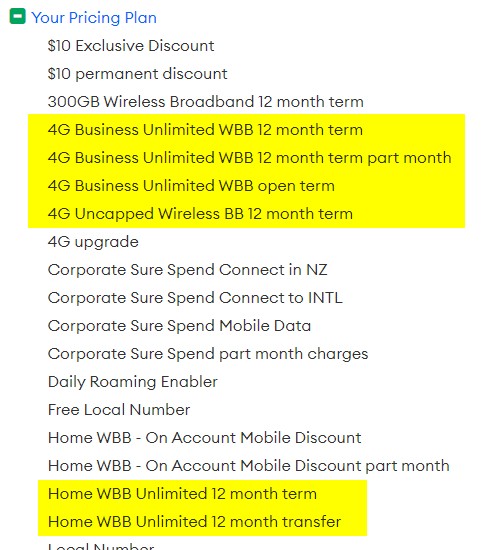
Maybe speak to a One NZ account manager & see if one of the highlighted plans are available?


Please keep this GZ community vibrant by contributing in a constructive & respectful manner.


SirHumphreyAppleby
2939 posts

Uber Geek
+1 received by user: 1862


  #3228772 10-May-2024 15:29
Send private message

Lias:


I've messaged off and asked for a picture of either end of the fibre to confirm if/how it's terminated, and a rough idea on what they're willing to budget.


In addition to how it's terminated (most likely one or two LC or SC, UPC connectors), you will want to find out if it's single or multi-mode fibre.


If it's terminated with a pair of SC connectors, I would suggest avoiding the ultra-cheap SC media converters and go for either switches (as you suggested), or media converters with SFP(+) slots. That way if something fails, you know you only need to replace component and not worry about compatibility between devices at each end.


SFP modules are usually coded for different brands... 'Cisco' seems to be a safe choice. Works fine with the cheap AliExpress and TP-Link switches I have.


Lias

5655 posts

Uber Geek
+1 received by user: 3978

ID Verified
Trusted
Lifetime subscriber

  #3228828 10-May-2024 17:58
Send private message

Okay so I got the photos and the "fibre" isn't.. it's just a standard copper run, currently terminated with a single wall port in the new house and not yet terminated in the original house but just coiled up in the roofspace. Which is good because that actually makes things much cheaper and easier for them (and the distance is only about 50m so shouldn't be an issue from that side of things). 


I've started asking questions about any desire for network segregation, desire/need to add additional Wifi coverage, add wired connectivity, multiple SSID's, parental controls (their charitable trust provides respite care for disabled young people), things like that. 


Thanks for the input folks.


I'm a geek, a gamer, a dad, a Quic user, and an IT Professional. I have a full rack home lab, size 15 feet, an epic beard and Asperger's. I'm a bit of a Cypherpunk, who believes information wants to be free and the Net interprets censorship as damage and routes around it. If you use my Quic signup you can also use the code R570394EKGIZ8 for free setup. Opinions are my own and not the views of my employer.


nztim
4013 posts

Uber Geek
+1 received by user: 2711

ID Verified
Trusted
TEAMnetwork
Subscriber

  #3228877 10-May-2024 21:06
Send private message

Copper while cheaper presents other problems of the other house electrical is grounded differently from the primary house or on an adjacent phase you could end up with a potential difference on the line. In this case I would power the AP in the second dwelling from PoE from
the primary and not let any device at the secondary dwelling be plugged into that ethernet port and power


Any views expressed on these forums are my own and don't necessarily reflect those of my employer. 


Create new topic


Geekzone Live »

Try automatic live updates from Geekzone directly in your browser, without refreshing the page, with Geekzone Live now.


Are you subscribed to our RSS feed? You can download the latest headlines and summaries from our stories directly to your computer or smartphone by using a feed reader.