Geekzone: technology news, blogs, forums
Guest
Welcome Guest.
You haven't logged in yet. If you don't have an account you can register now.


zubairj

4 posts

Wannabe Geek

ID Verified

#320451 16-Aug-2025 10:16
Send private message

Hi


My ISP comes with ORBI router which arent that good and cannot seperate 2.4Ghz and 5Ghz wifi. I am running IOT devices on a 2.4Ghz extender. 


I am looking for router suggestions for home internet and running smart devices. I am looking for something with vlan on wifi and lan to isolate wifi/lan IOT devices. Single level house. 


Preferably with:


  • OpenWRT supported router
  • Low power consumption
  • Not noisy
  • Tailscale on router?
  • Not too expensive
  • Good range (Does not need extender/mesh)

View this topic in a long page with up to 500 replies per page Create new topic
 1 | 2 | 3
SirHumphreyAppleby
2938 posts

Uber Geek
+1 received by user: 1860


  #3404010 16-Aug-2025 10:34
Send private message

I suggest using separate wireless access points. Depending on the area, you may need more than one. These will work together seamlessly.


E.g. Our house is approximately 250m^2, which is small enough for a single router with built-in Wi-Fi, but we have two access points (no Wi-Fi on the router) to ensure reliable access from a small number of low-powered IoT devices (Shelly relay and an ESP32-based sensor I hacked together).


michaelmurfy
meow
13579 posts

Uber Geek
+1 received by user: 10910

Moderator
ID Verified
Trusted
Lifetime subscriber

  #3404013 16-Aug-2025 11:09
Send private message

You shouldn’t ever need to split 2.4GHz and 5GHz anymore - in-fact, I highly advise against it. 


2.4GHz can’t see 5GHz networks. And I’ve never personally encountered a device that needs 5GHz fully disabled. I’ve never split my networks, never will and you shouldn’t either 😊


You should also never use WiFi extenders as these cause more problems then they solve.


If you’re wanting to have something a bit better then perhaps look at the Ubiquiti line of products like the Ubiquiti UniFi express - https://www.gowifi.co.nz/ubiquiti/ux.html then if required you can add UniFi access points on top. 


But again, stop splitting 2.4GHz off. You don’t need to!


Michael Murphy | https://murfy.nz
Referral Links: Quic Broadband (use R122101E7CV7Q for free setup)

Are you happy with what you get from Geekzone? Please consider supporting us by subscribing.
Opinions are my own and not the views of my employer.


freitasm
BDFL - Memuneh
80646 posts

Uber Geek
+1 received by user: 41030

Administrator
ID Verified
Trusted
Geekzone
Lifetime subscriber

  #3404014 16-Aug-2025 11:14
Send private message

As above. Also Wi-Fi 5 does a great job of ensuring co-existence of 2.4 GHz and 5 GHz devices on the same network. Modern routers mostly already support Wi-Fi 6 and newer ones even support Wi-Fi 7.


Keep the network as a single SSID and both 2.4 GHz and 5 GHz enabled, the devices will select the most appropriate one to use, or the router will steer them to the right AP.


Referral links: Quic Broadband (free setup code: R587125ERQ6VE) | Samsung | AliExpress | Wise | Sharesies 


Support Geekzone by subscribing (browse ads-free), or making a one-off or recurring donation through PressPatron.


Buckchoi
119 posts

Master Geek
+1 received by user: 43


  #3404031 16-Aug-2025 13:06
Send private message

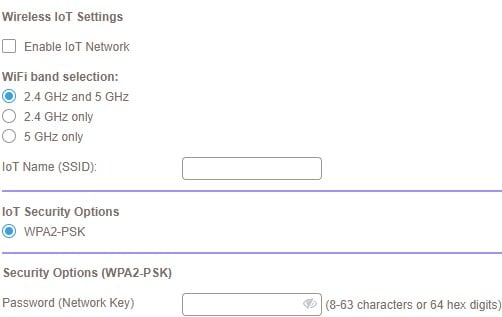
My Orbi mesh system has settings for a separate IoT network.


aj6828
177 posts

Master Geek
+1 received by user: 47

ID Verified
Trusted

  #3404033 16-Aug-2025 13:21
Send private message

If you're looking for an OpenWRT router, the Banana Pi BPI-R4 with Wi-Fi 7 card is highly customisable if you know what you're doing. If you want to wait a bit, there is also a 6ghz Banana Pi BPI-R4 Pro model that has just been announced. 


Exclusive for Geekzone Members!
Dynamic IP & Bring Your Own Device Hyperfibre & Fibre plans & NO Contracts with Hyperline.co.nz powered by ASN 9790 Network


Chrous areas only HYPERLINE.co.nz  


michaelmurfy
meow
13579 posts

Uber Geek
+1 received by user: 10910

Moderator
ID Verified
Trusted
Lifetime subscriber

  #3404035 16-Aug-2025 13:26
Send private message

Well technically… the Orbi runs OpenWRT, stock, right now as the firmware is based off it. But this isn’t needed to get those features. 


Michael Murphy | https://murfy.nz
Referral Links: Quic Broadband (use R122101E7CV7Q for free setup)

Are you happy with what you get from Geekzone? Please consider supporting us by subscribing.
Opinions are my own and not the views of my employer.


Shop now for Dyson appliances (affiliate link).
Batwing
692 posts

Ultimate Geek
+1 received by user: 224

Trusted
Subscriber

  #3404038 16-Aug-2025 13:38
Send private message

aj6828:


If you're looking for an OpenWRT router, the Banana Pi BPI-R4 with Wi-Fi 7 card is highly customisable if you know what you're doing. If you want to wait a bit, there is also a 6ghz Banana Pi BPI-R4 Pro model that has just been announced. 


If we're generally assuming wifi should be separate from the router, then the risc-v rv2 board appears a solid option 


aj6828
177 posts

Master Geek
+1 received by user: 47

ID Verified
Trusted

  #3404042 16-Aug-2025 13:57
Send private message

Batwing:


If we're generally assuming wifi should be separate from the router, then the risc-v rv2 board appears a solid option 


oh yep Banana Pi BPI-RV2 Siflower and orange pi rv2 can be a great Value for money :) for those who are in the 1Gig space 


Exclusive for Geekzone Members!
Dynamic IP & Bring Your Own Device Hyperfibre & Fibre plans & NO Contracts with Hyperline.co.nz powered by ASN 9790 Network


Chrous areas only HYPERLINE.co.nz  


lxsw20
3689 posts

Uber Geek
+1 received by user: 2174

Subscriber

  #3405048 16-Aug-2025 14:46
Send private message

michaelmurfy:


But again, stop splitting 2.4GHz off. You don’t need to!


You do you, but I personally will keep splitting it off. 

I have had issues with IoT devices not work when band steering is enabled before. 

I'd prefer to know the devices I want on 5/6GHz are getting that and not staying latched to a 2.4GHz signal because its slightly stronger. 


michaelmurfy
meow
13579 posts

Uber Geek
+1 received by user: 10910

Moderator
ID Verified
Trusted
Lifetime subscriber

  #3405062 16-Aug-2025 16:57
Send private message

lxsw20: I have had issues with IoT devices not work when band steering is enabled before.


Maybe in the past but these days it’s just simply not a thing… and even when 2.4GHz is available, I don’t have devices latch onto it instead of 5GHz. 


Michael Murphy | https://murfy.nz
Referral Links: Quic Broadband (use R122101E7CV7Q for free setup)

Are you happy with what you get from Geekzone? Please consider supporting us by subscribing.
Opinions are my own and not the views of my employer.


lxsw20
3689 posts

Uber Geek
+1 received by user: 2174

Subscriber

  #3405064 16-Aug-2025 17:11
Send private message

Not sure how you can confidently state that, its certainly an issue in mine. TP Link plugs being the worst culprit. 


Shop now for Lego sets and other gifts (affiliate link).
richms
29098 posts

Uber Geek
+1 received by user: 10207

Trusted
Lifetime subscriber

  #3405069 16-Aug-2025 18:12
Send private message

Its usually the wifi 6 being enabled on 2.4GHz or the fast roaming stuff that breaks crappy IOT gear. Simplest way is to give them their own SSID which also means when you have a stupid kid share the wifi with their friends you dont have to rekey all the iot tat when you change the key on the network your devices use.


Richard rich.ms

everettpsycho
668 posts

Ultimate Geek
+1 received by user: 270


  #3405072 16-Aug-2025 18:20
Send private message

I'm another 2.4/5 network split but I haven't bothered to do the vlan stuff. I had some problems with some of my smart home stuff that is 2.4ghz only not connecting when I had the same ssid so split it out. I ended up with Asus routers explicitly to facilitate this split and set them up as a mesh with the ai mesh feature, I know I know, I'm awful not using APs. As I still own those devices merging the networks back together will likely still run in to issues and I don't have the time to spend redoing all the devices on to another ssid.


I do plan to set up a custom router in a mini pc soon and set the Asus routers to AP mode as I think I've hit the limit on the Asus system so might look in to some other network config stuff when I do that. Eventually I'll replace them with actual APs but I'm not in any rush to buy a POE switch and crown round the attic with ethernet cables.


SpartanVXL
1498 posts

Uber Geek
+1 received by user: 666


  #3405079 16-Aug-2025 18:56
Send private message

I have had issues with band steering on supposedly supported kit, it’s nice when it works but is just another thing to check isn’t causing issues. I had iphones have sporadic disconnections with netgear AP’s and only disabling steering solved it.


michaelmurfy
meow
13579 posts

Uber Geek
+1 received by user: 10910

Moderator
ID Verified
Trusted
Lifetime subscriber

  #3405085 16-Aug-2025 19:45
Send private message

lxsw20: Not sure how you can confidently state that, its certainly an issue in mine. TP Link plugs being the worst culprit.


Yep I've got a bunch of those on my network too:


Again, never experienced any issues with running a mixed mode network even with IoT devices. On this network, I have fast roaming and even band steering enabled.


I can very confidently say that you shouldn't have any issues at all running a mixed mode network these days and trust me when I say I've had experience with many different setups.


Michael Murphy | https://murfy.nz
Referral Links: Quic Broadband (use R122101E7CV7Q for free setup)

Are you happy with what you get from Geekzone? Please consider supporting us by subscribing.
Opinions are my own and not the views of my employer.


 1 | 2 | 3
View this topic in a long page with up to 500 replies per page Create new topic


Geekzone Live »

Try automatic live updates from Geekzone directly in your browser, without refreshing the page, with Geekzone Live now.


Are you subscribed to our RSS feed? You can download the latest headlines and summaries from our stories directly to your computer or smartphone by using a feed reader.