Geekzone: technology news, blogs, forums
Guest
Welcome Guest.
You haven't logged in yet. If you don't have an account you can register now.


Shock

534 posts

Ultimate Geek
+1 received by user: 31

Trusted

#71659 14-Nov-2010 23:30
Send private message

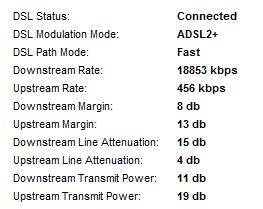
Howdy all. Noticed today that we have been upgraded to ADSL2+ as my WAG200G is syncing as that now, YAY!

However a quick twitter poll asking whether my new stats were any good revealed (and should have been obvious immediately to me) that my upstream stat is crap.

Now when previously on standard ADSL i have had fairly normal stats (no pic sorry), much higher that what it is now. Tried rebooting, changing to ADSL2+ syncing rather than "Multimode" etc, no luck.

Any ideas here people ? Modem is a Linksys WAG200G, has been used on a ADSL2+ area before and we have a master filter installed yadda yadda yadda.




Connecting to UFB? Go with Bigpipe and use this link for free credit!


Create new topic
cyril7
9075 posts

Uber Geek
+1 received by user: 2499

ID Verified
Trusted
Subscriber

  #404698 15-Nov-2010 07:44
Send private message

Hi, very common issue, there are numerous threads about here of folk with WAG's that do exactly what yours is doing. It seems that they dont like playing ball with the new ISAMs cards, purhaps the IKANOs ones that all newer cabinets will have a full compliment of.

Get a Broadcom based modem like the 8840, use your WAG as the WiFi AP.

http://www.ascent.co.nz/productspecification.aspx?ItemID=361956

Or the http://www.ascent.co.nz/productspecification.aspx?ItemID=388514 for an all in one.

Cyril


DjShadow
4222 posts

Uber Geek
+1 received by user: 1322

ID Verified
Trusted
Subscriber

  #404721 15-Nov-2010 09:15
Send private message

My olds have a WAG54G2, Matamata exchange has just recently been upgraded to ADSL2+ and noticed a similar issue, slight speed drop during the switch off (house is brand new)

Ragnor
8279 posts

Uber Geek
+1 received by user: 585

Trusted

  #404758 15-Nov-2010 10:35
Send private message

Yep and last firmware update for the WAG200G was June 2008, pretty old product so basically no chance of an update to fix performance with newer ADSL equipment in the cabinets/exchange.


Shock

534 posts

Ultimate Geek
+1 received by user: 31

Trusted

  #404814 15-Nov-2010 12:24
Send private message

Thanks for the feedback everyone ! Was hoping it wasn't going to be a need for new hardware.

So anything recent should be ok, like http://ascent.co.nz/productspecification.aspx?ItemID=9383821 ? Happy to step up to a new all in 1 device.

What am i looking for in the product description or is it purely based on the age of the tech, so newer the better ?


Connecting to UFB? Go with Bigpipe and use this link for free credit!


cyril7
9075 posts

Uber Geek
+1 received by user: 2499

ID Verified
Trusted
Subscriber

  #404817 15-Nov-2010 12:28
Send private message

Hi, dealt with a 120 the other day it was doing as it should and gave the right numbers on a test line as a TPLink, so based on that might be the go.

That all said, over the last couple of years Linksys products have given me more jib than I care for, so as a result I just pretend they no longer exists, but thats me.

Cyril

loathe
58 posts

Master Geek
+1 received by user: 5


  #408383 23-Nov-2010 16:44
Send private message

Was going to start new topic but saw this.

I have a similar issue with upload speed, but I dont think its my router. Recently we got upgraded to adsl2+ and our connection all but died. We were syncing at around 5000/900 and it dropped to 1200/400. Eventually Telecom sent out a tech out and changed something in the cabinet. We now sync at 12000/500. Downloads are fine but not too happy about hit in upload.

Heres my sync details

ADSL

 
 Type
Fast Path
 
 
   Status
SHOWTIME


Downstream
Upstream

   Data rate(Kbps)

12088Kb
508Kb

   Noise Margin

12
13

   Output power(dBm)

125
202

  Attenuation(dB)

23
10

 
Im sure Im not syncing at my lines potential? For the record, Ive installed a central splitter and have double checked that, and my router is a Belkin N1, which was tested on another connection near by and got 20000/1000. Just wanted to get some feedback before I ring them back. 
Im probably 250m walking distance from my cabinet.

Anything else you think Im missing?
Thanks


Shop now for Dyson appliances (affiliate link).
Ragnor
8279 posts

Uber Geek
+1 received by user: 585

Trusted

  #408466 23-Nov-2010 18:51
Send private message

Ragnor: Yep and last firmware update for the WAG200G was June 2008, pretty old product so basically no chance of an update to fix performance with newer ADSL equipment in the cabinets/exchange.


This might be worth a go for WAG200G owners

http://openwag200.sourceforge.net/ 

webwat
2036 posts

Uber Geek
+1 received by user: 145

Trusted

  #408829 24-Nov-2010 11:31
Send private message

loathe: Was going to start new topic but saw this.

I have a similar issue with upload speed, but I dont think its my router. Recently we got upgraded to adsl2+ and our connection all but died. We were syncing at around 5000/900 and it dropped to 1200/400. Eventually Telecom sent out a tech out and changed something in the cabinet. We now sync at 12000/500. Downloads are fine but not too happy about hit in upload.

Heres my sync details

ADSL

 
 Type
Fast Path
 
 
   Status
SHOWTIME


Downstream
Upstream

   Data rate(Kbps)

12088Kb
508Kb

   Noise Margin

12
13

   Output power(dBm)

125
202

  Attenuation(dB)

23
10

 
Im sure Im not syncing at my lines potential? For the record, Ive installed a central splitter and have double checked that, and my router is a Belkin N1, which was tested on another connection near by and got 20000/1000. Just wanted to get some feedback before I ring them back. 
Im probably 250m walking distance from my cabinet.

Anything else you think Im missing?
Thanks


Ask your ISP if they can get telecom to change the profile on your DSL port, they can usually experiment with them to see which gives the most appropriate up/down performance.

For the Linksys, is there any option to reduce the upstream transmit power? Telecom's side has it reduced to 11dBm because you are close to the cabinet, so maybe the Linksys doesn't detect that automatically.


Time to find a new industry!


loathe
58 posts

Master Geek
+1 received by user: 5


  #409278 25-Nov-2010 07:11
Send private message

webwat:

Ask your ISP if they can get telecom to change the profile on your DSL port, they can usually experiment with them to see which gives the most appropriate up/down performance.

For the Linksys, is there any option to reduce the upstream transmit power? Telecom's side has it reduced to 11dBm because you are close to the cabinet, so maybe the Linksys doesn't detect that automatically.


Thanks man, tried that. They said profile change should take place in about an hour. Its now been 24 and Ive not noticed a change. Ringing them back tonight.

I noticed my output power is really high? 

Create new topic


Geekzone Live »

Try automatic live updates from Geekzone directly in your browser, without refreshing the page, with Geekzone Live now.


Are you subscribed to our RSS feed? You can download the latest headlines and summaries from our stories directly to your computer or smartphone by using a feed reader.