Geekzone: technology news, blogs, forums
Guest
Welcome Guest.
You haven't logged in yet. If you don't have an account you can register now.


Lizard1977

2137 posts

Uber Geek
+1 received by user: 632

ID Verified

#317891 24-Nov-2024 16:28
Send private message

It's been a while since I shopped for PC hardware, and yet I still have friends asking me for advice about what hardware to get.


My friend has a PC that they built about 8 years ago which won't run Windows 11, so they are looking to rebuild.  They are also planning to do some photo editing on very large files using Lightroom.  They may get into more intensive editing tasks over the coming years, so they also want some headroom in the capabilities of this build.


What would you recommend for the MB/CPU/RAM/GPU/PSU base build.  They are going to re-use their existing SATA3 SSD and move to a faster M.2 option when they can afford it, but if there is a good value M.2 drive you think should be included, please suggest one.


Create new topic
Qazzy03
550 posts

Ultimate Geek
+1 received by user: 497


  #3312453 24-Nov-2024 16:38
Send private message

Min & max budget is pretty important, as well as if someone is doing a DIY build or a pre-built. 


Lizard1977

2137 posts

Uber Geek
+1 received by user: 632

ID Verified

  #3312454 24-Nov-2024 16:43
Send private message

Sorry.  Max budget is about $1500.  Just need the parts as they are capable of doing the build themselves.


Qazzy03
550 posts

Ultimate Geek
+1 received by user: 497


  #3312455 24-Nov-2024 16:56
Send private message

Puget has a pretty good breakdown of specs for lightroom. 


If I get time I will see if I can put together a part list based on that or someone else here might be able to help too. 


https://www.pugetsystems.com/solutions/photo-editing-workstations/adobe-lightroom-classic/hardware-recommendations/


https://www.pugetsystems.com/labs/articles/adobe-creative-cloud-performance-intel-6th-gen-to-13th-gen/#Adobe_Lightroom_Classic


As lightroom is a production task, intel will be the bang for buck, which might be cheaper as no one wants intel atm


Qazzy03
550 posts

Ultimate Geek
+1 received by user: 497


  #3312475 24-Nov-2024 20:18
Send private message

Alright, $1500 isn't much to play with. 


If your friend has a GPU / PSU to bring with them that could free up some cash to go to the new generation intel & ddr5. 


However here is the best I can do


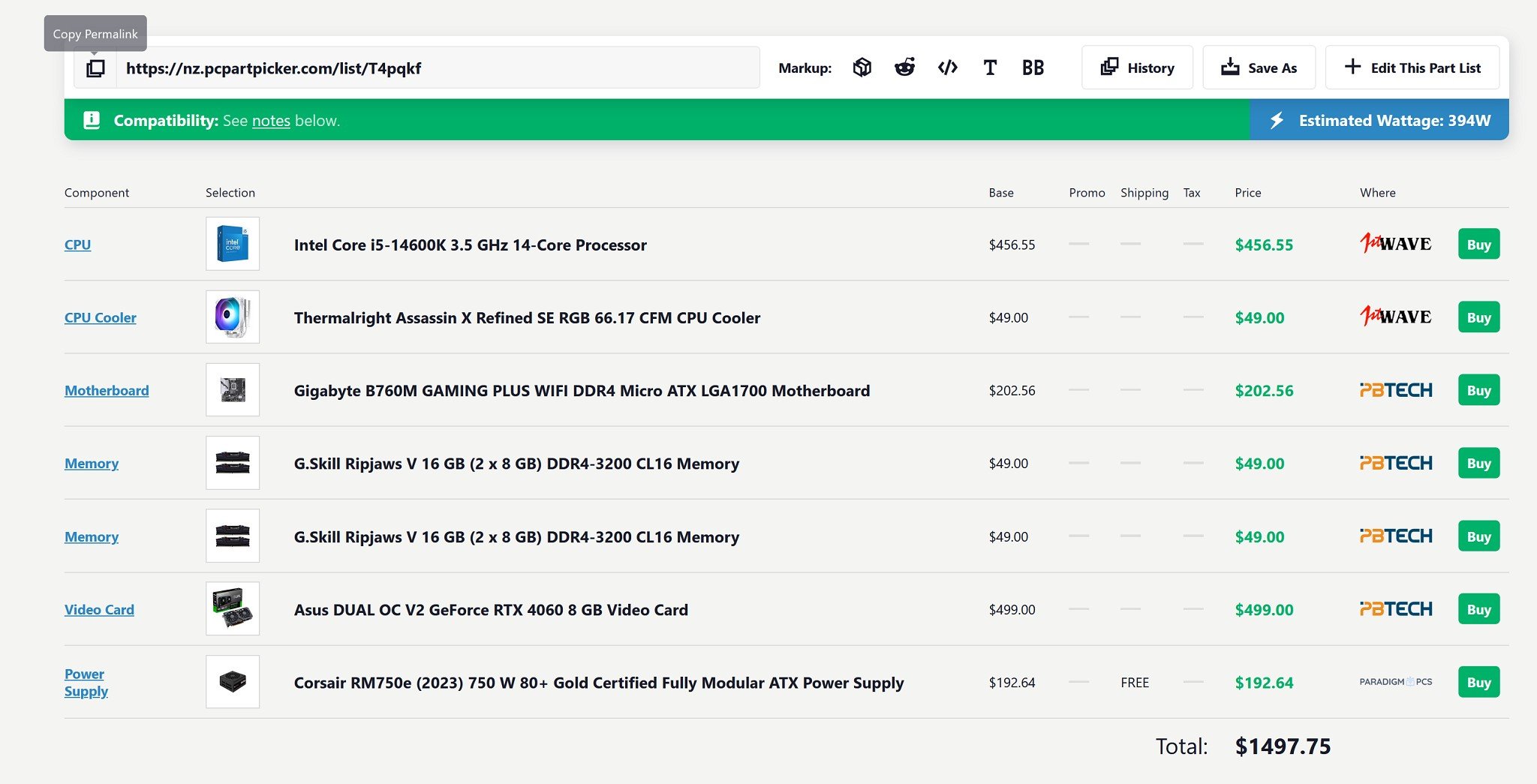
https://nz.pcpartpicker.com/list/T4pqkf


Note 13th & 14th gen had microcode issues and CPU's started to fail, intel say these have been resolved as the BIOS is updated then should be alright.


I was going to go with a i7 12700 but the i5 14600 outperforms in Lightroom. 


Also before that one person says DDR4 is a dead platform etc... i am trying to keep under $1500 and include a GPU, anyone else is welcome to provide a part list. 


Create new topic


Geekzone Live »

Try automatic live updates from Geekzone directly in your browser, without refreshing the page, with Geekzone Live now.


Are you subscribed to our RSS feed? You can download the latest headlines and summaries from our stories directly to your computer or smartphone by using a feed reader.