|
|
|
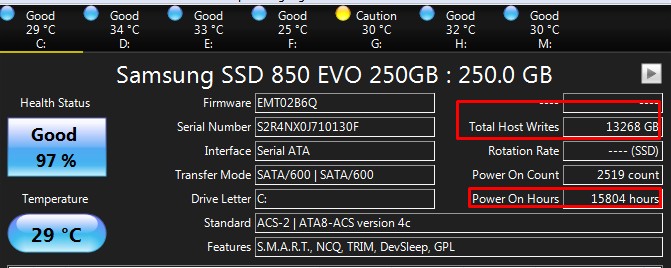
25GB/hr does seem a little high. I think I'll be best doing a fresh Windows 10 install, and probably buying HD Sentinel or getting a similar product to monitor things more closely for a while.
timmmay:eonsim:
If you don't have enough RAM then Windows will use C drive as a Swap disk which can result in a fair bit of data writes as it swaps stuff in and out. Secondly if you hibernate your computer I believe it writes the full content of your RAM to C drive.
Thanks for the thoughts. The computer has 32 GB RAM and I don't use hibernate, I suspend. I'm pretty sure I have swap on a different disk as well.
With 32GB of RAM the pagefile should really be disabled, it's possibly eating ~40GB of drive space.
A pagefile has never been an essential part of the OS, and if it is in use the machine needs more RAM. You can easily tell by looking at the Commit Charge, if the Commited amount is more than RAM, the pagefile is in use. Otherwise, disable it.
Fwiw, if you can, try to keep the OS on it's own drive.
In general, multiple drives with single partitions perform better and work less than single drives with multiple partitions. A multi partioned system drive isn't really ideal.
Turning off Hibernation will free up some more space.
Run Admin Command Prompt
powercfg -h off
230 TBW in 3 years seems very high...here's a comparison...
I usually disable browser caching. In Firefox at least, "caching" means caching to disk. Turning this off forces caching in RAM, which is how it should be.

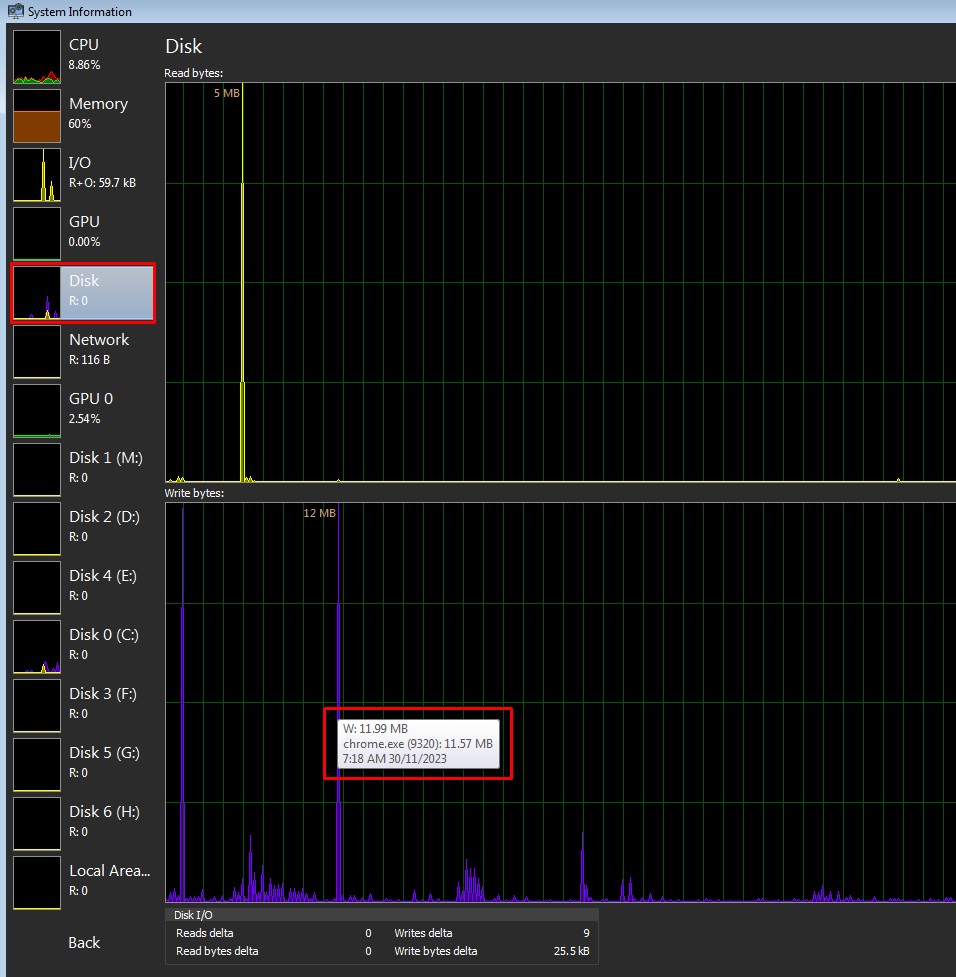
And have you tried out System Informer?

It can show total reads or writes for a given process....

K8Toledo:
With 32GB of RAM the pagefile should really be disabled, it's possibly eating ~40GB of drive space.
A pagefile has never been an essential part of the OS, and if it is in use the machine needs more RAM. You can easily tell by looking at the Commit Charge, if the Commited amount is more than RAM, the pagefile is in use. Otherwise, disable it.
Fwiw, if you can, try to keep the OS on it's own drive.
In general, multiple drives with single partitions perform better and work less than single drives with multiple partitions. A multi partioned system drive isn't really ideal.
Turning off Hibernation will free up some more space.
Run Admin Command Prompt
powercfg -h off
230 TBW in 3 years seems very high...here's a comparison...
I usually disable browser caching. In Firefox at least, "caching" means caching to disk. Turning this off forces caching in RAM, which is how it should be.
And have you tried out System Informer? It can show total reads or writes for a given process....
I think I just leave page file on system managed, on another drive. I could disable it, but if the OS doesn't need it I expect it won't use it. I already disabled hiberation. Disagree with disabling disk caching, that would mean slower page loading and increased bandwidth usage. I'll have a look at system informer, thanks, but I purchased HDSentinel as well.
Why do you think partitioned system drives perform better and work less? Do you have a reference for this opinion? I have the OS on its own drive / partition because that way when I do Macrium Reflect backups I don't back up a large amount of data with the system partition. I did wonder about partition level wear leveling, but I'll make the OS partition larger this time.
SpartanVXL: Yea don’t disable pagefile on windows. Doesn’t matter if you don’t need it or not, memory management still expects it to exist. Have it at 1GB if you really don’t want it, system managed setting should also have it quite low unless you actively have a lot going on.
I have 64GB Memory and system managed, my computer says it still wants a 19GB Pagefile!
networkn:
SpartanVXL: Yea don’t disable pagefile on windows. Doesn’t matter if you don’t need it or not, memory management still expects it to exist. Have it at 1GB if you really don’t want it, system managed setting should also have it quite low unless you actively have a lot going on.
I have 64GB Memory and system managed, my computer says it still wants a 19GB Pagefile!
32GB here with a 5GB page file.
Depends what youre doing I guess......
XPD / Gavin
Windows 11 new install, 32GB RAM, windows managed page file, it says it's 5GB. I see no need to turn it off.
SpartanVXL: Yea don’t disable pagefile on windows. Doesn’t matter if you don’t need it or not, memory management still expects it to exist. Have it at 1GB if you really don’t want it, system managed setting should also have it quite low unless you actively have a lot going on.
Sorry but this statement is completely false, demonstrates a lack of understanding of Memory Managment, or what a pagefile is, and the history of AMD vs Intel.
It also sounds like parotting of misinformation scattered around the internet, on various forums, and on Wikpedia by Intel and Microsoft technet blogs in the mid 2000's.
Microsoft have since dispelled this myth.
This misinformation campaign was noted during the landmark AMD vs Intel case, when Intel and Microsoft tried to drive AMD under after the release of Athlon 64 and AMD's x86-64 bit extension.
One of the editors Intel paid to edit Wikipedia articles related to memory, died in 2016, his name was Jamie Hanrahan.
Jamie was behind the MSDN blog "Pushing the limits of Physical Memory" that had Mark Russonovich's name at the top.
It was one of the most heavily cited, and fallicious blogs on the internet regarding Windows memory limits. It's been referenced on Wikipedia many times, by paid editors.
It stemmed mainly from Athlon 64's better performance vs IA-32e in x64 (long) mode. Athlon 64 also threatened Intel's dominance with Xeon, in the server market.
For 64bit programs to run, at least 4GB of space must be available to the CPU, for storing and retrieving data when requested by the OS, any less the program will not execute, including Windows.
Hence why Windows x64 can't be installed on IA-32 machines.
The CPU stores the data in RAM, the MMU keeps a record of where in RAM that piece of data is stored using address registers, so it can be retrieved.
RAM is primary storage for the CPU (excluding L1/L2/L3). You could even call RAM L4 cache, and the drive L5. That's storage is, different cache levels.
If the OS requests the CPU store a piece of data, and there is no more room in RAM to store it, that piece of data will then be stored on the hard drive, which is nothing more than secondary storage. The MMU keeps track of where on the hard drive this data is stored, by way of page tables held in RAM that record the exact location on the drive where the piece of data is stored.
When the data needs to be retrieved again, the CPU walks the page table, finds the location on the hard drive where it's stored, pages it back into RAM and then CPU cache.
The area on the drive where that data is stored, is called the page file. Apple call it swap space.
The windows pagefile must be enabled to give the CPU permission to store program data on the drive, otherwise it stores it in RAM.
CPU's are designed to communicate directly with RAM, not a hard drive. Read the hundreds of pages of the AMD Bios Developers and Programmers guide. The word "pagefile" is not mentioned once.
Conversly, in Intel's several hundred page IA-32/IA-32e programmers guide, the term "32bit" is ommited. Instead, Intel refer to something called "non Intel 64 mode". No flags raised here......
Prior to C2D, the only CPU in Intel's stable supporting more than 4GB of RAM was Xeon.
IA-32 had 32bit address registers and 32 bit data bus, limiting total address space to 4GB. IA-32e had 36bit address registers, and a 32bit data bus for storage.
A 32bit data bus and Intel's 2x 2GB segmented memory model with 2GB reserved for the OS, meant only 2GB was available for user mode programs.
And as I said, a 64bit program will not execute unless 4GB of address space is available to store program data. So a 2GB page file was needed.
Intel CPU's were "x64 compatable" and could execute 64 bit programs, but only if the page file was enabled.
Athlon 64 data bus was 40 bit, supporting over 8GB of RAM and used the flat memory model. AMD rigs could run Windows x64 and 64bit programs entirely in RAM, without a pagefile required.
Here's why Intel CPU's were slower than AMD's when running in x64 mode.
If you want confirmation, read AMD Programmers manual, Winternals 7, IBM server documentation, Pearsons, or look up Microsofts own library.
Personally speaking, I haven't used a pagefile since XP, none of the machines I supply or look after have it enabled either.
Conclusions are best drawn from sound reasoning and emperical evidence.
Also, up until W7 the default size of the PF was 1.5x RAM, it had been that way since Windows 3.1.
Memory Management is handled by the CPU MMU (Memory Management Unit), and the CPU does not "expect it to exist".
It only expects that if the OS requests a piece of data be stored by the CPU for later retrieval, there will be storage space available in RAM, to hold that piece of data.
If not, then some of the data will be stored on a slower storage medium, the HDD. The answer here is more RAM, not more pagefile.
cddt:
What happened was that I had a swap partition on my SSD (thought it would be good to have a "fast" swap partition lol). One day I wrote some code which contained a pretty horrendous memory leak, but I didn't know that at the time. I knew it would take my program a while to run (a few hours) so I left it running overnight. I woke up in the morning to see 100% activity on the disk and the machine completely unresponsive.
Got my NVME stats. My "Samsung SSD 960 EVO 250GB" has been my main drive since mid-2017 across two PCs.
16.4 TB written over 1,045 hours. Works out to average 16 GB / hour. But as mentioned above, I believe the vast majority of these writes were due to the self-inflicted scenario described.
Critical Warning: 0x00
Temperature: 30 Celsius
Available Spare: 100%
Available Spare Threshold: 10%
Percentage Used: 8%
Data Units Read: 120,146,982 [61.5 TB]
Data Units Written: 32,128,374 [16.4 TB]
Host Read Commands: 1,772,976,021
Host Write Commands: 652,964,586
Controller Busy Time: 2,742
Power Cycles: 2,560
Power On Hours: 1,045
Unsafe Shutdowns: 232
Media and Data Integrity Errors: 0
Error Information Log Entries: 1,194
Warning Comp. Temperature Time: 0
Critical Comp. Temperature Time: 0
Temperature Sensor 1: 30 Celsius
Temperature Sensor 2: 36 Celsius
K8Toledo:
Microsoft have since dispelled this myth.
Can you provide a link? Also, what do you think the downside of having a swap / page file is?
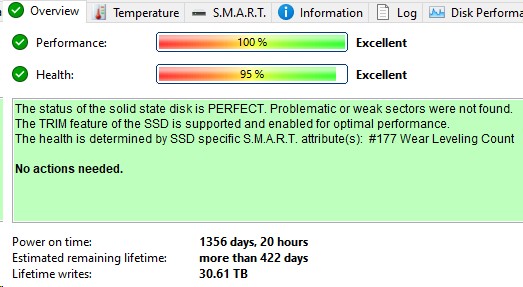
Desktop at home, 1240 days powered on, 80.9tb writes, 80% life remaining.
you must have had something doing some serious writes on your PC, surprised you didn't notice it.
personally i run fixed sized page files on my PCs, normally about 1/2 to full size of the ram installed. this resides on the OS drive.
|
|
|