Geekzone: technology news, blogs, forums
Guest
Welcome Guest.
You haven't logged in yet. If you don't have an account you can register now.


View this topic in a long page with up to 500 replies per page Create new topic
1 | 2 | 3 | 4 | 5
cddt
1973 posts

Uber Geek
+1 received by user: 1906


  #2919665 28-May-2022 10:48
Send private message

Definitely worth upgrading rather than replacing. 


If it's extremely slow, then as well as the SSD upgrade mentioned, a fresh install of Windows is a good idea, it's quite possible some malware (virus, cryptominer, or similar) has got on there and is causing the PC to run slowly.


richms
29105 posts

Uber Geek
+1 received by user: 10222

Trusted
Lifetime subscriber

  #2919689 28-May-2022 14:06
Send private message

gzt: Are any bios changes required?


If its doing legacy booting, then no change needed. If UEFI boot then you may have to go in once and choose the boot order again if it doesn't see the drive as the default after the clone.


Richard rich.ms

kiwifidget

"Cookie"
3641 posts

Uber Geek
+1 received by user: 1969

Lifetime subscriber

  #2920391 30-May-2022 14:27
Send private message

ok, so back to me for a moment.


I have a Veeam backup of the AiO.


Can I use the Veeam restore feature for the SSD rather than cloning from the HDD directly?


Delete cookies?! Are you insane?!


CokemonZ
1106 posts

Uber Geek
+1 received by user: 313


  #2920432 30-May-2022 15:19
Send private message

Just throwing this out there - thought it may be too late.


I have two machines of similar spec I purchased second hand at the start of the first lockdown for the kids to do remote learning on. I upgraded both to SSD's.


These processors are terrible. Just terrible. They were bad when released, and now just horrible. In my experience even running demanding websites on them can be just too much.


I would highly recommend replacing them if possible.


I've already got rid of one, and looking to get rid of the other when I can get another decent second hand machine.


kiwifidget

"Cookie"
3641 posts

Uber Geek
+1 received by user: 1969

Lifetime subscriber

  #2920443 30-May-2022 15:43
Send private message

@cokemonz , I suspect you are right, however I have to give it a try.


Delete cookies?! Are you insane?!


Wellingtondave
160 posts

Master Geek
+1 received by user: 88


  #2920614 30-May-2022 19:52
Send private message

A shared library Windows machine. How infested with spyware and viruses is it? 


Shop now at Mighty Ape (affiliate link).
CokemonZ
1106 posts

Uber Geek
+1 received by user: 313


  #2920626 30-May-2022 20:29
Send private message

Best of luck. If you do manage to bring it back to life please post a review/how to. Ours are dismal.

gzt

gzt
18690 posts

Uber Geek
+1 received by user: 7830

Lifetime subscriber

  #2920627 30-May-2022 20:33
Send private message

Is it worth trying your luck with some fast(ish) USB as ReadyBoost?

kiwifidget

"Cookie"
3641 posts

Uber Geek
+1 received by user: 1969

Lifetime subscriber

  #2920628 30-May-2022 20:34
Send private message

@gzt , perhaps. I'll do the SSD first and see where that gets us.


Delete cookies?! Are you insane?!


gzt

gzt
18690 posts

Uber Geek
+1 received by user: 7830

Lifetime subscriber

  #2920637 30-May-2022 21:02
Send private message

Pbtech have similar ex-lease AIO machines with i5 @$400. Readyboost is basically free if you have fast ish USB sticks lying around as many people do. Personally I think you will have little trouble adding ssd in a couple of hours. The service manuals for case removal are freely available. All the best on this epic tweaking mission : ).

yitz
2239 posts

Uber Geek
+1 received by user: 594


  #2920663 30-May-2022 23:37
Send private message

Do library consoles already run on some sort of VDI? You could virtualise and turn the unit into a thin client.


Support Geekzone with one-off or recurring donations Donate via PressPatron.
kiwifidget

"Cookie"
3641 posts

Uber Geek
+1 received by user: 1969

Lifetime subscriber

  #2920697 31-May-2022 08:19
Send private message

@yitz , it's not a library computer. It's our pc, located in the library.


Delete cookies?! Are you insane?!


kiwifidget

"Cookie"
3641 posts

Uber Geek
+1 received by user: 1969

Lifetime subscriber

  #2922587 4-Jun-2022 13:22
Send private message


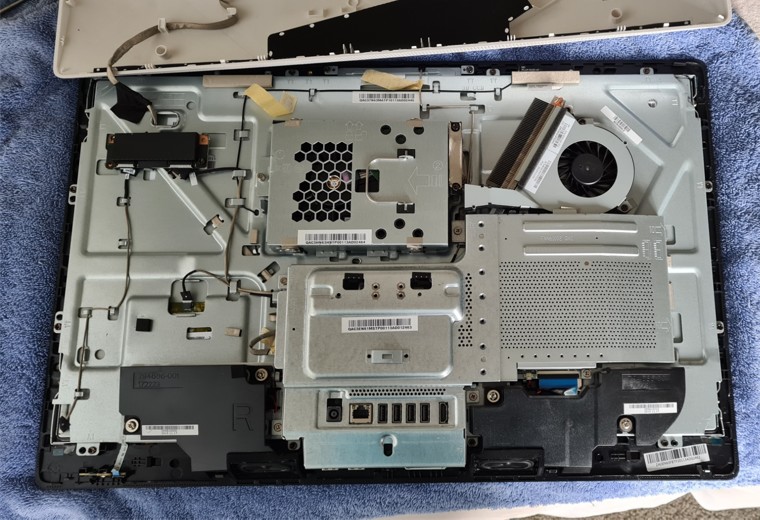
So far so good, only took an hour to get the back cover off, and I think I've broken both my thumbs. 😬


I hope it works without the cover on, coz I might to have switch the disks in and out before I'm all done.


Delete cookies?! Are you insane?!


kiwifidget

"Cookie"
3641 posts

Uber Geek
+1 received by user: 1969

Lifetime subscriber

  #2922724 4-Jun-2022 15:06
Send private message

So here is an extra question.


We have a collection of CD's (stop sniggering) that contain databases and little programs that access the data.


I have copied most of these to ISO, and for the few that I use at home, I launch the ISO as a Drive Letter and I can then run the program which insists the CD be loaded.


There will be room on the SSD to store these ISO files.


Is there a way of auto-launching the ISO when you run the program?


Delete cookies?! Are you insane?!


gzt

gzt
18690 posts

Uber Geek
+1 received by user: 7830

Lifetime subscriber

  #2922748 4-Jun-2022 16:12
Send private message

If the program is on an iso and the iso has a drive letter - isn't this just an ordinary shortcut to the program exe on the iso?

1 | 2 | 3 | 4 | 5
View this topic in a long page with up to 500 replies per page Create new topic


Geekzone Live »

Try automatic live updates from Geekzone directly in your browser, without refreshing the page, with Geekzone Live now.


Are you subscribed to our RSS feed? You can download the latest headlines and summaries from our stories directly to your computer or smartphone by using a feed reader.