Geekzone: technology news, blogs, forums
Guest
Welcome Guest.
You haven't logged in yet. If you don't have an account you can register now.


jamesrt

1663 posts

Uber Geek
+1 received by user: 941

ID Verified
Trusted
Lifetime subscriber

#105311 2-Jul-2012 10:55
Send private message

So, having just acquired a NAS for my home network, I set about on the weekend getting the Windows 7 laptops backing up via the WiFi.

However, much to my disappointment, Microsoft have removed the "network backup" ability of Windows backup in Windows 7 Home Premium - I need to be running "Windows 7 Professional" for this.  Not a smart decision, and presumably made entirely for marketing reasons and not for technical ones either!

So, need a better backup solution - and I thought, why not poll the community?

Can anyone recommend a decent backup package for Windows 7 Home Premium, that can backup to a network device, handles a decent backup schedule (i.e. weekly fulls and daily incrementals, for example), and preferably will retain old data for a month or so before deleting it from the backup device.

Something like TimeMachine would be ideal....

... and preferably low to no $$$, 'cause otherwise my Scottish Ancestry gets grumpy.

Thanks!

View this topic in a long page with up to 500 replies per page Create new topic
 1 | 2
billgates
4705 posts

Uber Geek
+1 received by user: 671

Trusted

  #649426 2-Jul-2012 10:59
Send private message


Do whatever you want to do man.


amanzi
Amanzi
1354 posts

Uber Geek
+1 received by user: 331

ID Verified
Trusted
Lifetime subscriber

  #649427 2-Jul-2012 11:00
Send private message

I set this up recently for my wife and she's needed to use it to restore files several times, and it's worked seamlessly each time: http://www.genie9.com/home/home_solutions.aspx
It doesn't do full image backups so it's only good for file-level restores (you'd still need to reinstall Windows and your apps if your whole computer crashed.)
There's a free version there too but the software is so good, it's worth supporting.

nakedmolerat
4631 posts

Uber Geek
+1 received by user: 874

Trusted
Lifetime subscriber

  #649440 2-Jul-2012 11:10
Send private message

amanzi: I set this up recently for my wife and she's needed to use it to restore files several times, and it's worked seamlessly each time: http://www.genie9.com/home/home_solutions.aspx
It doesn't do full image backups so it's only good for file-level restores (you'd still need to reinstall Windows and your apps if your whole computer crashed.)
There's a free version there too but the software is so good, it's worth supporting.


this is similar to Time Machine concept


Skolink
1081 posts

Uber Geek
+1 received by user: 32


  #649445 2-Jul-2012 11:14
Send private message

Syncback SE is excellent, and is not too expensive.

freitasm
BDFL - Memuneh
80646 posts

Uber Geek
+1 received by user: 41029

Administrator
ID Verified
Trusted
Geekzone
Lifetime subscriber

  #649464 2-Jul-2012 11:49
Send private message

Acronis if you want full image. But if you need to restore you will need network drivers on the boot device you create, otherwise the PC won't see the NAS or other network devices. Best option for image backup is to external HDD, and for file backup to the NAS using Genie or similar.


Referral links: Quic Broadband (free setup code: R587125ERQ6VE) | Samsung | AliExpress | Wise | Sharesies 


Support Geekzone by subscribing (browse ads-free), or making a one-off or recurring donation through PressPatron.


sidefx
3775 posts

Uber Geek
+1 received by user: 1295

Trusted

  #649467 2-Jul-2012 11:53
Send private message

I've come across a few recommendations for crashplan: http://www.crashplan.com/


Must admist I've yet to try it, but depending on what type of backups you want the free version may do what you need.  (Note to self, must give it a try ;-) )


"I was born not knowing and have had only a little time to change that here and there."         | Octopus Energy | Sharesies
              - Richard Feynman


HP


Shop now for HP laptops and other devices (affiliate link).
freitasm
BDFL - Memuneh
80646 posts

Uber Geek
+1 received by user: 41029

Administrator
ID Verified
Trusted
Geekzone
Lifetime subscriber

  #649471 2-Jul-2012 12:00
Send private message

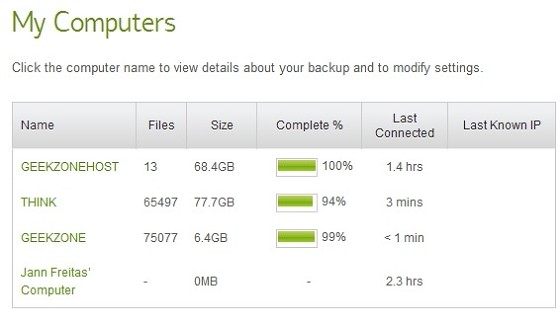
In addition to our NAS backup, and the image backup we use Crashplan at home and on Geekzone servers. This ensures that if our home is destroyed or the servers have problems we still can access backup from somewhere else.

It's an online backup though, so be prepared for extra bandwidth usage - a lot more on initial backup, and obviously only as much as you need after that...


The wife's Mac uses Time Machine service on the NAS, but we aregoing to backup online to Crashplan from this week... Adding another 60GB I'd say.


Referral links: Quic Broadband (free setup code: R587125ERQ6VE) | Samsung | AliExpress | Wise | Sharesies 


Support Geekzone by subscribing (browse ads-free), or making a one-off or recurring donation through PressPatron.


davidcole
6099 posts

Uber Geek
+1 received by user: 1465

Trusted

  #649476 2-Jul-2012 12:07
Send private message

Crashplan for data (free mode to folder/nas) or paid online for day to day data.

acronis for image based. I use both extensively. Have done restores for both as well.


Previously known as psycik

Home Assistant: Gigabyte AMD A8 Brix, Home Assistant with Aeotech ZWave Controller, Raspberry PI, Wemos D1 Mini, Zwave, Shelly Humidity and Temperature sensors
Media:Chromecast v2, ATV4 4k, ATV4, HDHomeRun Dual
Server
Host Plex Server 3x3TB, 4x4TB using MergerFS, Samsung 850 evo 512 GB SSD, Proxmox Server with 1xW10, 2xUbuntu 22.04 LTS, Backblaze Backups, usenetprime.com fastmail.com Sharesies Trakt.TV Sharesight 


sidefx
3775 posts

Uber Geek
+1 received by user: 1295

Trusted

  #649479 2-Jul-2012 12:11
Send private message

I got the impression Crashplan could also be setup to backup to other computers on your own network; so I had assumed to NAS too. Is that the case?

http://support.crashplan.com/doku.php/feature/multi_destination_backup


"I was born not knowing and have had only a little time to change that here and there."         | Octopus Energy | Sharesies
              - Richard Feynman


davidcole
6099 posts

Uber Geek
+1 received by user: 1465

Trusted

  #649482 2-Jul-2012 12:15
Send private message

sidefx: I got the impression Crashplan could also be setup to backup to other computers on your own network; so I had assumed to NAS too. Is that the case?

http://support.crashplan.com/doku.php/feature/multi_destination_backup


Yeah, for free you can back up to a folder (or USB connected drive, or file share), or another machine on your network (via their software), or a friend over the internet (if they have crashplan as well).

EDIT: I stand corrected on the network drive option.  It's not something I'd tried, as I have crashplan on all my machines and centralise my backups on one.


Previously known as psycik

Home Assistant: Gigabyte AMD A8 Brix, Home Assistant with Aeotech ZWave Controller, Raspberry PI, Wemos D1 Mini, Zwave, Shelly Humidity and Temperature sensors
Media:Chromecast v2, ATV4 4k, ATV4, HDHomeRun Dual
Server
Host Plex Server 3x3TB, 4x4TB using MergerFS, Samsung 850 evo 512 GB SSD, Proxmox Server with 1xW10, 2xUbuntu 22.04 LTS, Backblaze Backups, usenetprime.com fastmail.com Sharesies Trakt.TV Sharesight 


freitasm
BDFL - Memuneh
80646 posts

Uber Geek
+1 received by user: 41029

Administrator
ID Verified
Trusted
Geekzone
Lifetime subscriber

  #649487 2-Jul-2012 12:22
Send private message

You can backup for free using Crashplan to other friend's computer (or another one of yours). Obviously if you have all the PCs in the same household you don't have an off site protection, which is the whole idea.

You can't backup to a network drive - I tried setting my Crashplan storage to the NAS to allow my wife's PC to backup there, but it won't let me use network drives. I am not too worried because we now have the Time Machine service configured on the NAS so she's using that.

Her computer will also use Crashplan online for the reasons I posted: if the house burns down we still have our data somewhere else.


Referral links: Quic Broadband (free setup code: R587125ERQ6VE) | Samsung | AliExpress | Wise | Sharesies 


Support Geekzone by subscribing (browse ads-free), or making a one-off or recurring donation through PressPatron.


Shop now for Dyson appliances (affiliate link).
sidefx
3775 posts

Uber Geek
+1 received by user: 1295

Trusted

  #649490 2-Jul-2012 12:27
Send private message

freitasm: You can backup for free using Crashplan to other friend's computer (or another one of yours). Obviously if you have all the PCs in the same household you don't have an off site protection, which is the whole idea.

You can't backup to a network drive - I tried setting my Crashplan storage to the NAS to allow my wife's PC to backup there, but it won't let me use network drives. I am not too worried because we now have the Time Machine service configured on the NAS so she's using that.

Her computer will also use Crashplan online for the reasons I posted: if the house burns down we still have our data somewhere else.


Agree to some extent, but I would view my skydrive\sugarsync copies of really important files (mainly just important documents and all our digital photos) as covering me for the "house burns down" scenario.

Crashplan would then be a good solution for the "oh crap I accidently deleted a file I didn't mean to" or HDD failures.

Real pity about the lack of NAS\network share support though.


"I was born not knowing and have had only a little time to change that here and there."         | Octopus Energy | Sharesies
              - Richard Feynman


davidcole
6099 posts

Uber Geek
+1 received by user: 1465

Trusted

  #649493 2-Jul-2012 12:29
Send private message

sidefx:
freitasm: You can backup for free using Crashplan to other friend's computer (or another one of yours). Obviously if you have all the PCs in the same household you don't have an off site protection, which is the whole idea.

You can't backup to a network drive - I tried setting my Crashplan storage to the NAS to allow my wife's PC to backup there, but it won't let me use network drives. I am not too worried because we now have the Time Machine service configured on the NAS so she's using that.

Her computer will also use Crashplan online for the reasons I posted: if the house burns down we still have our data somewhere else.


Agree to some extent, but I would view my skydrive\sugarsync copies of really important files (mainly just important documents and all our digital photos) as covering me for the "house burns down" scenario.

Crashplan would then be a good solution for the "oh crap I accidently deleted a file I didn't mean to" or HDD failures.

Real pity about the lack of NAS\network share support though.


Just add a friend to the mix....else pay the $50 a year.  There's no limits to the size of your backup....and while you can't do it with the online, you can seed a friends backups by giving them a harddrive.


Previously known as psycik

Home Assistant: Gigabyte AMD A8 Brix, Home Assistant with Aeotech ZWave Controller, Raspberry PI, Wemos D1 Mini, Zwave, Shelly Humidity and Temperature sensors
Media:Chromecast v2, ATV4 4k, ATV4, HDHomeRun Dual
Server
Host Plex Server 3x3TB, 4x4TB using MergerFS, Samsung 850 evo 512 GB SSD, Proxmox Server with 1xW10, 2xUbuntu 22.04 LTS, Backblaze Backups, usenetprime.com fastmail.com Sharesies Trakt.TV Sharesight 


dontpanic42
1574 posts

Uber Geek
+1 received by user: 11


  #649502 2-Jul-2012 12:38
Send private message

I just thought I would add, if any one is concerned about security (you should be) with regards to online backups, there is a handy program called Cloud Fogger which will encrypt your data before leaving your computer.

This isn't such a big deal for backup solutions such as CrashPlan, which already offers client-side encryption.
It is very handy for the likes of free services you already have (such as SkyDrive, Google Drive) if you want to back up to them, but also want the added security of encrypting your files.

Of course, it should be noted that if you do use Cloud Fogger to backup to SkyDrive, Google Drive etc, you probably won't be able to view any of the files using the web based file browsers.

EDIT: Here's a link.
http://www.cloudfogger.com/en/

freitasm
BDFL - Memuneh
80646 posts

Uber Geek
+1 received by user: 41029

Administrator
ID Verified
Trusted
Geekzone
Lifetime subscriber

  #649506 2-Jul-2012 12:44
Send private message

sidefx:
freitasm: You can backup for free using Crashplan to other friend's computer (or another one of yours). Obviously if you have all the PCs in the same household you don't have an off site protection, which is the whole idea.

You can't backup to a network drive - I tried setting my Crashplan storage to the NAS to allow my wife's PC to backup there, but it won't let me use network drives. I am not too worried because we now have the Time Machine service configured on the NAS so she's using that.

Her computer will also use Crashplan online for the reasons I posted: if the house burns down we still have our data somewhere else.


Agree to some extent, but I would view my skydrive\sugarsync copies of really important files (mainly just important documents and all our digital photos) as covering me for the "house burns down" scenario.

Crashplan would then be a good solution for the "oh crap I accidently deleted a file I didn't mean to" or HDD failures.

Real pity about the lack of NAS\network share support though.


I also have my Documents synchronising with Skydrive. But it's not a backup, it's remote access really. It won't protect you against "oh, damn, deleted the wrong folder" once it syncs the deletion (as you already know).


Referral links: Quic Broadband (free setup code: R587125ERQ6VE) | Samsung | AliExpress | Wise | Sharesies 


Support Geekzone by subscribing (browse ads-free), or making a one-off or recurring donation through PressPatron.


 1 | 2
View this topic in a long page with up to 500 replies per page Create new topic


Geekzone Live »

Try automatic live updates from Geekzone directly in your browser, without refreshing the page, with Geekzone Live now.


Are you subscribed to our RSS feed? You can download the latest headlines and summaries from our stories directly to your computer or smartphone by using a feed reader.