Geekzone: technology news, blogs, forums
Guest
Welcome Guest.
You haven't logged in yet. If you don't have an account you can register now.


quickymart

14940 posts

Uber Geek
+1 received by user: 13953

ID Verified

#150896 6-Aug-2014 22:28
Send private message

Thinking it's time to upgrade my desktop monitors. I have a GEForce GTX650 graphics card in my desktop and it has two slots (both look like DVI but I think one is and one isn't).
Two queries:


* can I run dual monitors with this graphics card?
* what adapters would I need?

I'm also looking at upgrading my monitor. I would like one with speakers - preferably front-mounted - as this would be best for my home setup (watching movies on the screen etc). Viewsonic monitors have caught my eye lately, do they sell them with front-mounted speakers?

Thanks in advance laughing

Create new topic
Coil
6614 posts

Uber Geek
+1 received by user: 2153
Inactive user


  #1103702 6-Aug-2014 22:30
Send private message


Coil
6614 posts

Uber Geek
+1 received by user: 2153
Inactive user


  #1103704 6-Aug-2014 22:33
Send private message

To answer the question. most likely as that chipset does support 4 displays.

wasabi2k
2102 posts

Uber Geek
+1 received by user: 860


  #1103705 6-Aug-2014 22:33
Send private message

why don't you think it is DVI?

do they both look like this?

http://ctcolumbia.technology-solved.com/files/2011/03/DVI-port1.jpg


Then they are both DVI - you just need a monitor with a DVI input - most non cheap and nasties will have DVI- in. It is also digital so no auto adjustment bollocks - just a nice sharp picture.

Dell makes nice monitors, as does HP. What is your budget.

Don't waste money on integrated speakers - nearly any standalone desktop speaker set will be a million times better - have a look at logitech's range.


quickymart

14940 posts

Uber Geek
+1 received by user: 13953

ID Verified

  #1103722 6-Aug-2014 23:11
Send private message

It appears to have two outputs - they both look like the images Tim has posted there.

I'm sure that external speakers sound better but for my setup I prefer integrated ones. I had an HP monitor with them previously (an HP vs17e, from memory) and that was really good.

quickymart

14940 posts

Uber Geek
+1 received by user: 13953

ID Verified

  #1103724 6-Aug-2014 23:14
Send private message

This is the graphics card, btw.

afe66
3181 posts

Uber Geek
+1 received by user: 1678

Lifetime subscriber

  #1103822 7-Aug-2014 09:52
Send private message

Get separate speakers as its most likely that they will out last the monitor and will sound better.

Think of the quality of speakers built into LCD tvs.

I'm still running some Creative 5.1 speakers which I bought in 2003.... since then the monitor has changed from a 17" CRT to a 21" CRT to 23" Dell to a two screen Dell 23" setup.
The PC had two or three mother board upgrades, two graphic card upgrades.
Then replaced the PC with a newer one in 2011 and its done through 2 more graphics card... (currently runing a radeon hd5450......)

Same speakers and Logitech keyboard.


A.


Shop now for Dyson appliances (affiliate link).
Lias
5655 posts

Uber Geek
+1 received by user: 3978

ID Verified
Trusted
Lifetime subscriber

  #1103834 7-Aug-2014 10:24
Send private message

quickymart: This is the graphics card, btw.


Right. So you have these ports:
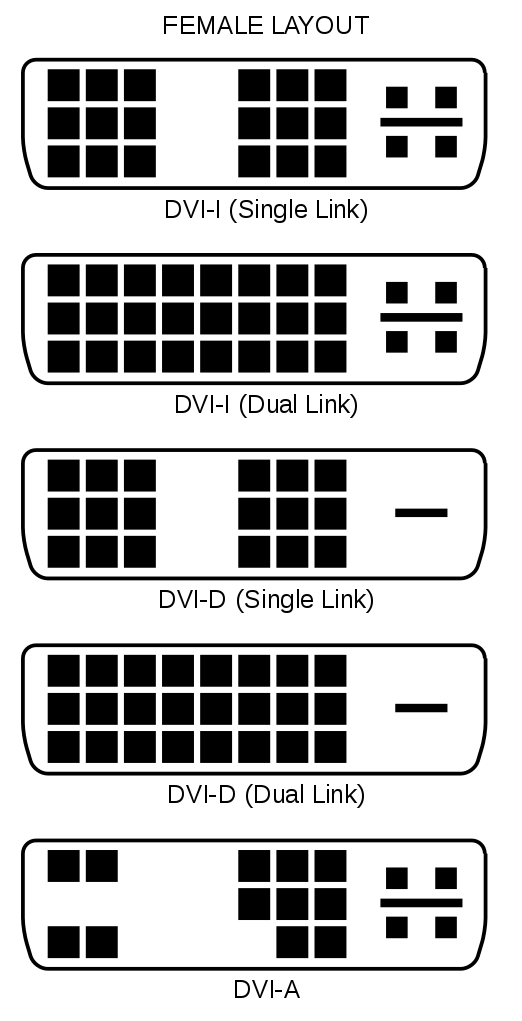
1x DVI-I (DVI Integrated, Analog AND digital signals on one connector, can be used with a DVI to VGA Dapter, it's the one with the most pins)
1x DVI-D (Digital Only, can only be used as a Digital port)
1x HDMI

You should be able to support 3 displays, however only one of them can be analog VGA, the other two need to be digital.

Clear as mud?


I'm a geek, a gamer, a dad, a Quic user, and an IT Professional. I have a full rack home lab, size 15 feet, an epic beard and Asperger's. I'm a bit of a Cypherpunk, who believes information wants to be free and the Net interprets censorship as damage and routes around it. If you use my Quic signup you can also use the code R570394EKGIZ8 for free setup. Opinions are my own and not the views of my employer.


wasabi2k
2102 posts

Uber Geek
+1 received by user: 860


  #1103839 7-Aug-2014 10:36
Send private message

http://pricespy.co.nz/category.php?m=s179147696&o=produkt_pris_inkmoms#prodlista

1
920 x 1080 with DVI In and Built in Speakers ordered by price.

Adjust for screen size/technology if you wish.

Ragnor
8279 posts

Uber Geek
+1 received by user: 585

Trusted

  #1104164 7-Aug-2014 15:14
Send private message

quickymart: 

I'm also looking at upgrading my monitor. I would like one with speakers - preferably front-mounted - as this would be best for my home setup (watching movies on the screen etc). Viewsonic monitors have caught my eye lately, do they sell them with front-mounted speakers?


If you value sound quality get separate speakers rather than a monitor with speakers.

Q: How much do you want to spend max?

quickymart

14940 posts

Uber Geek
+1 received by user: 13953

ID Verified

  #1104304 7-Aug-2014 19:17
Send private message

I won't be using it 24 hours a day, just from time to time - maybe several times in a week.
Probably around $200-$250 (at a push)?

Create new topic


Geekzone Live »

Try automatic live updates from Geekzone directly in your browser, without refreshing the page, with Geekzone Live now.


Are you subscribed to our RSS feed? You can download the latest headlines and summaries from our stories directly to your computer or smartphone by using a feed reader.