Geekzone: technology news, blogs, forums
Guest
Welcome Guest.
You haven't logged in yet. If you don't have an account you can register now.


D1023319

527 posts

Ultimate Geek
+1 received by user: 90

ID Verified

#218016 22-Jul-2017 16:27
Send private message

Hi


I built by PC in 2011 based on a I5-2500K CPU and ASUS P8z68 VPro motherboard with 8 GB DDR3 memory.
I then later updated the graphic card to Geforce GT630 and OS to Win 10 64bit and the HDD to a SSD/HDD system.


Recently whenever the PC goes to sleep - it disconnects from the internet on awaking.
A system check says there is a issue with the ethernet driver, but after a reboot, the issue goes away.

I checked and theres been no driver updates for Win10.


Any thoughts? - I had thought it might be a motherboard fault.
In interim, I have turned off sleep function.


FYI - I really dont want to do a PC update as it still runs very well.
And I am resistant to changing the motherboard as the Socket 1155 is long obsolete.


Create new topic
OmniouS
434 posts

Ultimate Geek
+1 received by user: 46

Trusted
Lifetime subscriber

  #1827155 22-Jul-2017 16:37
Send private message

What is the NIC identified as under Device Manager? Did you update it via the motherboard manufacturer's website? If so, you could probably find a newer driver from whoever makes the NIC chipset.


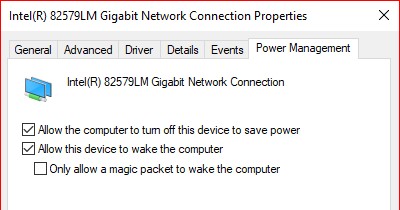
You could try disabling the 'turn off this device to save power' option under the Power Management settings for the NIC (via Device Manager)


ANglEAUT
altered-ego
2436 posts

Uber Geek
+1 received by user: 842

Trusted
Lifetime subscriber

  #1827159 22-Jul-2017 16:44
Send private message

OmniouS: You could try disabling the 'turn off this device to save power' option under the Power Management settings for the NIC (via Device Manager) 


Have to agree.


Please keep this GZ community vibrant by contributing in a constructive & respectful manner.


D1023319

527 posts

Ultimate Geek
+1 received by user: 90

ID Verified

  #1827201 22-Jul-2017 17:39
Send private message

Thanks for prompt response.


FYI - I have already tried disabling that option but to no effect.
The only resolution so far is to disable sleep option.


I am now wondering if Microsoft update is installing its own driver net1ic64.inf for the MB's ethernet Intel(R) 82579V Gigabit Network Connection


I am looking at Intel the chipset provider to see if they have a driver


IcI:


OmniouS: You could try disabling the 'turn off this device to save power' option under the Power Management settings for the NIC (via Device Manager) 


Have to agree.


gzt

gzt
18684 posts

Uber Geek
+1 received by user: 7824

Lifetime subscriber

  #1827209 22-Jul-2017 17:49
Send private message

If it recently and is a driver update, then look for a rollback button on the driver properties in device manager. Finding the correct driver could also work.

Create new topic


Geekzone Live »

Try automatic live updates from Geekzone directly in your browser, without refreshing the page, with Geekzone Live now.


Are you subscribed to our RSS feed? You can download the latest headlines and summaries from our stories directly to your computer or smartphone by using a feed reader.