Has anyone got the "Reply to another address" option working?
I have entered the appropriate details but the recipient still gets the originating Gmail address, not the alternative.
|
|
|
Where do you see this option (ie message pane or settings menus)?
--
OldGeek.
Quic referal code: https://account.quic.nz/refer/581402 and use this code for free setup: R581402E48MJA
As above. Where do you see the option to "Reply to different address"
I can only find Reply or Forward.
Forward is what I have always used if I want to send a reply to a different address.
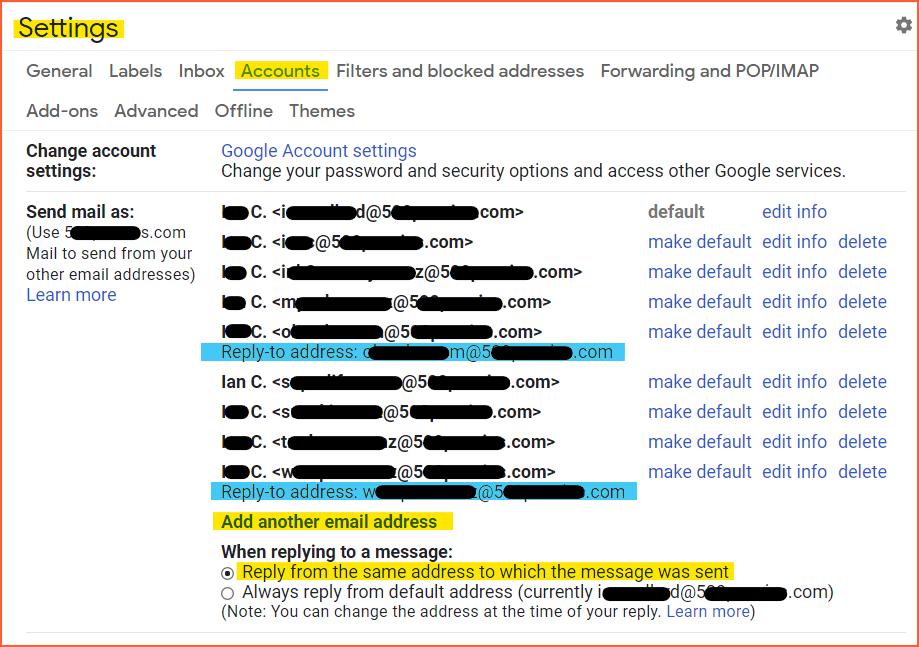
Gmail, Settings (Gear Wheel), Settings, Accounts and Import …. 3rd item down.
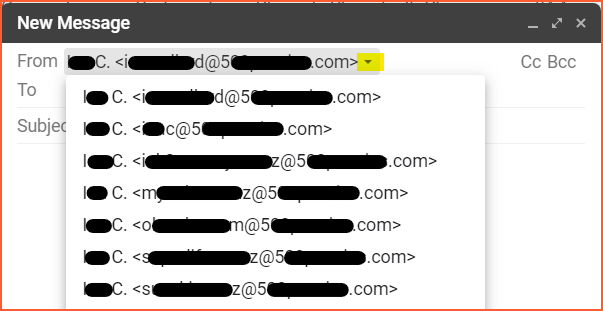
Do you mean something like this?

.
.
. then follow the yellow highlights
Or are you asking about the blue highlights?

Please keep this GZ community vibrant by contributing in a constructive & respectful manner.
That is 'Send email as'. What setting here is causing you a problem?
--
OldGeek.
Quic referal code: https://account.quic.nz/refer/581402 and use this code for free setup: R581402E48MJA
OK, thanks for replies …. problem seems to be that all I have is an EDIT option, no MAKE DEFAULT !
Installed Chrome, but still cannot see all options alongside this Setting.
Any ideas welcome.
Weirder and weirder … found a suggestion that the "Reply-to" option only works if the Gmail account recovery set up has sent a verification code.
When setting up this account, I did NOT get any email providing a verification code, yet Gmail is still working fine for the purpose of emails ðĪŠ
I have even gone through the Account Recovery process …. no change.
Update: Checked Gmail Settings thoroughly, and all states that my Reply-to address is different to my Gmail one … excellent.
IF I create and send an email using browser/web-based Gmail, then the recipient will get the desired 'other' address when clicking on Reply … again all good.
What fails, however, is if I send an email using Outlook through Gmail, the recipient only sees the Gmail address when clicking Reply.
Rickles:
Update: Checked Gmail Settings thoroughly, and all states that my Reply-to address is different to my Gmail one … excellent.
IF I create and send an email using browser/web-based Gmail, then the recipient will get the desired 'other' address when clicking on Reply … again all good.
What fails, however, is if I send an email using Outlook through Gmail, the recipient only sees the Gmail address when clicking Reply.
Ah I can see where the issue is. You are assuming that Google and Microsoft want to play nicely together... ð
>Ah I can see where the issue is. You are assuming that Google and Microsoft want to play nicely together... ð<
In the words of the great philosopher Barry Crump: Bugger! ðĪ
dfnt: angleaut you forgot to blank out the last email address
Fixed. Thx. Let's hope the internet will forget.
Please keep this GZ community vibrant by contributing in a constructive & respectful manner.
Rickles: ... What fails, however, is if I send an email using Outlook through Gmail, the recipient only sees the Gmail address when clicking Reply.
Mentioning Outlook in the opening post certainly would have been helpful. Try this? https://www.howtogeek.com/298780/how-to-change-the-reply-to-address-for-email-messages-in-outlook/
Edit: added HowToGeek link
Please keep this GZ community vibrant by contributing in a constructive & respectful manner.
|
|
|