Geekzone: technology news, blogs, forums
Guest
Welcome Guest.
You haven't logged in yet. If you don't have an account you can register now.


Zepanda66

533 posts

Ultimate Geek
+1 received by user: 212


#261469 29-Nov-2019 11:46
Send private message

How is everyone's CPU handling the warmer weather? Its supposed to be 20C+ for the next week or more in Auckland. My 1700x is already ideling at 40C+ compared to the usual 30-36C in normal weather. Any tips to keep things cool besides getting a better cooler? Or is that basically all there is too it?




http://www.speedtest.net/result/7315955530.png


Create new topic
ratsun81
516 posts

Ultimate Geek
+1 received by user: 183


  #2362789 29-Nov-2019 12:03
Send private message

Good case airflow makes a massive amount of difference for both CPU and GPU temps. Personally i dont like systems with less than 2 fans. 


This one might get a few arguments but replacing the thermal paste on your cpu at regular intervals can help as well. 2+ years old and i would consider it. 


Cleaning out the computer case is another one to think about, really this is something that everyone should do annually. 


Quic Broadband


Use R212389ELFLL2 promo code for free setup at checkout.


grimwulf
121 posts

Master Geek
+1 received by user: 85


  #2362799 29-Nov-2019 12:26
Send private message

Ambient temp is somewhat unavoidable unless you keep your PC in a fridge, and then all sorts of moisture problems ;)


In all seriousness - whilst ambient obviously contributes to idle temp, the main other contributor is your CPU boosting it's frequencies when not needed. Some CPUs are twitchier than others on this - the latest Ryzens for example boost at the drop of a hat (or having a single browser open doing nothing).


So making sure you have latest BIOS, appropriate BIOS settings and latest chipset drivers for your OS is essential.


Once you've sorted that, then check your Windows power plan is correctly set - if you have it set to max performance then Windows will be constantly telling your CPU to boost - which increases it's temps.


Generally set to balanced, or Ryzen Balanced or even custom if you want to tweak it even further - could drop to power saver if you're the type that leaves the PC on for long periods doing nothing. 


Finally, for minor benefits - tweak your fan profiles a bit - in warmer weather you want to favour exhaust a bit over intake - and in cooler weather the reverse. 


Oh and while you're at it, keep your PC off the ground if possible - I come across so many people with their PC's sat on a carpet with no ventilation beneath...


wellygary
8810 posts

Uber Geek
+1 received by user: 5287


  #2362800 29-Nov-2019 12:26
Send private message

If you are getting concerned about mid 20's then wait until Feb,


If Australia's summer is as much of a scorcher as predicted I would expect to see more 30+ days in NZ than normal....


hio77
'That VDSL Cat'
13036 posts

Uber Geek
+1 received by user: 3896

ID Verified
Trusted
Lizard Networks
Subscriber

  #2362802 29-Nov-2019 12:28
Send private message

i often drop my OC by a few hundred mhz in the hotter months. but realistically your dissipating about the same heat... Does no different for the room.


#include <std_disclaimer>


Any comments made are personal opinion and do not reflect directly on the position my current or past employers may have. 


1101
3141 posts

Uber Geek
+1 received by user: 1143


  #2362817 29-Nov-2019 12:49
Send private message

Zepanda66:


.. My 1700x is already ideling at 40C+ compared to the usual 30-36C in normal weather. Any tips to keep things cool besides getting a better cooler? Or is that basically all there is too it?


honestly , 40C is nothing.
dont worry about it .


Otherwise spend many $$$$$$  to get that temp right down .
so unless overclocking or running at 100% CPU 24/7 .......  :-)


richms
29097 posts

Uber Geek
+1 received by user: 10205

Trusted
Lifetime subscriber

  #2362939 29-Nov-2019 14:40
Send private message

40 is nothing to worry about. Ramp your fans up if you want but I have my fan curves basically doing almost nothing till it gets to 80 so that its nice and quiet most of the time.


Richard rich.ms

HP


Shop now for HP laptops and other devices (affiliate link).
timmmay
20857 posts

Uber Geek
+1 received by user: 5349

Trusted
Lifetime subscriber

  #2362954 29-Nov-2019 14:59
Send private message

2600K is currently on 42 - 46 instead of the usual 36-38, but I have the fans dialed back. With the case and CPU fan up it drops back to about 38 but is a bit louder. From memory this CPU can do 80 degrees so no real issue.


Of course we can just turn them off and go outside...


muppet
2642 posts

Uber Geek
+1 received by user: 1660

Trusted

  #2362959 29-Nov-2019 15:04
Send private message

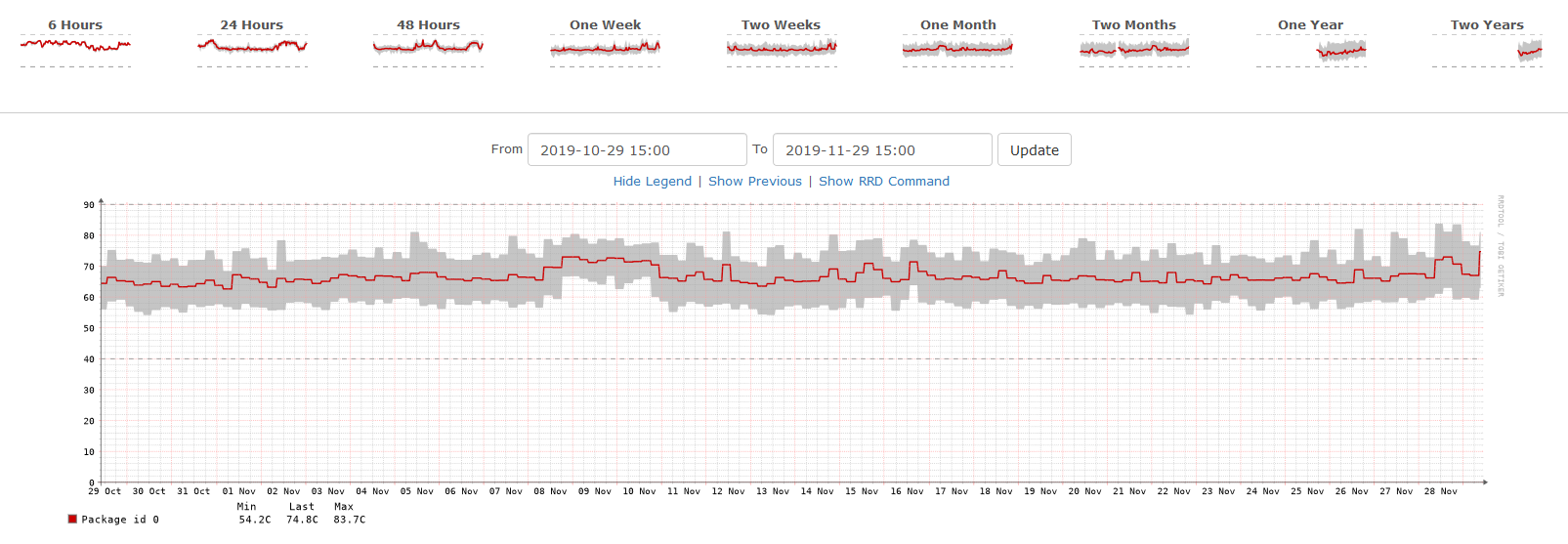
Seems to be getting up there.


This a little Mini Server that lives under the stairs with a: Intel(R) Core(TM) i5-5250U CPU @ 1.60GHz CPU.


Click to see full size


I only started using LibreNMS @ home ~ 6 months ago, so I hope to see that graph trend down over Winter.


Item
1739 posts

Uber Geek
+1 received by user: 726

Subscriber

  #2362961 29-Nov-2019 15:07
Send private message

Nothing to worry about surely?


Even with good cooling your CPU is probably reaching between 50-80 degrees under load. The fact that the ambient temperature could be 30+ and the idle temps increase accordingly with the fans idling shouldn't make any appreciable difference to cooling under load once they kick in?


.

Item
1739 posts

Uber Geek
+1 received by user: 726

Subscriber

  #2362963 29-Nov-2019 15:08
Send private message

timmmay:


Of course we can just turn them off and go outside...


Heretic!


.

djtOtago
1181 posts

Uber Geek
+1 received by user: 605


  #2363034 29-Nov-2019 16:37
Send private message

My encoding and rendering server cpus (dual cpu box) run somewhere between 70 and 80 degrees pretty much 24-7 and have done so for the last 2 years.


Shop now for Dyson appliances (affiliate link).
Zeon
3926 posts

Uber Geek
+1 received by user: 759

Trusted

  #2363043 29-Nov-2019 16:58
Send private message

My pump breaks sometimes on my AIO cooler. The CPU gets to 100degrees and then throttles itself. Hitting the pump a few times gets the water flowing again. So as long as you don't exceed that it shouldn't throttle your CPU (this is core i5-8400)


I'm not sure if its true running hotter will reduce the lifetime.


Speedtest 2019-10-14


richms
29097 posts

Uber Geek
+1 received by user: 10205

Trusted
Lifetime subscriber

  #2363060 29-Nov-2019 17:12
Send private message

Zeon:


I'm not sure if its true running hotter will reduce the lifetime.


Even if it does reduce it, will you really care if in 5+ years a CPU dies and you are "forced" into upgrading?


Richard rich.ms

muppet
2642 posts

Uber Geek
+1 received by user: 1660

Trusted

  #2363102 29-Nov-2019 19:25
Send private message

richms:


Zeon:


I'm not sure if its true running hotter will reduce the lifetime.


Even if it does reduce it, will you really care if in 5+ years a CPU dies and you are "forced" into upgrading?


Yes, I will.


I've got an eeepc 701 that lives out in the shed.  I've had it longer than I've been married, and I'll have been married for 10 years in March.


That little mofo just won't stop (it's power supply just died, its got a dead screen) it's a great server.  Currently has a Digital TV Tuner USB thingy in it to stream interesting audio it can tune into...


bagheera
544 posts

Ultimate Geek
+1 received by user: 189


  #2363368 30-Nov-2019 10:28
Send private message

Zepanda66:


How is everyone's CPU handling the warmer weather? Its supposed to be 20C+ for the next week or more in Auckland. My 1700x is already ideling at 40C+ compared to the usual 30-36C in normal weather. Any tips to keep things cool besides getting a better cooler? Or is that basically all there is too it?


should not be a problem with room temp in the 20s, most datacentres run at low, to mid 20s in the cold side depending on how much they trust their cooler not breaking, their hot side is alot hotter - the key is good airflow, it cost a lot to cool down a DC, so you want to set it to temp that is fine for the CPU, but not cost you $$$ in cooling. If your pc can not handle 20+ c room temp, then you got a problem with the fans, and you should sort that out, and only worry when you get  30+ for room temp


Create new topic


Geekzone Live »

Try automatic live updates from Geekzone directly in your browser, without refreshing the page, with Geekzone Live now.


Are you subscribed to our RSS feed? You can download the latest headlines and summaries from our stories directly to your computer or smartphone by using a feed reader.