Geekzone: technology news, blogs, forums
Guest
Welcome Guest.
You haven't logged in yet. If you don't have an account you can register now.


gehenna

8667 posts

Uber Geek
+1 received by user: 3883

Moderator
Trusted
Lifetime subscriber

#262212 10-Jan-2020 16:15
Send private message

Motherboard: Asrock Z370 Extreme4 version P4.20


Unraid: unRAID server Plus, version 6.8.0


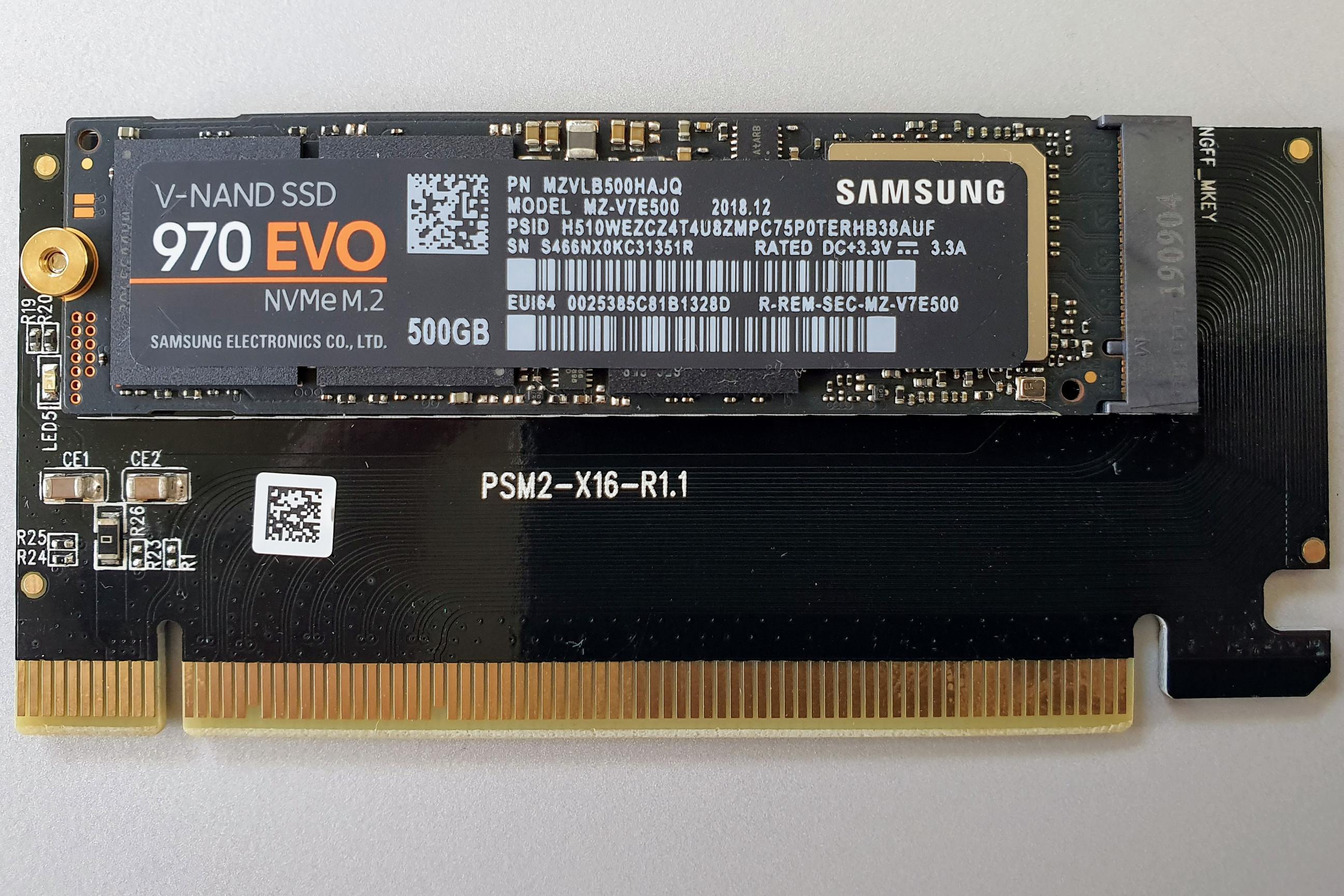
Expansion: Orico M.2 NVME PCle3.0 x16 M.2 SSD Expansion Card


M.2: Samsung EVO 970 500GB NVMe M.2


Hi folks


I am looking to free up a couple of SATA ports on my motherboard in order to add extra storage to my array.  Currently I have 2x older SATA SSD's running cache and as an unassigned device.  The idea is to replace these with PCI M.2 devices, and as such I have 3x of the Orico expansion cards that I mention above.  I have 1x NVMe M.2 SSD so I'm trying to install that one for now to use as another unassigned device.  Reason I'm using PCI expansions is because even though I have 2x M.2 slots on my motherboard, they share SATA lanes which I am using with spinning disks. 


For some reason this is recognised correctly in my EFI config (shows the correct M.2 EVO 970 info) but not in Unraid.  Has anyone run into this before?  I can't imagine there's any drivers required and the firmware is up to date on the Z370.  Is there anything I'm missing to get this to show up?


Interestingly I can see the following in the System Devices section of Unraid: 


[144d:a808] 02:00.0 Non-Volatile memory controller: Samsung Electronics Co Ltd NVMe SSD Controller SM981/PM981/PM983


But also some warnings and errors in the syslog related to NVMe:


kernel: Buffer I/O error on dev nvme0n1p1, logical block 16259, async page read


kernel: nvme nvme0: failed to set APST feature (-19


Let me know if you need any more info to help, thanks
 

Click to see full size


Filter this topic showing only the reply marked as answer Create new topic
JaseNZ
2576 posts

Uber Geek
+1 received by user: 1489

ID Verified
Lifetime subscriber

  #2389731 10-Jan-2020 16:47
Send private message

Seems strange. I just finished building my unRAID server about a month ago and its the best thing I have ever made. I used the 1TB version of the 970 M.2 for the cache and did not have any problems at all. Mine is on a Gigabyte Z370 platform board though.


One thing I did do though was move away from using the onboard ports. I grabbed this SAS HBA card. Gave me all the expandability I could want. Just flashed it to IT mode.


https://www.aliexpress.com/item/4000065128684.html?spm=a2g0s.9042311.0.0.138a4c4d6FWjIu


Out of curiosity I put exactly the same M.2 you mention in your post onto a generic expansion card and it picked it up fine in unRAID and i mounted it as an unassigned drive. Could it be the expansion card not playing well with unRAID.


I know you do not want to use them on the main board but did you try it just to make sure unRAID picked your drive up ok. 


Ding Ding Ding Ding Ding : Ice cream man , Ice cream man


gehenna

8667 posts

Uber Geek
+1 received by user: 3883

Moderator
Trusted
Lifetime subscriber

  #2389740 10-Jan-2020 16:59
Send private message

I can't get test on the mboard without removing an array disk.

I suspect it'll be the PCI riser. I have two more here that I'll try first. Though the fact that it's recognised in EFI doesn't support that line of inquiry.

gehenna

8667 posts

Uber Geek
+1 received by user: 3883

Moderator
Trusted
Lifetime subscriber

  #2389942 10-Jan-2020 22:07
Send private message

Tried a 2nd riser card and it's the same thing.  Definitely detected at the hardware level, but the OS can't seem to initialise the SSD. 


gehenna

8667 posts

Uber Geek
+1 received by user: 3883

Moderator
Trusted
Lifetime subscriber

  #2389945 10-Jan-2020 22:28
Send private message

Fixed.  For anyone searching for this in future, the fix was to add the following to my default boot config within UnRAID's settings and reboot.  The SSD now shows as an unassigned device that I can use:


nvme_core.default_ps_max_latency_us=0 


JaseNZ
2576 posts

Uber Geek
+1 received by user: 1489

ID Verified
Lifetime subscriber

  #2389946 10-Jan-2020 22:35
Send private message

gehenna:


Fixed.  For anyone searching for this in future, the fix was to add the following to my default boot config within UnRAID's settings and reboot.  The SSD now shows as an unassigned device that I can use:


nvme_core.default_ps_max_latency_us=0 


Nice glad you got it sorted.


Ding Ding Ding Ding Ding : Ice cream man , Ice cream man


killjoy389
2 posts

Wannabe Geek


  #2491647 26-May-2020 10:58
Send private message

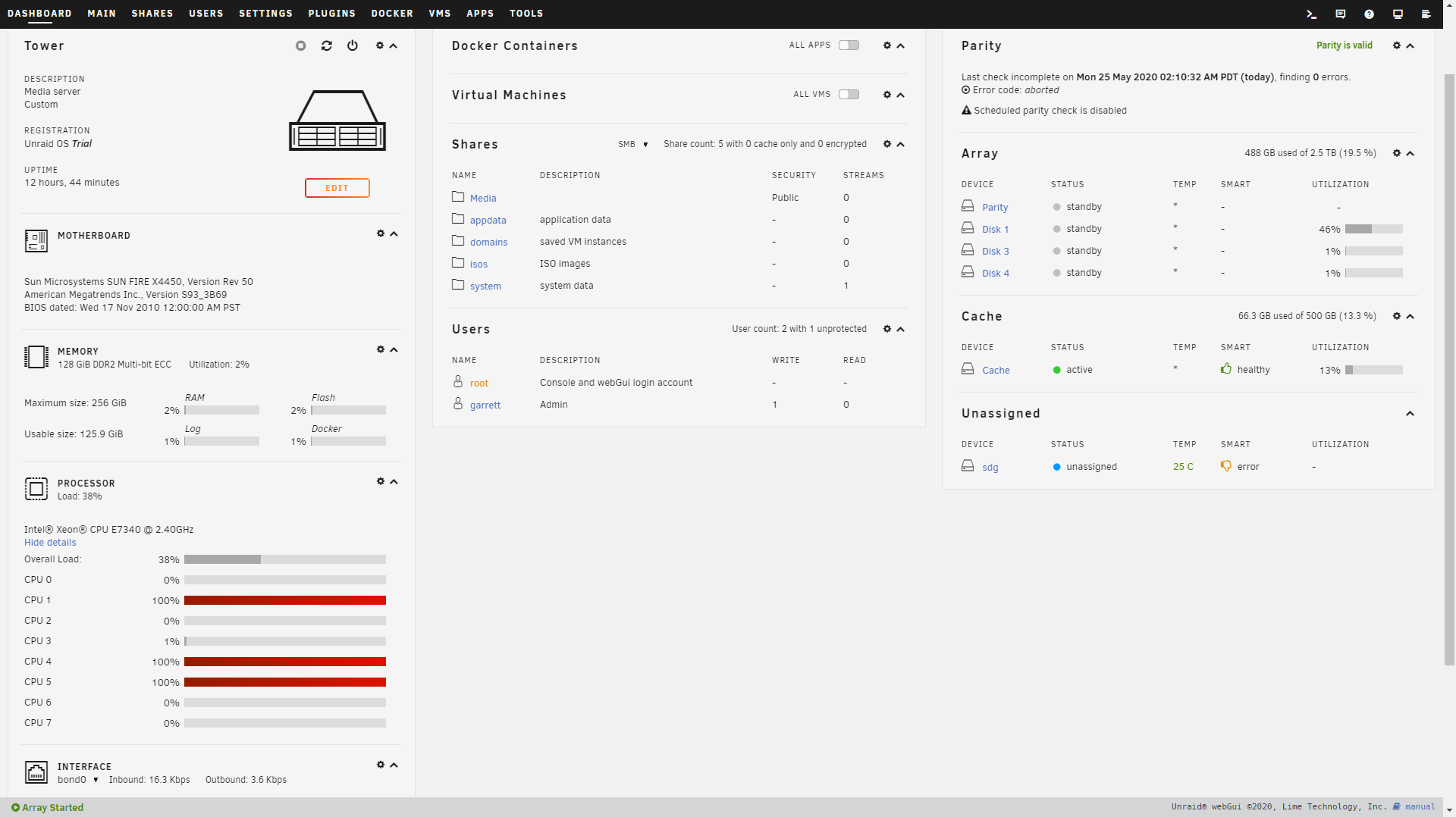
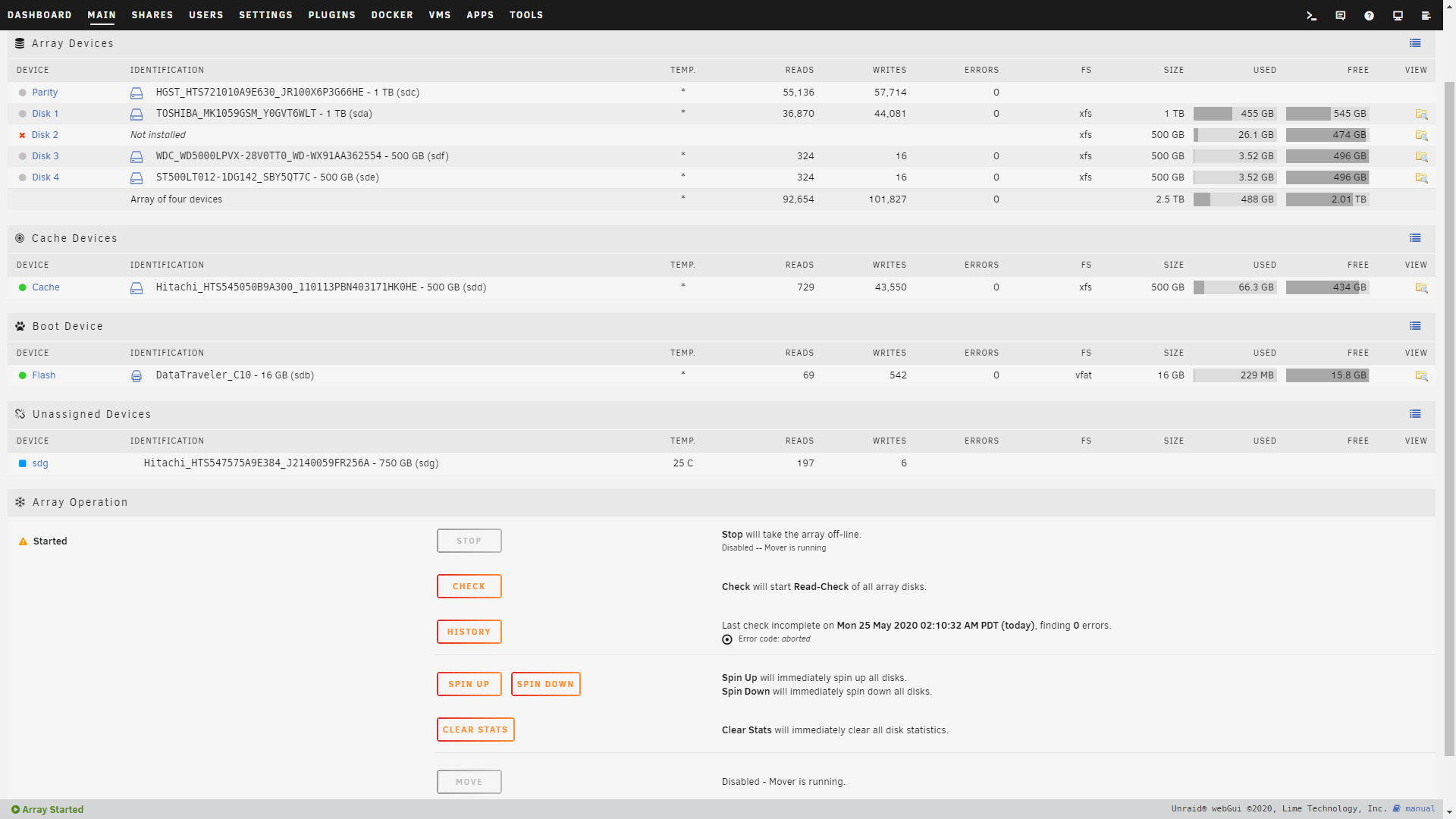
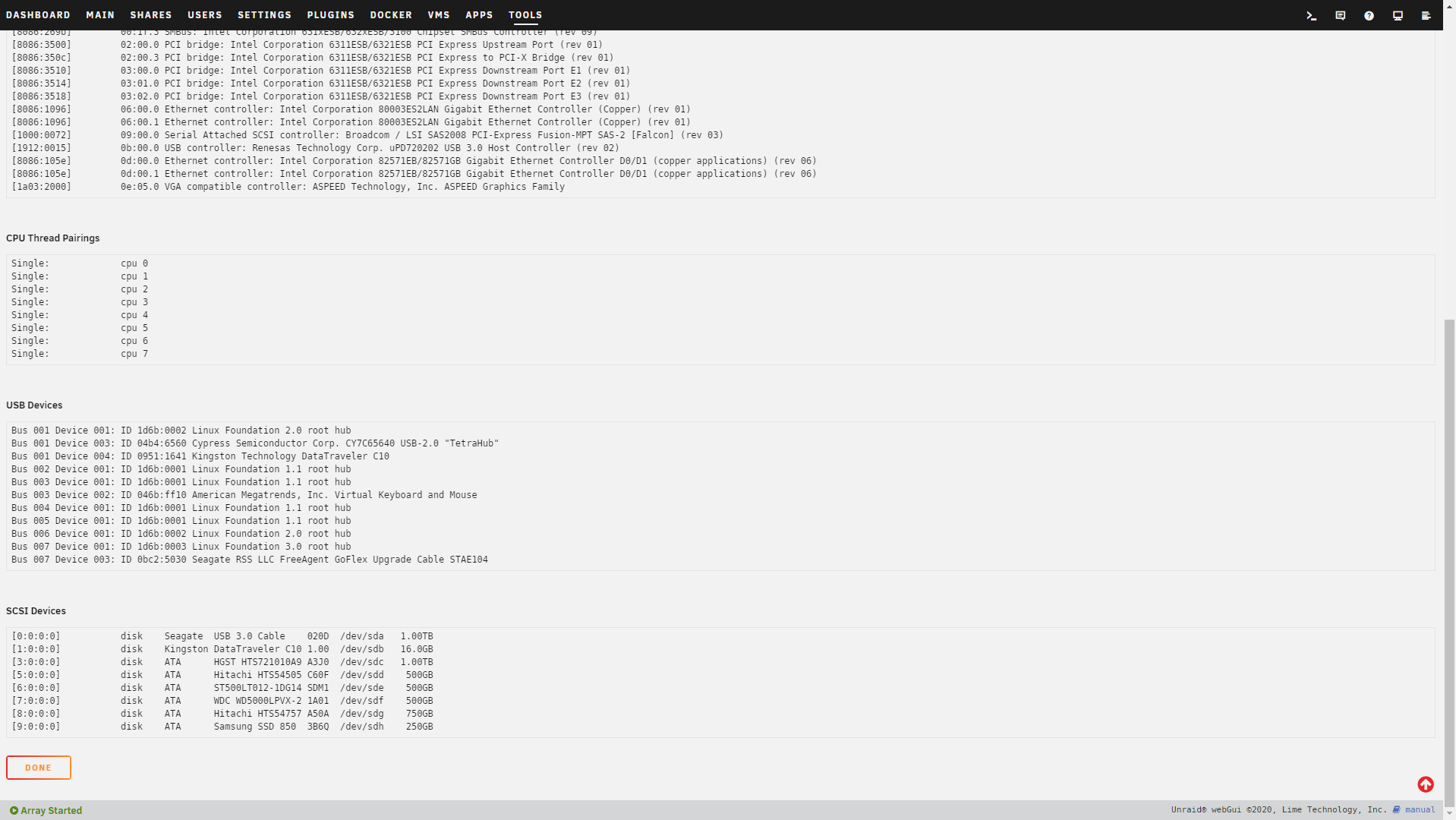
As a complete Unraid newb I am having a similar issue. I am using a used Sun Server with a HBA card that attaches to the factory server back-plane. I have used many different drives but as soon as I pop a sata ssd(Samsung 850 evo) I have noticed Unraid wont see it as a disk drive in the main page, But when I look at system devices it is listed under drives. If anyone can help it would be much appreciated.  I saw you had a fix listed above and hoped that it might work I'm just not sure where to use that code.


Shop now for Dyson appliances (affiliate link).
PANiCnz
999 posts

Ultimate Geek
+1 received by user: 161


  #2491705 26-May-2020 11:43
Send private message

gehenna:


Reason I'm using PCI expansions is because even though I have 2x M.2 slots on my motherboard, they share SATA lanes which I am using with spinning disks. 


Have you tried them in the onboard M.2 slots? I'm pretty sure if you're using NVME drives (like the 970) it doesn't affect your ability to use the associated SATA ports.


killjoy389
2 posts

Wannabe Geek


  #2491752 26-May-2020 13:07
Send private message

PANiCnz:


gehenna:


Reason I'm using PCI expansions is because even though I have 2x M.2 slots on my motherboard, they share SATA lanes which I am using with spinning disks. 


Have you tried them in the onboard M.2 slots? I'm pretty sure if you're using NVME drives (like the 970) it doesn't affect your ability to use the associated SATA ports.


That problem has already been solved I have a different/similar problem.


gehenna

8667 posts

Uber Geek
+1 received by user: 3883

Moderator
Trusted
Lifetime subscriber

  #2492228 26-May-2020 20:44
Send private message

That config goes into the boot config XML.  So go to your boot device on the Main page and click on the Flash link.  Then in there under SysLinux Configuration paste the line I mentioned above into the Unraid OS section, and restart.  


gehenna

8667 posts

Uber Geek
+1 received by user: 3883

Moderator
Trusted
Lifetime subscriber

  #2492276 26-May-2020 21:10
Send private message

IIRC I also had to check the box on the bottom left of that page to Permit UEFI Boot Mode.  


Filter this topic showing only the reply marked as answer Create new topic


Geekzone Live »

Try automatic live updates from Geekzone directly in your browser, without refreshing the page, with Geekzone Live now.


Are you subscribed to our RSS feed? You can download the latest headlines and summaries from our stories directly to your computer or smartphone by using a feed reader.
