Geekzone: technology news, blogs, forums
Guest
Welcome Guest.
You haven't logged in yet. If you don't have an account you can register now.


QuackPipe

57 posts

Master Geek
+1 received by user: 10


#270116 24-Apr-2020 12:13
Send private message

Hi all, so as the title says essentially every time I shut down my pc it will not power back on immediately unless I remove the cmos battery or I unplug the psu from the mains for 15 minutes than it will power on and away it goes until I shut it down again, thus the cycle continues.

A bit of history it all started from the pc going into “sleep” from which I could not wake it with keyboard or mouse so a manual shutdown was required to get it to start again. Since than I adjusted the power settings so it would not sleep but stay on until I shut it down, a temporary workaround that was fine for a while but now it refuses to boot immediately after shutdown.

Things I’ve tried
Flashing the latest bios.
Resetting bios settings to factory
Booting with one ram stick/reseating ram sticks
Running Memtest to eliminate RAM
Removing any USB devices other than KBM than trying to power on.
Tried in another case as I thought front I/O may be faulty.. nope

Things I will try next
New cmos battery
Installing any OS updates (I turned auto updates off)
New surge protector, maybe current one is faulty and dirty power through mains causing issues?

Things I can’t try
Another motherboard
Another CPU
Another PSU
Booting without gpu as 2600x has no integrated graphics

I’m totally stumped, and Dr Google throws out all sorts of scenarios which look leads you down 5 different rabbit holes.

Specs as follow
Ryzen 5 2600x
Gigabyte b450m
16gb ram
550w psu
RX5700

Any suggestions? Thanks


Bear attack tip #6


If attacked by a bear, play dead....


It will be good practice for when you die a couple minutes later.

View this topic in a long page with up to 500 replies per page Create new topic
 1 | 2 | 3
Apsattv
2452 posts

Uber Geek
+1 received by user: 724


  #2469165 24-Apr-2020 12:30
Send private message

I had a brand new pc build fail in a similar way after 1 year. . %100 sure it will be the powersupply


https://www.jam-software.com/heavyload


run that to test it , expect your pc to shut down within 1 or 2 minutes of starting it


Rather than pull the cmos battery every time , you can do a power drain by pulling the power lead out and holding the front case button on for 30 seconds.


also use cpuid hwmonitor to view the voltages and temps etc.


https://www.cpuid.com/softwares/hwmonitor.html


QuackPipe

57 posts

Master Geek
+1 received by user: 10


  #2469172 24-Apr-2020 12:37
Send private message

Cheers I’ll give it a go. My first thought was the PSU and still think it may be the issue.


Bear attack tip #6


If attacked by a bear, play dead....


It will be good practice for when you die a couple minutes later.

Apsattv
2452 posts

Uber Geek
+1 received by user: 724


  #2470772 25-Apr-2020 10:03
Send private message

Is there an update?


QuackPipe

57 posts

Master Geek
+1 received by user: 10


  #2471239 25-Apr-2020 18:08
Send private message

Apsattv:

Is there an update?


I ran the stress test and nothing out of the ordinary popped up, temps were fine along with voltages.

All windows updates installed and switched out surge protector and issue still persists. At this point I have no clue and without spare parts I can’t test any further.


Bear attack tip #6


If attacked by a bear, play dead....


It will be good practice for when you die a couple minutes later.

Gordy7
gordy7
2001 posts

Uber Geek
+1 received by user: 505

ID Verified
Lifetime subscriber

  #2471243 25-Apr-2020 18:24
Send private message

Other things to try...


Running Windows in Safe Mode.


Running PC Startup diags...


Boot PC from a Linux USB Stick... Set Bios to start with USB... and see if you have shut down/ Startup problems.


Gordy


My first ever AM radio network connection was with a 1MHz AM crystal(OA91) radio receiver.


bagheera
544 posts

Ultimate Geek
+1 received by user: 189


  #2471246 25-Apr-2020 18:28
Send private message

try turning off fast boot - have seen problems booting with it on


https://www.howtogeek.com/243901/the-pros-and-cons-of-windows-10s-fast-startup-mode/


Shop now for Lego sets and other gifts (affiliate link).
QuackPipe

57 posts

Master Geek
+1 received by user: 10


  #2471263 25-Apr-2020 19:36
Send private message

Will give these suggestions a go and report back.


Bear attack tip #6


If attacked by a bear, play dead....


It will be good practice for when you die a couple minutes later.

Apsattv
2452 posts

Uber Geek
+1 received by user: 724


  #2471575 26-Apr-2020 13:25
Send private message

You could try this


https://www.ultimatebootcd.com/


it has a number of boot up stability tests, i used it to confirm my power supply issue. Using the cpustresstests


Just to confirm you shut the pc down completely? then pressing power button the pc won't come back on?


Do the lights come on? does the power supply fan and cpu fan come on?


Can you boot into the bios?


MadEngineer
4591 posts

Uber Geek
+1 received by user: 2570

Trusted

  #2471597 26-Apr-2020 14:06
Send private message

When it boots, check it’s not failing over to the 2nd bios.


You're not on Atlantis anymore, Duncan Idaho.

QuackPipe

57 posts

Master Geek
+1 received by user: 10


  #2471618 26-Apr-2020 14:49
Send private message

Apsattv:

You could try this


https://www.ultimatebootcd.com/


it has a number of boot up stability tests, i used it to confirm my power supply issue. Using the cpustresstests


Just to confirm you shut the pc down completely? then pressing power button the pc won't come back on?


Do the lights come on? does the power supply fan and cpu fan come on?


Can you boot into the bios?


Correct, complete shutdown and than pushing the power button does nothing, no lights or fans spin. In order to boot I have to switch off the PSU for about 15min before it will post and boot again.


Bear attack tip #6


If attacked by a bear, play dead....


It will be good practice for when you die a couple minutes later.

Gordy7
gordy7
2001 posts

Uber Geek
+1 received by user: 505

ID Verified
Lifetime subscriber

  #2471630 26-Apr-2020 15:17
Send private message

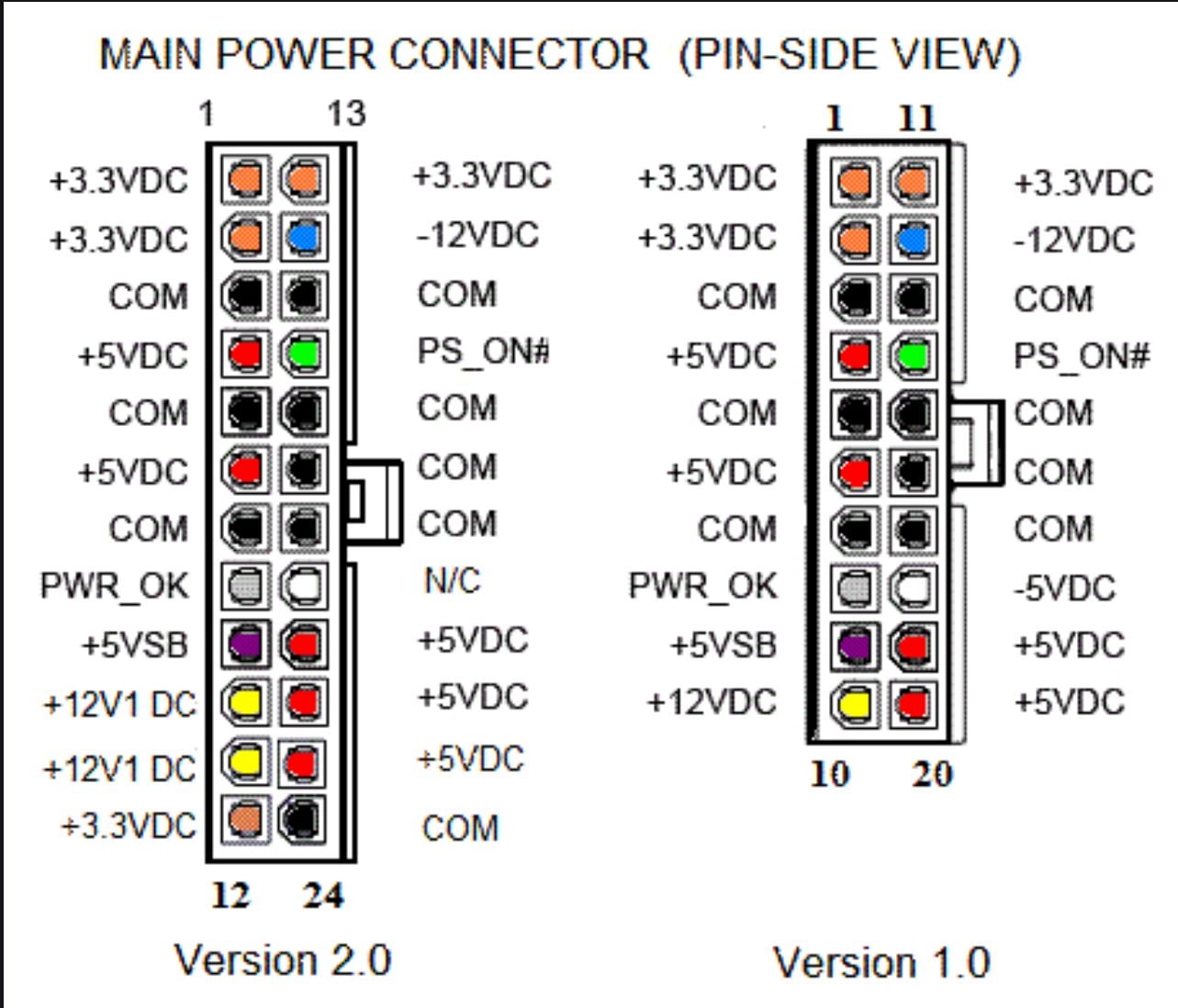
That is a pretty low level hardware fault and sounds like the power supply is not sensing the power switch.


If you remove the 20 or 24 pin power connector from the mother board and jumper the green wire pin to a black wire pin...


Does the power supply and fan start up?


Gordy


My first ever AM radio network connection was with a 1MHz AM crystal(OA91) radio receiver.


Shop now on AliExpress (affiliate link).
QuackPipe

57 posts

Master Geek
+1 received by user: 10


  #2471636 26-Apr-2020 15:49
Send private message

Yes fans spun up as normal.


Bear attack tip #6


If attacked by a bear, play dead....


It will be good practice for when you die a couple minutes later.

richms
29098 posts

Uber Geek
+1 received by user: 10208

Trusted
Lifetime subscriber

  #2471637 26-Apr-2020 15:52
Send private message

I have had crazy non powerup things with a USB device backfeeding into the motherboard. Does unplugging USB stuff make it come back?


Richard rich.ms

QuackPipe

57 posts

Master Geek
+1 received by user: 10


  #2471640 26-Apr-2020 15:56
Send private message

At first I thought that may be the cause too as I actually got a post when I unplugged all non essential USB devices, but all I have plugged in is Keyboard, mouse and Bluetooth dongle for wireless headphones and problem still persists.


Bear attack tip #6


If attacked by a bear, play dead....


It will be good practice for when you die a couple minutes later.

Gordy7
gordy7
2001 posts

Uber Geek
+1 received by user: 505

ID Verified
Lifetime subscriber

  #2471648 26-Apr-2020 16:13
Send private message

So the problem seems to be somewhere on the MB between the front panel switch connection and the PSU startup pins.


You have upgraded the BIOS and restored to factory defaults....


Does the MB look clean and tidy. No sign of swollen capacitors or MB corrosion?


How old is the MB? There is some mention on the web of faulty capacitors causing startup problems.


Has the MB ever been subject to dampness or water?


Any diags in the BIOS to test power startup?


Does the PC restart ok.


Gordy


My first ever AM radio network connection was with a 1MHz AM crystal(OA91) radio receiver.


 1 | 2 | 3
View this topic in a long page with up to 500 replies per page Create new topic


Geekzone Live »

Try automatic live updates from Geekzone directly in your browser, without refreshing the page, with Geekzone Live now.


Are you subscribed to our RSS feed? You can download the latest headlines and summaries from our stories directly to your computer or smartphone by using a feed reader.