Geekzone: technology news, blogs, forums
Guest
Welcome Guest.
You haven't logged in yet. If you don't have an account you can register now.


caffynz

320 posts

Ultimate Geek
+1 received by user: 140

ID Verified
Subscriber

#270234 29-Apr-2020 18:46
Send private message

I have a Logitech HD Webcam C525, that is flipped horizontally (e.g. my right hand raised appears as my left hand on screen; or if I write a note on paper, it's backwards).


I have the Logitech Camera Settings software, it does not have a flip/mirror option. Nor does the Camera app.


This is occurring when I use the native Camera app on my desktop - Windows 10.


This is also occurring in Zoom (despite me fiddling with the mirror settings - this only changes MY view of my camera) and in Facebook Messenger and Skype too. 


Any ideas how to fix this?


Thanks


Create new topic
Jase2985
13754 posts

Uber Geek
+1 received by user: 6236

ID Verified
Lifetime subscriber

  #2473634 29-Apr-2020 20:01
Send private message

that's normal isn't it?


both my laptop and cellphone do this


the cellphone can turn the image around when you take a photo but it does this in post processing


caffynz

320 posts

Ultimate Geek
+1 received by user: 140

ID Verified
Subscriber

  #2473637 29-Apr-2020 20:26
Send private message

I don't think it is normal. For example, I see everyone in the Zoom conversation appearing the right way, and it is just me that is appearing the wrong way around (I appear the right way to myself). I have fiddled with my Zoom settings, and I can switch my video between mirrored and normal - but this is only changing MY view of my video, not theirs. They've taken photos of me and shown this to me and I am indeed appearing the wrong way around.


You're right the cellphone camera shows a mirror when it is on, but once the photo/video is taken, it switches to normal. This is not happening with the native Camera app. 


caffynz

320 posts

Ultimate Geek
+1 received by user: 140

ID Verified
Subscriber

  #2473640 29-Apr-2020 20:30
Send private message

Apsattv:


Have you put the driver on it?


https://forums.whatthetech.com/uploads/monthly_10_2018/post-18272-0-17352500-1540429006.png


https://support.logi.com/hc/en-nz/articles/360023408093


According to Device Manager, I have the best drivers already installed. I don't have that software that appears in the photo.
I'll look on Logitech website


caffynz

320 posts

Ultimate Geek
+1 received by user: 140

ID Verified
Subscriber

  #2473689 29-Apr-2020 21:48
Send private message

Well that was interesting.


Logitech website - for the C525 webcam the software I downloaded was Logitech Camera Settings, which is what I already had on my computer. No mirror/normal option in that (even in advanced settings), as I said before.


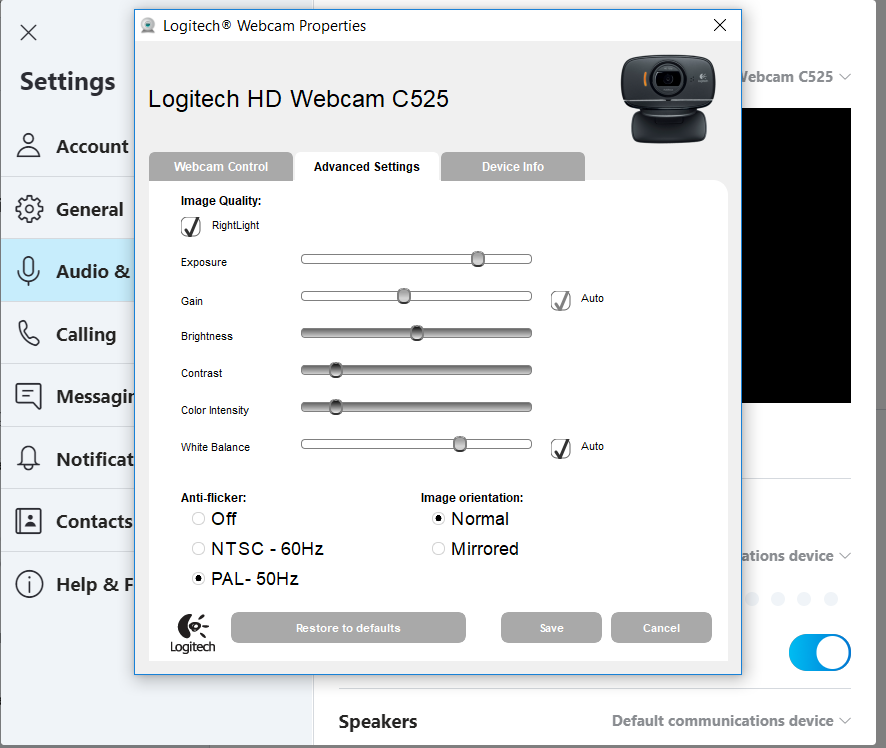
I searched my computer for "Logitech Webcam Properties" (the software in the image linked by Apsattv) - nothing. 


Then I noticed that the image was Skype. So went into Skype, clicked on webcam settings, and Logitech Webcam Properties came up, and sure enough, the image orientation was set to mirrored! So have chosen Normal, and now my webcam is back to normal! Have done a few test calls that confirms this. Taken a photo with Camera app - it appears correctly now.

Strange I can't access Logitech Webcam Properties any other way; and strange that the newer software does not have image orientation as an option. 


Anyway - the issue is now resolved :)


Create new topic


Geekzone Live »

Try automatic live updates from Geekzone directly in your browser, without refreshing the page, with Geekzone Live now.


Are you subscribed to our RSS feed? You can download the latest headlines and summaries from our stories directly to your computer or smartphone by using a feed reader.