Geekzone: technology news, blogs, forums
Guest
Welcome Guest.
You haven't logged in yet. If you don't have an account you can register now.


Savageone

44 posts

Geek


#271835 28-May-2020 17:41
Send private message

The motherboard specifies it supports m.2 and I am looking at getting one. The problem I'm having is knowing what's compatible with this motherboard since it's fairly old now and I have no idea what I'm looking at when it comes to m.2. So any suggestions or advice would be greatly appreciated.



https://www.asus.com/Motherboards/Z97K/specifications/


Create new topic
sqishy
530 posts

Ultimate Geek
+1 received by user: 193


  #2493836 28-May-2020 18:10
Send private message

Its the type 2260/2280 code you need to look for when buying


Jase2985
13730 posts

Uber Geek
+1 received by user: 6202

ID Verified
Lifetime subscriber

  #2493854 28-May-2020 18:55
Send private message

M.2 Socket 3, with M Key, type 2260/2280 storage devices support


https://www.crucial.com/compatible-upgrade-for/asus/z97-k#ssd


example of whats out there and works


concordnz
492 posts

Ultimate Geek
+1 received by user: 277

Trusted
EMT (R)

  #2493871 28-May-2020 19:19
Send private message

This might help you more.....

That motherboard can take either
a SATA M.2 drive
Or a NMVE M.2 drive.

If you are running Win 7 - get a SATA M.2 drive
(Max speed 550MB/s]
(unless you are technically savvy - & happy to waste hours slipstreaming drivers into a win7 install.)

If you are running Win10 - Get NMVE M.2
(Max speed up to 3500MB/s = up to 7 x faster)
& these are now cheaper than the SATA M.2's

Note - Changing to an M2 drive - will require a clean install - backup your data.....


concordnz
492 posts

Ultimate Geek
+1 received by user: 277

Trusted
EMT (R)

  #2493874 28-May-2020 19:26
Send private message

512GB SSD's are best 'bang for buck' sweet spot at the moment.
And pricing is going up as we speak

Going smaller will reduce speed/performance.
(Just trust me - it's complicated - )
.....SSD'S write to multiple chips at once - when you go to a small drive - you have less chips so you have less 'channels' to write through at the same time = less read/write speed.

Savageone

44 posts

Geek


  #2493891 28-May-2020 20:13
Send private message

Awesome. I'm running Win 10 so I guess I'll look out for a NVME M.2. Any specific brands more reliable than others or are all pretty much the same in reliability? I see a lot of people love Samsung 900 series


richms
29098 posts

Uber Geek
+1 received by user: 10208

Trusted
Lifetime subscriber

  #2493926 28-May-2020 21:39
Send private message

Search out that you dont get a dram-less one. The dram makes them work fast, the ones without it become crap after some time. In the case of the kingspec ones I got for the junker computers, they got so slow that the OS would give up on them. NVMe doesnt have the absurdly long timeouts that sata drives do so even when slightly laggy, errors will happen.


There was a 3rd type of drive that was common for a bit but seems all but gone now - AHCI - it looked like a sata controller to the computer but performed somewhat faster. NVMe has rightly made it totally redundant but there were a few around when I was looking for sale just selling as PCIe drives.


Richard rich.ms


Shop now at Mighty Ape (affiliate link).
concordnz
492 posts

Ultimate Geek
+1 received by user: 277

Trusted
EMT (R)

  #2493937 28-May-2020 22:16
Send private message

WD (Western Digital), Samsung, Adata, Gigabyte, are all good.
Intel was ok - but they have exited Consumer SSD's to focusing on Enterprise customers who don't care about price.

Savageone

44 posts

Geek


  #2493941 28-May-2020 22:28
Send private message

Sweet cheers guys. I'll probably pick up one of these in couple weeks n do a clean install of windows (been too long). Possibly even the 1TB version


https://www.pbtech.co.nz/product/HDDSAM971501/Samsung-970-EVO-Plus-500GB-M2-2280NVMe-SSD-RWMax-3?qr=product_option


michaelmurfy
meow
13579 posts

Uber Geek
+1 received by user: 10910

Moderator
ID Verified
Trusted
Lifetime subscriber

  #2493945 28-May-2020 22:37
Send private message

Instead of the Samsung - save a little bit of money and pick up the AData:


https://www.pbtech.co.nz/product/HDDADA82020/ADATA-SX8200-Pro-512GB-M2-NVMe-SSD-ultra-fast-PCIe


This is what I personally run in my build and they're quick, and cheaper.


Michael Murphy | https://murfy.nz
Referral Links: Quic Broadband (use R122101E7CV7Q for free setup)

Are you happy with what you get from Geekzone? Please consider supporting us by subscribing.
Opinions are my own and not the views of my employer.


Jase2985
13730 posts

Uber Geek
+1 received by user: 6202

ID Verified
Lifetime subscriber

  #2494017 29-May-2020 06:28
Send private message

i have the 1tb version of that and its been fine. I picked it because it revied really well and was cheaper than the samsung


Savageone

44 posts

Geek


  #2494284 29-May-2020 11:51
Send private message

Nice that seems perfect for this old computer. Thanks so much everyone 👍


Support Geekzone with one-off or recurring donations Donate via PressPatron.
concordnz
492 posts

Ultimate Geek
+1 received by user: 277

Trusted
EMT (R)

  #2497222 3-Jun-2020 09:38
Send private message

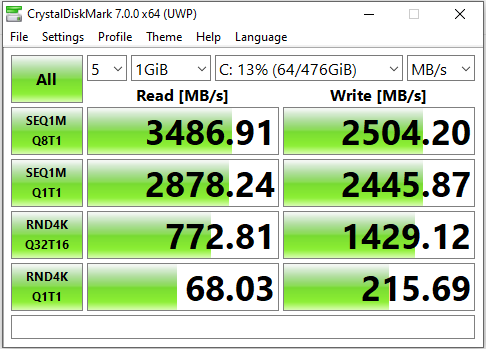
Three outta three!, on the Adata SX8200 Pro,

I also run that drive in my main PC, - only the 512 version, as I couldnt afford the 1TB at the time,


Create new topic


Geekzone Live »

Try automatic live updates from Geekzone directly in your browser, without refreshing the page, with Geekzone Live now.


Are you subscribed to our RSS feed? You can download the latest headlines and summaries from our stories directly to your computer or smartphone by using a feed reader.