Geekzone: technology news, blogs, forums
Guest
Welcome Guest.
You haven't logged in yet. If you don't have an account you can register now.


ANglEAUT

altered-ego
2436 posts

Uber Geek
+1 received by user: 842

Trusted
Lifetime subscriber

#273289 14-Aug-2020 20:59
Send private message

How do I troubleshoot this display issue? I wouldn't even know what to search for.


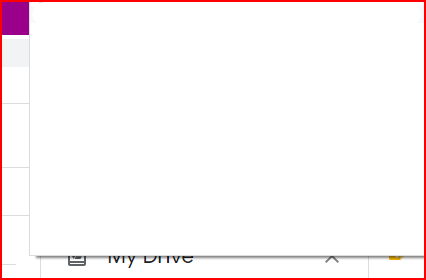
With the window maximised, the Google Chrome menu is blank & higher up than it is supposed to be.


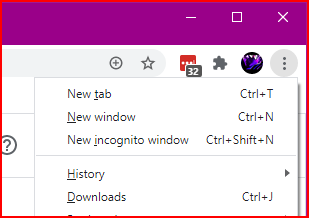
With the window not maximised, the menu displays correctly.


Somebody else had a similar issue. Maximised, all the tabs & the book marks bar had a gigantic white strip displayed instead. Restore the window & you could see all tabs & the bookmarks bar.


Clicking the white area results in no action performed. That means if I tried to click a certain area because I knew what button / tab was supposed to be in that position, nothing happened.




Please keep this GZ community vibrant by contributing in a constructive & respectful manner.


Filter this topic showing only the reply marked as answer Create new topic
Oblivian
7345 posts

Uber Geek
+1 received by user: 2117

ID Verified

  #2541354 14-Aug-2020 21:22
Send private message


freitasm
BDFL - Memuneh
80652 posts

Uber Geek
+1 received by user: 41045

Administrator
ID Verified
Trusted
Geekzone
Lifetime subscriber

  #2541355 14-Aug-2020 21:24
Send private message

Is this on the main screen or on a secondary display? I had weird things with Chrome on secondary display for years.


Referral links: Quic Broadband (free setup code: R587125ERQ6VE) | Samsung | AliExpress | Wise | Sharesies 


Support Geekzone by subscribing (browse ads-free), or making a one-off or recurring donation through PressPatron.


michaelmurfy
meow
13580 posts

Uber Geek
+1 received by user: 10910

Moderator
ID Verified
Trusted
Lifetime subscriber

  #2541358 14-Aug-2020 21:33
Send private message

Also I know this doesn't answer your question but consider using Firefox. I found it far better than Chrome in many regards.


Michael Murphy | https://murfy.nz
Referral Links: Quic Broadband (use R122101E7CV7Q for free setup)

Are you happy with what you get from Geekzone? Please consider supporting us by subscribing.
Opinions are my own and not the views of my employer.


ANglEAUT

altered-ego
2436 posts

Uber Geek
+1 received by user: 842

Trusted
Lifetime subscriber

  #2543367 18-Aug-2020 08:10
Send private message

michaelmurfy:


Also I know this doesn't answer your question but consider using Firefox. ...


Firefox at home, Chrome at work. C'est la vie


Please keep this GZ community vibrant by contributing in a constructive & respectful manner.


ANglEAUT

altered-ego
2436 posts

Uber Geek
+1 received by user: 842

Trusted
Lifetime subscriber

  #2543368 18-Aug-2020 08:12
Send private message

freitasm:


Is this on the main screen or on a secondary display? I had weird things with Chrome on secondary display for years.


External monitor to laptop set as primary.


Please keep this GZ community vibrant by contributing in a constructive & respectful manner.


ANglEAUT

altered-ego
2436 posts

Uber Geek
+1 received by user: 842

Trusted
Lifetime subscriber

  #2543369 18-Aug-2020 08:13
Send private message

Oblivian:


Appears not alone. 2 screens with different DPI sizing?


https://support.google.com/chrome/thread/48361981?hl=en


https://support.google.com/chrome/thread/49617169?hl=en


Thanks, I'll check these out. Monitors have different scaling, but would have to check on the DPI.


Please keep this GZ community vibrant by contributing in a constructive & respectful manner.


Shop now at Mighty Ape (affiliate link).
richms
29099 posts

Uber Geek
+1 received by user: 10210

Trusted
Lifetime subscriber

  #2543392 18-Aug-2020 08:47
Send private message

Try killing off all chrome processes including the tray icon thing and relaunching it with just one screen and see if it works better. Had something similar on my shed PC last night, its internal screen is 150% and the TV on it is 100% and it wouldnt work on the TV properly till I ended it and restarted it. Windows update rebooted the PC when I went out to use it was not logged in like normal.


Richard rich.ms

freitasm
BDFL - Memuneh
80652 posts

Uber Geek
+1 received by user: 41045

Administrator
ID Verified
Trusted
Geekzone
Lifetime subscriber

  #2543409 18-Aug-2020 09:08
Send private message

ANglEAUT:


freitasm:


Is this on the main screen or on a secondary display? I had weird things with Chrome on secondary display for years.


External monitor to laptop set as primary.


Yes, Chrome doesn't like these things...


Referral links: Quic Broadband (free setup code: R587125ERQ6VE) | Samsung | AliExpress | Wise | Sharesies 


Support Geekzone by subscribing (browse ads-free), or making a one-off or recurring donation through PressPatron.


Gordy7
gordy7
2001 posts

Uber Geek
+1 received by user: 505

ID Verified
Lifetime subscriber

  #2543416 18-Aug-2020 09:16
Send private message

So, how does Chrome behave using only your laptop display?


Gordy


My first ever AM radio network connection was with a 1MHz AM crystal(OA91) radio receiver.


Technofreak
6657 posts

Uber Geek
+1 received by user: 3477

Trusted

  #2543422 18-Aug-2020 09:37
Send private message

ANglEAUT:


michaelmurfy:


Also I know this doesn't answer your question but consider using Firefox. ...


Firefox at home, Chrome at work. C'est la vie


I use Opera at home, a corporate computer I use has Chrome installed by default, but I am able to load Opera and I run that. Perhaps you might be able to do the same with Firefox or another browser?


Sony Xperia XA2 running Sailfish OS. https://sailfishos.org The true independent open source mobile OS 
Samsung Galaxy Tab S6
Dell Inspiron 14z i5


ANglEAUT

altered-ego
2436 posts

Uber Geek
+1 received by user: 842

Trusted
Lifetime subscriber

  #2544086 18-Aug-2020 23:45
Send private message

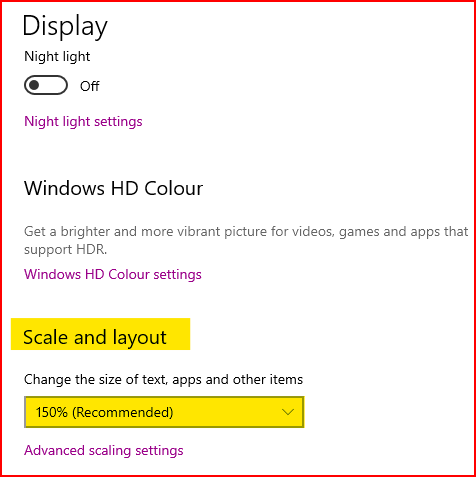
Changing the scaling of your monitor seems to do the trick. You will have to find a scaling that works on your machine. Some report success at 100%, others at 125% & one even at 101%.


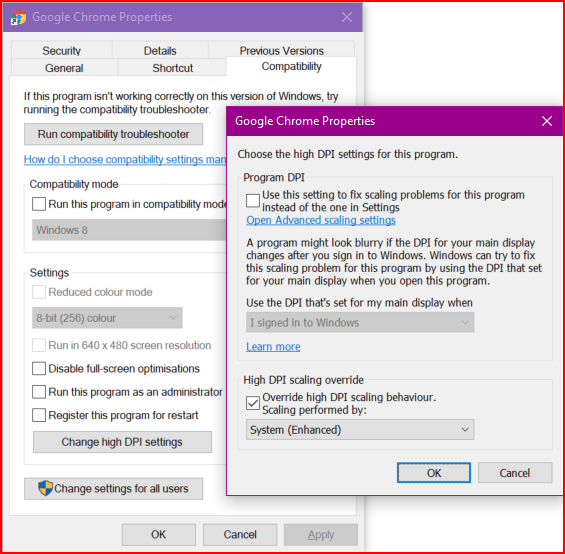
As per Celeste B in this thread, setting the DPI settings under "Compatibility Mode" also resolves the issue.


Please keep this GZ community vibrant by contributing in a constructive & respectful manner.


Filter this topic showing only the reply marked as answer Create new topic


Geekzone Live »

Try automatic live updates from Geekzone directly in your browser, without refreshing the page, with Geekzone Live now.


Are you subscribed to our RSS feed? You can download the latest headlines and summaries from our stories directly to your computer or smartphone by using a feed reader.