Geekzone: technology news, blogs, forums
Guest
Welcome Guest.
You haven't logged in yet. If you don't have an account you can register now.


shapes

237 posts

Master Geek
+1 received by user: 18
Inactive user


#274516 26-Aug-2020 15:06
Send private message


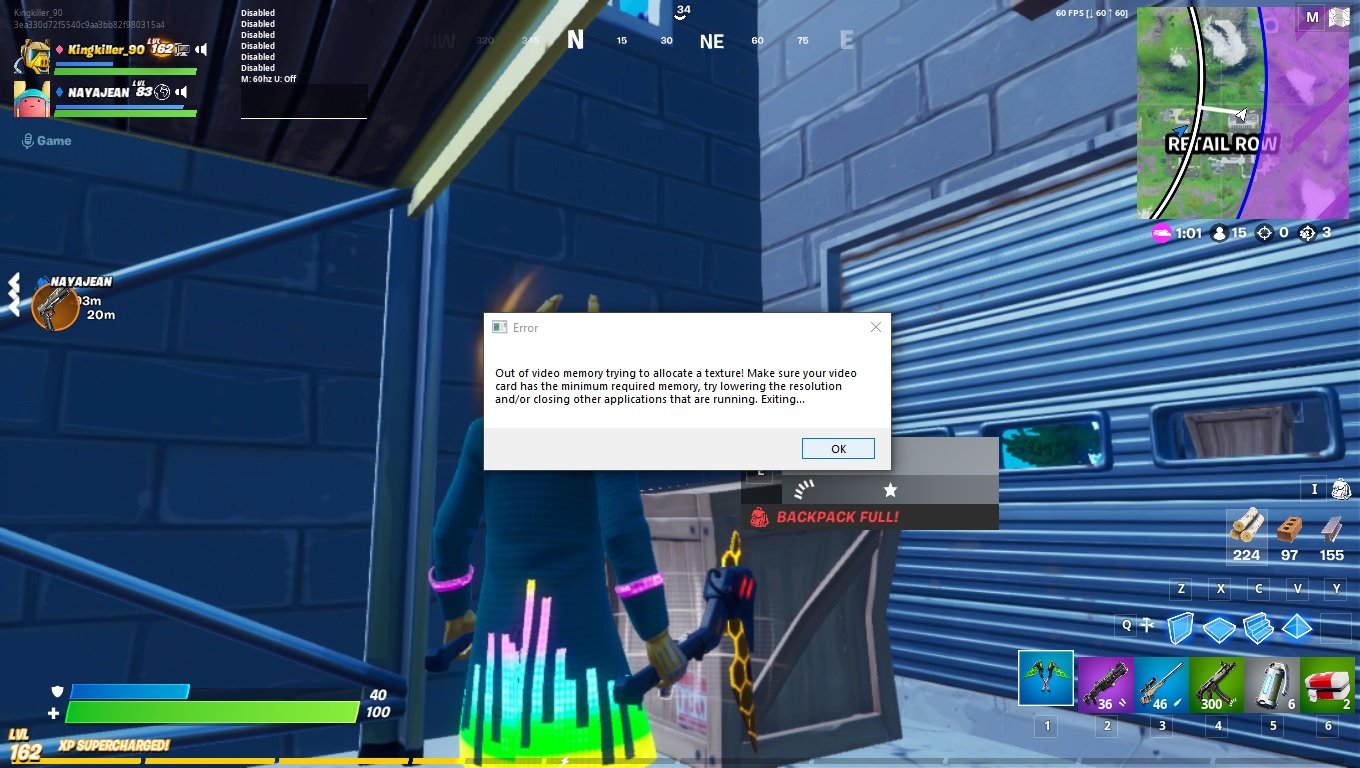
im getting this message on almost all games i play after a while now my pc is running ryzen 2400g vega 11 1x8gb ram 
ever since Monday ive been getting freezing in games or games will run fine then crash giving me this error shown in the photo
i have never ever had this problem before running any of the games i play and i play fortnite every day even putting everything low and 3d rendering scale on lowest i still have this problem


i have never changed anything any setting or installed any new programs or updated drivers or changed anything in the bios ect
i have no other programs running when playing games

i do want to upgrade the ram but first i want to make sure its a ram problem but i don't think it is as i ran a memtest twice and ram is fine 


its odd that im just now getting this problem anybody know what may cause it


View this topic in a long page with up to 500 replies per page Create new topic
 1 | 2

xpd

xpd
Geek of Coastguard
14193 posts

Uber Geek
+1 received by user: 4659

Retired Mod
ID Verified
Trusted
Lifetime subscriber

  #2550055 26-Aug-2020 15:08
Send private message

Highly recommend minimum 16GB for any PC these days, especially gaming. Moreso when using onboard video.


Ensure you're running latest BIOS and video/board drivers.


Also look at getting dedicated video card....


XPD / Gavin


LinkTree


shapes

237 posts

Master Geek
+1 received by user: 18
Inactive user


  #2550058 26-Aug-2020 15:14
Send private message

xpd:


Highly recommend minimum 16GB for any PC these days, especially gaming. Moreso when using onboard video.


Ensure you're running latest BIOS and video/board drivers.


Also look at getting dedicated video card....


yes i will check for a bios update

but its odd i never changed anything and now get this problem


michaelmurfy
meow
13664 posts

Uber Geek
+1 received by user: 11069

Moderator
ID Verified
Trusted
Lifetime subscriber

  #2550118 26-Aug-2020 16:03
Send private message

Since you're running a Ryzen you really need 2 matching sticks of DDR4 ram to make the most of the on-board video.


Take note of the slots too - there are 2 pairs and they normally go Slot 1, 3, 2, 4 where "1 + 2" are the slots you should be using for dual channel mode. This can increase graphics performance on average by 40% on Ryzen APU's.


Michael Murphy | https://murfy.nz
Referral Links: Quic Broadband (use R122101E7CV7Q for free setup)

Are you happy with what you get from Geekzone? Please consider supporting us by subscribing.
Opinions are my own and not the views of my employer.


Jase2985
13772 posts

Uber Geek
+1 received by user: 6254

ID Verified
Lifetime subscriber

  #2550138 26-Aug-2020 16:45
Send private message

can you allocate more memory to it in the bios?


yitz
2277 posts

Uber Geek
+1 received by user: 608


  #2550141 26-Aug-2020 16:50
Send private message

It could also mean you are low on free disk space to page stuff out into virtual memory.


See Task Manager > Performance tab > Memory > Committed
You may be hitting the commit limit which cannot expand due to lack of free disk space.


richms
29251 posts

Uber Geek
+1 received by user: 10359

Trusted
Lifetime subscriber

  #2550234 26-Aug-2020 18:53
Send private message

Lower quality in games, The auto detect stuff doesnt really seem to grasp the idea of shared memory and will assume that you have 8 gigs sytem plus whatever it shows as video memory. You will have to turn it all the way down with only 8 gigs in it. Really need 32 with onboard ryzen graphics.


Richard rich.ms


Shop now on Samsung phones, tablets, TVs and more (affiliate link).
shapes

237 posts

Master Geek
+1 received by user: 18
Inactive user


  #2550255 26-Aug-2020 19:06
Send private message

yitz:


It could also mean you are low on free disk space to page stuff out into virtual memory.


See Task Manager > Performance tab > Memory > Committed
You may be hitting the commit limit which cannot expand due to lack of free disk space.


i have 49gb left on my ssd and my hdd has 755gb left

also just now i played fornite for over 2 and a half hours and then it crash again :(


shapes

237 posts

Master Geek
+1 received by user: 18
Inactive user


  #2550286 26-Aug-2020 19:08
Send private message

richms:


Lower quality in games, The auto detect stuff doesnt really seem to grasp the idea of shared memory and will assume that you have 8 gigs sytem plus whatever it shows as video memory. You will have to turn it all the way down with only 8 gigs in it. Really need 32 with onboard ryzen graphics.


no matter what setting i choose i still get this problem


Froglotion
208 posts

Master Geek
+1 received by user: 78


  #2550289 26-Aug-2020 19:13
Send private message

Another stick of memory will also boost your framerate quite a lot. Worth the investment IMO.


xpd

xpd
Geek of Coastguard
14193 posts

Uber Geek
+1 received by user: 4659

Retired Mod
ID Verified
Trusted
Lifetime subscriber

  #2550320 26-Aug-2020 20:22
Send private message

It could also be caused by an update in the game, that's addressing something your Vega gfx isn't handling very well.


XPD / Gavin


LinkTree


MadEngineer
4639 posts

Uber Geek
+1 received by user: 2617

Trusted

  #2550380 26-Aug-2020 21:38
Send private message

System restore to before Monday.


You're not on Atlantis anymore, Duncan Idaho.


Shop now for Lenovo laptops and other devices (affiliate link).
ToPGuNZ
Topgunz
401 posts

Ultimate Geek
+1 received by user: 147

Lifetime subscriber

  #2550566 27-Aug-2020 11:02
Send private message

I have also been having similar issues. I am running i7-6700 and GTX 1060. I do a small amount of gaming.


First it was memory error when using PC generally so I upgraded ram to 16gb. Seemed fine but then when playing a game, Torchlight 3, I got video memory error similar to yours. I was planning on putting the PC in for service after lock down, in the mean time I thought I should check window updates and found a .net Framework and a Windows 10 update that were there so I updated the PC. I have had no issues since then, no idea if doing the updates is the reason.


Good point by xpd that a game update could be the issue, Torchlight is early access and doing lots of updates.


Just having a test now and I notice GPU was hitting 100%, memory sitting at 8-9gb, no error encountered. Running spotify, lots of browser tabs, citrix and the game Torchlight.


Keen to see how you progress and will let you know if it occurs again for me. 


shapes

237 posts

Master Geek
+1 received by user: 18
Inactive user


  #2550753 27-Aug-2020 15:34
Send private message

ToPGuNZ:


I have also been having similar issues. I am running i7-6700 and GTX 1060. I do a small amount of gaming.


First it was memory error when using PC generally so I upgraded ram to 16gb. Seemed fine but then when playing a game, Torchlight 3, I got video memory error similar to yours. I was planning on putting the PC in for service after lock down, in the mean time I thought I should check window updates and found a .net Framework and a Windows 10 update that were there so I updated the PC. I have had no issues since then, no idea if doing the updates is the reason.


Good point by xpd that a game update could be the issue, Torchlight is early access and doing lots of updates.


Just having a test now and I notice GPU was hitting 100%, memory sitting at 8-9gb, no error encountered. Running spotify, lots of browser tabs, citrix and the game Torchlight.


Keen to see how you progress and will let you know if it occurs again for me. 


thanks i just checked and there is an update i will update windows and see if it fixes this problem


ratsun81
517 posts

Ultimate Geek
+1 received by user: 183


  #2551915 29-Aug-2020 13:24
Send private message

Several things here, 


Run hwinfo in sensor mode to keep an eye on memory allocation when gaming. Make sure you dont have something simple like overheating. 


As already said you absolutely should get a proper 16GB memory kit installed with good XMP profiles that matches your motherboards QVL. It will give you a nice performance bump. Ryzen loves higher speed RAM and dual channel is a must have. 


Update the BIOS on Ryzen systems as there are regular fixes to issues that can come up. 


Update drivers, with game updates you should update your video drivers as these also come with performance updates and you can imagine that memory allocation changes can be included in these. 


Quic Broadband


Use R212389ELFLL2 promo code for free setup at checkout.


Apsattv
2467 posts

Uber Geek
+1 received by user: 731


  #2552198 30-Aug-2020 03:26
Send private message
 1 | 2
View this topic in a long page with up to 500 replies per page Create new topic


Geekzone Live »

Try automatic live updates from Geekzone directly in your browser, without refreshing the page, with Geekzone Live now.


Are you subscribed to our RSS feed? You can download the latest headlines and summaries from our stories directly to your computer or smartphone by using a feed reader.
