Geekzone: technology news, blogs, forums
Guest
Welcome Guest.
You haven't logged in yet. If you don't have an account you can register now.


gehenna

8667 posts

Uber Geek
+1 received by user: 3883

Moderator
Trusted
Lifetime subscriber

#277240 2-Oct-2020 23:47
Send private message

Hi folks. It's been a while since I have built a PC that isn't a server. I've done just that and have run into some problems so wanted to get some advice from the team here.

I have a ROG Strix B550i motherboard and a Ryzen 7 3700x CPU with no integrated graphics. I've also got an MSI RTX 2080 Ti and 32GB memory and a 1TB Samsung Evo M.2 SSD. This is sitting in an NZXT case with a 650W NZXT PSU.

The problem is that I'm getting no picture when I boot. The motherboard has a sequence of LEDs that flash as it boots. So it goes from amber to red to white and that's where it stops. From what I'm reading white is a VGA error. It should get past that to green which means it's booting to POST.

I'm not sure what the issue is at this point. It could be incompatible memory (G.Skill F4-3200 2x 16GB Unbuffered Non-ECC) as that's not specifically mentioned as compatible in the motherboard manual, but the type is supposed to be fully supported. I've never really had a problem with memory. It seems to prefer 3600 but I've always known memory to step down if it needs to.

That said, would that cause a VGA issue? Could it be that is not recognising the 2080 Ti and I need to enable something in the BIOS to pick it up? That seems annoying since there's no integrated graphics on the processor. I would have expected the PCI graphics to at least show an image even if the drivers aren't installed to an OS yet.

Speaking of which I haven't been able to even install Windows yet because of this. So I'm kinda dead until I figure it out. All the components are getting power. The fans spin on the case and AIO. The light is stable on the GPU and the front panel of the case.

Any advice?


View this topic in a long page with up to 500 replies per page Create new topic
 1 | 2 | 3
CYaBro
4708 posts

Uber Geek
+1 received by user: 1182

ID Verified
Trusted

  #2578377 2-Oct-2020 23:51
Send private message

Got the pcie power cable connected to the graphics card?

Next thing would be to remove it all from the case and try it on the bench to make sure nothing was shorting.


Opinions are my own and not the views of my employer.


gehenna

8667 posts

Uber Geek
+1 received by user: 3883

Moderator
Trusted
Lifetime subscriber

  #2578380 2-Oct-2020 23:54
Send private message

Yip pci-e power is connected, 2x 4 plug from memory. The GPU RGB is stable and fans are spinning. I've had it in two separate cases so far. The motherboard has mounting pins underneath so it's not directly screwed to the case either. The PC behaved the same when the GPU wasn't installed at all. I just figured that was the fact there's no integrated graphics at that point.

richms
29097 posts

Uber Geek
+1 received by user: 10205

Trusted
Lifetime subscriber

  #2578381 2-Oct-2020 23:55
Send private message

Try another slot for the GPU, and if that works update the bioses on both of them.


Richard rich.ms


gehenna

8667 posts

Uber Geek
+1 received by user: 3883

Moderator
Trusted
Lifetime subscriber

  #2578395 2-Oct-2020 23:57
Send private message

There's only one slot

JaseNZ
2576 posts

Uber Geek
+1 received by user: 1489

ID Verified
Lifetime subscriber

  #2578396 2-Oct-2020 23:57
Send private message

From memory under tool in the bios there is a gpu option where you can see gpu settings, If there is an error with the graphics card I am assuming it would not show up or show an error there.


Ding Ding Ding Ding Ding : Ice cream man , Ice cream man


gehenna

8667 posts

Uber Geek
+1 received by user: 3883

Moderator
Trusted
Lifetime subscriber

  #2578411 3-Oct-2020 00:01
Send private message

I can't get a picture to go into the bios. That's the issue.


Want to support Geekzone and browse the site without the ads? Subscribe to Geekzone now (monthly, annual and lifetime options).
JaseNZ
2576 posts

Uber Geek
+1 received by user: 1489

ID Verified
Lifetime subscriber

  #2578412 3-Oct-2020 00:03
Send private message

gehenna: I can't get a picture to go into the bios. That's the issue.


Sorry mate, late night dumb ass reply DOH. 


Ding Ding Ding Ding Ding : Ice cream man , Ice cream man


JaseNZ
2576 posts

Uber Geek
+1 received by user: 1489

ID Verified
Lifetime subscriber

  #2578414 3-Oct-2020 00:07
Send private message

gehenna: Yip pci-e power is connected, 2x 4 plug from memory. The GPU RGB is stable and fans are spinning. I've had it in two separate cases so far. The motherboard has mounting pins underneath so it's not directly screwed to the case either. The PC behaved the same when the GPU wasn't installed at all. I just figured that was the fact there's no integrated graphics at that point.


MB should poll the pci's slots and change if required if there as a gpu and auto output display to the card.


If the gpu led is staying lit then must be the card. No other card you can try in there ??


Ding Ding Ding Ding Ding : Ice cream man , Ice cream man


JaseNZ
2576 posts

Uber Geek
+1 received by user: 1489

ID Verified
Lifetime subscriber

  #2578415 3-Oct-2020 00:19
Send private message

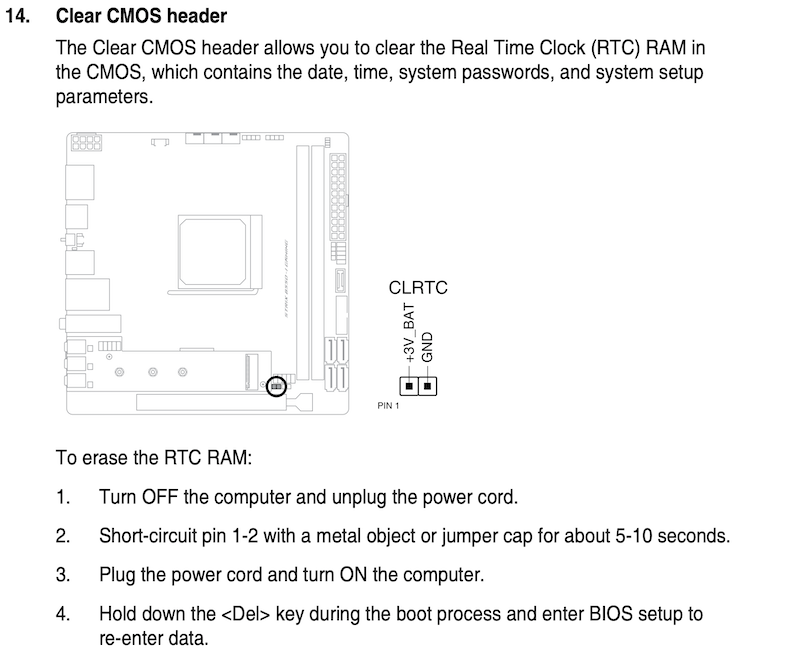
The other thing you could try is clearing the bios. This is out of the manual for that motherboard.


Ding Ding Ding Ding Ding : Ice cream man , Ice cream man


gehenna

8667 posts

Uber Geek
+1 received by user: 3883

Moderator
Trusted
Lifetime subscriber

  #2578417 3-Oct-2020 00:25
Send private message

Thanks. Seems I was wrong about the GPU fans. The lights are on but fans aren't spinning so I connected the third block of power and when I turn it on now I get stuck on the amber light which is DRAM, so indicating a memory issue now. The GPU fans spin now. Also before if I pressed the power button it would instantly turn off or on. Now I have to hold it for 5 seconds to turn off. Seems like progress to some extent.

I'm doubtful the graphics card is at issue. It's brand new. I guess I could try it on my server tomorrow.

bigalow
568 posts

Ultimate Geek
+1 received by user: 112


  #2578418 3-Oct-2020 00:25
Send private message

 a few thinks to ask


is the GPU in the socket right some times you have to push hard


is the monitor plugged in tho the GPU card and NOT where the IO is (where mouse keyboard USB etc are) 


i have people have the same problem and its always one of these


Move to New Zealand's best fibre broadband service (affiliate link). Free setup code: R587125ERQ6VE. Note that to use Quic Broadband you must be comfortable with configuring your own router.
gehenna

8667 posts

Uber Geek
+1 received by user: 3883

Moderator
Trusted
Lifetime subscriber

  #2578420 3-Oct-2020 00:29
Send private message

Yes and No to those questions. I've tried DP and HDMI ports on the card itself, and it's seated firmly.

gehenna

8667 posts

Uber Geek
+1 received by user: 3883

Moderator
Trusted
Lifetime subscriber

  #2578425 3-Oct-2020 00:36
Send private message

I'm thinking I might have power connected incorrectly based on the change of behaviour. I'll review that tomorrow. Thanks for the contributions so far.

JaseNZ
2576 posts

Uber Geek
+1 received by user: 1489

ID Verified
Lifetime subscriber

  #2578427 3-Oct-2020 00:55
Send private message

Happy to help : Hick 🍻


Ding Ding Ding Ding Ding : Ice cream man , Ice cream man


Handle9
11922 posts

Uber Geek
+1 received by user: 9674

Trusted
Lifetime subscriber

  #2578431 3-Oct-2020 05:02
Send private message

Start with reseating all the power cables then go to ram and gpu (in that order). Try one stick of ram in every socket before moving on.

It sounds like something not plugged in or seated right.

I did a new build/rebuild last week and forgot to plug in the cpu power. All the fans were spinning but of course no post. It happens to all of us.

 1 | 2 | 3
View this topic in a long page with up to 500 replies per page Create new topic


Geekzone Live »

Try automatic live updates from Geekzone directly in your browser, without refreshing the page, with Geekzone Live now.


Are you subscribed to our RSS feed? You can download the latest headlines and summaries from our stories directly to your computer or smartphone by using a feed reader.