Geekzone: technology news, blogs, forums
Guest
Welcome Guest.
You haven't logged in yet. If you don't have an account you can register now.


borgia

101 posts

Master Geek
+1 received by user: 5


#280861 15-Jan-2021 19:25
Send private message

I hope it is reasonable to post here, but Im kinda stumped and I figure there are some water-cooling lurkers out there.


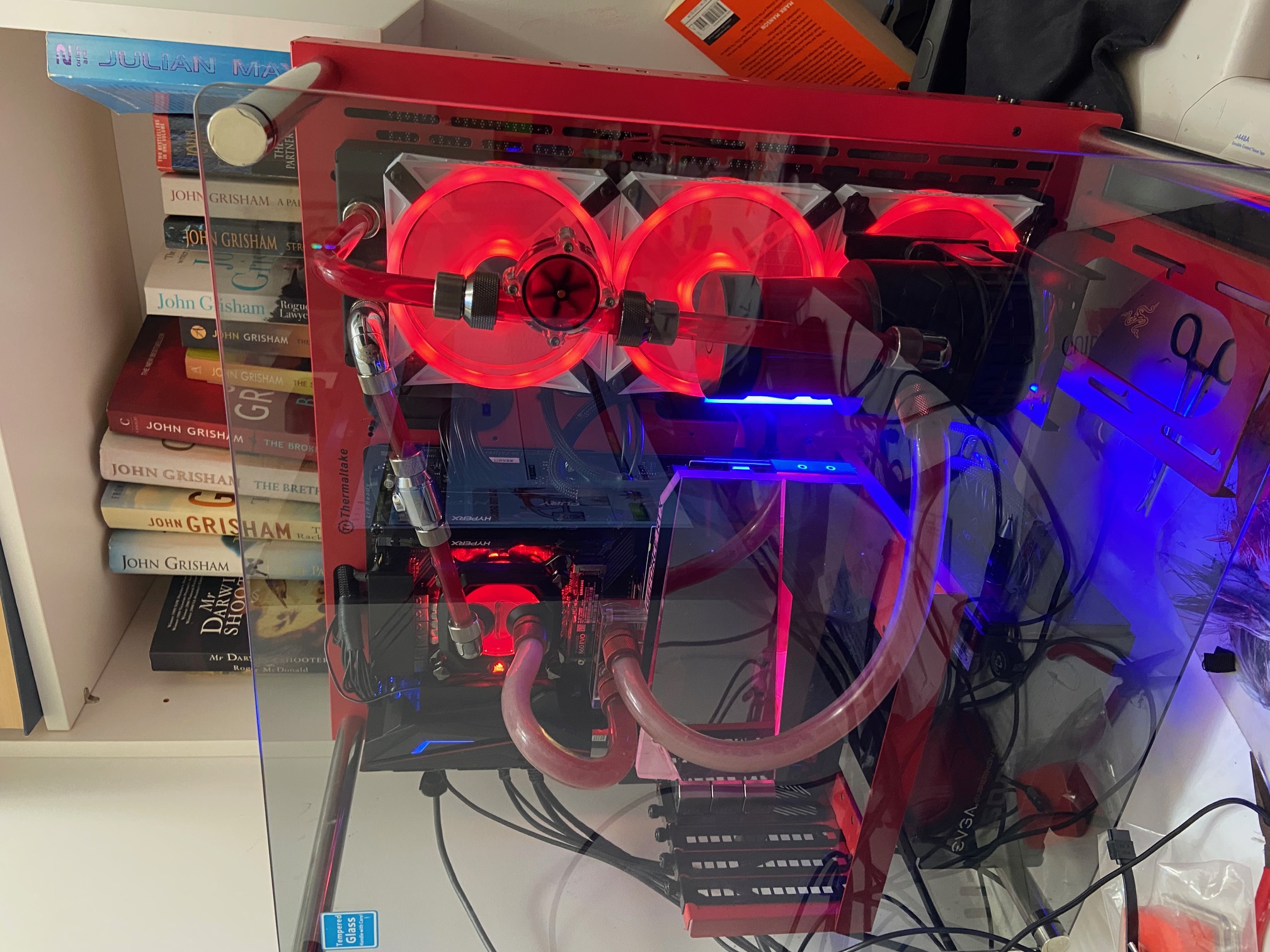
I have a custom loop, a dogs breakfast for various reasons but it should work.


Coolstream SE Radiator (single depth) with three corsair static pressure fans-> pump ->3080 waterforce -> i9-9900KF (stocK)


I have reseated the block on the the cpu several times with a couple of different pastes.  Still my CPU runs hot, thermal throttle on Prime95 (no AVX) and 85-90 on games.  The whole loop is hot, and the exit from the cpu must be 50-60 degrees.  The water running in seems very warm also.  I have the fans running fast and there is a a lot of heat being pushed out.  The classic formula is 1+ number of cooled components for radiator size.


Pic enclosed.


Any thoughts?  More radiator needed?  Reseat cpu again?


Cheers Ivan


View this topic in a long page with up to 500 replies per page Create new topic
 1 | 2
timmmay
20858 posts

Uber Geek
+1 received by user: 5350

Trusted
Lifetime subscriber

  #2636262 15-Jan-2021 19:37
Send private message

Wow. Impressive. Might be time to expand your library from John Grisham, and good to see you keep your nails trimmed ;)


(Generic engineer's view no experience with water cooling) If the CPU was hot and everything else was cool then you might re-seat the CPU, but if everything is hot then the heat is leaving the CPU ok, it's just not leaving the closed system. The whole loop being hot suggests an issue at the heat exchanger. Are the fans spinning fast enough to exchange enough heat? Is there good exchange from the cooling loop to the heatsink the fans blow over?


ratsun81
516 posts

Ultimate Geek
+1 received by user: 183


  #2636264 15-Jan-2021 19:39
Send private message

Got pics of the other side of the case, including the intake for the rad? Which way is your airflow going in the case? 


I run a 2080Ti, Ryzen 3900X with a single EKWB Coolstream PE 360 rad and dont ever get temps that high. I think the highest ive seen is in the 70's on the CPU. 


How thick is your radiator? How long does it take to hit those temps? 


Jase2985
13730 posts

Uber Geek
+1 received by user: 6202

ID Verified
Lifetime subscriber

  #2636287 15-Jan-2021 21:18
Send private message

how hot is the GPU?


how thick is the radiator? it doesnt look very thick in that picture


fans pushing or pulling through the radiator?


is it a new CPU block? if its an old one it could be gunked up a bit in its internal fins and using colored fluid doesn't normally help with gunking up the blocks or radiators


I would go for a thicker radiator and a bigger reservoir to give you more liquid to act as a heat sync.


borgia

101 posts

Master Geek
+1 received by user: 5


  #2636307 15-Jan-2021 22:01
Send private message

Hi


Cpu hits 100, its an open case and a single thickness 360 rad.  Fans are spinning 1600 (max).  Back of case where fans exit to is free and hot air blows out.


I just wonder if my cooling capacity is too low.


Cheers for the help


Tzoi
425 posts

Ultimate Geek
+1 received by user: 90


  #2636310 15-Jan-2021 22:36
Send private message

Mounting pressure is ok? Pump adequate to push the water around?


josephhinvest
1550 posts

Uber Geek
+1 received by user: 322

ID Verified
Trusted

  #2636315 15-Jan-2021 23:15
Send private message

I don’t know a lot about this... air trapped somewhere? Does the coolant move clockwise in the picture - perhaps air trapped at the top of radiator? I saw a good diagram recently but cannot find it, showing how to avoid trapped air


Shop now for Dell laptops and other devices (affiliate link).
ratsun81
516 posts

Ultimate Geek
+1 received by user: 183


  #2636316 15-Jan-2021 23:38
Send private message

borgia:


Hi


Cpu hits 100, its an open case and a single thickness 360 rad.  Fans are spinning 1600 (max).  Back of case where fans exit to is free and hot air blows out.


I just wonder if my cooling capacity is too low.


Cheers for the help


There is no way you kit is working properly, well setup water cooling wont get anywhere near thermal throttling. 


Rad size doesnt matter as the cooling (water) will get to a thermal capacity and then sit there.... It really sounds like you either dont have a working pump or your CPU block is installed backwards or blocked. 


As others have asked how are your fans oriented push/pull and what sort of airflow do you get through the rad. 
Please can you give us a full list of all the parts in your build as far as water cooling goes. 


Please also include figures on what your fans and pump are running at while idle


What temps do you get on your GPU while you get throttling of your CPU? 


Jase2985
13730 posts

Uber Geek
+1 received by user: 6202

ID Verified
Lifetime subscriber

  #2636326 16-Jan-2021 06:43
Send private message

@borgia do you think you can actually go through and answer all the questions above?


what are your idle temps?


borgia

101 posts

Master Geek
+1 received by user: 5


  #2636352 16-Jan-2021 08:39
Send private message

Hi


Thanks for the interest


Theere is good waterflow, I have an indicator in the loop and it spins fast.  Pump set around 4000.  Fans 1600 (max).


Idles at 50 or so, which is too high.


No air in block, I can see into it an there is flow.


Fans in push config, blowing air out the back, which is hot.


I think I agree with the guidance, need to check seating/direction of cpu block and make sure its not gunged up.  Ill get a thicker radiator also.  Apparently it does make a difference about how much heat you can remove from the system and my radiator outflow is hot.


Cheers for the help.


Ivan


Jase2985
13730 posts

Uber Geek
+1 received by user: 6202

ID Verified
Lifetime subscriber

  #2636378 16-Jan-2021 10:01
Send private message

how hot is the GPU under load? how hot is it at idle?


how long does it take to warm up when you put some load on it?


if the GPU is cool and the CPU isnt then its likely something to do with the CPU thats the cause of your issues.


richms
29098 posts

Uber Geek
+1 received by user: 10209

Trusted
Lifetime subscriber

  #2636472 16-Jan-2021 12:48
Send private message

Is the radiator itself hot? I have seen some where the water basically went in and out of it without ever traversing the whole thing depending which holes on it were used.


Richard rich.ms


Want to support Geekzone and browse the site without the ads? Subscribe to Geekzone now (monthly, annual and lifetime options).
antoniosk
2382 posts

Uber Geek
+1 received by user: 742

ID Verified
Trusted
Lifetime subscriber

  #2636532 16-Jan-2021 15:18
Send private message

Ok, so I’ve never dabbled into liquid cooling.


but looking at your picture, you have the cpu in serial with your gpu. So you’re taking heated liquid and feeding it onto another heat source.


is this how it’s supposed to be? Also, what liquid are you using?  I assume it’s some special mix chemical that allows for efficient heat transfer once it passes through the radiator


last thing I can think of is your room and the source of air for the heat exchange - are you in a closed area with no air exchange, so you’re changing hot air for hot air?


________


Antoniosk


Jase2985
13730 posts

Uber Geek
+1 received by user: 6202

ID Verified
Lifetime subscriber

  #2636540 16-Jan-2021 16:01
Send private message

antoniosk:


but looking at your picture, you have the cpu in serial with your gpu. So you’re taking heated liquid and feeding it onto another heat source.


is this how it’s supposed to be?


Yes its generally how its done unless you use a dual loop system which adds cost and complexity.


borgia

101 posts

Master Geek
+1 received by user: 5


  #2636576 16-Jan-2021 17:58
Send private message

Thanks for the help team


I changed some things


- bigger radiator


- static pressure fans (mine were airflow (duh))


- Changed cpu paste and re-seated it


- I had the cpu block the wrong way around, fluid going in through the out hole


- put cpu after radiator getting coolest fluid


Now temp running furmark on the 3080 and Prime95 (no AVX) is 90, which is fine for this CPU.  Thanks for the input!


Cheers Ivan


andrewNZ
2487 posts

Uber Geek
+1 received by user: 1461
Inactive user


  #2636583 16-Jan-2021 18:52
Send private message

If it's any help, in a recent (large) refrigeration plant I worked on, every single fan on the site pulled air through the heat exchange system it was part of.

 1 | 2
View this topic in a long page with up to 500 replies per page Create new topic


Geekzone Live »

Try automatic live updates from Geekzone directly in your browser, without refreshing the page, with Geekzone Live now.


Are you subscribed to our RSS feed? You can download the latest headlines and summaries from our stories directly to your computer or smartphone by using a feed reader.
