Geekzone: technology news, blogs, forums
Guest
Welcome Guest.
You haven't logged in yet. If you don't have an account you can register now.


peejayw

1913 posts

Uber Geek
+1 received by user: 123


#288629 13-Jul-2021 14:23
Send private message

I have a fairly old desktop PC running Windows 10. Just recently the system time has started behaving oddly. After doing a time synch it runs ok for maybe 10 min or so then either slows, stops or starts going backwards. This while the computer is on and running. I have heard that it might need a new bios battery but I thought that was only to keep the system time when the computer was switched off.





 I'm supposed to respect my elders, but it's getting harder and harder for me to find one now.


Filter this topic showing only the reply marked as answer Create new topic

xpd

xpd
Geek of Coastguard
14115 posts

Uber Geek
+1 received by user: 4574

Retired Mod
ID Verified
Trusted
Lifetime subscriber

  #2743672 13-Jul-2021 14:34
Send private message

Wont hurt replacing the battery anyway. 


Its regional settings etc are set to NZ ?


XPD / Gavin


LinkTree


peejayw

1913 posts

Uber Geek
+1 received by user: 123


  #2743675 13-Jul-2021 14:37
Send private message

Yes, Time and Region are set to Auto.


 I'm supposed to respect my elders, but it's getting harder and harder for me to find one now.


Jase2985
13730 posts

Uber Geek
+1 received by user: 6202

ID Verified
Lifetime subscriber

  #2743748 13-Jul-2021 15:56
Send private message

Mine is doing the same thing, started about 1-2 months ago, i think after a windows update.


i was manually setting the time


I rest the time 2 hours ago and its already lost 2 minutes, in 2 hours.


I wouldn't have thought it was the battery as the system is powered on all the time


tripper1000
1648 posts

Uber Geek
+1 received by user: 1176


  #2743749 13-Jul-2021 15:57
Send private message

Bios battery is usually only need when turned off. Computers with a flat battery will normally keep their time while powered up. Most, but not all, computers also give a warning on power-up when their battery is flat. But they're cheap and easy to change - typically a 2032 button cell or similar (have a look) and ~$5 from hardware store or supermarket.


Auto isn't the same as having the region set to N.Z. Auto means the computer is free the change region willy-nilly which would explain time changes. You're not using a proxy server by any chance? 


peejayw

1913 posts

Uber Geek
+1 received by user: 123


  #2743750 13-Jul-2021 16:01
Send private message

I have set Region to NZ and have set the timezone to Auck, no proxy.


 I'm supposed to respect my elders, but it's getting harder and harder for me to find one now.


xpd

xpd
Geek of Coastguard
14115 posts

Uber Geek
+1 received by user: 4574

Retired Mod
ID Verified
Trusted
Lifetime subscriber

  #2743753 13-Jul-2021 16:02
Send private message

Not had any issues here and Im fully updated.


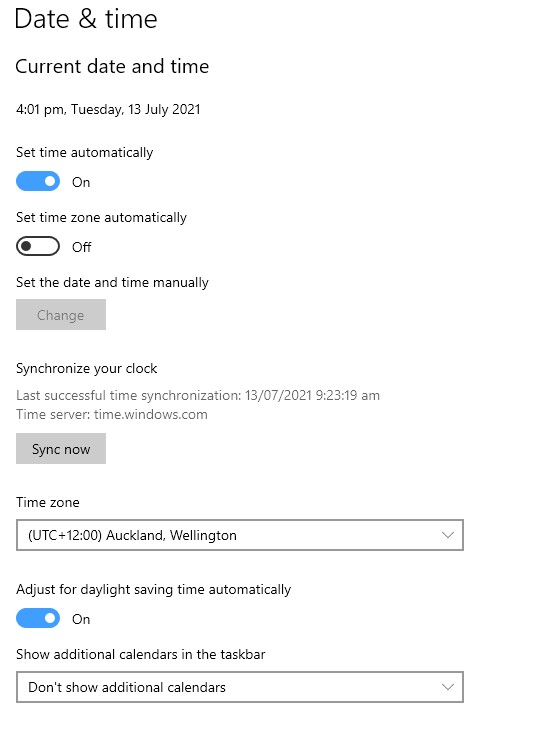
My time/date settings...


XPD / Gavin


LinkTree


Shop now on Samsung phones, tablets, TVs and more (affiliate link).
freitasm
BDFL - Memuneh
80646 posts

Uber Geek
+1 received by user: 41026

Administrator
ID Verified
Trusted
Geekzone
Lifetime subscriber

  #2743763 13-Jul-2021 17:12
Send private message

Try changing the server to time.cloudflare.com - although time update is only every few hours or days so it shouldn't affect - but who knows?


Referral links: Quic Broadband (free setup code: R587125ERQ6VE) | Samsung | AliExpress | Wise | Sharesies 


Support Geekzone by subscribing (browse ads-free), or making a one-off or recurring donation through PressPatron.


peejayw

1913 posts

Uber Geek
+1 received by user: 123


  #2743766 13-Jul-2021 17:21
Send private message

I put in a new battery and so far it has kept time for about an hour so fingers crossed.


 I'm supposed to respect my elders, but it's getting harder and harder for me to find one now.


peejayw

1913 posts

Uber Geek
+1 received by user: 123


  #2743896 14-Jul-2021 09:27
Send private message

After replacing the battery the issue seems to have been fixed, time has been maintained correctly overnight. Thanks for all the suggestions esp XPD who prompted me to change the battery, would never have thought that could be the problem.


 I'm supposed to respect my elders, but it's getting harder and harder for me to find one now.


Filter this topic showing only the reply marked as answer Create new topic


Geekzone Live »

Try automatic live updates from Geekzone directly in your browser, without refreshing the page, with Geekzone Live now.


Are you subscribed to our RSS feed? You can download the latest headlines and summaries from our stories directly to your computer or smartphone by using a feed reader.