Geekzone: technology news, blogs, forums
Guest
Welcome Guest.
You haven't logged in yet. If you don't have an account you can register now.


qwertee

735 posts

Ultimate Geek
+1 received by user: 259

Lifetime subscriber

#293132 31-Dec-2021 17:44
Send private message

Hi 


Pardon me if this is the incorrect forum


My Apacer 64Gb MicroSD card that is used in my LGv21 mobile as aexternal memory storage has become faulty and 
the device is asking me to format it.  Did not want to do this as I will run the risk of deleting all data. ( photos, music and videos)


I have attempted the following steps but without much success. The gold plated terminals are clean 


1  Removed SD card and tried on 2 different computers running Win10 and different SD card adapters.
    Result:   E:\ is not accessible  the file or directory is unreadable or corrupted.


2  Have tried a repair  using  C:\WINDOWS\system32>chkdsk e: /f
The type of the file system is FAT32.
Volume Serial Number is 37AC-190A
The \ entry contains a nonvalid link.
Windows is verifying files and folders...
94 percent completed....


3 Changed the drive letter to P     Result is same as 1
   P is not accessible   the file or directory is unreadable or corrupted


4  Tried a recovery software called recuva  
    It 'recovered' a lot of files  with the file extension .file .  Nothing is readable minus a few photos that I can now see.


5  Tried 2 other recovery programs and can see the photos in the preview but need to pay for the service as some are limited to 200mb


Is there anything else that I should attempt before I format and risk losing all or just count my losses and move on. 
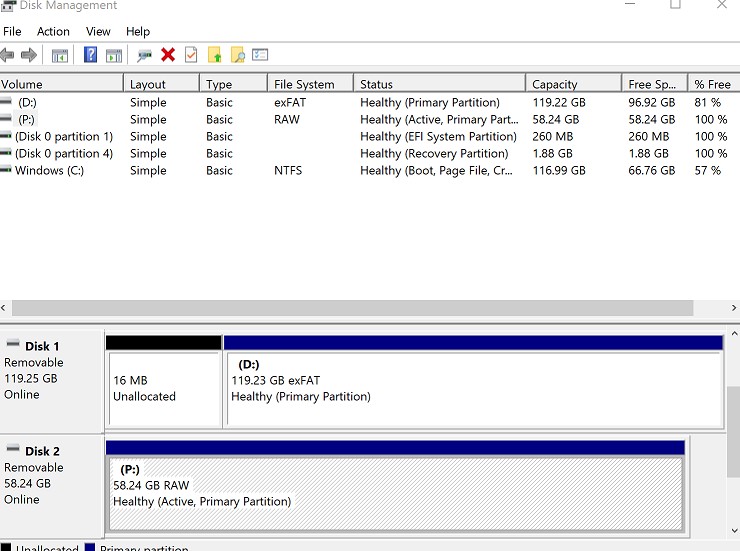
Why is it coming up as RAW in the file system rather than FAT or NTSF  


thanks


A happy new year to all. 


Create new topic
MadEngineer
4591 posts

Uber Geek
+1 received by user: 2570

Trusted

  #2840928 31-Dec-2021 18:06
Send private message

Recover the lost media from your google account… because I’m sure you’re making use of that, right?

Image the drive to a file on your pc and run recovery software against that.


You're not on Atlantis anymore, Duncan Idaho.


1yippy1
67 posts

Master Geek
+1 received by user: 1


  #2840939 31-Dec-2021 18:28
Send private message

Try PhotoRec


qwertee

735 posts

Ultimate Geek
+1 received by user: 259

Lifetime subscriber

  #2840940 31-Dec-2021 18:32
Send private message

MadEngineer: Recover the lost media from your google account… because I’m sure you’re making use of that, right?

Image the drive to a file on your pc and run recovery software against that.


Thanks @MadEngineer


Yes , I have the media in my google account ie: photos and videos.  So all is not lost.  The music not, but not too fussed about that.
Its a matter of retrieving the media and as  I had them in sub folders in my SD Card


Can you elaborate on how to image this unreadable drive to a PC.  
I will also look up instructions on how to as well. What is your go to recovery software that is free ?


qwertee

735 posts

Ultimate Geek
+1 received by user: 259

Lifetime subscriber

  #2840942 31-Dec-2021 18:35
Send private message

1yippy1:


Try PhotoRec


Thanks @1yippy1  
Does this also recover other media ie: music


Will give it a go as I am travelling and  away from my home computer.
May it was just bad luck that this happened to the Apacer.  Maybe buy a Samsung SD card in future.


1yippy1
67 posts

Master Geek
+1 received by user: 1


  #2840943 31-Dec-2021 18:38
Send private message

qwertee:


1yippy1:


Try PhotoRec


Thanks @1yippy1  
Does this also recover other media ie: music


Will give it a go as I am travelling and  away from my home computer.
May it was just bad luck that this happened to the Apacer.  Maybe buy a Samsung SD card in future.


https://www.cgsecurity.org/wiki/File_Formats_Recovered_By_PhotoRec


qwertee

735 posts

Ultimate Geek
+1 received by user: 259

Lifetime subscriber

  #2841475 1-Jan-2022 16:36
Send private message

1yippy1:


Try PhotoRec


Tried this software but stopped it as it takes about 4 hours .  Will do it later when I am home 


Looks like it can recover all the files , but man it creates so many subfolders unless I am doing it wrong!
But thanks @1yipp1   This looks promising .


Shop now at Mighty Ape (affiliate link).
MadEngineer
4591 posts

Uber Geek
+1 received by user: 2570

Trusted

  #2841485 1-Jan-2022 17:08
Send private message

qwertee:


MadEngineer: Recover the lost media from your google account… because I’m sure you’re making use of that, right?

Image the drive to a file on your pc and run recovery software against that.


Thanks @MadEngineer


Yes , I have the media in my google account ie: photos and videos.  So all is not lost.  The music not, but not too fussed about that.
Its a matter of retrieving the media and as  I had them in sub folders in my SD Card


Can you elaborate on how to image this unreadable drive to a PC.  
I will also look up instructions on how to as well. What is your go to recovery software that is free ?


Whew and Tools for OSForensics - ImageUSB - Write an image to multiple USB Flash Drives


I've used other software to do this, just whatever turns up in google


You're not on Atlantis anymore, Duncan Idaho.

allan
2073 posts

Uber Geek
+1 received by user: 899

ID Verified
Lifetime subscriber

  #2841600 1-Jan-2022 20:14
Send private message

I've had good success in the past with recovery software (paid) called GetDataBack - https://www.runtime.org/data-recovery-software.htm for both an SD card (was overseas on holiday and it had numerous holiday photos on it) plus a number of spinning hard drives for family.


qwertee

735 posts

Ultimate Geek
+1 received by user: 259

Lifetime subscriber

  #2841722 2-Jan-2022 08:26
Send private message

allan:


I've had good success in the past with recovery software (paid) called GetDataBack - https://www.runtime.org/data-recovery-software.htm for both an SD card (was overseas on holiday and it had numerous holiday photos on it) plus a number of spinning hard drives for family.


Thanks @allan
Good to know of a software package that has worked. 


1yippy1
67 posts

Master Geek
+1 received by user: 1


  #2842243 3-Jan-2022 07:51
Send private message

qwertee:


1yippy1:


Try PhotoRec


Tried this software but stopped it as it takes about 4 hours .  Will do it later when I am home 


Looks like it can recover all the files , but man it creates so many subfolders unless I am doing it wrong!
But thanks @1yipp1   This looks promising .


No that's sounds about right, every 500 files it will create a new folder.


qwertee

735 posts

Ultimate Geek
+1 received by user: 259

Lifetime subscriber

  #2844682 6-Jan-2022 22:45
Send private message

1yippy1:


Try PhotoRec


@1yippy1
PhotoRec worked well for me, and managed to salvage all photos, pdfs and videos. 


Should I bother re-formating this SD Card and re-use as before on my LG V21 mobile or buy a new one?
Any particular SD card brand that people would recommend?


Thanks


Shop now for Dell laptops and other devices (affiliate link).
1yippy1
67 posts

Master Geek
+1 received by user: 1


  #2844698 7-Jan-2022 06:16
Send private message

qwertee:


1yippy1:


Try PhotoRec


@1yippy1
PhotoRec worked well for me, and managed to salvage all photos, pdfs and videos. 


Should I bother re-formating this SD Card and re-use as before on my LG V21 mobile or buy a new one?
Any particular SD card brand that people would recommend?


Thanks


Personally I would just buy a new sd card but in saying that not knowing the age and use your sd card has had a format may be all that's needed 


😀


Create new topic


Geekzone Live »

Try automatic live updates from Geekzone directly in your browser, without refreshing the page, with Geekzone Live now.


Are you subscribed to our RSS feed? You can download the latest headlines and summaries from our stories directly to your computer or smartphone by using a feed reader.
