Geekzone: technology news, blogs, forums
Guest
Welcome Guest.
You haven't logged in yet. If you don't have an account you can register now.


quickymart

14940 posts

Uber Geek
+1 received by user: 13953

ID Verified

#293728 10-Feb-2022 13:42
Send private message

Brief backstory, I bought my desktop PC from PB Tech (custom made) in around March 2018. Ran without any issues but I noticed recently that the internal temperature was slowly crawling up, using the Speedfan app.


When I first got it, anywhere from 20°C-25°C was pretty normal; on cold days, it could be as low as 15°C, which I understand is good: the lower the temperature, the better for the system (less risk of overheating, etc).


Fast forward to late last year. The fans were sounding clogged with dust and the temperature was gradually rising to near 40°C. Realising my system needed a good clean out, I took it back to PB Tech to get it serviced.


A friend of mine many years ago who used to build his own machines told me that when doing this, as well as the de-dusting, the "thermal paste" should also be replaced to help with keeping temperatures down (he described it as being more like grease).


The PC was returned to me after a few days, and it now has a noticeable hum that it didn't before I took it in. The temperature was (initially) slightly lower, but only down to 30°C. Today it was at nearly 39, which I've never seen before.


E-mailed PB Tech, no reply. Tried Facebook, no reply. Finally called today and talked to a guy who told me that 39°C is "a really good temperature", and he had no idea why it would have been around 50% of that when I got the machine back in 2018.


So. Am I over-reading into this? Is it something I should be concerned about, or is nearly 40°C a "normal" temperature for a desktop PC to run at?
Note that I don't play any games that might highly tax the CPU, in fact my usage is quite normal.


Any feedback appreciated, thanks 🙂


View this topic in a long page with up to 500 replies per page Create new topic
 1 | 2 | 3
timmmay
20858 posts

Uber Geek
+1 received by user: 5350

Trusted
Lifetime subscriber

  #2864750 10-Feb-2022 13:47
Send private message

When it's about 22 degrees inside my Ryzen 5600X idles in the region of 30 - 40 degrees. When it's busy doing video encoding even just doing big windows updates it gets up to 70 or 80 degrees for a short time. I have a fairly large Dark Rock Pro 4 CPU cooler with two fans, I have it configured in "very quiet" mode with the fans spinning very slowly so it only turns the fans up when it really needs to. My CPU is fine up to 95 degrees C. I wouldn't worry about your temps, more about the odd noise if it bothers you.


What CPU do you have? I think Intel can run a bit cooler and their max temp isn't as high, though a quick Google says they're fine up to about 100C as well.


quickymart

14940 posts

Uber Geek
+1 received by user: 13953

ID Verified

  #2864757 10-Feb-2022 13:56
Send private message

According to Belarc Advisor:


Processor 3.10 gigahertz AMD A8-9600 RADEON R7, 10 COMPUTE CORES 4C+6G
320 kilobyte primary memory cache
2048 kilobyte secondary memory cache
64-bit ready
Multi-core (4 total)
Not hyper-threaded
Main Circuit Board b Board: ASRock A320M-HDV
Bus Clock: 100 megahertz
UEFI: American Megatrends Inc. P3.00 07/17/2017 


Let me know if you need any other info that could help.


Gurezaemon
~HONYAKKER!~
1417 posts

Uber Geek
+1 received by user: 1565

ID Verified
Lifetime subscriber

  #2864764 10-Feb-2022 14:06
Send private message

Your temperatures are fine. 


Conversely, I'm a little skeptical that the temperatures you measured when you first got the PC were accurate - unless you have some extremely high-end refrigeration cooling systems, the CPU and GPU are never going to be cooler than the ambient in the room the PC is situated. Of course, if you were getting 15 to 20° temperatures, I'd suspect you were using the PC in a walk-in freezer!


I have a fairly grunty work PC that doubles as a gaming rig, and when I'm working, CPU and GPU temperatures range from 35° to 50° - when under load they'll get up to around 70°, which is still well within rated specs. 


Get your business seen overseas - Nexus Translations


Sinuation
151 posts

Master Geek
+1 received by user: 73

ID Verified

  #2864766 10-Feb-2022 14:14
Send private message

Your initial temps definitely were not normal for the average user. 40° - 50° is what's considered normal, depending on the ambient temperature. So I wouldn't worry, plus these things have redundancies that reduce causes it to thermal throttle so you don't damage anything when it overheats.


Your spec sheet would be good too, for example the 5800x on Ryzen runs hot on average.


Mehrts
1112 posts

Uber Geek
+1 received by user: 984

Trusted

  #2864767 10-Feb-2022 14:18
Send private message

Why pay to get your PC "serviced"?

Just take a few minutes out of your day and do it yourself once every so often. You don't need any specialist cleaning items for this, just a basic toolkit for dismantling things. Replacing thermal paste is a simple task too.

If you DIY, then you know exactly what's been done, and not what someone claimed to have done.

Your temps are fine too.


MaxineN
Max
2049 posts

Uber Geek
+1 received by user: 1662

ID Verified
Trusted
Subscriber

  #2864769 10-Feb-2022 14:25
Send private message

If you haven't cleaned and replaced the thermal paste, sure I'd agree with the rest that's actually perfectly normal for that APU (from the bristol ridge series so it's not those hot box liano based ones!). What you probably saw back in 2018-2019 was either the system being absolutely fresh off the line or really low ambient. 


2 things that can cause higher than normal idle temps.


Clock speed is constantly at full tilt and it not being allowed to go into more idle lower clocks(reducing voltage and actual power needed).


Thermal paste is expired or the mount is bad(then you'd see incredibly high spikes during sudden loads).


The clock speed is easy to see, just boot up task manager > performance and click on the CPU graph on the left hand side and see if it drops clock speeds at all after leaving it for a minute. If not, adjust your power plan in the old control panel under power.


Thermal paste expired? Time to grab a screw driver and some Artic Silver 5 and be done with it.


I do want to re-iterate that your temps are absolutely fine.


Ramblings from a mysterious lady who's into tech. Warning I may often create zingers.


Stream your favourite shows now on Apple TV (affiliate link).

xpd

xpd
Geek of Coastguard
14115 posts

Uber Geek
+1 received by user: 4574

Retired Mod
ID Verified
Trusted
Lifetime subscriber

  #2864771 10-Feb-2022 14:27
Send private message

I honestly don't trust any temp readings until the system is having issues. According to this, my system should be smoking.


I give my systems a clean out at least once a year.


XPD / Gavin


LinkTree


Jase2985
13730 posts

Uber Geek
+1 received by user: 6202

ID Verified
Lifetime subscriber

  #2864773 10-Feb-2022 14:29
Send private message

your initial temps are way too low, even with nothing running and it being cold inside i would still expect the idle temp to be in the mid 30's -40's range.


Anything below 90 degrees is normally fine. though i never like mine to get that hot, and with my current cooler its usually mid to high 70's doing a prime 95 stress test and a heaven benchmark on the graphics card to heat soak everything.


Jase2985
13730 posts

Uber Geek
+1 received by user: 6202

ID Verified
Lifetime subscriber

  #2864775 10-Feb-2022 14:31
Send private message

@quickymart how are you measuring the temps?


CPUID HWmonitor is one of the better ones to use.


quickymart

14940 posts

Uber Geek
+1 received by user: 13953

ID Verified

  #2864776 10-Feb-2022 14:37
Send private message

Thanks for all the comments. Unfortunately I don't get a lot of time to do self-maintenance on my PC, and I don't have all the tools or knowhow to replace the thermal paste.


However I do vacuum out all the dust I can see, usually every 6 months. Just this time it wasn't making any difference to the temperature (normally it drops it by a bit) so figured it was possibly time for the thermal paste to be redone, etc.


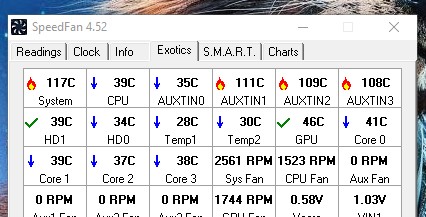
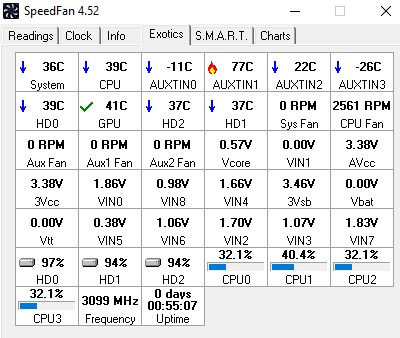
I measure my temperatures using Speedfan, as in xpd's screenshot (this is mine taken just now):


However if you are all saying my temperatures are all good, then I'll go with that, thanks 🙂👍


MaxineN
Max
2049 posts

Uber Geek
+1 received by user: 1662

ID Verified
Trusted
Subscriber

  #2864782 10-Feb-2022 14:51
Send private message

Speedfan is absolutely out of date and should never be used or trusted.


Try HWInfo or CPUID HWMonitor(HWInfo shows a lot more)


Ramblings from a mysterious lady who's into tech. Warning I may often create zingers.


Shop now for Lenovo laptops and other devices (affiliate link).
Jase2985
13730 posts

Uber Geek
+1 received by user: 6202

ID Verified
Lifetime subscriber

  #2864787 10-Feb-2022 14:58
Send private message

The problem with speedfan is some CPU's needed an offset added and it didnt take this into account.


other software has and does


xpd

xpd
Geek of Coastguard
14115 posts

Uber Geek
+1 received by user: 4574

Retired Mod
ID Verified
Trusted
Lifetime subscriber

  #2864793 10-Feb-2022 15:19
Send private message

MaxineN:


Speedfan is absolutely out of date and should never be used or trusted.


I'm using an old machine anyway, so wouldnt matter really. (i5 6500)


XPD / Gavin


LinkTree


Gurezaemon
~HONYAKKER!~
1417 posts

Uber Geek
+1 received by user: 1565

ID Verified
Lifetime subscriber

  #2864798 10-Feb-2022 15:21
Send private message

A cheap and easy form of preventative maintenance is a few cans of air duster.


A vacuum doesn't really have the oomph to get out all the dust from crevices. I'd suggest blasting fans (while holding them so they don't spin too fast) and heat sinks with the spray air, and have a vacuum going nearby to catch all the dust that comes out.


Get your business seen overseas - Nexus Translations


TheMaskedOnion
51 posts

Master Geek
+1 received by user: 4


  #2864957 10-Feb-2022 18:23
Send private message

Are you able to take the side panel off and take a few pictures so we can see your set up.


Speedfan is reporting that you have a single fan in your system.  Does your case have fans installed? usually there is incoming and outgoing fans at the front and back.


 1 | 2 | 3
View this topic in a long page with up to 500 replies per page Create new topic


Geekzone Live »

Try automatic live updates from Geekzone directly in your browser, without refreshing the page, with Geekzone Live now.


Are you subscribed to our RSS feed? You can download the latest headlines and summaries from our stories directly to your computer or smartphone by using a feed reader.