Geekzone: technology news, blogs, forums
Guest
Welcome Guest.
You haven't logged in yet. If you don't have an account you can register now.


MadEngineer

4591 posts

Uber Geek
+1 received by user: 2570

Trusted

#294119 6-Mar-2022 15:46
Send private message

MadEngineer:


My home PC randomly locking up and no clue as to what's causing it.  The mouse pointer is still movable for a while at least and I can sometimes close one or two frozen programs but nothing else.  I suspect it might be media content on websites including adverts causing problems with the second hand video card or the M2 SSD on its way out.  Possibly the latter as nothing is ever written to the windows even logs.  HDD light keeps intermittently blinking when it's locked up.


Seems to have started after one of the last windows 11 updates that included some enhancements to Edge.


Test from 2018:


Today:
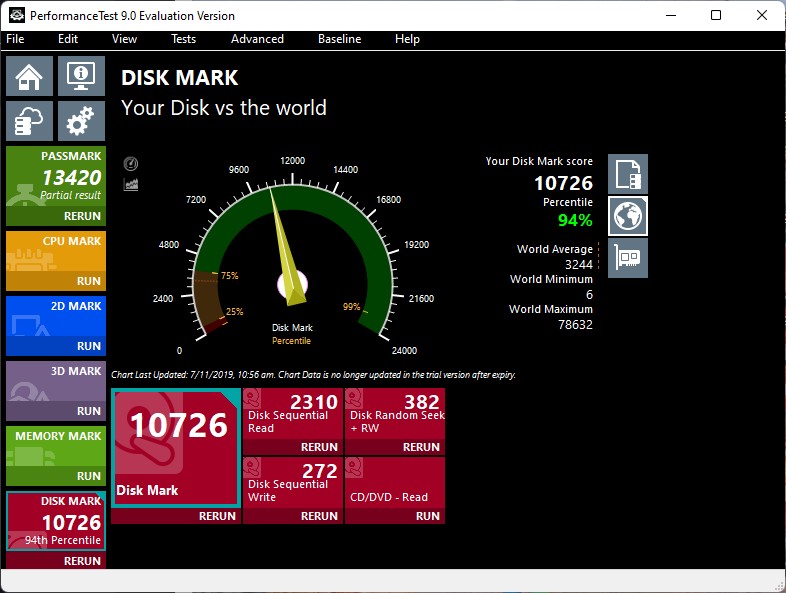


The fault here being the write speed has plummeted.  Don't really notice in day to day use.


Another oddity,  CSM support is turned on in the BIOS.  Not sure when that happend; maybe after a BIOS update at some point in time and maybe Windows 11 recovered itself to make it work.  But now if I turn that on the system won't POST.


I remember running the Windows 11 test prior to upgrading from 10 and everything was ticked.  Now I notice that secure boot is disabled not that anything is complaining about that.


The BIOS doesn't list any devices under the UEFI screen


System Info reports BIOS mode is UEFI


i5-8400
GA-Z370XP-SLI
ADATA XPG SX8200NP


You're not on Atlantis anymore, Duncan Idaho.

View this topic in a long page with up to 500 replies per page Create new topic
 1 | 2
timmmay
20857 posts

Uber Geek
+1 received by user: 5349

Trusted
Lifetime subscriber

  #2879870 6-Mar-2022 16:57
Send private message

How full is the disk? Have you tried defragmenting it with something like defraggler? I know defragging SSDs isn't generally recommended, but it might be worth a shot.


MadEngineer

4591 posts

Uber Geek
+1 received by user: 2570

Trusted

  #2879909 6-Mar-2022 18:43
Send private message

It's just a little over half full.  Not so keen on the defrag :p


You're not on Atlantis anymore, Duncan Idaho.

timmmay
20857 posts

Uber Geek
+1 received by user: 5349

Trusted
Lifetime subscriber

  #2879910 6-Mar-2022 18:48
Send private message

I defragment my solid state drives every few months. Those things can run petabytes before they wear out, and they will likely be obselste before then.


Jase2985
13730 posts

Uber Geek
+1 received by user: 6202

ID Verified
Lifetime subscriber

  #2879927 6-Mar-2022 18:58
Send private message

timmmay: I defragment my solid state drives every few months. Those things can run petabytes before they wear out, and they will likely be obselste before then.


why? they have built in functionality that does that stuff for you with out creating excess wear on the NAND


https://www.crucial.com/articles/about-ssd/should-you-defrag-an-ssd


timmmay
20857 posts

Uber Geek
+1 received by user: 5349

Trusted
Lifetime subscriber

  #2879960 6-Mar-2022 20:03
Send private message

Jase2985:


timmmay: I defragment my solid state drives every few months. Those things can run petabytes before they wear out, and they will likely be obselste before then.


why? they have built in functionality that does that stuff for you with out creating excess wear on the NAND


https://www.crucial.com/articles/about-ssd/should-you-defrag-an-ssd


I read something a while back about it helping consolidate directory tables or something. May or may not be correct.


Jase2985
13730 posts

Uber Geek
+1 received by user: 6202

ID Verified
Lifetime subscriber

  #2879973 6-Mar-2022 20:57
Send private message

timmmay:


I read something a while back about it helping consolidate directory tables or something. May or may not be correct.


you are not correct. SSD's dont need defragging. they use different logic to the old spinning platter drives and have way lower latency


Samsung:


Will defragmentation improve my Samsung Solid State Drive’s performance?


No, Solid State Drives do not need defragmentation because they have no moving parts and can access any location on the drive equally fast.


Please disable any defragmentation utilities on your computer because they will only wear down the performance of your SSD. Visit the OS Optimization section of Samsung SSD Magician for help doing this.


the previous information was from Crucial


to the OP make sure trim is turned on on your drive, if its not turn it on and run it manually and see if that helps


Shop now for Lego sets and other gifts (affiliate link).
timmmay
20857 posts

Uber Geek
+1 received by user: 5349

Trusted
Lifetime subscriber

  #2879977 6-Mar-2022 21:16
Send private message

Yeah, I know how an SSD works. Defragmenting files so they're contiguous isn't useful, in the old drives that helps because drive head movements are minimised. There are a couple of advantages, but it's something that should be done rarely, at best.


Dynamic
4015 posts

Uber Geek
+1 received by user: 1850

ID Verified
Trusted
Lifetime subscriber

  #2880069 7-Mar-2022 07:42
Send private message

Perhaps double check that TRIM is enabled on that drive?


How to Check if TRIM Is Enabled for Your SSD (and Enable It if It Isn’t) (howtogeek.com) 


“Don't believe anything you read on the net. Except this. Well, including this, I suppose.” Douglas Adams


openmedia
3449 posts

Uber Geek
+1 received by user: 877

Trusted

  #2880108 7-Mar-2022 09:51
Send private message

Yes this sounds like a trim issue. See if you can run a manual TRIM. Some drives behave very badly when they're close to full


Generally known online as OpenMedia, now working for Red Hat APAC as a Technology Evangelist and Portfolio Architect. Still playing with MythTV and digital media on the side.


MadEngineer

4591 posts

Uber Geek
+1 received by user: 2570

Trusted

  #2880739 7-Mar-2022 20:57
Send private message

NTFS DisableDeleteNotify = 0  (Allows TRIM operations to be sent to the storage device)
ReFS DisableDeleteNotify = 0  (Allows TRIM operations to be sent to the storage device)


You're not on Atlantis anymore, Duncan Idaho.

MadEngineer

4591 posts

Uber Geek
+1 received by user: 2570

Trusted

  #2880753 7-Mar-2022 21:59
Send private message

Hmm, well the slow ssd might be a red herring.  I cloned the drive to a spare old SATA ssd, booted from it and it read at nearly 500MB/s. Still had the lockups.


Now trying onboard graphics only in case it's the video card (or PSU ...) which makes more sense seeing I can sometimes trigger it when scrolling facebook


Video card is a Sapphire Dual-X R9 270X OC Specs | TechPowerUp GPU Database


(No LOL's please :p)


You're not on Atlantis anymore, Duncan Idaho.


Shop now for Dyson appliances (affiliate link).
richms
29097 posts

Uber Geek
+1 received by user: 10206

Trusted
Lifetime subscriber

  #2880763 7-Mar-2022 22:47
Send private message

defragging can be helpful for the filesystem performance however. It seems that it mostly gets sorted out by itself with ntfs but I have had some occasions on my torrenting machine with SSD where performance would go to absolute junk till I either moved the extremely large iso files that were fragmented to hell and back off it onto the spinning rust or else did a defrag on the drive.


Im also thinking that might be why I have the incredibly high write amounts on that drive as it spent about a year being my torrenting machine until I demoted it to only storing music and I do all the torrenting on a seedbox and just scp it all down when done (which is much slower than directly downloading to the home connection but oh well)


Richard rich.ms

K8Toledo
1018 posts

Uber Geek
+1 received by user: 311


  #2880788 8-Mar-2022 03:28
Send private message

MadEngineer:


Another oddity,  CSM support is turned on in the BIOS.  Not sure when that happend; maybe after a BIOS update at some point in time and maybe Windows 11 recovered itself to make it work.  But now if I turn that on the system won't POST.


I remember running the Windows 11 test prior to upgrading from 10 and everything was ticked.  Now I notice that secure boot is disabled not that anything is complaining about that.


The BIOS doesn't list any devices under the UEFI screen


System Info reports BIOS mode is UEFI


i5-8400
GA-Z370XP-SLI
ADATA XPG SX8200NP



I haven't read through the entire thread just replying to this post:   


Do you mean BIOS doesn't list any devices under UEFI or Boot Menu doesn't list any UEFI devices?


It's likely you mean the Boot Menu in which case the boot drive is probably MBR formatted. If so, it won't be listed under UEFI Boot Menu.


CSM allows booting from MBR formatted drive as well as GPT.


CSM disabled only GPT formatted boot drives will be detected. Once CSM is enabled a Boot Devices/Storage Devices submenu should appear with options to boot from either UEFI, Legacy, or both UEFI & Legacy.


'Legacy' in this case refers to MBR drives.


Regarding drive health/performance, SMART stats and real life benchmark results (vs synthetic) would be handy.


CrystalDisk


1101
3141 posts

Uber Geek
+1 received by user: 1143


  #2880834 8-Mar-2022 08:45
Send private message

timmmay:


I read something a while back about it helping consolidate directory tables or something. May or may not be correct.


there where technical reasons for defragging SSD's .


Thats why Win10 DOES actually auto defrag your SSD's .


https://www.bleepingcomputer.com/news/microsoft/windows-10-alert-defragger-bug-defrags-ssd-drives-too-often/


"Storage Optimizer will defrag an SSD once a month if volume snapshots are enabled. This is by design and necessary due to slow volsnap copy on write performance on fragmented SSD volumes."


There was actually a Win10 bug where Win10 would defrag SSD's far too often (every reboot ?)
It took MS many months to fix that bug .


So your SSD's may allready have all that ~wear~ from that bug , if you ran Win10 .
Does that ~wear~ really matter in real life usage ?
:-)


wratterus
1687 posts

Uber Geek
+1 received by user: 678


  #2880837 8-Mar-2022 08:54
Send private message

1101:


there where technical reasons for defragging SSD's that I cant remember


Thats why Win10 DOES actually auto defrag your SSD's .


It doesn't. It runs TRIM. Big difference. Edit - or maybe I should say it's supposed to run TRIM?


Edit again, never mind. I didn't read right through the thread. Not come across that issue before though, to be fair, I never use Windows backup at all which is probably why. 


 1 | 2
View this topic in a long page with up to 500 replies per page Create new topic


Geekzone Live »

Try automatic live updates from Geekzone directly in your browser, without refreshing the page, with Geekzone Live now.


Are you subscribed to our RSS feed? You can download the latest headlines and summaries from our stories directly to your computer or smartphone by using a feed reader.