Geekzone: technology news, blogs, forums
Guest
Welcome Guest.
You haven't logged in yet. If you don't have an account you can register now.


caffynz

317 posts

Ultimate Geek
+1 received by user: 139

ID Verified
Subscriber

#295192 11-Mar-2022 11:49
Send private message

Currently I use Google Photos, and have paid for the 100GB option, and it works well for us.


However, I wonder if there should be another back up option, in case Google Photos for some reason fails (in 5+ years of using it, I've not had any issues, touch wood).


What are you guys doing, just using Google Photos or are you also making another backup somewhere too? If so, what cloud storage option is that, and does it work across multiple devices?


View this topic in a long page with up to 500 replies per page Create new topic
 1 | 2

xpd

xpd
Geek of Coastguard
14115 posts

Uber Geek
+1 received by user: 4574

Retired Mod
ID Verified
Trusted
Lifetime subscriber

  #2884859 11-Mar-2022 12:04
Send private message

I do a local backup of my home server, and take a copy of that offsite occasionally. 


That holds all my personal docs and pics etc. Hardly have anything stored in cloud.


XPD / Gavin


LinkTree


nedkelly
666 posts

Ultimate Geek
+1 received by user: 104

Trusted
Subscriber

  #2884874 11-Mar-2022 12:22
Send private message

xpd:


I do a local backup of my home server, and take a copy of that offsite occasionally. 


That holds all my personal docs and pics etc. Hardly have anything stored in cloud.


I am absolutely with xpd on this, none of my photos are stored anywhere near the public cloud, just on dedicated machines at home and on an external drive at a friends place an hour from mine.


caffynz

317 posts

Ultimate Geek
+1 received by user: 139

ID Verified
Subscriber

  #2884877 11-Mar-2022 12:25
Send private message

What is the rationale of doing so? 

I've had an external HDD fail on me and lost my backup so wary of physical devices...


freitasm
BDFL - Memuneh
80646 posts

Uber Geek
+1 received by user: 41030

Administrator
ID Verified
Trusted
Geekzone
Lifetime subscriber

  #2884883 11-Mar-2022 12:34
Send private message

It is not only "if it fails" but if Google lock your account - and in most cases it means no way of getting it back.


Use Google Takeout to download your content every few months and store it away on another cloud service. I did try using GoodSync (aff link) but it can only access Google Drive, not Google Photos. 


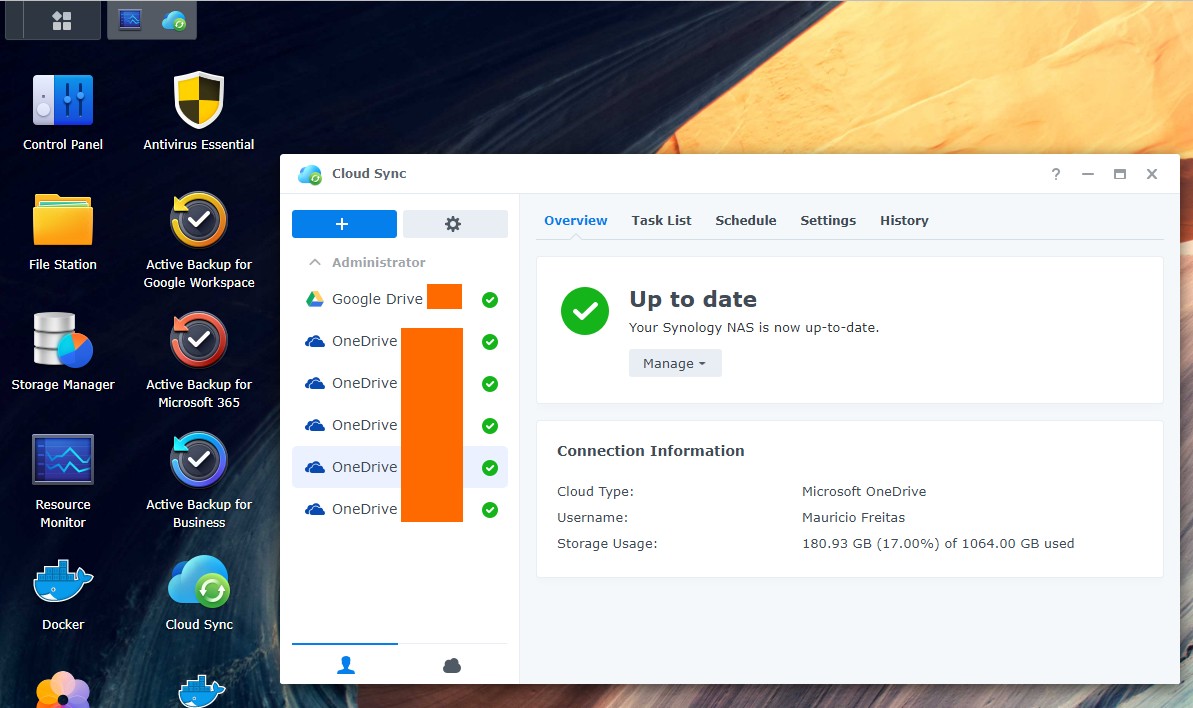
I do use the Synology NAS CloudSync to create backups to my NAS but again it will not access Photos, only Drive.


Referral links: Quic Broadband (free setup code: R587125ERQ6VE) | Samsung | AliExpress | Wise | Sharesies 


Support Geekzone by subscribing (browse ads-free), or making a one-off or recurring donation through PressPatron.


alasta
6888 posts

Uber Geek
+1 received by user: 3362

Trusted
Subscriber

  #2884899 11-Mar-2022 12:58
Send private message

I have all of my photos on my laptop, syncing to iCloud and backed up to an external hard drive.


That way all of my content is on three types of media, spread across two physical locations, with two copies in my physical possession. 


nedkelly
666 posts

Ultimate Geek
+1 received by user: 104

Trusted
Subscriber

  #2885007 11-Mar-2022 13:56
Send private message

caffynz:


What is the rationale of doing so? 

I've had an external HDD fail on me and lost my backup so wary of physical devices...


Backup Strategy 3-2-1


Keep at least 3 copies of your data


Keep backup data on 2 different devices (or medium)


Keep at least one copy of the data offsite


This way if you did have a hard drive fail you would have other copies, or if you had things stolen then its physically offsite too, and then you retain total ownership and control of your data.


Support Geekzone with one-off or recurring donations Donate via PressPatron.
timmmay
20858 posts

Uber Geek
+1 received by user: 5350

Trusted
Lifetime subscriber

  #2885041 11-Mar-2022 14:56
Send private message

I have:


  • Everything on my PC in the original format on a ReFS mirror
  • Everything backed up internally using Restic incremental block based backup
  • Everything on a backup disk in my shed in both original format and with Restic incremental backups
  • Everything on a hard drive in a friends house not far away
  • Everything in AWS Cloud in S3 Deep Glacier storage class. Because I pay per MB I suspect it's less likely to be blocked than Google, who seem to suspend accounts almost at random

For most people I think BackBlaze B2 is a better option than AWS as it's reliable, reasonably priced, and much easier to use. AWS S3 is powerful but complex.


xpd

xpd
Geek of Coastguard
14115 posts

Uber Geek
+1 received by user: 4574

Retired Mod
ID Verified
Trusted
Lifetime subscriber

  #2885042 11-Mar-2022 14:59
Send private message

+1 for backblaze


I'd been using it for a month then got hit by ransomware - just blew away the PC and downloaded everything back again.


Think price has increased a bit, but was around $70 a year when I had it. 


XPD / Gavin


LinkTree


ANglEAUT
altered-ego
2436 posts

Uber Geek
+1 received by user: 841

Trusted
Lifetime subscriber

  #2885107 11-Mar-2022 16:54
Send private message

xpd: I do a local backup of my home server, and take a copy of that offsite occasionally.


nedkelly: ... just on dedicated machines at home and on an external drive at a friends place an hour from mine.


Please can you provide examples & actual steps to achieve this?


Please keep this GZ community vibrant by contributing in a constructive & respectful manner.


ANglEAUT
altered-ego
2436 posts

Uber Geek
+1 received by user: 841

Trusted
Lifetime subscriber

  #2885108 11-Mar-2022 16:56
Send private message

freitasm: ...I did try using GoodSync (aff link) but it can only access Google Drive, not Google Photos. 


I do use the Synology NAS CloudSync to create backups to my NAS but again it will not access Photos, only Drive.


Back in the day, Google allowed you to sync your photos with Google Drive. It's a pity that they removed that functionality.


Please keep this GZ community vibrant by contributing in a constructive & respectful manner.


panther2
385 posts

Ultimate Geek
+1 received by user: 143


  #2885121 11-Mar-2022 17:16
Send private message

Use google photos auto sync with wifi. Use phone for photos so they are also on the sd card and on occasion I do a backup of the sd to an external hd.


Shop now for Lego sets and other gifts (affiliate link).
ANglEAUT
altered-ego
2436 posts

Uber Geek
+1 received by user: 841

Trusted
Lifetime subscriber

  #2885145 11-Mar-2022 18:15
Send private message

caffynz: Currently I use Google Photos, and have paid for the 100GB option, and it works well for us. ...


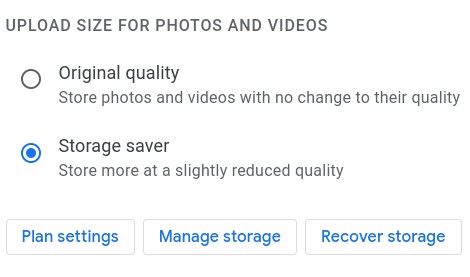
Even though you pay for the storage, you will want to check the storage option for your photos. One reason not to use the cloud storage is because of reduced quality.


Also, remember all systems do go down:


As freitasm & others have said, do you want to be locked out of your data for any reason?


Please keep this GZ community vibrant by contributing in a constructive & respectful manner.


Reanalyse
398 posts

Ultimate Geek
+1 received by user: 311


  #2885162 11-Mar-2022 19:13
Send private message

I backup locally to high capacity pen drives, also a backup provider called Zoolz and a third backup (write mostly) to AWS Glacier Deep Storage (around $US12 per TB per Year). The last option is for Disaster Recover for all my images and videos and usually operated as write only/with recovery if all else fails.


cokemaster
Exited
4937 posts

Uber Geek
+1 received by user: 1089

Retired Mod
Trusted
Lifetime subscriber

  #2885171 11-Mar-2022 19:40
Send private message

I have a similar set up to @timmmay


  • Onedrive and local computer for 'hot' storage. 
  • On site File server as a back up, in storage pools and critical stuff is set to replicate across multiple drives.  
  • iDrive (not renewing) for snapshots. Will replace with a 'storage' machine in Hawkes Bay.
  • AWS S3 Deep Glacier for 'offsite'. The per GB price for US East is very compelling, provided that you only use it as a method of last resort. 


webhosting

Loose lips may sink ships - Be smart - Don't post internal/commercially sensitive or confidential information!


nedkelly
666 posts

Ultimate Geek
+1 received by user: 104

Trusted
Subscriber

  #2885189 11-Mar-2022 20:59
Send private message

ANglEAUT:


Please can you provide examples & actual steps to achieve this?


So I have all my family photos and important scanned documents saved to one specific machine at home, and two 1tb hard drives (different brands) that I rotate at my friend's house every month, so as I add more photos to the machine the drive offsite gets refreshed every month, or shorter if I feel like it.


Yes its sneaker net but I visit my friends at least twice a month if not more, so I'm already there so its no trouble for me to exchange the drives.


 1 | 2
View this topic in a long page with up to 500 replies per page Create new topic


Geekzone Live »

Try automatic live updates from Geekzone directly in your browser, without refreshing the page, with Geekzone Live now.


Are you subscribed to our RSS feed? You can download the latest headlines and summaries from our stories directly to your computer or smartphone by using a feed reader.