Geekzone: technology news, blogs, forums
Guest
Welcome Guest.
You haven't logged in yet. If you don't have an account you can register now.


Lykho

253 posts

Ultimate Geek
+1 received by user: 1


#300640 24-Sep-2022 16:51
Send private message

ugh, you know how it's optimal to give people like 3 or so choices instead of 300? yea... 
I don't even know how to decide Intel or Ryzen, fan or watercooling, what gen of CPU is fit for my needs, etc.


if anyone has good youtube tutorial/overviews please post em, I know it would be a lot for anyone to try to explain from scratch.

I'm in Chch, so 99% sure I'll be getting something from PB Tech (I know TasTech is good, too, but their website isn't ideal for my level of ignorance), and just order the parts and pay a mate for assembly. but there are so many choices I feel like I'm going to end up just randomly choosing one of their stock builds.


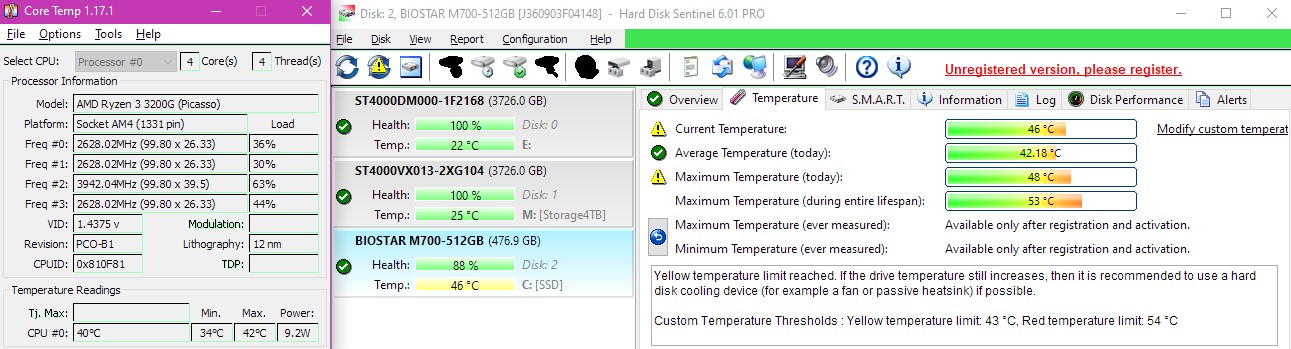
currently my PC is a second hand budget build and just resets itself randomly now and then for some reason, and sometimes the SSD spikes from 40 to 50+degrees during HDD transfers, which may be the issue. so I'm looking to get a replacement ASAP but can't make up my mind!!


but I'm not even sure if I should go 'workstation' or 'gaming rig' (I never play games, and I do want to do a little bit of video editing, but nothing extreme, which I've done before without even having a GPU, so I don't imagine my hardware requirements are huge).


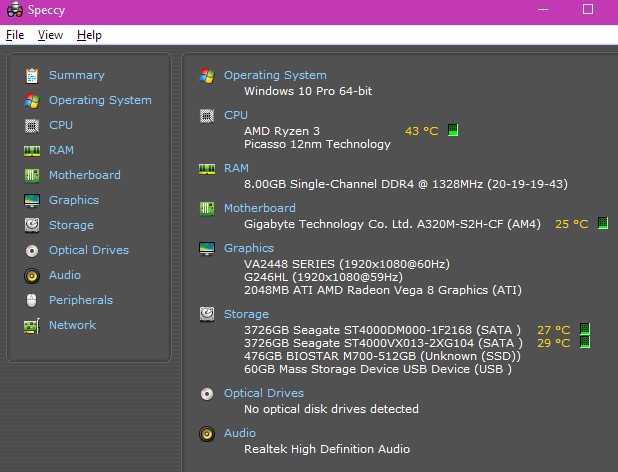
I'm looking to spend around $2,000 (already have 2 monitors, speakers, keyboard, mouse, and 2 ok HDDs (but I think they are often my bottleneck since they run through VeraCrypt, so maybe it's worth spending more on additional SSD space?. I could also salvage my very new and CPU cooler (dunno where to find the parts name) if it's compatible (it just barely fits in my current case, and I think it comes with brackets for Ryzen or Intel, bought it hoping to make my system quieter, but it was the PSU that was the issue).)


apparently I'll get no real use out of USB 3.2, but a mobo with 3.1 is probably worth going for,


and maybe the CPU is worth spending the most on?


ideally I'd like something quiet, apparently my PSU causes most of the noise in my current build.

current system:


Create new topic
l43a2
1784 posts

Uber Geek
+1 received by user: 591

ID Verified
Trusted

  #2972518 24-Sep-2022 17:38
Send private message

https://www.pbtech.co.nz/products/CHACOR04000_CPUAMD05700G_HDDSAM980600_MBDASU25515_MEMCOR602103_PSUCOR9020198_?qr=sharelink


something like the above would give you the great computer for a reasonable price, and gives you room to add extra parts as and if required.


Lykho

253 posts

Ultimate Geek
+1 received by user: 1


  #2972520 24-Sep-2022 17:54
Send private message

 something like the above would give you the great computer for a reasonable price, and gives you room to add extra parts as and if required.


thank you :)


mentalinc
3384 posts

Uber Geek
+1 received by user: 1023

Trusted

  #2972583 24-Sep-2022 20:29
Send private message

https://pyronic.al/


Provides different options at several price points.


CPU: AMD 5900x | RAM: GSKILL Trident Z Neo RGB F4-3600C16D-32GTZNC-32-GB | MB:  Asus X570-E | GFX: EVGA FTW3 Ultra RTX 3080Ti| Monitor: LG 27GL850-B 2560x1440


Quic: https://account.quic.nz/refer/473833 R473833EQKIBX 


Lykho

253 posts

Ultimate Geek
+1 received by user: 1


  #2972646 24-Sep-2022 21:39
Send private message

mentalinc:


https://pyronic.al/


Provides different options at several price points.


seems to be particularly about gaming, which I don't plan to do any of.


the most GPU intensive thing I'm going to need is the ability to play 1080p videos and maybe edit and reencode a few.


timmmay
20858 posts

Uber Geek
+1 received by user: 5350

Trusted
Lifetime subscriber

  #2972650 24-Sep-2022 22:36
Send private message

Look at PBTech prebuilt home and study PCs. The two more expensive ones would be suitable. Intel, AMD, doesn't really matter, both are fine. I do light video editing of family videos and a low end GPU, Premier Elements, it works fine without a decent GPU. It worked fine on my old i7 2600K with 16GB RAM, it's a bit faster on my Ryzen 5600X with 32GB of RAM, but that's just rendering and that can happen overnight.


Also, you can look at Dell / Lenovo websites based on the sorts of specs you see above.


Lykho

253 posts

Ultimate Geek
+1 received by user: 1


  #2972659 25-Sep-2022 01:31
Send private message

timmmay:


Look at PBTech prebuilt home and study PCs. The two more expensive ones would be suitable. Intel, AMD, doesn't really matter, both are fine. I do light video editing of family videos and a low end GPU, Premier Elements, it works fine without a decent GPU. It worked fine on my old i7 2600K with 16GB RAM, it's a bit faster on my Ryzen 5600X with 32GB of RAM, but that's just rendering and that can happen overnight


do you think I can skimp on the GPU for now (go with something like the parts the first reply suggest) and invest in one later on if performance isn't quite up to my demands?, or better to just get at the very least a budget range GPU?


Shop now for Lego sets and other gifts (affiliate link).
timmmay
20858 posts

Uber Geek
+1 received by user: 5350

Trusted
Lifetime subscriber

  #2972664 25-Sep-2022 08:27
Send private message

Lykho:


do you think I can skimp on the GPU for now (go with something like the parts the first reply suggest) and invest in one later on if performance isn't quite up to my demands?, or better to just get at the very least a budget range GPU?


GPUs are easy to add later, so I think that's a good strategy. I had integrated graphics with my i7 2600K for many years, it worked well, what's built into the current gen CPUs is probably fine for most things. I only got a GPU because the CPU I wanted didn't have one inside it.


People often use GPU for video encoding and such. My entry level GPU is about the same speed as the CPU, so if you're going to bother with it later do some research.


PANiCnz
999 posts

Ultimate Geek
+1 received by user: 161


  #2972669 25-Sep-2022 09:06
Send private message

It's probably worth spending the money to get your PC fixed, it might be secondhand but it's not old/out of date.


If you're not gaming upgrading to something like the 5600G would be good value for money along with adding more/new RAM (8Gb is a bit low) and a mid-range NVME drive.


timmmay
20858 posts

Uber Geek
+1 received by user: 5350

Trusted
Lifetime subscriber

  #2972672 25-Sep-2022 09:32
Send private message

I'm not sure if I would pay someone to fix the current PC as it could be one of those odd problems that takes ages and costs a lot, but it is probably worth trying a couple of things yourself like first updating all the drivers with the official ones, and maybe doing a fresh windows install. If that works then the PC is probably still fine for a while with a few minor upgrades.

PANiCnz
999 posts

Ultimate Geek
+1 received by user: 161


  #2972687 25-Sep-2022 12:01
Send private message

timmmay: I'm not sure if I would pay someone to fix the current PC as it could be one of those odd problems that takes ages and costs a lot, but it is probably worth trying a couple of things yourself like first updating all the drivers with the official ones, and maybe doing a fresh windows install. If that works then the PC is probably still fine for a while with a few minor upgrades.


If the PC is randomly restarting it's probably one of three things, the PSU, cooling or RAM. Given a new HSF has just been installed it's probably worth checking it was installed correctly. 


fe31nz
1294 posts

Uber Geek
+1 received by user: 423


  #2972870 26-Sep-2022 00:36
Send private message

The very first thing I always do when a PC is doing random things like that is give it a good clean.  The CPU cooler heat sinks in particular clog up with dust and then when the CPU is hitting one bit of its silicon hard that bit overheats and does something strange.  If the CPU overheats enough, its temperature sensor will just cause it to shut down completely.  So invest in a spray can of air (or gas) and blow out all that dust.  I find this needs to be done about twice a year for 24/7 PCs.


https://www.pbtech.co.nz/product/TOLSTO1040/Dynamix-CK-AD400-400ml-Air-Duster-Non-Flammable-hi


Shop now for Dell laptops and other devices (affiliate link).
Lykho

253 posts

Ultimate Geek
+1 received by user: 1


  #2972875 26-Sep-2022 05:05
Send private message

PANiCnz:


timmmay: I'm not sure if I would pay someone to fix the current PC as it could be one of those odd problems that takes ages and costs a lot, but it is probably worth trying a couple of things yourself like first updating all the drivers with the official ones, and maybe doing a fresh windows install. If that works then the PC is probably still fine for a while with a few minor upgrades.


If the PC is randomly restarting it's probably one of three things, the PSU, cooling or RAM. Given a new HSF has just been installed it's probably worth checking it was installed correctly. 


I hate doing all that shit more than I can describe. it's bad enough I have to rearrange my windows every day when they used to be memorized. if I'm going to reinstall every program again it may as well be on a platform that won't lag when I try to drag an explorer window across the screen.


I thought the random power cut/reset was due to old ext. HDDs installed (Hard Disk Sentinel warned me the 'estimated remaining lifespan' of one of them was like 2 weeks lol ('over 1000 days' is what it says for everything else)), and since I took them out I've had fewer crashes--these aren't BSOD or anything, it's literally like a power cut, and it just restarts as if nothing went wrong usually, sometimes it'll stall or load an error/recovery screen, but not usually. the SSD is listed as 88% health, and seems to overheat, but my old flatmate installed a high end cooler and configured the fan, so I dunno, he tends to know what he's doing. I don't know if the PSU is dodgy or the SSD is dodgy or what, but it was old when I bought it a couple years ago, so I'm ready to have something decent for once, that's finally worth reinstalling music and video software on. the peace of mind alone of not having data lost and corruption from random resets is priceless to me.


Lykho

253 posts

Ultimate Geek
+1 received by user: 1


  #2972876 26-Sep-2022 05:09
Send private message

fe31nz:


The very first thing I always do when a PC is doing random things like that is give it a good clean.  The CPU cooler heat sinks in particular clog up with dust and then when the CPU is hitting one bit of its silicon hard that bit overheats and does something strange.  If the CPU overheats enough, its temperature sensor will just cause it to shut down completely.  So invest in a spray can of air (or gas) and blow out all that dust.  I find this needs to be done about twice a year for 24/7 PCs.


https://www.pbtech.co.nz/product/TOLSTO1040/Dynamix-CK-AD400-400ml-Air-Duster-Non-Flammable-hi


yeh. I think my sensor was set to around 50 and I put it up to 55 recently (max temp today was 48...and I've only just turned it on, max lifetime is 53. but I can't find any historical data that I could correlate with critical error logs, I only installed HD Sentinel very recently).


the other day I was just transferring a download from SSD to HDD and the temperature graph spiked from 40 to 50 degrees in under a minute and the transfer seemed really slow, so maybe the CPU is getting cooled but the SSD doesn't get anything (there's a normal fan at the back but no side fans or anything). M2 SSD.


Lykho

253 posts

Ultimate Geek
+1 received by user: 1


  #2972877 26-Sep-2022 05:15
Send private message

PANiCnz:


timmmay: I'm not sure if I would pay someone to fix the current PC as it could be one of those odd problems that takes ages and costs a lot, but it is probably worth trying a couple of things yourself like first updating all the drivers with the official ones, and maybe doing a fresh windows install. If that works then the PC is probably still fine for a while with a few minor upgrades.


If the PC is randomly restarting it's probably one of three things, the PSU, cooling or RAM. Given a new HSF has just been installed it's probably worth checking it was installed correctly. 


downloaded an app for CPU temp and it looks like it's fine (though I haven't tried anything intensive yet), while sitting here just browsing the SSD is still sitting at 48degrees


Create new topic


Geekzone Live »

Try automatic live updates from Geekzone directly in your browser, without refreshing the page, with Geekzone Live now.


Are you subscribed to our RSS feed? You can download the latest headlines and summaries from our stories directly to your computer or smartphone by using a feed reader.