Geekzone: technology news, blogs, forums
Guest
Welcome Guest.
You haven't logged in yet. If you don't have an account you can register now.


Zeon

3926 posts

Uber Geek
+1 received by user: 759

Trusted

#301967 19-Oct-2022 16:02
Send private message

Hey guys,


We are doing the fitout for a new office and want to setup a wall for monitoring operations of all our systems. We currently have 5x 43" which is completely inadequate for the number of systems we want to have on display. We have a new wall that will be dedicated to it and have measured it all up and can fit 3x rows of 6x 43" TVs for 18x TV in total. The electrician is putting in the cables currently.


I am wondering about the hardware for the comptuer to drive this. I work with 6x screens every day - 4x from GPU and 2x from motherboard which work without a hitch and easy to setup in Win10.


Will it scale to 18x?


I was thinking to just get an ATX board with 5x PCI-E slots and 5x something like this:
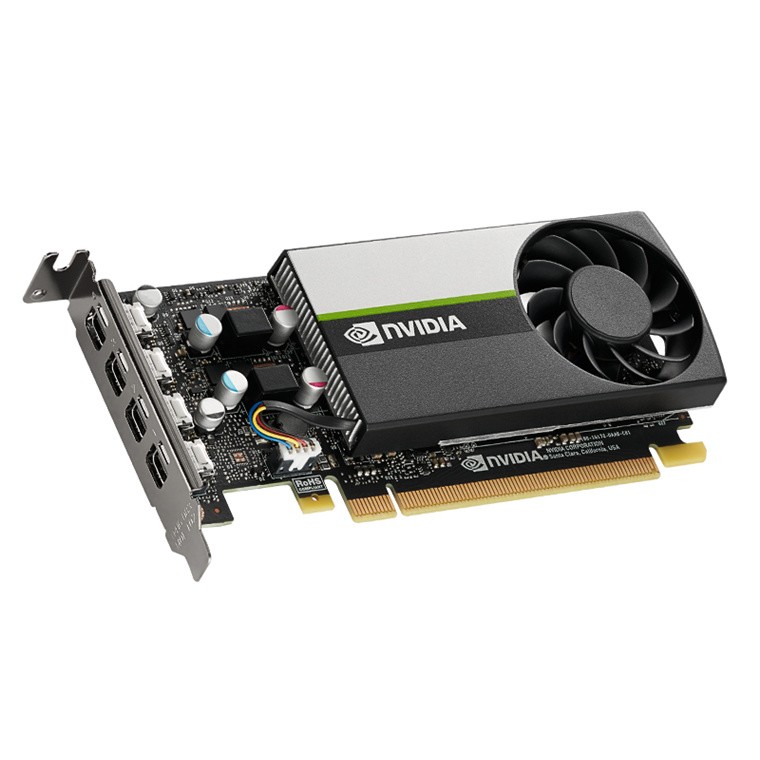


Any issues can be forseen?


Also any suggestions on where to source the TVs from? Ideally we can have a power switch to switch them all on and off - when we switch them on (AC power) they will auto-switch on to whatever input they were on previously.





Speedtest 2019-10-14


Create new topic
antoniosk
2382 posts

Uber Geek
+1 received by user: 742

ID Verified
Trusted
Lifetime subscriber

  #2984796 19-Oct-2022 16:14
Send private message

Lots of important screens to run from one machine.... whats the plan if the machine dies suddenly?


________


Antoniosk


richms
29097 posts

Uber Geek
+1 received by user: 10206

Trusted
Lifetime subscriber

  #2984798 19-Oct-2022 16:22
Send private message

Do you need 4k on the screens or is 1080p good enough? I got a video wall controller to try out as a signage solution to reduce the number of players needed. It takes a 4k input and gives 4 1080p outputs. If you choose the 2 by 2 layout it is pretty good looking for readability. I was trying it on some junk 32" 1360x768 screens so the 1080 was being scaled, but it was quite usable for a menu with prices, and meant that 3 screens could come from a single signage player vs needing 3 of them and them not being 100% in sync with each other.


Richard rich.ms

Zeon

3926 posts

Uber Geek
+1 received by user: 759

Trusted

  #2984811 19-Oct-2022 16:55
Send private message

antoniosk:


Lots of important screens to run from one machine.... whats the plan if the machine dies suddenly?


Panic!!! We already live with 5x screens now and automatic alerting so it wouldn't be the end of the world if it was offline for a bit. All monitoring systems can be access from comptuers.


richms:


Do you need 4k on the screens or is 1080p good enough? I got a video wall controller to try out as a signage solution to reduce the number of players needed. It takes a 4k input and gives 4 1080p outputs. If you choose the 2 by 2 layout it is pretty good looking for readability. I was trying it on some junk 32" 1360x768 screens so the 1080 was being scaled, but it was quite usable for a menu with prices, and meant that 3 screens could come from a single signage player vs needing 3 of them and them not being 100% in sync with each other.


Will be 1080p - no need for 4k. It's just a bunch of graphs. Each screen will be a different browser window showing a Grafana screen like this:


Speedtest 2019-10-14


mentalinc
3384 posts

Uber Geek
+1 received by user: 1023

Trusted

  #2984812 19-Oct-2022 16:57
Send private message

Can't you just do 4k screens, with 4 1080p groupings? will also save large volumes of power


CPU: AMD 5900x | RAM: GSKILL Trident Z Neo RGB F4-3600C16D-32GTZNC-32-GB | MB:  Asus X570-E | GFX: EVGA FTW3 Ultra RTX 3080Ti| Monitor: LG 27GL850-B 2560x1440


Quic: https://account.quic.nz/refer/473833 R473833EQKIBX 


richms
29097 posts

Uber Geek
+1 received by user: 10206

Trusted
Lifetime subscriber

  #2984814 19-Oct-2022 17:03
Send private message

Ok, this is what I got and it seems to do the job OK for menus - only 30Hz which might not matter for you. Gone from that seller but the same thing is all over aliexpress. https://www.aliexpress.com/item/1005004354053316.html


Richard rich.ms

insane
3324 posts

Uber Geek
+1 received by user: 1006

ID Verified
Trusted
2degrees
Subscriber

  #2984830 19-Oct-2022 18:35
Send private message

We did something similar at my last job. Setup a huge stack of raspberry PIs and did away with the old PC that was full of Matrox quadhead cards.

Each PI ran a single screen, and ran like a kiosk. Worked brilliantly and kept up just fine.


Shop now for Lenovo laptops and other devices (affiliate link).
everettpsycho
668 posts

Ultimate Geek
+1 received by user: 270


  #2984876 19-Oct-2022 20:45
Send private message

If all you need is a browser window can't you use anything that has a browser? I've seen raspberry pis get used a lot for exactly this but if that's all you need even something like an Android tv or fire stick with sleep settings turned off could achieve this result and be significantly more resilient than 1 pc running all screens.

jnimmo
1098 posts

Uber Geek
+1 received by user: 255


  #2984960 19-Oct-2022 22:19
Send private message

Not sure how the pricing or performance would compare but you could also consider the BlackMagic 8 channel 3G-SDI cards with some cheap SDI to HDMI adapter for the TV side.

SomeoneSomewhere
1882 posts

Uber Geek
+1 received by user: 1086

Lifetime subscriber

  #2985044 20-Oct-2022 00:23
Send private message

Cards with 6x mini-DP are also available.


If all it's doing is pointing at web pages, pointing a browser built into the TV at a web page could also be an option.


Zeon

3926 posts

Uber Geek
+1 received by user: 759

Trusted

  #2985820 21-Oct-2022 12:36
Send private message

Thanks all for the feedback. Some interesting info there.


To be honest it would be a bit of a pain to have a seperate device to run each screen as the monitoring software needs login so would hate to do that 18x so probably the Pi and stick ideas are out.


Will followup the others and post some pics when its all setup.


Speedtest 2019-10-14


richms
29097 posts

Uber Geek
+1 received by user: 10206

Trusted
Lifetime subscriber

  #2985823 21-Oct-2022 12:46
Send private message

Also with what pi's cost these days you can get a whole PC for less. At least a pi 4 could do 2 screens for you if you use the right signage software.


When we were looking at it for a solution, some of the signage softwares will let you send the cookies out to them to use to get resources as part of their cloud syncing stuff. I wasn't too involved in the software choice so didn't look too much into that side of it. I know the process involved using a keyboard to log one of them in and then the cookies were somehow syncable to all the others.


Richard rich.ms


Shop now on Samsung phones, tablets, TVs and more (affiliate link).
Varkk
643 posts

Ultimate Geek
+1 received by user: 477


  #2985857 21-Oct-2022 13:49
Send private message

Don't forget you can also daisy chain Displayport if your monitors support it. I think you can run up to 4 1080P displays on a single DP1.2 port. So that may be an option, but you will likely need to pay a bit more for each monitor to get ones which support it.


Zeon

3926 posts

Uber Geek
+1 received by user: 759

Trusted

  #3007576 9-Dec-2022 01:39
Send private message

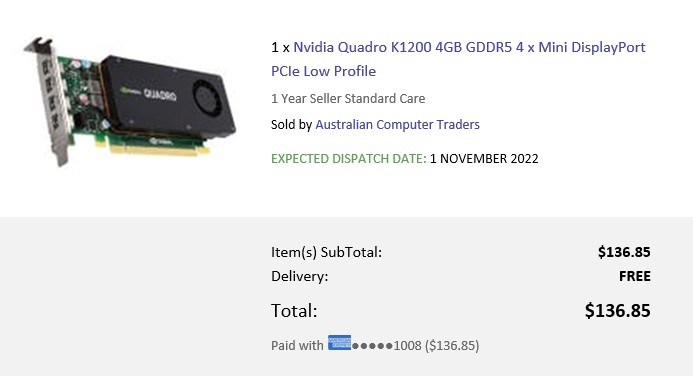
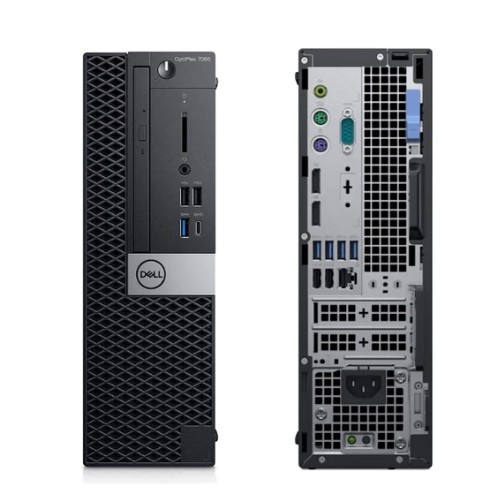
So I ended up getting a bunch of reconditioned Quadro K1200 for ~$130 each inc. GST from Dick Smith (ship out of Aus) - each can do 4x displays. I have bought a number of ex-lease Dell optiplex 7060 (small form factor - SFF) which each have 2x PCI-E slots and the whole setup is working fine with 5x 43" @ 1080P.


Works out at around $100 per screen to drive them.


Next item is actual screens. Any particular recommendations rather than the cheapest that can be found for 43"? The main requirement will be that after they are hard powered-off, when the power comes back, if they were on previously they come back on to the same input they were on originally. Planning to have a single flip switch for all the power points as don't want to use a remote on 18x TVs! Probably looking for the cheapest option that can do that.....


Speedtest 2019-10-14


Create new topic


Geekzone Live »

Try automatic live updates from Geekzone directly in your browser, without refreshing the page, with Geekzone Live now.


Are you subscribed to our RSS feed? You can download the latest headlines and summaries from our stories directly to your computer or smartphone by using a feed reader.