Geekzone: technology news, blogs, forums
Guest
Welcome Guest.
You haven't logged in yet. If you don't have an account you can register now.


AlDrag

280 posts

Ultimate Geek
+1 received by user: 27


#304338 26-Apr-2023 08:29
Send private message

Currently using a 27inch IPS monitor, as it's my gaming monitor. But thinking of getting something else for working from home as a software dev.


38 inch ultrawide looks great! But the price is insane compared to 34 inch (but might be worth it). Otherwise, 42inch LG C2 TV is tempting...


What are you guys using?


Create new topic
reven
3748 posts

Uber Geek
+1 received by user: 874

Trusted

  #3068087 26-Apr-2023 09:19
Send private message

i use a asus 49" 3840x1080 ultra wide for my work pc.  for my personal PC that i game on and do non-work programming, i use a samsung odyssey neo thats 5120x1440.  I much prefer the neo for the more pixels.


I use to rock 3x 24" screens, but a single ultra wide I find easier, less cables, can make windows larger if needed.   I never maximise stuff now though and everything is just kinda floating, i dont snap windows to edges.


Programming wise, im a c# dev that does full stack, lots of backend, lots of front end, if that matters


AlDrag

280 posts

Ultimate Geek
+1 received by user: 27


  #3068089 26-Apr-2023 09:25
Send private message

reven:


i use a asus 49" 3840x1080 ultra wide for my work pc.  for my personal PC that i game on and do non-work programming, i use a samsung odyssey neo thats 5120x1440.  I much prefer the neo for the more pixels.


I use to rock 3x 24" screens, but a single ultra wide I find easier, less cables, can make windows larger if needed.   I never maximise stuff now though and everything is just kinda floating, i dont snap windows to edges.


Programming wise, im a c# dev that does full stack, lots of backend, lots of front end, if that matters


I assume that's the Odyssey Neo G9 with mini-led? That sounds like a great compromise to get close to OLED contrast.


49inch does seem like an awesome form factor (2 x 27inch monitors side-by-side equivalent).


reven
3748 posts

Uber Geek
+1 received by user: 874

Trusted

  #3068090 26-Apr-2023 09:27
Send private message

https://www.pbtech.co.nz/product/MONSAM74997/Samsung-Odyssey-Neo-G9-49-Super-Ultrawide-Dual-QHD


this one.  yeah its good, it has a great R factor, 1800R, my asus is only 1000R.   But the asus was about 1/3rd the price.  didnt want to spend too much incase i didnt like the ultrawide.  But nah, love it.


frankv
5705 posts

Uber Geek
+1 received by user: 3666

Lifetime subscriber

  #3068121 26-Apr-2023 10:56
Send private message

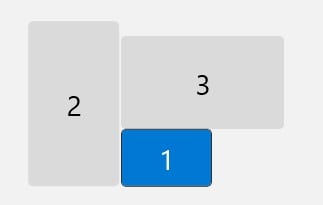
I have 2x27", one portrait & one landscape, plus the laptop in the gap below the landscape one.


I prefer multiple monitors to one large one, just because it's easy to maximise a window to one screen. But it seems that Windows now has a thing where you can make multiple virtual screens out of one large one. 


I wouldn't want to go much wider, because I have single vision lenses in my "work" glasses, and I think the edges of a large monitor would start to go out of focus. But maybe 4 or so more inches? If it was curved? I also wouldn't want to go much taller because of the constant eye & head movement up & down, but maybe a couple more inches?


timmmay
20858 posts

Uber Geek
+1 received by user: 5350

Trusted
Lifetime subscriber

  #3068124 26-Apr-2023 11:07
Send private message

25" Dell QHD. I find I can only look at one thing at a time, and I don't want to turn my neck to see my screens. When I use the super wide 40+" monitors at work I put all the windows in the center of the big monitors.


nzkc
1634 posts

Uber Geek
+1 received by user: 1041


  #3068197 26-Apr-2023 16:38
Send private message

A pair of Dell U2720Q monitors. I had one, I loved it so much I bought another!


What I have discoverd is that a few things dont like it...


  • Google Meets now wont let me share my laptop screen. It only presents the two 4K screens as options. Fine for me - less so for those trying to view on a 1080p screen!
  • Full screen meetings can sometimes flicker - didnt happen with one monitor. I assume its related to the GPU and struggling to push 2 x 4K monitors. Do not have the problem in regular use - again Google Meet

I tend to have apps snapped to the side of each screen effectively giving me 4 x 1920 x 2160 panels.  I haven tried the screens in portrait mode yet... need to give that a whirl but I'm not sure I'll like it all.


Shop now at Mighty Ape (affiliate link).
lxsw20
3689 posts

Uber Geek
+1 received by user: 2174

Subscriber

  #3068217 26-Apr-2023 17:56
Send private message

nzkc:


A pair of Dell U2720Q monitors.


Yeap this is what I'd go for too, they are really nice. There is a 32" version too.


deadlyllama
1283 posts

Uber Geek
+1 received by user: 476

Trusted

  #3068226 26-Apr-2023 19:03
Send private message

I'm happy with my pair of Dell S2721QSes, plus an old 1080p Viewsonic which I added to see how many monitors this thing could drive.


Should have bought a larger laptop though, the XPS 13 is too small.


Back in the day I managed to code with one display, 80x25 text, uphill both ways in a howling southerly (no snow in Wellington), etc.


Create new topic


Geekzone Live »

Try automatic live updates from Geekzone directly in your browser, without refreshing the page, with Geekzone Live now.


Are you subscribed to our RSS feed? You can download the latest headlines and summaries from our stories directly to your computer or smartphone by using a feed reader.