Geekzone: technology news, blogs, forums
Guest
Welcome Guest.
You haven't logged in yet. If you don't have an account you can register now.


Sideface

9649 posts

Uber Geek
+1 received by user: 15596

Trusted
DR
Lifetime subscriber

#310451 20-Oct-2023 13:47
Send private message

Advice please ...


I recently upgraded my main desktop PC - a 2019 vintage medium-spec Wintel build:


Intel i7 9700 CPU
32GB DDR4 RAM
Gigabyte Z390 mobo
Two NVMe M2 SSDs
Windows 11 latest


The original system drive - a 250GB NVMe M2 - was 90% full, so I cloned it to a new 1TB NVMe M2, using True Image.*


The PC rebooted OK, and showed the new 1TB system drive.  All software worked normally.


The problem: the HDD LED indicator light was now flashing rapidly and continuously, like a strobe light. This did not happen with the old drive. Very bright and very distracting.  🙁


The CPU and SSD run cool (low 20s), and with less than 5% HDD activity at idle. 
Disconnecting from the Internet makes no difference.  
ESET and Malwarebytes scans are negative.

System Properties show no file system errors, but System Properties / Hardware / Events shows:


Device settings for SCSI \ Disk&Ven_NVMe&Prod_Samsung_SSD_990\5&bbd7e95&0&000000 were not migrated from previous OS installation due to partial or ambiguous device match.


I have used True Image for years and have never had this problem.


All expert advice gratefully received.  😐


 *  I tried both Acronis True Image 2021 and the new Acronis Cyber Protect Home Office, with identical results.



Sideface


Create new topic
Ruphus
469 posts

Ultimate Geek
+1 received by user: 181


  #3150516 20-Oct-2023 15:43
Send private message

Do you still have the original 250GB NVME SSD plugged into the motherboard, in the same slot? If you did, I'd remove it and test that you could boot from the new NVME SSD without the old drive installed. Last thing you'd want is to format the old NVME and find out that the boot records weren't cloned over, and your computer doesn't boot.


As for the LED light, can you remove the HDD cables from the front panel connector on the motherboard?


There is this reddit post about the LED light blinking on a Z390 Aorus Pro. Could be a compatibility issue with the NVME SSD and motherboard.


No HDD Activity Light on Z390 Auros Pro : gigabyte (reddit.com)


Gordy7
gordy7
2001 posts

Uber Geek
+1 received by user: 505

ID Verified
Lifetime subscriber

  #3150517 20-Oct-2023 15:43
Send private message

Not an expert here... Could it be a Windows indexing issue?


Gordy


My first ever AM radio network connection was with a 1MHz AM crystal(OA91) radio receiver.


huckster
886 posts

Ultimate Geek
+1 received by user: 460

ID Verified
Lifetime subscriber

  #3150528 20-Oct-2023 16:06
Send private message

How long have you had it running on the new drive?


Could be Windows checking things etc. and it may stop after it has finished....


Batman
Mad Scientist
30012 posts

Uber Geek
+1 received by user: 6217

Trusted
Lifetime subscriber

  #3150602 20-Oct-2023 19:37
Send private message

try macrium free clone, i've cloned a lot of ssd <-> nvme drives they just plug and play


Sideface

9649 posts

Uber Geek
+1 received by user: 15596

Trusted
DR
Lifetime subscriber

  #3150605 20-Oct-2023 19:59
Send private message

Apologies for my slow reply (via my iPhone).  🙄


I've been "fighting" this PC all day - and losing.


The old SDD appears to be completely dead - I managed to save a little data before it failed, but I now have several days of work ahead of me to reinstall about 20 apps!


The good news is that the PC appears to be working normally with the new SSD and Win 11 re-installed.


Fortunately, I had backed up most of my lost data.


Thank you all for your advice.  🙂


Sideface


Sideface

9649 posts

Uber Geek
+1 received by user: 15596

Trusted
DR
Lifetime subscriber

  #3150859 21-Oct-2023 19:46
Send private message

Progress Report 21 Oct 2023


The good news:  I (luckily) found a system drive image created a month ago, and was able to rebuild the "dead" SSD system drive on the new SSD, rescuing all the lost software.


The bad news:  The error message persists unchanged, and the HDD LED keeps flashing continuously.


I tried cloning the "flashing" drive using Macrium Reflect as recommended - and got a perfect copy on a second drive - but it still flashes!


Sideface


Want to support Geekzone and browse the site without the ads? Subscribe to Geekzone now (monthly, annual and lifetime options).
rhy7s
673 posts

Ultimate Geek
+1 received by user: 147


  #3151013 22-Oct-2023 08:08
Send private message

Do you see the source of the drive activity in Task Manager (Ctrl-Shift-Esc)? I disconnect LED indicators myself.

rhy7s
673 posts

Ultimate Geek
+1 received by user: 147


  #3151015 22-Oct-2023 08:23
Send private message

(Resource Monitor is under the three dot menu in the Performance tab).

Sideface

9649 posts

Uber Geek
+1 received by user: 15596

Trusted
DR
Lifetime subscriber

  #3151018 22-Oct-2023 08:54
Send private message


rhy7s:  Do you see the source of the drive activity in Task Manager (Ctrl-Shift-Esc)? I disconnect LED indicators myself.


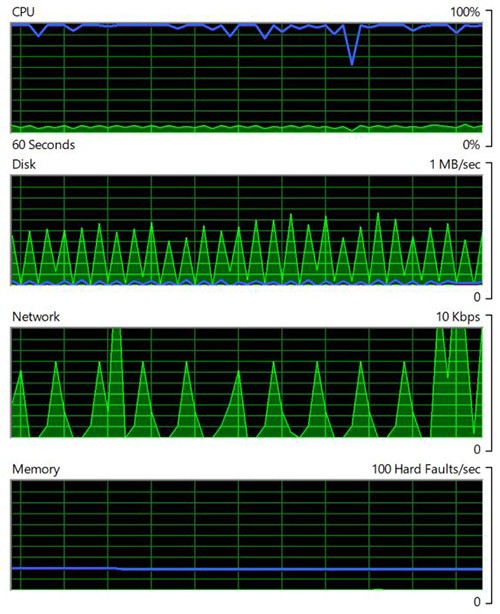
Task Manager (at idle) :  


CPU 2 to 5%, Disk 1 to 2% 
No "suspect" activity.
Occasional activity (not continuous): System, Windows Search Indexer, Desktop Windows Manager, Task Manager! 


Resource Monitor (at idle):


Disk I/O <1 MB/sec  


Sideface


huckster
886 posts

Ultimate Geek
+1 received by user: 460

ID Verified
Lifetime subscriber

  #3151019 22-Oct-2023 09:05
Send private message

As mentioned above. Maybe leave it running for a while (overnight) to see if it is a Windows thing that just needs to complete.


Gordy7
gordy7
2001 posts

Uber Geek
+1 received by user: 505

ID Verified
Lifetime subscriber

  #3151036 22-Oct-2023 12:54
Send private message

What happens to disk activity if you boot Windows in safe mode?


Gordy


My first ever AM radio network connection was with a 1MHz AM crystal(OA91) radio receiver.


Shop on-line at New World now for your groceries (affiliate link).
Sideface

9649 posts

Uber Geek
+1 received by user: 15596

Trusted
DR
Lifetime subscriber

  #3151097 22-Oct-2023 20:26
Send private message

Thank you for your queries.


Restarting in safe mode made no difference to the rapid flashing.


Leaving the PC running overnight made no difference.


Moving the SSD to another PC with similar specs gave an instant cure - it functioned normally with just occasional flashing.   🙂 


Sideface


Gordy7
gordy7
2001 posts

Uber Geek
+1 received by user: 505

ID Verified
Lifetime subscriber

  #3151098 22-Oct-2023 20:38
Send private message

Check for any motherboard Bios updates....


Gordy


My first ever AM radio network connection was with a 1MHz AM crystal(OA91) radio receiver.


huckster
886 posts

Ultimate Geek
+1 received by user: 460

ID Verified
Lifetime subscriber

  #3151099 22-Oct-2023 20:39
Send private message

Did you boot from the drive after moving it?


rhy7s
673 posts

Ultimate Geek
+1 received by user: 147


  #3151100 22-Oct-2023 20:54
Send private message

Do you see a different pattern and disk I/O rate on the different hardware? And as the poster above said, this system is booting into the same install? If you sort disk activity by total, read, or write - are the same processes at the top of the list between systems?

Create new topic


Geekzone Live »

Try automatic live updates from Geekzone directly in your browser, without refreshing the page, with Geekzone Live now.


Are you subscribed to our RSS feed? You can download the latest headlines and summaries from our stories directly to your computer or smartphone by using a feed reader.