Geekzone: technology news, blogs, forums
Guest
Welcome Guest.
You haven't logged in yet. If you don't have an account you can register now.


Scott3

4177 posts

Uber Geek
+1 received by user: 2990

Trusted
Lifetime subscriber

#316088 16-Sep-2024 02:07
Send private message

Storage space has suddenly come to a head in my household.

My set up is as follow's


Dell Precision M4700 Laptop with 500 GB ssd boot drive + 2 TB 2.5" HDD:


  • Photos from DSLR, and smartphone's every time they get full
  • Some archival stuff from my wifes business
  • Some video footage from my childhood
  • General personal files
  • I use this laptop for downloading media (mostly torrents), but immediately transfer it off to our NAS so we can watch it on our TV, bedroom projector etc.
  • Backed up via blazeback.
  • Yes it's a 2011 era laptop, but is still going strong for this application. Work has issued me a modern high end work station that I use most of the time (I have admin privileges on this, but want to keep it fairly clean and not cluttered with my personal stuff, and of course I don't want to run any risky programs etc on my employers computer)


QNAP TS-212 NAS (2011 era i think) with 2x 2TB disks. Brought used with disks many years back


  • Functions as a file server for media (plus a small handful of files that me and my wife want to work on at a similar time).
  • Set up as two independent volumes
  • No RAID, No mirroring, No backup. (data on it is largely replaceable if a drive should fail)
  • Been running at the limit of capacity with this for 2+ years. Delete old stuff to make room for new stuff.
  • Runs 24/7, with disks spun down most of the time (and compact enough to wedge into the bottom of my data panel).
  • Kinda slow. Tops out at ~30MB/S copying files, with CPU at 100%.
  • Has lots of capability (torrents etc), but interface is clunky so I don't use it.

I also have a stack of external hard drives (often the boot drives of systems that died, or when I upgraded the boot drive and did a clean install). Have stuff files from past employers if I ever wanted to become professionally chartered (Working in a different field ATM). Prob 2.5TB of drives, but mostly junk on them. Don't really have time to purge, but don't want to throw away.


Current situation:


  • Collection of photos has grown to a point where my personal laptop is becoming full, Likely could purge a lot, but would rather not.
  • Purchase of a 4k TV means media is now ~4 times larger, so NAS is going to run out of space fast.


Options I am considering


  • Upgrade laptop HDD to say 4TB, and upgrade NAS capacity and continue as per currently.
  • Move all my large storage to a NAS or file server. (photos etc would need some back up method)


First option seems essayist, but I am a little weary that my laptop drops out of windows 10 support next year (and modern laptops don't tend to have multiple disk bays). Means #2 is the obvious pick.

But if i move all my photos to the NAS, I can on longer use a single computer blaze back licence for all my backups. And to be prudent I should start mirriong drives. And the bottom line is doing data storage properly is quite expensive...


On the NAS upgrade I have a few options:


  • Shoehorn some more storage into my current NAS (drive upgrade or external drive via USB).
  • Upgrade to a modern faster NAS. Either set up to tolerate a drive failure, or not.
  • Get a file server to replace the NAS, could mean I could remote in (never had done remote access before), and download media direct to it's storage location, rather than the somewhat painful download then transfer. If it was a computer, not a NAS, I could use a single blazeback licence on it (and back my laptop up to it, meaning I don't need a backup licence for my laptop).


Any thoughts on this? Want to keep the cost & power consumption reasonable if I can, but this gear is not cheap.


Security camera's for our house is in the maybe, some day category. But I assume having them go the cloud would be better than local storage?




View this topic in a long page with up to 500 replies per page Create new topic
 1 | 2 | 3
K8Toledo
1018 posts

Uber Geek
+1 received by user: 311


  #3282867 16-Sep-2024 22:59
Send private message

Option three, buy a reliable desktop with four SATA ports, install/clone the laptop drive for use as the system drive, then buy a couple of 3.5" desktop drives for storage? Better going 2x 2TB vs 1x 4TB.


I wouldn't recommend 2.5" laptop drives for server duty, you'll find 3.5" drives faster and more durable.


Windows 10 will function fine after 2025, but will not receive new fixes or security updates - in other words it's good for a few more years yet.  W11 is a nightmare imho.


The SFF has four? ports from memory.


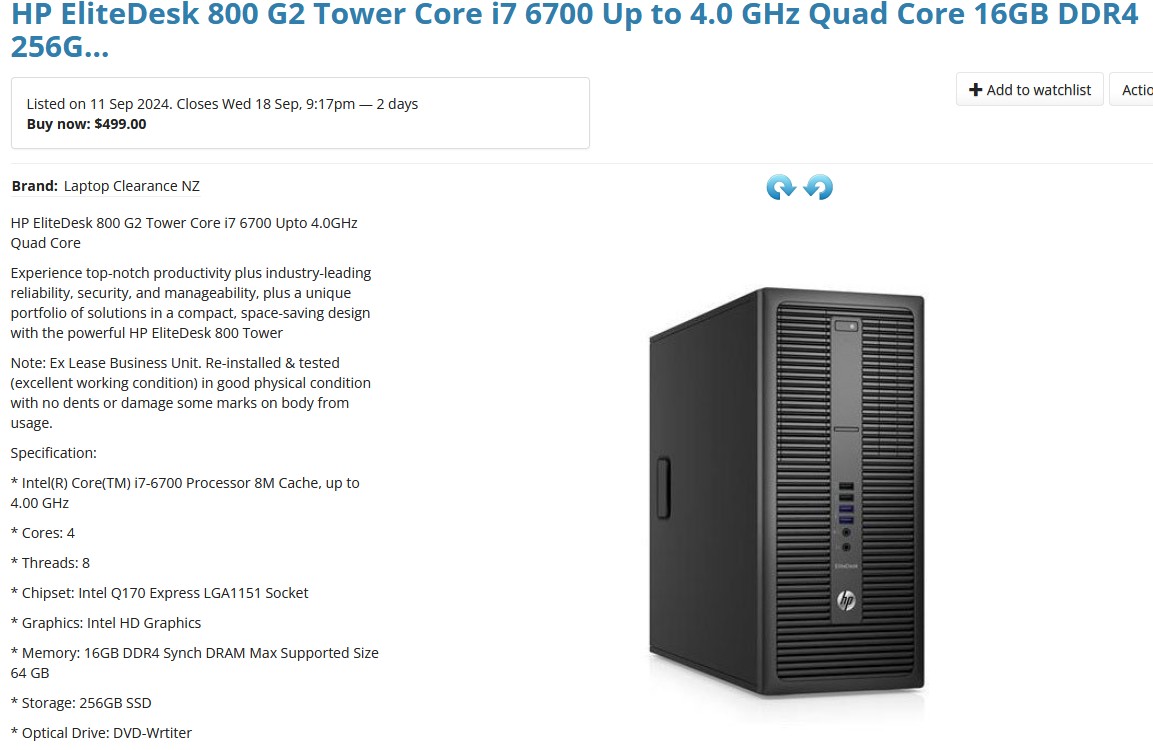
The Elite Desk tower versions have five? ports I think, and may be more suited for multiple drives. This one is $500 with overkill i7, but I've seen them go for half that much. 


Blows away any NAS.


Handle9
11926 posts

Uber Geek
+1 received by user: 9679

Trusted
Lifetime subscriber

  #3282871 17-Sep-2024 04:56
Send private message

A NAS makes a lot of sense for a variety of reasons. It gives you a variety of use cases as well as offering redundancy.


It really comes down to whether you want an appliance or a hobby. Either way buy something with an intel processor so you get Quicksync for hardware transcoding.


If you want an appliance buy an intel 4 bay synology. You get software raid 5 (it uses a parity drive so N-1 storage with the ability to deal with a single drive failure) as well as a rich software ecosystem that largely just works. It's a decent investment but then you can forget about it for the next 5-10 years.


If you want a hobby then building your own NAS is good fun and can save you money. There's a ton of different options out there for hardware and software but if I was starting again I'd be inclined to go for a Jonsbo N2/N3/N4 case with an MATX motherboard. There's a great variety of chinese motherboard/cpu combos from the likes of Erying and Toptonwhich have 6-8 sata ports, a PCIE slot and a variety of CPUs. Cores are more important for a NAS than speed. If you run lots of containers and a VMs they get chewed up fast.


If you go the hobby route there's a variety of OS/hypervisors available from commercial and reasonably slick (unRAID, which I use) to free and harder work (Proxmox, Truenas etc).


Incidentally there are containers available for both Backblaze and Crashplan. They let you backup from a NAS to the private versions of Crashplan and Backblaze. I use the backblaze one for my critical files like photos. It's ok but a bit flaky. I get around that by restarting the container on a schedule.


Either way NAScompares is a great resource.


https://nascompares.com/


Handle9
11926 posts

Uber Geek
+1 received by user: 9679

Trusted
Lifetime subscriber

  #3282872 17-Sep-2024 04:59
Send private message

BTW either way you can have automated photo backup using either Synology photos or something like Immich. I use Immich and it's great albeit with a steep learning curve.


Scott3

4177 posts

Uber Geek
+1 received by user: 2990

Trusted
Lifetime subscriber

  #3283154 17-Sep-2024 13:40
Send private message

Very much want an appliance.

My current Q-nap NAS has been basically stuffed in my data cabinet (Just luck that the 2 bay format just fitted), and left for close to a decade. Other than the clunky web interface, and transfer speed topping out at ~30MB/s I have been very happy with it.

Keen to replace it something relatively efficient that can run for a decade without significant intervention. A bit wary that using a 8 year old ex corporate PC is going to chew a chunk of power, and need maintenance like dust removal and re-pasting.


The issue is that Maxing out my personal laptop storage (largely from photos, and my wife's business stuff both of which I want backed up), has happened concurrently with us getting a 4k TV meaning I want a lot more media storage capacity on my NAS. Would be good to purge and sell my various external drives at the same time.

Given I am need to upgrade my NAS capacity anyway, makes sense to move my file archive away from my laptop (A 4TB 2.5" drive is $400, and I think they are all SMR), Vs getting ex data center 3.5" 12TB drives for $195 a piece (which is cheap enough I can run N-1, rather then my current situation of relying on a backup).

But then I need a backup solation for (at least ~3 TB of content) of my NAS / File server.


Appeal of having a windows computer as my file server is:


  • I can use the unlimited capacity blazeback computer service to back everything up for USD99 / year, were as for a proper NAS I would need to either use their B2 service at US$6/TB/Mo (which is more than I am willing to spend).
  • I could remote into that machine and use it to directly run media downloads / torrents, straight to the destination, vs my current solution of down loading onto my personal laptop, then transferring. Amusingly my internet is so fast and my NAS is so slow, the second step can take longer than the first. (I think my current NAS can do torrents, but I the interface is so slow and clunky I have never tried to use that ability.)


Currently toying with the idea of getting rid of my blazeback subscription (Allways keen to get rid of recuring costs), and using my current NAS (2x 2TB for backup), Ideally remote in a family members home somewhere. This should be big enough for my critical files.


------

On drives, 12TB seems to be the current sweet spot for used drives.

They run at about $195 for SATA & $160 for SAS.

Could do 4x of them in N-1 to give 36TB usable...


Would prefer 3x 16 TB or 18 TB drives (future proofing for an Additional drive and better residual values), but the pricing is too high for me at the moment. Guessing when the 30 & 32 TB drives start hitting data centers we will see a drop in the price of 16 - 24 TB drives.


K8Toledo
1018 posts

Uber Geek
+1 received by user: 311


  #3283287 17-Sep-2024 16:11
Send private message

Scott3:


Very much want an appliance.

My current Q-nap NAS has been basically stuffed in my data cabinet (Just luck that the 2 bay format just fitted), and left for close to a decade. Other than the clunky web interface, and transfer speed topping out at ~30MB/s I have been very happy with it.

Keen to replace it something relatively efficient that can run for a decade without significant intervention. A bit wary that using a 8 year old ex corporate PC is going to chew a chunk of power, and need maintenance like dust removal and re-pasting.


Those HP machines are built with high quality components such as PSU's from Delta, and go through rigorous testing by HP.


They would be the best desktops available (besides HP Z series) and will still be running in 10 years time. I've supplied dozens for clients over the years and never had one come back. 


I've also seen many late 2000 era machines that are going strong.....  Power draw is generally low with no dedicated GPU.


Reapplying thermal paste is something overclockers or gamers would do, not required on business machines.


The thing about desktops vs NAS is the desktop always has higher specs and gives you more bang for buck.  A $500 NAS gives you what - a Pentium/Celeron dual core with 4GB RAM? 


Handle9
11926 posts

Uber Geek
+1 received by user: 9679

Trusted
Lifetime subscriber

  #3283296 17-Sep-2024 16:42
Send private message

I don't think the extra specs matter for a NAS with highly optimised software. The most important specs are throughput and hardware transcoding for media. You are paying for the software but there's real value there.


If it's for a homelab it's a different use case but OP has fairly modest needs and wants an appliance type solution without the maintenance that comes with a PC style solution.


If it was me in that situation I'd be buying a DS423+ (J4125 quad core) and calling it a day. Synology is the market leader for a reason.


12TB enterprise drives are definitely the sweet spot. I've bought a couple of those for my backup server and will be buying another 2 this month. They are great value.


It's also well worth adding a 1TB NVME for cache, it'll give much better write in performance as well as general QOL improvements. I'd also max out the RAM, it'll give some nice performance uplift and it's a modest cost. You don't need to use the synology stuff, there are cheaper options that work.


Move to New Zealand's best fibre broadband service (affiliate link). Free setup code: R587125ERQ6VE. Note that to use Quic Broadband you must be comfortable with configuring your own router.
Scott3

4177 posts

Uber Geek
+1 received by user: 2990

Trusted
Lifetime subscriber

  #3283302 17-Sep-2024 17:21
Send private message

My personal laptop is a 2013 era Dell M4700, that has run 24/7 for a decent chunk of it's life, so I am no stranger to old hardware. That needed re-pasting (along with being taking apart to get the the fluff that can't be accessed externally out). I'm a bit torn, i can deal with the hardware maintenance, just would prefer not to.

As per the other post, the big selling points of a PC are the ability to use a computer blaze back account for backup (but I am warming to doing my own backup), and the ability to use it to download torrents directly to their storage path, avoiding the need to subsequent copy.


I am a little wary that if I buy a ~8 year old PC, shoehorn in a drive cage, and run it for a decade, it will be a 18 year old PC at the end of that time.  Perhaps I am a little concerned about power consumption. A 150W heater in my garage year round would help a little with mold reduction etc. But you are right, that I get a lot of grunt for a cheap price in a used PC.

Assume I would run windows?


Biggest selling point of a NAS is low power consumption & compact size (Space is very precious in my house). My current NAS must spend ~95% of the time without the drives spinning...

As long as the NAS can throughput ~100 MB/s (up from my current 30MB/s) and the interface is fairly fluid I will be happy don't need to do any transcoding etc. 


On the DS423+ It's a $950 unit. Before the upgrades you suggest.

Wondering if a Entry level unit would meet my needs. This one has 2.5 Gb ethernet, which at some point I will be upgrading my home network to:

https://www.pbtech.co.nz/product/NASAST1104/Asustor-AS1104T-4-Bay-NAS-Quad-Core-14-GHz-1GB-RAM


Is automating a backup (ideally versioned), from one NAS to another of a different brand (ideally in a different location) hard.


lxsw20
3689 posts

Uber Geek
+1 received by user: 2174

Subscriber

  #3283304 17-Sep-2024 17:40
Send private message

Whats the best place for s/h drives - https://serverpartdeals.com??


I've just got a DS423+ with 2 spare bays to fill. 


Handle9
11926 posts

Uber Geek
+1 received by user: 9679

Trusted
Lifetime subscriber

  #3283310 17-Sep-2024 17:55
Send private message

Scott3:As per the other post, the big selling points of a PC are the ability to use a computer blaze back account for backup (but I am warming to doing my own backup), and the ability to use it to download torrents directly to their storage path, avoiding the need to subsequent copy.


Any modern x64 NAS will allow you to run a torrent client in a container as well as the *arr suite for automation. There should be no need to run anything locally.


Handle9
11926 posts

Uber Geek
+1 received by user: 9679

Trusted
Lifetime subscriber

  #3283311 17-Sep-2024 17:58
Send private message

lxsw20:


Whats the best place for s/h drives - https://serverpartdeals.com??


I've just got a DS423+ with 2 spare bays to fill. 


amazon.com (not .au) ships to NZ


Handle9
11926 posts

Uber Geek
+1 received by user: 9679

Trusted
Lifetime subscriber

  #3283321 17-Sep-2024 18:47
Send private message

Scott3:

Wondering if a Entry level unit would meet my needs. This one has 2.5 Gb ethernet, which at some point I will be upgrading my home network to:

https://www.pbtech.co.nz/product/NASAST1104/Asustor-AS1104T-4-Bay-NAS-Quad-Core-14-GHz-1GB-RAM


Have a look here, it gives you a detailed review of the unit.


https://nascompares.com/review/drivestor-4-nas-drive-review-best-value-raid-5-nas/


Shop now for Lenovo laptops and other devices (affiliate link).
Handle9
11926 posts

Uber Geek
+1 received by user: 9679

Trusted
Lifetime subscriber

  #3283323 17-Sep-2024 19:31
Send private message

Scott3:
Is automating a backup (ideally versioned), from one NAS to another of a different brand (ideally in a different location) hard.


Theoretically no but the devil is in the detail of course. If you can run tailscale on the nas or a raspberrypi it's pretty easy.


ratsun81
516 posts

Ultimate Geek
+1 received by user: 183


  #3283324 17-Sep-2024 19:53
Send private message

My advice would be dont go and buy old hardware for a storage system unless you dont care. Its "cheap" but as soon as it lets go its not cheap anymore.


Ive been burnt by OOB systems such as synology and qnap and wont do it anymore.


my recommendation would be to buy and build an unraid system, where you can build your own but you do need to plan it out. 


Quic Broadband


Use R212389ELFLL2 promo code for free setup at checkout.


Jase2985
13732 posts

Uber Geek
+1 received by user: 6207

ID Verified
Lifetime subscriber

  #3283326 17-Sep-2024 20:06
Send private message

ratsun81:


Ive been burnt by OOB systems such as synology and qnap and wont do it anymore.


I would like to know why you say that? These systems are super reliable and well supported.


Surely your suggestion has more risk and offers less functionality and requires more management than the above options.


Jase2985
13732 posts

Uber Geek
+1 received by user: 6207

ID Verified
Lifetime subscriber

  #3283327 17-Sep-2024 20:16
Send private message

Handle9:


Scott3:

Wondering if a Entry level unit would meet my needs. This one has 2.5 Gb ethernet, which at some point I will be upgrading my home network to:

https://www.pbtech.co.nz/product/NASAST1104/Asustor-AS1104T-4-Bay-NAS-Quad-Core-14-GHz-1GB-RAM


Have a look here, it gives you a detailed review of the unit.


https://nascompares.com/review/drivestor-4-nas-drive-review-best-value-raid-5-nas/


I would consider what software packages the OEM offer with their devices, Photo, Video backup, PC backups , Google Drive alternatives, snapshot replication etc etc. 


Most Synology's offer a PCI-e Slot to put in a network card, so i wouldn't be too concerned and have that as a limiting factor in your purchase.


 1 | 2 | 3
View this topic in a long page with up to 500 replies per page Create new topic


Geekzone Live »

Try automatic live updates from Geekzone directly in your browser, without refreshing the page, with Geekzone Live now.


Are you subscribed to our RSS feed? You can download the latest headlines and summaries from our stories directly to your computer or smartphone by using a feed reader.