Geekzone: technology news, blogs, forums
Guest
Welcome Guest.
You haven't logged in yet. If you don't have an account you can register now.


Davoid

173 posts

Master Geek
+1 received by user: 37

Lifetime subscriber

#319980 22-Jun-2025 09:21
Send private message

Hello,


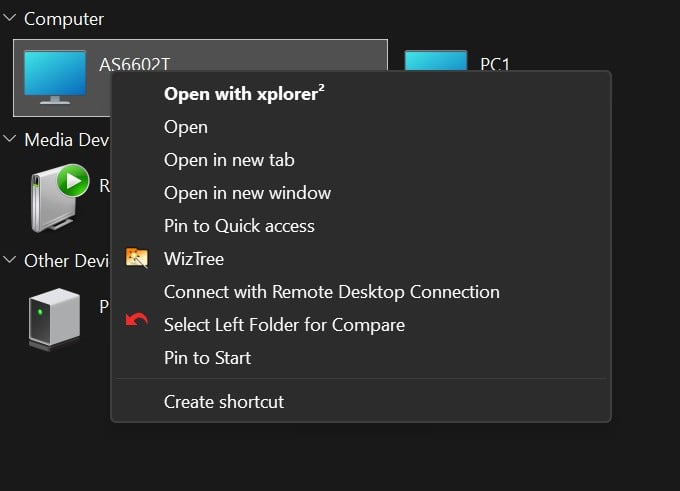
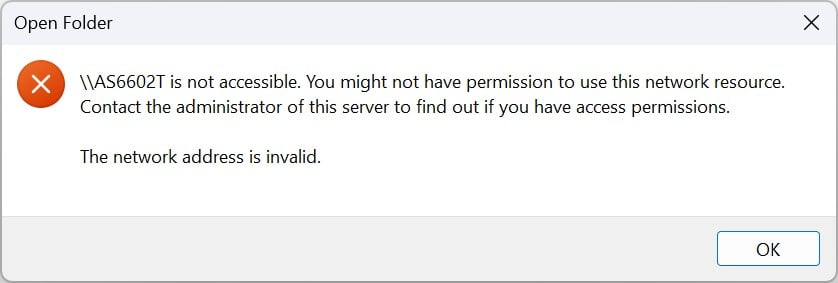
I have 2 Nas drives attached to my Windows 11 system (both show under "network" in explorer) with the QNap being the main one for streaming to TV (this works fine and can open in explorer). I also have a Asustor Nas which is connected via a Ethernet switch, this has worked fine until I have cleaned my hard drive and reinstalled Windows 11. I can open the Qnap Nas fine form explorer, but the Asustor Nas (I get the attached error window). I have set all permissions on the Nas to allow viewing from explorer.


Can anyone give me some advice on how to fix this?


Regards,
David


Create new topic
Spyware
3818 posts

Uber Geek
+1 received by user: 1366

Lifetime subscriber

  #3386156 22-Jun-2025 09:25
Send private message

Create a host file entry to point to AS6602T IP address and make sure account username:password on computer matches an account on the NAS.


Spark Max Fibre using Mikrotik CCR1009-8G-1S-1S+, CRS125-24G-1S, Unifi UAP, U6-Pro, UAP-AC-M-Pro, Apple TV 4K (2022), Apple TV 4K (2017), iPad Air 1st gen, iPad Air 4th gen, iPhone 13, SkyNZ3151 (the white box). If it doesn't move then it's data cabled.


freitasm
BDFL - Memuneh
80646 posts

Uber Geek
+1 received by user: 41029

Administrator
ID Verified
Trusted
Geekzone
Lifetime subscriber

  #3386158 22-Jun-2025 09:40
Send private message

Or when connecting select the option to use different username and enter one that matches the username on your NAS.


Referral links: Quic Broadband (free setup code: R587125ERQ6VE) | Samsung | AliExpress | Wise | Sharesies 


Support Geekzone by subscribing (browse ads-free), or making a one-off or recurring donation through PressPatron.


gehenna
8667 posts

Uber Geek
+1 received by user: 3883

Moderator
Trusted
Lifetime subscriber

  #3386164 22-Jun-2025 10:07
Send private message

Windows requires a username and password for an SMB share now, regardless of whether the share is open permissions or not. 


Davoid

173 posts

Master Geek
+1 received by user: 37

Lifetime subscriber

  #3386174 22-Jun-2025 11:08
Send private message

Thank you all for the reply.


I am not sure how I can check or change the Nas explorer username and password for the Asustor Nas, any help would be appreciated. Also, I use Goodsync to do backups to the Nas and this works fine in Windows.


thanks,


David


freitasm
BDFL - Memuneh
80646 posts

Uber Geek
+1 received by user: 41029

Administrator
ID Verified
Trusted
Geekzone
Lifetime subscriber

  #3386176 22-Jun-2025 11:21
Send private message

If you open Windows Explorer and select Map Network Drive you can enter the address (as in \\192.168.2.111\folder but use the NAS IP and the share folder). When asked for credentials, click Use Different Credentials and then enter the username and password for the NAS.


Referral links: Quic Broadband (free setup code: R587125ERQ6VE) | Samsung | AliExpress | Wise | Sharesies 


Support Geekzone by subscribing (browse ads-free), or making a one-off or recurring donation through PressPatron.


Davoid

173 posts

Master Geek
+1 received by user: 37

Lifetime subscriber

  #3386190 22-Jun-2025 13:18
Send private message

Thank you Mauricio for the reply and help, this works fine but I end up with another drive letter in explorer. I was hoping to just be able to open the Nas drive from within Explorer? I have a number of shared folders on the Nas at present.
I can open the QNap Nas fine from Explorer at present (both listed under "network") it is only the Asustor that gives me the issue.


Regards,
David


Move to New Zealand's best fibre broadband service (affiliate link). Free setup code: R587125ERQ6VE. Note that to use Quic Broadband you must be comfortable with configuring your own router.
freitasm
BDFL - Memuneh
80646 posts

Uber Geek
+1 received by user: 41029

Administrator
ID Verified
Trusted
Geekzone
Lifetime subscriber

  #3386198 22-Jun-2025 14:13
Send private message

You have an option to open the folder instead of mapping it. 


Referral links: Quic Broadband (free setup code: R587125ERQ6VE) | Samsung | AliExpress | Wise | Sharesies 


Support Geekzone by subscribing (browse ads-free), or making a one-off or recurring donation through PressPatron.


Davoid

173 posts

Master Geek
+1 received by user: 37

Lifetime subscriber

  #3386369 23-Jun-2025 11:41
Send private message

Thanks again for the help Mauricio, I have it now showing as a folder under network.


Regards,
David


Create new topic


Geekzone Live »

Try automatic live updates from Geekzone directly in your browser, without refreshing the page, with Geekzone Live now.


Are you subscribed to our RSS feed? You can download the latest headlines and summaries from our stories directly to your computer or smartphone by using a feed reader.