Geekzone: technology news, blogs, forums
Guest
Welcome Guest.
You haven't logged in yet. If you don't have an account you can register now.


ToPGuNZ

Topgunz
399 posts

Ultimate Geek
+1 received by user: 142

Lifetime subscriber

#38516 30-Jul-2009 22:06
Send private message

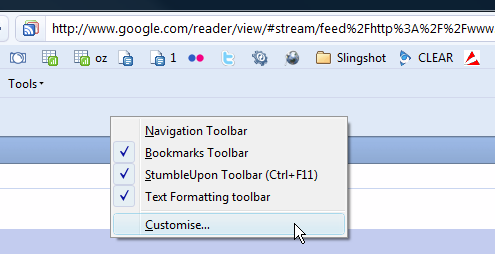
Hi, each time I start Firefox the navigation toolbar does not show. This has only started happening recently (possibly since installing 3.5).

I can select the navigation toolbar option once firefox is open and it then shows, I have reset to default set and not sure what else I can try. Have done a quick google and no info there.

Any suggestions? must be something simple I am missing.

Create new topic
hellonearthisman
1819 posts

Uber Geek
+1 received by user: 52

Trusted

  #240784 30-Jul-2009 23:40
Send private message

I have a random thought on this one. Try this out.
Reduce your Firefox from full screen, make the the navigation bar changes.
Then exit firefox while still out of full screen.


If that doesn't work, open navigation customisation and drag all things in the navbar into your menu bar at the to of the screen.


ToPGuNZ

Topgunz
399 posts

Ultimate Geek
+1 received by user: 142

Lifetime subscriber

  #241568 2-Aug-2009 21:04
Send private message

Hi hellonearthisman. Thanks for your suggestions. First one did not work. I then moved the items in the navigation bar to the menu bar and they stay there. I am happy with that, thanks very much for your help.

Create new topic


Geekzone Live »

Try automatic live updates from Geekzone directly in your browser, without refreshing the page, with Geekzone Live now.


Are you subscribed to our RSS feed? You can download the latest headlines and summaries from our stories directly to your computer or smartphone by using a feed reader.