Geekzone: technology news, blogs, forums
Guest
Welcome Guest.
You haven't logged in yet. If you don't have an account you can register now.


88325

23 posts

Geek


#56707 21-Jan-2010 13:14
Send private message

Two weeks ago I purchased a 2.5" Transcend storejet 500gb external harddrive. This one:http://pricespy.co.nz/product.php?p=355479

Worked fine but went to plug it in today, and it makes a funny beeping noise for a short period and nothing shows up on my computer. The light comes on, on the external harddrive and everything, and I've also tried it on another computer getting the same problem.

I have about 100gb worth of movies on there that I want to get off as I bought the drive specifically to put movies on. When I used it yesterday I didn't use the safely remove hardware feature and instead just straight unplugged it, which can apparently corrupt it.

Just wondering if anyone has any idea's or software that I could try on it to get it going again. Other wise they will replace it under warranty but I wont get any of the data back.

Appreciate your help

Create new topic
88325

23 posts

Geek


  #291962 21-Jan-2010 16:21
Send private message

Anyones help would be much appreciated


Ragnor
8279 posts

Uber Geek
+1 received by user: 585

Trusted

  #291985 21-Jan-2010 18:11
Send private message

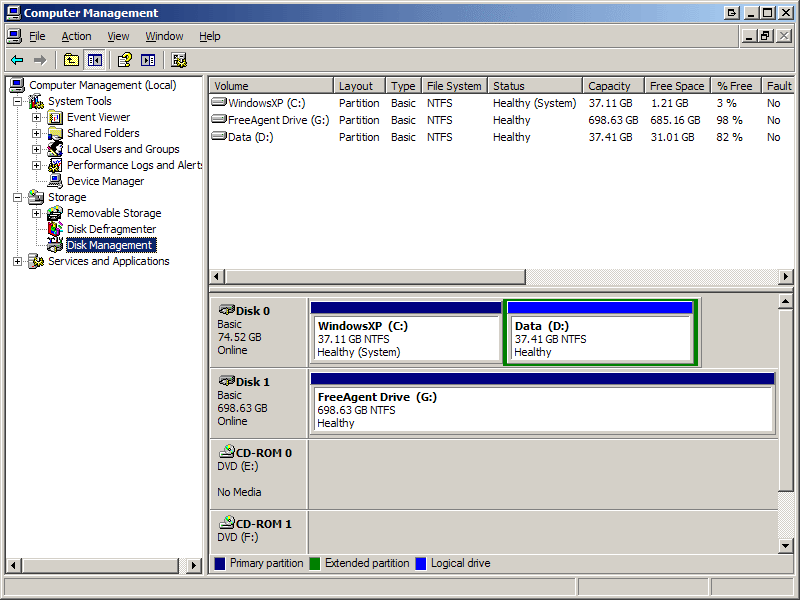
start > run > diskmgmt.msc

What does that show when the usb disk is plugged in?

Should look something like this (this is XP, Vista or 7 will look slightly different)


88325

23 posts

Geek


  #292004 21-Jan-2010 19:09
Send private message

Cheers for the reply.
Couldnt upload the picture properly. Followed your instructions and it doesn't show the external harddrive in that list. Just had my computers harddrive and two other small ones similar to yours.


Niel
3267 posts

Uber Geek
+1 received by user: 80

Trusted

  #292015 21-Jan-2010 19:59
Send private message

(I've bought the same drive at PB Tech on Boxing day.)

Always use safe remove with external drives. In theory should for FLASH drives also, but not really necessary if you are sure nothing is accessing it (like anti-virus...).

Guess you should take it back to the shop to get sorted, but if it was PB Tech then good luck. They are not so clued up.

Or the Transcend web site has a formatting utility. You probably do not want to format it, but the utility will tell you if the drive is connected.

If you do not want to go down the warranty or format route, then you will have to try and open the drive to plug it into a PC.

Any chance the USB port is damaged from pulling out a high current device?


You can never have enough Volvos!


88325

23 posts

Geek


  #292033 21-Jan-2010 22:03
Send private message

No luckily it wasn't PB tech. I tried that formatting utility however it doesn't pick up the device. I gave the shop I got it from a call and they said if I want to have the data taking off it by a professional, opening it up will void the warranty.

Well I tried the external hard drive on two different computers and used different USB ports also but still the same result.

What I want to know is that if I have somehow corrupted it by just straight unplugging it, surely it can't have done anything too serious? Surely there would be something simple that could have been blown and can be replaced??

Ragnor
8279 posts

Uber Geek
+1 received by user: 585

Trusted

  #292051 21-Jan-2010 23:50
Send private message

Sounds more like a hardware fault to me as opposed to corruption of the filesystem or data.

I would expect it to still show up as a physical disk (eg: Disk1, Disk2) even if the data/filesystem was corrupted.

Maybe try a linux live boot cd or perhaps the trial of GetDataBack's bootable CD... I'm not sure if they can pickup USB drives but it's worth a go.

At the end of the day I guess this is a lesson for you too, if you have data you want to keep never store it on just one phsyical disk.


Shop now for Lenovo laptops and other devices (affiliate link).
Niel
3267 posts

Uber Geek
+1 received by user: 80

Trusted

  #292170 22-Jan-2010 13:12
Send private message

Any chance you damaged the cable? Try a normal single plug USB cable, as long as it is not a thin short one. Plug into a rear port which is directly on-board for the best possible power, not on a front socket or a rear cover panel.


You can never have enough Volvos!


Niel
3267 posts

Uber Geek
+1 received by user: 80

Trusted

  #292171 22-Jan-2010 13:14
Send private message

Sounds bad to me, especially that noise you are talking about. I'd say data is lost and do a warranty return. Sounds like a head crash.


You can never have enough Volvos!


Create new topic


Geekzone Live »

Try automatic live updates from Geekzone directly in your browser, without refreshing the page, with Geekzone Live now.


Are you subscribed to our RSS feed? You can download the latest headlines and summaries from our stories directly to your computer or smartphone by using a feed reader.