
Geekzone: technology news, blogs, forums
Guest
Welcome Guest.
You haven't logged in yet. If you don't have an account you can register now.


View this topic in a long page with up to 500 replies per page Create new topic
1 | 2 
freitasm
BDFL - Memuneh
80646 posts

Uber Geek
+1 received by user: 41030

Administrator
ID Verified
Trusted
Geekzone
Lifetime subscriber

#10409 24-Nov-2004 11:41
Send private message

You have to enter this on the Connection settings. Tap Start | Settings, change to Connections. Then go to Advanced and tap Select Networks.

Edit the connection created when you first entered the Bluetooth configuration. Select one of the names and click Edit. Keep going until you see a button called Advanced. Tap in it and you'll see a dialog similar to this:
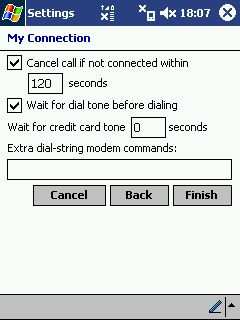


That's where you have to enter the Init String.



Referral links: Quic Broadband (free setup code: R587125ERQ6VE) | Samsung | AliExpress | Wise | Sharesies 


Support Geekzone by subscribing (browse ads-free), or making a one-off or recurring donation through PressPatron.


jeff

14 posts

Geek
Inactive user


#10410 24-Nov-2004 12:20
Send private message

You seem to have fixed it! I can't thank you enough! I followed your instructions and switched between the different dial up numbers and took out the "9," from the dial string and it worked! THank you so much! After five hours on telephone support with Rogers, HP and Nokia and getting no-where, I'm very impressed and grateful for your help! I'll be patronizing this site exclusively from now an and any apps I buy for my PDA will be from here, and only from here! THank you again!

freitasm
BDFL - Memuneh
80646 posts

Uber Geek
+1 received by user: 41030

Administrator
ID Verified
Trusted
Geekzone
Lifetime subscriber

#10414 24-Nov-2004 19:55
Send private message

Very good! Well done...


Referral links: Quic Broadband (free setup code: R587125ERQ6VE) | Samsung | AliExpress | Wise | Sharesies 


Support Geekzone by subscribing (browse ads-free), or making a one-off or recurring donation through PressPatron.


1 | 2 
View this topic in a long page with up to 500 replies per page Create new topic


Geekzone Live »

Try automatic live updates from Geekzone directly in your browser, without refreshing the page, with Geekzone Live now.


Are you subscribed to our RSS feed? You can download the latest headlines and summaries from our stories directly to your computer or smartphone by using a feed reader.