Geekzone: technology news, blogs, forums
Guest
Welcome Guest.
You haven't logged in yet. If you don't have an account you can register now.


freitasm

BDFL - Memuneh
80652 posts

Uber Geek
+1 received by user: 41045

Administrator
ID Verified
Trusted
Geekzone
Lifetime subscriber

#108859 7-Sep-2012 08:28
Send private message

I was just told mysms for Windows Phone is now available in beta. 

the software synchronises SMS from your device to the cloud so you can access it from the browser. You will see all your messages in both browser or app. Messages between mysms users are free.

I have this installed on an Android device for testing a few weeks ago and it looked like a good idea.

Just tried installing it on my Windows Phone and it says my phone number is in an invalid format. I have one of the six digits Vodafone numbers (+64 21361xxx) and I suspect the app is expecting a minimum length of seven or more. Reported this here and if you have the same problem please let them know by posting in that thread.





Referral links: Quic Broadband (free setup code: R587125ERQ6VE) | Samsung | AliExpress | Wise | Sharesies 


Support Geekzone by subscribing (browse ads-free), or making a one-off or recurring donation through PressPatron.


Create new topic
allan
2073 posts

Uber Geek
+1 received by user: 899

ID Verified
Lifetime subscriber

  #682705 7-Sep-2012 10:27
Send private message

How is this supposed to work exactly?

Downloaded the app to my Windows Phone. Started it, got prompted to enter my mobile no (Telecom 7 digit) and got texted an activation code, which included several non-english characters, so copy and pasted into the activation code field and pressed the tick. Screen just went blank and app closed. So now when I restart it I'm just being prompted again.

Nothing in the FAQ's at mysms.com to indicate how the activation process works, or how you subsequently create a login and password.

Anyone used it in earnest?


jbard
1377 posts

Uber Geek
+1 received by user: 17


  #682715 7-Sep-2012 10:45
Send private message

allan: How is this supposed to work exactly?

Downloaded the app to my Windows Phone. Started it, got prompted to enter my mobile no (Telecom 7 digit) and got texted an activation code, which included several non-english characters, so copy and pasted into the activation code field and pressed the tick. Screen just went blank and app closed. So now when I restart it I'm just being prompted again.

Nothing in the FAQ's at mysms.com to indicate how the activation process works, or how you subsequently create a login and password.

Anyone used it in earnest?


Exactly the same thing just happened to me. Seems the activation code is meant to be numbers but I got letters and non english characters.

freitasm

BDFL - Memuneh
80652 posts

Uber Geek
+1 received by user: 41045

Administrator
ID Verified
Trusted
Geekzone
Lifetime subscriber

  #682718 7-Sep-2012 10:49
Send private message

I will post more later when out of the TechEd session.


Referral links: Quic Broadband (free setup code: R587125ERQ6VE) | Samsung | AliExpress | Wise | Sharesies 


Support Geekzone by subscribing (browse ads-free), or making a one-off or recurring donation through PressPatron.


chiefie
I iz your trusted friend
5877 posts

Uber Geek
+1 received by user: 151

Retired Mod
Trusted
Lifetime subscriber

  #682727 7-Sep-2012 11:26
Send private message

I installed mySMS and got the code on my Vodafone 6-digits phone number (on Vodafone network).


Internet is my backyard...


«Geekzone blog: Tech 'n Chips Takeaway» «Personal blog: And then...»


Please read the Geekzone's FUG


chiefie
I iz your trusted friend
5877 posts

Uber Geek
+1 received by user: 151

Retired Mod
Trusted
Lifetime subscriber

  #682728 7-Sep-2012 11:29
Send private message

Doesn't look like the mySMS for Windows Phone has SMS synchronisation to cloud. :-/


Internet is my backyard...


«Geekzone blog: Tech 'n Chips Takeaway» «Personal blog: And then...»


Please read the Geekzone's FUG


freitasm

BDFL - Memuneh
80652 posts

Uber Geek
+1 received by user: 41045

Administrator
ID Verified
Trusted
Geekzone
Lifetime subscriber

  #682732 7-Sep-2012 11:32
Send private message

Yes and PaulSpain did as well. It is only the login to existing accounts that is faulty.

Mysms didn't work for him though. It should takeover SMS but did nothing on his device


Referral links: Quic Broadband (free setup code: R587125ERQ6VE) | Samsung | AliExpress | Wise | Sharesies 


Support Geekzone by subscribing (browse ads-free), or making a one-off or recurring donation through PressPatron.


Support Geekzone with one-off or recurring donations Donate via PressPatron.
chiefie
I iz your trusted friend
5877 posts

Uber Geek
+1 received by user: 151

Retired Mod
Trusted
Lifetime subscriber

  #682734 7-Sep-2012 11:34
Send private message

Same... it seems like MySMS can only SMS other MySMS users.. and my "Friends" list is empty, and synchronise it doesn't achieve anything... To me, it is another "Whatsapp" or "Viber"... :-/

I was hoping this could be a SMS backup solution to cloud.


Internet is my backyard...


«Geekzone blog: Tech 'n Chips Takeaway» «Personal blog: And then...»


Please read the Geekzone's FUG


jbard
1377 posts

Uber Geek
+1 received by user: 17


  #682735 7-Sep-2012 11:35
Send private message

chiefie: Same... it seems like MySMS can only SMS other MySMS users.. and my "Friends" list is empty, and synchronise it doesn't achieve anything... To me, it is another "Whatsapp" or "Viber"... :-/

I was hoping this could be a SMS backup solution to cloud.


Yeah I was looking for a backup solution as well, as far as I know their is no way to backup SMS on WP?

chiefie
I iz your trusted friend
5877 posts

Uber Geek
+1 received by user: 151

Retired Mod
Trusted
Lifetime subscriber

  #682751 7-Sep-2012 11:52
Send private message

jbard: Yeah I was looking for a backup solution as well, as far as I know their is no way to backup SMS on WP?


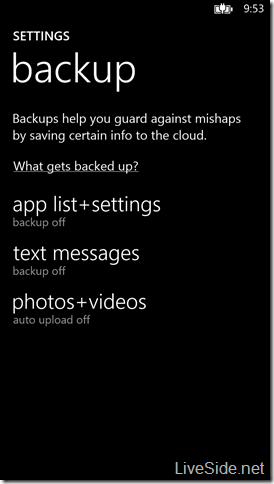
OT: Windows Phone 8 will have this feature apparently...


Internet is my backyard...


«Geekzone blog: Tech 'n Chips Takeaway» «Personal blog: And then...»


Please read the Geekzone's FUG


billgates
4706 posts

Uber Geek
+1 received by user: 672

Trusted

  #682755 7-Sep-2012 11:56
Send private message

chiefie:
jbard: Yeah I was looking for a backup solution as well, as far as I know their is no way to backup SMS on WP?


OT: Windows Phone 8 will have this feature apparently...


mySMS on Windows phone is another Whatsaapp/groupme/viber like client due to the API level restrictions that devs have in WP 7.5 SDK.

WP8 will have backup options for SMS, apps settings and more :)


Do whatever you want to do man.


chiefie
I iz your trusted friend
5877 posts

Uber Geek
+1 received by user: 151

Retired Mod
Trusted
Lifetime subscriber

  #682763 7-Sep-2012 12:05
Send private message

billgates: mySMS on Windows phone is another Whatsaapp/groupme/viber like client due to the API level restrictions that devs have in WP 7.5 SDK.

WP8 will have backup options for SMS, apps settings and more :)


Cool. Sadly, I'm on the fence for our next phone upgrade.. I see so much potential for WP8... but its limitation on not able to share purchased apps, or the tightly integration of primary ID with XBoxLive and SkyDrive et al kinda putting me off..

I'm enjoying the main iTunes/Apple ID with secondary Apple ID approach on iOS devices. *sigh*


Internet is my backyard...


«Geekzone blog: Tech 'n Chips Takeaway» «Personal blog: And then...»


Please read the Geekzone's FUG


Shop now on AliExpress (affiliate link).
freitasm

BDFL - Memuneh
80652 posts

Uber Geek
+1 received by user: 41045

Administrator
ID Verified
Trusted
Geekzone
Lifetime subscriber

  #682837 7-Sep-2012 15:07
Send private message

The mysms description in Marketplace clearly says messages are kept in sync. Unless the app is mysms Messenger which is only to communicate with other mysms users, in which case it is nothing more than those apps...

They should clarify this in the description.


Referral links: Quic Broadband (free setup code: R587125ERQ6VE) | Samsung | AliExpress | Wise | Sharesies 


Support Geekzone by subscribing (browse ads-free), or making a one-off or recurring donation through PressPatron.


allan
2073 posts

Uber Geek
+1 received by user: 899

ID Verified
Lifetime subscriber

  #682868 7-Sep-2012 16:41
Send private message

Oh well, at least it's not just me then...

Create new topic


Geekzone Live »

Try automatic live updates from Geekzone directly in your browser, without refreshing the page, with Geekzone Live now.


Are you subscribed to our RSS feed? You can download the latest headlines and summaries from our stories directly to your computer or smartphone by using a feed reader.