Geekzone: technology news, blogs, forums
Guest
Welcome Guest.
You haven't logged in yet. If you don't have an account you can register now.


chakkaradeep

799 posts

Ultimate Geek

Trusted

#24146 16-Jul-2008 10:18
Send private message

I have succesfully connected to a Microsoft Exchange Server by creating a new Exchange Server account. I can see all my calender events as well as mails, but when it comes to contact, the default Contacts application hasnt synced the Exchange contacts, rather I have to select to search for a contact in the Company Directory option. This connects to the Exchange Server and pulls the data, which uses my data connection or WiFi (whicever is present). How do I pull all my contacts to my mobile Contacts list and also push contacts?

Thanks.


Regards,
Chaks

Desktop : Intel Quad Core Q9400 2.66GHz - 8GB RAM - 500 GB + 500 GB HDD - NVidia GeForce 9800GT - LG246WH Flatron Display - Windows Server 2008 R2 Enterprise with Hyper-V
Virtual Machine : Powered by Hyper-V and VMWare Workstation
Laptop: HP dv7-3004TX Entertainment Notebook PC | HP Touchsmart tx2 1119au - Windows 7 Ultimate x64
Mac: iMac 21.5" Snow Leopard
Mobile : iPhone 3GS

Create new topic
freitasm
BDFL - Memuneh
80646 posts

Uber Geek
+1 received by user: 41024

Administrator
ID Verified
Trusted
Geekzone
Lifetime subscriber

#148430 16-Jul-2008 10:25
Send private message

ActiveSync only synchronises the personal folders. And for Tasks, Contacts and Appointments it only synchonises the default folders, not subfolders.


Referral links: Quic Broadband (free setup code: R587125ERQ6VE) | Samsung | AliExpress | Wise | Sharesies 


Support Geekzone by subscribing (browse ads-free), or making a one-off or recurring donation through PressPatron.


chakkaradeep

799 posts

Ultimate Geek

Trusted

  #148434 16-Jul-2008 10:37
Send private message

freitasm: ActiveSync only synchronises the personal folders. And for Tasks, Contacts and Appointments it only synchonises the default folders, not subfolders.


So, how do bring all my Exchange contacts into my phone? Is there any good third party tool to do this?


Regards,
Chaks

Desktop : Intel Quad Core Q9400 2.66GHz - 8GB RAM - 500 GB + 500 GB HDD - NVidia GeForce 9800GT - LG246WH Flatron Display - Windows Server 2008 R2 Enterprise with Hyper-V
Virtual Machine : Powered by Hyper-V and VMWare Workstation
Laptop: HP dv7-3004TX Entertainment Notebook PC | HP Touchsmart tx2 1119au - Windows 7 Ultimate x64
Mac: iMac 21.5" Snow Leopard
Mobile : iPhone 3GS

freitasm
BDFL - Memuneh
80646 posts

Uber Geek
+1 received by user: 41024

Administrator
ID Verified
Trusted
Geekzone
Lifetime subscriber

#148435 16-Jul-2008 10:39
Send private message

You don't need any third party to bring contacts from Exchange to your device. Just make sure it's selected on ActiveSync, and make sure you store your contacts in the default folder on your account/mailbox.


Referral links: Quic Broadband (free setup code: R587125ERQ6VE) | Samsung | AliExpress | Wise | Sharesies 


Support Geekzone by subscribing (browse ads-free), or making a one-off or recurring donation through PressPatron.


chakkaradeep

799 posts

Ultimate Geek

Trusted

#148451 16-Jul-2008 11:36
Send private message

freitasm:

You don't need any third party to bring contacts from Exchange to your device. Just make sure it's selected on ActiveSync, and make sure you store your contacts in the default folder on your account/mailbox.


I have set up my ActiveSync Exchange Server settings to synchonize Contacts, but it only synchronises the Caleder :(. Not sure what is going on. The sync status too is success.


Regards,
Chaks

Desktop : Intel Quad Core Q9400 2.66GHz - 8GB RAM - 500 GB + 500 GB HDD - NVidia GeForce 9800GT - LG246WH Flatron Display - Windows Server 2008 R2 Enterprise with Hyper-V
Virtual Machine : Powered by Hyper-V and VMWare Workstation
Laptop: HP dv7-3004TX Entertainment Notebook PC | HP Touchsmart tx2 1119au - Windows 7 Ultimate x64
Mac: iMac 21.5" Snow Leopard
Mobile : iPhone 3GS

chakkaradeep

799 posts

Ultimate Geek

Trusted

#148574 16-Jul-2008 17:52
Send private message

freitasm:

You don't need any third party to bring contacts from Exchange to your device. Just make sure it's selected on ActiveSync, and make sure you store your contacts in the default folder on your account/mailbox.


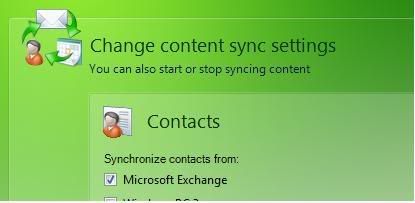
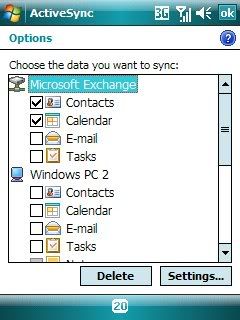
I have my settings setup like this, but still it doesnt sync

In WMDC


And in ActiveSync


Regards,
Chaks

Desktop : Intel Quad Core Q9400 2.66GHz - 8GB RAM - 500 GB + 500 GB HDD - NVidia GeForce 9800GT - LG246WH Flatron Display - Windows Server 2008 R2 Enterprise with Hyper-V
Virtual Machine : Powered by Hyper-V and VMWare Workstation
Laptop: HP dv7-3004TX Entertainment Notebook PC | HP Touchsmart tx2 1119au - Windows 7 Ultimate x64
Mac: iMac 21.5" Snow Leopard
Mobile : iPhone 3GS

freitasm
BDFL - Memuneh
80646 posts

Uber Geek
+1 received by user: 41024

Administrator
ID Verified
Trusted
Geekzone
Lifetime subscriber

  #148581 16-Jul-2008 18:18
Send private message

And no filter set when looking at contacts?

Are you sure your contacts are in the main folder on the default contacts folder for your mailbox?


Referral links: Quic Broadband (free setup code: R587125ERQ6VE) | Samsung | AliExpress | Wise | Sharesies 


Support Geekzone by subscribing (browse ads-free), or making a one-off or recurring donation through PressPatron.


Shop now for Lego sets and other gifts (affiliate link).
chakkaradeep

799 posts

Ultimate Geek

Trusted

  #148585 16-Jul-2008 18:29
Send private message

freitasm: And no filter set when looking at contacts?

Are you sure your contacts are in the main folder on the default contacts folder for your mailbox?


There is no filter.

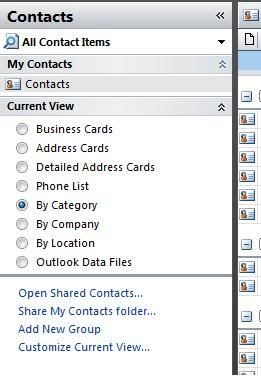
And just checked my Outlook and in main contacts folder, I dont see any of my exchange contacts.


But all the Exchange Contacts are present in the Global Address Book in Outlook

So, unless those contacts get synced with my Outlook, it wont be synced with my mobile? and how do I do that? :(


Regards,
Chaks

Desktop : Intel Quad Core Q9400 2.66GHz - 8GB RAM - 500 GB + 500 GB HDD - NVidia GeForce 9800GT - LG246WH Flatron Display - Windows Server 2008 R2 Enterprise with Hyper-V
Virtual Machine : Powered by Hyper-V and VMWare Workstation
Laptop: HP dv7-3004TX Entertainment Notebook PC | HP Touchsmart tx2 1119au - Windows 7 Ultimate x64
Mac: iMac 21.5" Snow Leopard
Mobile : iPhone 3GS

freitasm
BDFL - Memuneh
80646 posts

Uber Geek
+1 received by user: 41024

Administrator
ID Verified
Trusted
Geekzone
Lifetime subscriber

#148589 16-Jul-2008 18:45
Send private message

It looks strange. Global Address Book is the one automatically created by the server based on the users for the system. The screenshot you show looks like your personal address book...


Referral links: Quic Broadband (free setup code: R587125ERQ6VE) | Samsung | AliExpress | Wise | Sharesies 


Support Geekzone by subscribing (browse ads-free), or making a one-off or recurring donation through PressPatron.


chakkaradeep

799 posts

Ultimate Geek

Trusted

  #148590 16-Jul-2008 18:47
Send private message

freitasm: It looks strange. Global Address Book is the one automatically created by the server based on the users for the system. The screenshot you show looks like your personal address book...


Yes. The screenshot is my personal address book and only that is synced right now. And the only other address book I have is that Global Address book. My emails, calenders, tasks work fine, except this contacts.


Regards,
Chaks

Desktop : Intel Quad Core Q9400 2.66GHz - 8GB RAM - 500 GB + 500 GB HDD - NVidia GeForce 9800GT - LG246WH Flatron Display - Windows Server 2008 R2 Enterprise with Hyper-V
Virtual Machine : Powered by Hyper-V and VMWare Workstation
Laptop: HP dv7-3004TX Entertainment Notebook PC | HP Touchsmart tx2 1119au - Windows 7 Ultimate x64
Mac: iMac 21.5" Snow Leopard
Mobile : iPhone 3GS

freitasm
BDFL - Memuneh
80646 posts

Uber Geek
+1 received by user: 41024

Administrator
ID Verified
Trusted
Geekzone
Lifetime subscriber

#148591 16-Jul-2008 18:48
Send private message

To make it clear, your personal address book is synchonising to your device? You can see those names there?


Referral links: Quic Broadband (free setup code: R587125ERQ6VE) | Samsung | AliExpress | Wise | Sharesies 


Support Geekzone by subscribing (browse ads-free), or making a one-off or recurring donation through PressPatron.


chakkaradeep

799 posts

Ultimate Geek

Trusted

  #148594 16-Jul-2008 18:53
Send private message

freitasm: To make it clear, your personal address book is synchonising to your device? You can see those names there?


Yes. I can see all my personal address book contacts in my mobile.


Regards,
Chaks

Desktop : Intel Quad Core Q9400 2.66GHz - 8GB RAM - 500 GB + 500 GB HDD - NVidia GeForce 9800GT - LG246WH Flatron Display - Windows Server 2008 R2 Enterprise with Hyper-V
Virtual Machine : Powered by Hyper-V and VMWare Workstation
Laptop: HP dv7-3004TX Entertainment Notebook PC | HP Touchsmart tx2 1119au - Windows 7 Ultimate x64
Mac: iMac 21.5" Snow Leopard
Mobile : iPhone 3GS


Move to New Zealand's best fibre broadband service (affiliate link). Free setup code: R587125ERQ6VE. Note that to use Quic Broadband you must be comfortable with configuring your own router.
freitasm
BDFL - Memuneh
80646 posts

Uber Geek
+1 received by user: 41024

Administrator
ID Verified
Trusted
Geekzone
Lifetime subscriber

  #148595 16-Jul-2008 18:55
Send private message

So it is working as intended. You only synchronise personal contacts. The GAL is only accessible through search, therefore you must be online for that.

chakkaradeep: How do I pull all my contacts to my mobile Contacts list and also push contacts?


I read this and thought you were talking about "your" contacts", but actually you were talking about "their" contacts...


Referral links: Quic Broadband (free setup code: R587125ERQ6VE) | Samsung | AliExpress | Wise | Sharesies 


Support Geekzone by subscribing (browse ads-free), or making a one-off or recurring donation through PressPatron.


chakkaradeep

799 posts

Ultimate Geek

Trusted

  #148596 16-Jul-2008 18:58
Send private message

freitasm: So it is working as intended. You only synchronise personal contacts. The GAL is only accessible through search, therefore you must be online for that.


Yea. I had to go online to search for a contact. I was under the impression that if I am syncing Contacts with my exchange server I should get them offline too Embarassed


Regards,
Chaks

Desktop : Intel Quad Core Q9400 2.66GHz - 8GB RAM - 500 GB + 500 GB HDD - NVidia GeForce 9800GT - LG246WH Flatron Display - Windows Server 2008 R2 Enterprise with Hyper-V
Virtual Machine : Powered by Hyper-V and VMWare Workstation
Laptop: HP dv7-3004TX Entertainment Notebook PC | HP Touchsmart tx2 1119au - Windows 7 Ultimate x64
Mac: iMac 21.5" Snow Leopard
Mobile : iPhone 3GS

Create new topic


Geekzone Live »

Try automatic live updates from Geekzone directly in your browser, without refreshing the page, with Geekzone Live now.


Are you subscribed to our RSS feed? You can download the latest headlines and summaries from our stories directly to your computer or smartphone by using a feed reader.