Geekzone: technology news, blogs, forums
Guest
Welcome Guest.
You haven't logged in yet. If you don't have an account you can register now.


rwaits

17 posts

Geek


#4590 8-Aug-2005 03:20
Send private message

I need to install a root certificate so I can ActiveSync with Exchange Server over a Wi-Fi connection. I have been unable to find instructions on how to do so on the Microsoft site for an IPAQ 6315. I read the article on this site, but it only applied to smart phones. Of course the HP help center was of no use since the software waranty has expired.

Create new topic
freitasm
BDFL - Memuneh
80652 posts

Uber Geek
+1 received by user: 41045

Administrator
ID Verified
Trusted
Geekzone
Lifetime subscriber

#17662 8-Aug-2005 08:49
Send private message

Place the certificate on your Pocket PC via ActiveSync (copy and paste). Then open File Explorer on your Pocket PC, find the file and tap it once. This will install the certificate:

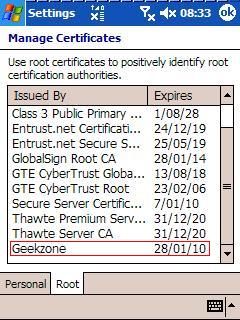
To see if it is loaded, tap Start | Settings | System and tap the Certificates icon:


Referral links: Quic Broadband (free setup code: R587125ERQ6VE) | Samsung | AliExpress | Wise | Sharesies 


Support Geekzone by subscribing (browse ads-free), or making a one-off or recurring donation through PressPatron.



freitasm
BDFL - Memuneh
80652 posts

Uber Geek
+1 received by user: 41045

Administrator
ID Verified
Trusted
Geekzone
Lifetime subscriber

#17677 8-Aug-2005 12:17
Send private message

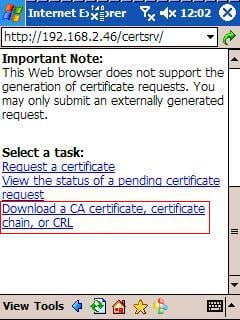
Another option is to open the Certificate Server webpage on your Pocket PC, if it is available. Browse to http://[server]/certsrv and at the bottom of the page there's a link where you can download the certificate. When prompted select the option to open the file after download:


Referral links: Quic Broadband (free setup code: R587125ERQ6VE) | Samsung | AliExpress | Wise | Sharesies 


Support Geekzone by subscribing (browse ads-free), or making a one-off or recurring donation through PressPatron.


rwaits

17 posts

Geek


#17751 9-Aug-2005 02:28
Send private message

Thanks for the responce. I had tried that but when I copied the certificate to the PPC it didn't reconize it when I clicked on it. My personal certificate I received from Thawte installed fine, but the one I received from our system administrator loads fine on the desk top, but doesn't on the PPC.


freitasm
BDFL - Memuneh
80652 posts

Uber Geek
+1 received by user: 41045

Administrator
ID Verified
Trusted
Geekzone
Lifetime subscriber

#17758 9-Aug-2005 08:05
Send private message

You are trying to install a Personal Certificate... Perhaps you need to install the CA certificate first, since this is your own CA, before installing any other certificate from that authority?

Also, HP Pocket PC used to come with a tool called "Enroll" (Start | Settings | System), which was used to load Personal Certificates.


Referral links: Quic Broadband (free setup code: R587125ERQ6VE) | Samsung | AliExpress | Wise | Sharesies 


Support Geekzone by subscribing (browse ads-free), or making a one-off or recurring donation through PressPatron.


Create new topic


Geekzone Live »

Try automatic live updates from Geekzone directly in your browser, without refreshing the page, with Geekzone Live now.


Are you subscribed to our RSS feed? You can download the latest headlines and summaries from our stories directly to your computer or smartphone by using a feed reader.