Geekzone: technology news, blogs, forums
Guest
Welcome Guest.
You haven't logged in yet. If you don't have an account you can register now.


aucklander

478 posts

Ultimate Geek
+1 received by user: 11


#298784 16-Jul-2022 09:54
Send private message

Hi all,


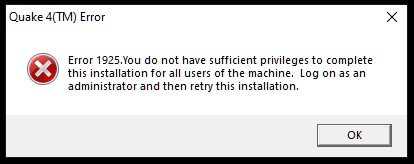
nostalgia hit me last week and got the old Quake 4 CD which provided countless hours of fun 10 years ago (or more) but to my surprise the current Win 10 would not allow it to install. The installer launches and the CD key is required, I enter that and it is accepted then it says "uninstalling apps" then gives me an error that I do not have the right to install this game for all users, or something like that.


The installer from the CD was launched as admin, then I also added the compatibility mode to XP-SP2 and then switched to XP-SP3 but same result, same error. Tried to copy all files from Cd to HDD, same attempts, same results. I found some talks on internet about a patch file called quake4-1.2.4 and tried to install that but it tells me that "Qauke4(TM)" is not found. That file is on the CD, and I even placed this patch in the same folder with the Quake49TM) file but it still tells me it is not found on the system... The advice on internet appears to be that after installing this patch the game will install Ok.


Any other advice please, to make this work? I am also running HalfLife-2 and that works flawlessly, it worked the same under the old Win7 and with the new Win10.


I did all updates to Win 10, currently it shows "no updates are available".


Many thanks for any suggestion.


Create new topic
aucklander

478 posts

Ultimate Geek
+1 received by user: 11


  #2942569 16-Jul-2022 10:05
Send private message


Detruire
1789 posts

Uber Geek
+1 received by user: 85


  #2942955 16-Jul-2022 17:37
Send private message

While not a solution to the problem, but you might be able to avoid the problem with the "Quake 4 Xbox Insider Preview" if you don't mind signing up for it.


rm *


aucklander

478 posts

Ultimate Geek
+1 received by user: 11


  #2942968 16-Jul-2022 18:51
Send private message

would this work?


- get another small SSD, add this to the system and install Win XP on this SSD


- install Quake 4 on this SSD where basically I will have only Win XP and the game


- at start-up I will access the BIOS to select which drive should be used for boot. I will generally use the current SSD (with Win10 64bit) but occasionally I would boot from the other one (Win XP), simply to be able to play this game?


Is this over the top, or more complicated? Would this introduce any sort of instability in the system?


Brumfondl
1201 posts

Uber Geek
+1 received by user: 526

Trusted
Subscriber

  #2942983 16-Jul-2022 20:50
Send private message

Are you trying to install to the C: drive or a different drive? The game may not like the permissions on the C: drive. Quake 4 is meant to work without issue with the latest patch for the game.


aucklander

478 posts

Ultimate Geek
+1 received by user: 11


  #2942991 16-Jul-2022 21:12
Send private message

Brumfondl:


Quake 4 is meant to work without issue with the latest patch for the game.


I see that patch file called "Quake4-1.4.2" if I am not wrong, tried to install that and tells me that it could not find "Quake4(TM)" file on the system. But that file is installed only when the game is installed, which is supposed to be done AFTER the patch is installed, correct? So then how come the patch is looking for that file and complains it is not there?...


yitz
2277 posts

Uber Geek
+1 received by user: 608


  #2942996 16-Jul-2022 21:22
Send private message

You don't have anything weird going on like having User Account Control turned off? Or installing from a limited user account then elevating to Administrator?


Shop now for Lenovo laptops and other devices (affiliate link).
aucklander

478 posts

Ultimate Geek
+1 received by user: 11


  #2942998 16-Jul-2022 21:26
Send private message

none of the things you mentioned, it is my personal computer at home, fresh Win 10 install (2 weeks old), it is asking me all the times to click yes to grant admin rights when an app needs that, there are no other users created apart from me (admin).


Oblivian
7374 posts

Uber Geek
+1 received by user: 2143

ID Verified

  #2943002 16-Jul-2022 21:33
Send private message

Patch wont apply unless the game installer has completed.

Which yours is not. It goes over the top if installed and stops the memory address crashes so it runs.

I take it you tried non elevated to see if it sorts itself out into the virtualstore since its largely hard coded for xp/7 and may need that.

As above the largest cause appears to be the default paths since being hardened

See notes section
https://www.pcgamingwiki.com/wiki/Quake_4

yitz
2277 posts

Uber Geek
+1 received by user: 608


  #2943016 16-Jul-2022 22:06
Send private message

Try creating a new folder in File Explorer at the root of your drive e.g. C:\Games and make the installation to that location.


Don't use Application Compatibility (XP).


aucklander

478 posts

Ultimate Geek
+1 received by user: 11


  #2943021 16-Jul-2022 22:55
Send private message

I created a new folder C:\Games and attempted to install in there. I get the same error message about not having rights, etc. After the installation is cancelled, the folder I created is not visible anymore! The system simply deleted that folder! I created it again, it is shown, closed Explorer, opened again, the folder is there. Then deleted "read only" from the folder's properties, tried to do the install from the CD again, same error, and then the Games folder is again deleted !!


I also tried to install on a different HDD than C: drive (D:\) and the installer crashes with the same error message about me not having the rights... The installer was launched as Administrator.


Creating another C: drive with Win XP on it appears to be the only trick which would go around this strange behavior of Win 10. Then at start-up I select in BIOS which drive to be used for boot. Does this sound like a decent work-around please?


aucklander

478 posts

Ultimate Geek
+1 received by user: 11


  #2943024 16-Jul-2022 23:05
Send private message

I am afraid I will have to re-install Win 10? Not ideal, but there is something very strange happening.


It tells me Windows Defender is managed by some group policies. Cannot get it activated at all.


Then all folders are read Only and I remove the property but it keeps coming back so I checked these instructions: https://appuals.com/how-to-fix-folder-keeps-reverting-to-read-only-on-windows-10/


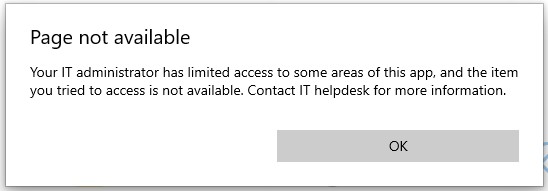
To my surprise, tried to go through these changes step-by-step and when I tried to access the "Controlled Folders" feature this is what I get!! As I said, there is no IT department involved, I did the install myself on my own PC...


Stream your favourite shows now on Apple TV (affiliate link).
jamesrt
1679 posts

Uber Geek
+1 received by user: 961

ID Verified
Trusted
Lifetime subscriber

  #2943056 17-Jul-2022 09:34
Send private message

Time for a malware scan, perhaps?

Or at the very least, run a system file check

MadEngineer
4644 posts

Uber Geek
+1 received by user: 2619

Trusted

  #2943584 19-Jul-2022 07:52
Send private message

See if steam accepts the cd key


You're not on Atlantis anymore, Duncan Idaho.

Create new topic


Geekzone Live »

Try automatic live updates from Geekzone directly in your browser, without refreshing the page, with Geekzone Live now.


Are you subscribed to our RSS feed? You can download the latest headlines and summaries from our stories directly to your computer or smartphone by using a feed reader.