Geekzone: technology news, blogs, forums
Guest
Welcome Guest.
You haven't logged in yet. If you don't have an account you can register now.


boingoboingo

20 posts

Geek
+1 received by user: 15


#300774 3-Oct-2022 18:47
Send private message

Hi there,


My son wanted to get into gaming (he's 12) last year, so we got him a decent used Dell-office machine from trademe (for 150 NZD) and put in a basic graphics card (Geforce 1030).
It was good enough for Fortnite and Minecraft, but he'd like to play some better games (Red Dead Redemption 2) and I'd like to play as well (maybe Elden Ring?) so it's time to upgrade.


He's 12 so this can't be a 5K (or 3K) machine. We're trying to find something that is ...decent. We're upgrading from a 400 NZD setup, so.... that'll give you an idea. Maybe up to 2K.


I thought it would be fun to build it ourselves (in the olden days I built a couple of PCs myself), but it's really hard to know what we need.


We tried the PBtech Gaming PC builder, but the endless combinations of CPUs motherboard and GPUs melt my head and I can't be really bothered to learn all about this.


What's the best way to get a good deal on a gaming setup? I'm happy to do a bit of research on where to buy components (Amazon.au vs. Pbtech, etc) and then plonk them together myself.


Or are the deals better on a ready-made system?


Also, is it worth waiting for Black Friday or other upcoming sales, or is that not really such a big thing?



Create new topic
Jase2985
13730 posts

Uber Geek
+1 received by user: 6202

ID Verified
Lifetime subscriber

  #2976929 3-Oct-2022 19:37
Send private message

https://www.pbtech.co.nz/category/computers/pcs/gaming-pcs


any of the prebuilts near the 2k mark will show you what kinda components you need to be looking for. you can modify slightly to your taste in the pc builder.


All should play most games at at least 60fps (most modern ones)


have your read through similar threads on there asking similar questions? they might be helpful.


tukapa1
753 posts

Ultimate Geek
+1 received by user: 235


  #2976943 3-Oct-2022 20:38
Send private message

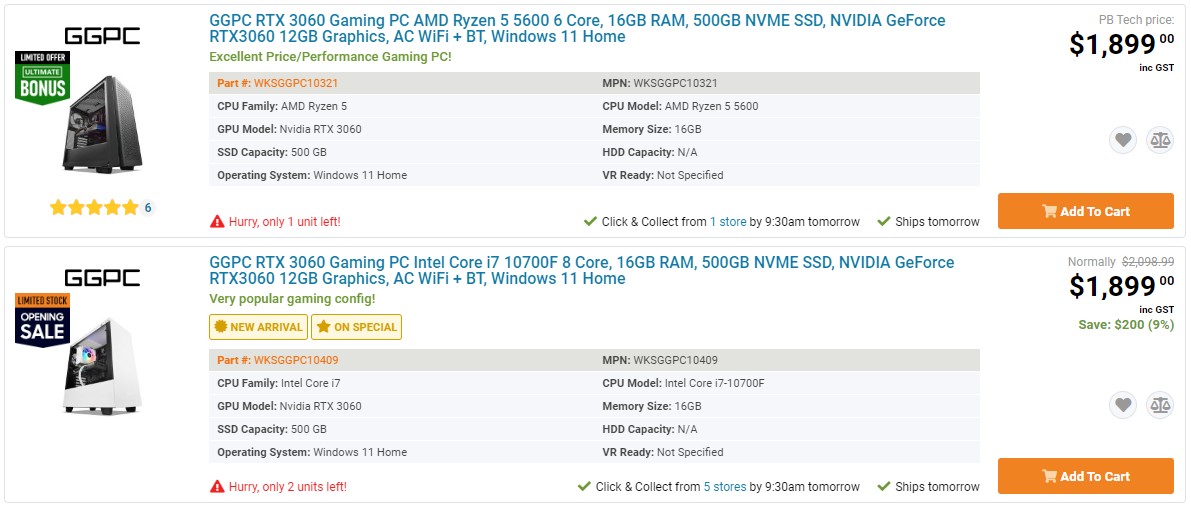
One of these two at PB Tech for that money;


Gurezaemon
~HONYAKKER!~
1417 posts

Uber Geek
+1 received by user: 1565

ID Verified
Lifetime subscriber

  #2976944 3-Oct-2022 20:49
Send private message

If you're comfortable putting things together yourself, pyronic.al has some good options as starting points. 


https://nz.pcpartpicker.com/ has some good ideas as well, for every budget.


Get your business seen overseas - Nexus Translations


sqishy
530 posts

Ultimate Geek
+1 received by user: 193


  #2976947 3-Oct-2022 21:09
Send private message

I think PBTech is a good start..its usually not too hard once you knwo a few basics:


Decide on which CPU - AMD or Intel. I'm Intel fan so always choose i7.


Goto mobo page https://www.pbtech.co.nz/category/components/motherboards/intel-motherboards


Choose AMD or Intel.


If you go Intel the bigger the number the newer the board, they start with H, Z or B. Z cost most.


Try to get say a Micro ATX (MATX) or ATX board that has DDR4 memory (DDR5 is better but cost more) - stock may restrict what you can buy.


Try and get a mobo that has 2 x M2 so you can later add an extra drive. (Most do anyway unless smaller).


The board states the Gen of CPU and Socket eg 12 Gen and Socket LGA1700.


Find the CPU that  matches Socket and throw in a decent heatsink. CPU is normally second biggest cost.


Next head over to SSD https://www.pbtech.co.nz/category/components/ssdrives/ssd-m2 and pick something in price range speed off SSD + size =  more cost.


Last few parts are case, graphics card and PSU.


Case needs to fit the board so if MATX or ATX buy a case that says it fits.


Graphics card can be largest spend. Maybe wait until later and just use onboard graphics until you know what you really want.


PSU - I think if you buy 850W you would be pretty safe.


If in any doubt you buy from PBTech ask them to check components match - they are pretty good. Or List here and we geeks can check for you.


boingoboingo

20 posts

Geek
+1 received by user: 15


  #2977382 4-Oct-2022 17:12
Send private message

Thanks for the replies, that's helpful.


Looked at the Pyronical and PC Part Picker and it seems easier to use than PBTech's site.


One more Q: Do all these retailers generally do Black Friday sales in NZ? (1stwave, ComputerLLounge, Newegg, etc.) and it is worth waiting for these sales?


Or do they just raise the prices the week before and you end up with negligible savings?


Cheers


Lias
5655 posts

Uber Geek
+1 received by user: 3978

ID Verified
Trusted
Lifetime subscriber

  #2977504 4-Oct-2022 23:24
Send private message

Might I humbly suggest you buy this:


https://www.geekzone.co.nz/forums.asp?forumid=77&topicid=300786


It's a bloody good price and the seller is well known around here. It will absolutely wipe the floor with a 3060 and I only suggest this because I can't afford it at the mo for MY kids gaming rigs :-)


I'm a geek, a gamer, a dad, a Quic user, and an IT Professional. I have a full rack home lab, size 15 feet, an epic beard and Asperger's. I'm a bit of a Cypherpunk, who believes information wants to be free and the Net interprets censorship as damage and routes around it. If you use my Quic signup you can also use the code R570394EKGIZ8 for free setup. Opinions are my own and not the views of my employer.


Create new topic


Geekzone Live »

Try automatic live updates from Geekzone directly in your browser, without refreshing the page, with Geekzone Live now.


Are you subscribed to our RSS feed? You can download the latest headlines and summaries from our stories directly to your computer or smartphone by using a feed reader.