Geekzone: technology news, blogs, forums
Guest
Welcome Guest.
You haven't logged in yet. If you don't have an account you can register now.


LoganMcArthur

52 posts

Master Geek
+1 received by user: 2


#320364 4-Aug-2025 23:50
Send private message

Hi all, 


Long time reader first time poster-ish. 


Am having some trouble with my PS5 gaming. I play alot of a game called NBA 2K. Have zero issues with any other game. 


What has started to happen recently is im having very very very small (BUT NOTICEABLE) spikes. Has never happened before only recently. 


My internet plan is with spark and is the 1000 down - 750 upload plan ( or close to that 750 upload ) plan. Using the default Spark router - installed about 2 years ago.


PS5 Is relatively clean although I will pull the fan out tomorrow and give it a good clean, but am stuck now as nothing seems to be fixing this issue that has just started. Im thinking maybe I need a new better ethernet cable connected to the ps5? as my cable is currently pretty long - about 30metres when it probably only needs to be 15metres.


Just wondering if anyone could help me out with suggestions on what it could be?


Based In wellington. Thanks!!!!


View this topic in a long page with up to 500 replies per page Create new topic
 1 | 2 | 3
lNomNoml
1842 posts

Uber Geek
+1 received by user: 521

ID Verified

  #3400065 5-Aug-2025 00:28
Send private message

It's most likely is it's just the game and/or an update has caused the issue. especially since you have listed that it's the only game having the issue, try reinstalling it and see if that helps, you can run ethernet cables up to 100M without issue. It could be connecting to a server over seas and the route it is taking might be silly which could be causing a delay, try changing the ethernet cable but it's unlikely to fix the issue. Would be good to check online if anyone else is reporting the issue.


michaelmurfy
meow
13579 posts

Uber Geek
+1 received by user: 10910

Moderator
ID Verified
Trusted
Lifetime subscriber

  #3400066 5-Aug-2025 00:29
Send private message

I don't think it will be the ethernet cable but just ensure your PS5 is actually using Ethernet and not WiFi in the connection settings.


Michael Murphy | https://murfy.nz
Referral Links: Quic Broadband (use R122101E7CV7Q for free setup)

Are you happy with what you get from Geekzone? Please consider supporting us by subscribing.
Opinions are my own and not the views of my employer.


LoganMcArthur

52 posts

Master Geek
+1 received by user: 2


  #3400067 5-Aug-2025 00:33
Send private message

Hi all thanks, yeah have done a force system update on safe mode in ps5. Seems to have fixed it and yep am on Ethernet connection on ps5 settings.


LoganMcArthur

52 posts

Master Geek
+1 received by user: 2


  #3400157 5-Aug-2025 15:57
Send private message

has started to happen again, any suggestions?


LoganMcArthur

52 posts

Master Geek
+1 received by user: 2


  #3401179 9-Aug-2025 01:12
Send private message

any suggestions?


cyril7
9075 posts

Uber Geek
+1 received by user: 2499

ID Verified
Trusted
Subscriber

  #3401185 9-Aug-2025 09:14
Send private message

Hi, whats the exact URL or IP address to the server you use for this game


Cyril


Move to New Zealand's best fibre broadband service (affiliate link). Free setup code: R587125ERQ6VE. Note that to use Quic Broadband you must be comfortable with configuring your own router.
LoganMcArthur

52 posts

Master Geek
+1 received by user: 2


  #3401214 9-Aug-2025 10:58
Send private message

Hi Man - I play nba 2k25. Unsure. But I know we have oce servers.


cyril7
9075 posts

Uber Geek
+1 received by user: 2499

ID Verified
Trusted
Subscriber

  #3401219 9-Aug-2025 11:41
Send private message

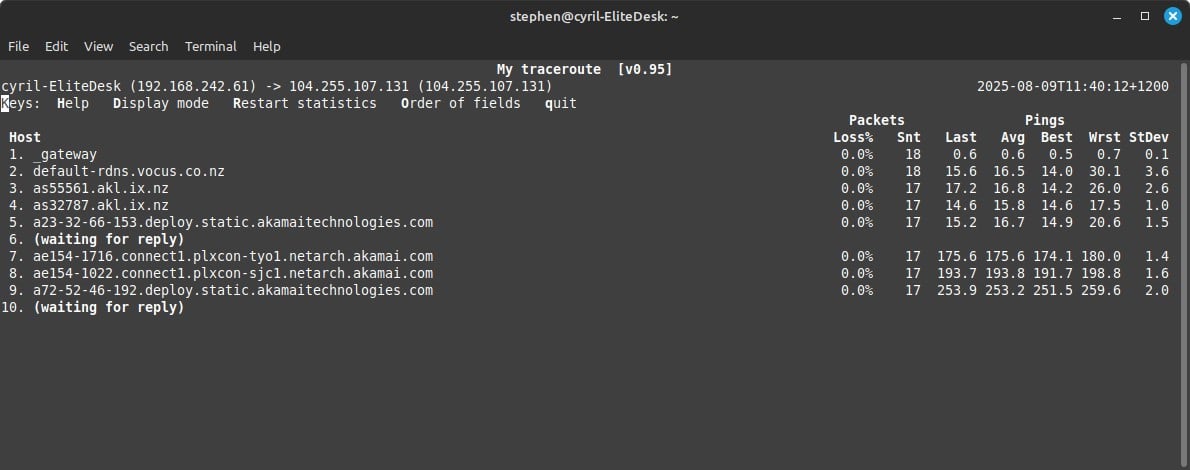
Hi, so looking at the NBA 2k support site, they are saying to test to 104.255.107.131 which resolves to an Akamai host in the US, as its a live stream game, I am assuming its not CDN federated to local NZ Akamai hosts, but I could be wrong.


Anyway as its seems its directly hosted in the US you are always going to be subject to international route changes and variances.


Cyril


LoganMcArthur

52 posts

Master Geek
+1 received by user: 2


  #3401222 9-Aug-2025 12:00
Send private message

Hi Cyril, thanks for this. Any chance you can explain in simpilar terms? not very tech savy. 


Understandable, i will have some sort of delay living in nz - but just the stuttering on the ps5 during the game is a nightmare that has just started! 


i have cleared cache etc on the ps5 in safe mode. Monitor is a great model under a year old with awesome response time. And using an ethernet connection to the ps5. 


My next step is to replace the hdmi and a last ditch effort. Do you suggest replacing the ethernet cable also? Its a cat 6 but ive had it awhile. 


cyril7
9075 posts

Uber Geek
+1 received by user: 2499

ID Verified
Trusted
Subscriber

  #3401236 9-Aug-2025 12:58
Send private message

Hi, without knowing exactly what server you are connecting to and noting the info provided by NBA2k, I can only assume you are connecting directly to a US server and there is no local cache, but as I say I could be wrong.


If that is the case, as you can see there is 250mS of latency to that US server and that is not reducable by any significant amount as its the laws of physics. Also you are at the mercy of internation transit that can change routes at any moment without ryme or reason from your perspective, but it could significantly impact your game.


If I were you I would try test if I am right as far as where the server is, and if it is infact US based then see if there is a local option.


Cyril


LoganMcArthur

52 posts

Master Geek
+1 received by user: 2


  #3401305 9-Aug-2025 17:38
Send private message

Hi Cryil, problem still here. 2k Has an oce server so it isnt that.


Shop now for Dell laptops and other devices (affiliate link).
RunningMan
9185 posts

Uber Geek
+1 received by user: 4838


  #3401307 9-Aug-2025 17:50
Send private message

Have you tried testing with all other local devices disconnected? You may have something on the network that is periodically saturating the connection - cloud syncing, torrents etc.


LoganMcArthur

52 posts

Master Geek
+1 received by user: 2


  #3401334 9-Aug-2025 20:46
Send private message

yeah hasnt been that, last ditch effort is to fully reset the ps5. results will be in shortly..


LoganMcArthur

52 posts

Master Geek
+1 received by user: 2


  #3401360 9-Aug-2025 23:46
Send private message

still happening..


michaelmurfy
meow
13579 posts

Uber Geek
+1 received by user: 10910

Moderator
ID Verified
Trusted
Lifetime subscriber

  #3401362 10-Aug-2025 00:34
Send private message

LoganMcArthur: still happening..


The problem is without additional information (eg, traceroutes or an IP address it is connecting to) we have no idea what may be causing this.


We can't keep prompting you to try things here. Saying "still happening" isn't helpful to anyone as we're literally throwing darts blind.


Try and run a MTR (winmtr) or use Pingplotter to 104.255.107.131 while you're gaming on a computer that is connected via ethernet and capture the results. But other than that, I doubt we're going to resolve it for you as I don't think many of us have knowledge of the game.


Is there a subreddit for it with other people having the same issue?


Michael Murphy | https://murfy.nz
Referral Links: Quic Broadband (use R122101E7CV7Q for free setup)

Are you happy with what you get from Geekzone? Please consider supporting us by subscribing.
Opinions are my own and not the views of my employer.


 1 | 2 | 3
View this topic in a long page with up to 500 replies per page Create new topic


Geekzone Live »

Try automatic live updates from Geekzone directly in your browser, without refreshing the page, with Geekzone Live now.


Are you subscribed to our RSS feed? You can download the latest headlines and summaries from our stories directly to your computer or smartphone by using a feed reader.