Geekzone: technology news, blogs, forums
Guest
Welcome Guest.
You haven't logged in yet. If you don't have an account you can register now.


Murf5252

1 post

Wannabe Geek


#299464 10-Sep-2022 09:11
Send private message

Hi,


I am on starlink which is CGNAT. I want to connect to my QNAP NAS to check security camera software QVRPro. Is there a way I can achieve this. I have an active subscription to Nordvpn but not sure if Nord has a solution. Ipv6 does not work currently with starlink. I have read that a VPN service can make this work but have no idea how. Any help or ideas appreciated.


Thanks


Create new topic
Jiriteach
1141 posts

Uber Geek
+1 received by user: 376

ID Verified
Trusted
Lifetime subscriber

  #2965274 10-Sep-2022 09:13
Send private message

Use something like - https://ngrok.com/pricing or Cloudflare ZeroTrust tunnels.


-- opinions expressed by me are solely my own. ie - personal


davidcole
6112 posts

Uber Geek
+1 received by user: 1476

Trusted

  #2965322 10-Sep-2022 09:37
Send private message

Or taillscale or zerotier


Previously known as psycik

Home Assistant: Gigabyte AMD A8 Brix, Home Assistant with Aeotech ZWave Controller, Raspberry PI, Wemos D1 Mini, Zwave, Shelly Humidity and Temperature sensors
Media:Chromecast v2, ATV4 4k, ATV4, HDHomeRun Dual
Server
Host Plex Server 3x3TB, 4x4TB using MergerFS, Samsung 850 evo 512 GB SSD, Proxmox Server with 1xW10, 2xUbuntu 22.04 LTS, Backblaze Backups, usenetprime.com fastmail.com Sharesies Trakt.TV Sharesight 


freitasm
BDFL - Memuneh
80949 posts

Uber Geek
+1 received by user: 41713

Administrator
ID Verified
Trusted
Geekzone
Lifetime subscriber

  #2965380 10-Sep-2022 10:42
Send private message

I have Tailscale installed on my laptop and desktop, as well as my Synology NAS. This way I can access the NAS from anywhere, without having to port forward anything. But it gives every device a new IP address.


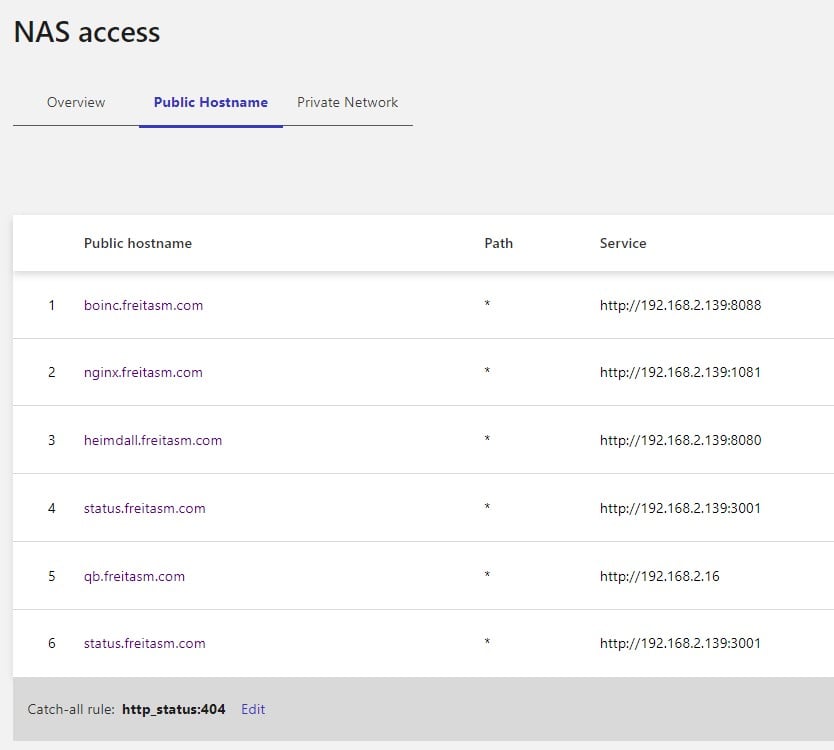
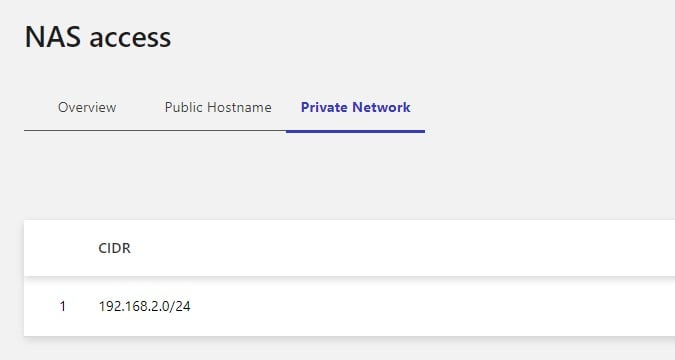
So I use another option. If you have more time to configure have a cloudflared docker instance on your NAS, and configure a private network for that using the Cloudflare rules (see screenshots). Using the WARP client and logging into your account will give you access to the private network.


The difference here is that Tailscale will create a network with its own IP addresses while on cloudlfared you create a split tunnel that let you access your network using existing IP addresses.


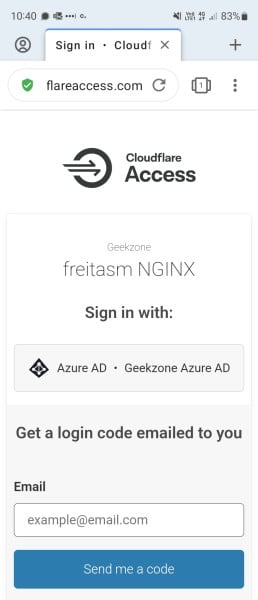
If you have your own domain you can extend this to create a tunnel that points to your NAS so you can access it via a URL and a sub-domain on your browser so you don't even need the WARP client if you just need browser access. In addition you then can configure an Cloudflare Access Application and set it so that only people with some email addresses (or logged via Office 365 or Google Workspace accounts) can access to the subdomain. This way you can access your NAS via browser without having to install any client so you can do it from any machine.


Referral links: Quic Broadband (free setup code: R587125ERQ6VE) | Samsung | AliExpress | Wise | Sharesies 


Support Geekzone by subscribing (browse ads-free), or making a one-off or recurring donation through PressPatron.


davidcole
6112 posts

Uber Geek
+1 received by user: 1476

Trusted

  #2965619 10-Sep-2022 20:22
Send private message

Also with cloudflared you do have to be somewhat careful. It does simplify the network side and remove the need to port forward.

But it also by default requires the destination application or device to provide all the security. Eg I do it for Nextcloud. But Nextcloud has pretty good security.

I also do it for some ssh. And while I use ssh keys I have also put it behind cloudflare access for for extra security.


Previously known as psycik

Home Assistant: Gigabyte AMD A8 Brix, Home Assistant with Aeotech ZWave Controller, Raspberry PI, Wemos D1 Mini, Zwave, Shelly Humidity and Temperature sensors
Media:Chromecast v2, ATV4 4k, ATV4, HDHomeRun Dual
Server
Host Plex Server 3x3TB, 4x4TB using MergerFS, Samsung 850 evo 512 GB SSD, Proxmox Server with 1xW10, 2xUbuntu 22.04 LTS, Backblaze Backups, usenetprime.com fastmail.com Sharesies Trakt.TV Sharesight 


BarTender
3630 posts

Uber Geek
+1 received by user: 2572

ID Verified
Trusted
Lifetime subscriber

  #2965623 10-Sep-2022 20:34
Send private message

Run WireGuard very happily on my Synology which is the free version of tailscale.

freitasm
BDFL - Memuneh
80949 posts

Uber Geek
+1 received by user: 41713

Administrator
ID Verified
Trusted
Geekzone
Lifetime subscriber

  #2965624 10-Sep-2022 20:39
Send private message

davidcole: Also with cloudflared you do have to be somewhat careful. It does simplify the network side and remove the need to port forward.

But it also by default requires the destination application or device to provide all the security. Eg I do it for Nextcloud. But Nextcloud has pretty good security.

I also do it for some ssh. And while I use ssh keys I have also put it behind cloudflare access for for extra security.


Not quite. If you expose as an application within a subdomain you can lockdown access with rules. And if you expose it via tunnel then it is an outbound connection so no firewall needed. If you expose an existing Web service using a port forward then you need to block any connection not coming from a Cloudflare IP address. Similarly if your application is directly connected to the Internet.

Well configured it is safer than port forward and firewalls.


Referral links: Quic Broadband (free setup code: R587125ERQ6VE) | Samsung | AliExpress | Wise | Sharesies 


Support Geekzone by subscribing (browse ads-free), or making a one-off or recurring donation through PressPatron.


Shop now on Samsung phones, tablets, TVs and more (affiliate link).
boland
569 posts

Ultimate Geek
+1 received by user: 91


  #2965898 11-Sep-2022 15:56
Send private message

freitasm:


I have Tailscale installed on my laptop and desktop, as well as my Synology NAS. This way I can access the NAS from anywhere, without having to port forward anything. But it gives every device a new IP address.


So I use another option. If you have more time to configure have a cloudflared docker instance on your NAS, and configure a private network for that using the Cloudflare rules (see screenshots). Using the WARP client and logging into your account will give you access to the private network.


I'm using Tailscale as well and also ran into the problem of the new IP addresses. I've got a QNAP NAS and I want to connect to it from the Android app regardless of whether I'm connected to Tailscale or not.


I've got a Raspberry PI with Pi Hole that serves as DNS server.


What I have done, is add a manual DNS entry to my Pi Hole with the FQDN of my NAS (e.g. nas.tailscale.beta.net) with the internal (192.168.x) IP address of my NAS. In my Android app I'm using that FQDN as the URL. And then it works magically! With the DNS feature in Tailscale it automatically registers the FQDN nas.tailscale.beta.net to point to the Tailscale 100.100 address, and Pi Hole ensures it resolves to 192.168.x.x while at home.


Perhaps not the most elegant solution but it works. 


Create new topic


Geekzone Live »

Try automatic live updates from Geekzone directly in your browser, without refreshing the page, with Geekzone Live now.


Are you subscribed to our RSS feed? You can download the latest headlines and summaries from our stories directly to your computer or smartphone by using a feed reader.