Geekzone: technology news, blogs, forums
Guest
Welcome Guest.
You haven't logged in yet. If you don't have an account you can register now.


Hatch

816 posts

Ultimate Geek
+1 received by user: 57


#303120 17-Jan-2023 17:03
Send private message

I have my fritzbox connect to the ONT in the garage. It provides pretty decent wifi speeds to
70% of the house. I have an Ethernet connection from the garage to the other side of the house, wondering if I can have some sort of mesh/repeater setup with a second unit via Ethernet connection to the base router.

Happy to look at other brands/models as a solution.

Just setting up a second fritzbox as a wifi mesh unit would be fine but just wondering if I can utilise the Ethernet port at the other end of the house or not.

Filter this topic showing only the reply marked as answer View this topic in a long page with up to 500 replies per page Create new topic
 1 | 2 | 3
cyril7
9075 posts

Uber Geek
+1 received by user: 2499

ID Verified
Trusted
Subscriber

  #3022866 17-Jan-2023 17:20
Send private message

Hi, yes the Fritz will allow you to do this, to save me explaining see link below


https://en.avm.de/faqs/setting-up-fritzrepeater-in-the-mesh/dok2/903_Integrating-FRITZ-Repeater-into-the-Mesh-via-LAN/


Cyril


networkn
Networkn
32876 posts

Uber Geek
+1 received by user: 15477

ID Verified
Trusted
Lifetime subscriber

  #3022867 17-Jan-2023 17:21
Send private message

Mesh is wireless to wireless. If it's Ethernet connected it would be considered Ethernet Backhaul.


For example, if you had 2 AP's connected via ethernet and a third connected via wireless, then the last one is using 'mesh'.


Some people do use the term Mesh but what they are really saying is I want seamless handover from one AP to another.


Handle9
11930 posts

Uber Geek
+1 received by user: 9689

Trusted
Lifetime subscriber

  #3022870 17-Jan-2023 17:23
Send private message

networkn:

Mesh is wireless to wireless. If it's Ethernet connected it would be considered Ethernet Backhaul.


For example, if you had 2 AP's connected via ethernet and a third connected via wireless, then the last one is using 'mesh'.


Some people do use the term Mesh but what they are really saying is I want seamless handover from one AP to another.


Pretty much every mesh system does have the option of using Ethernet backhaul though.


Jase2985
13739 posts

Uber Geek
+1 received by user: 6220

ID Verified
Lifetime subscriber

  #3022876 17-Jan-2023 17:26
Send private message

networkn:


Mesh is wireless to wireless. If it's Ethernet connected it would be considered Ethernet Backhaul.


For example, if you had 2 AP's connected via ethernet and a third connected via wireless, then the last one is using 'mesh'.


Some people do use the term Mesh but what they are really saying is I want seamless handover from one AP to another.


thing is Mesh (wirelessly connected access points) access points are sold as a product, and its their selling point, most will offer Ethernet backhaul.


Where are regular access points dont generally offer the mesh functionality.


networkn
Networkn
32876 posts

Uber Geek
+1 received by user: 15477

ID Verified
Trusted
Lifetime subscriber

  #3022883 17-Jan-2023 17:38
Send private message

Handle9:


Pretty much every mesh system does have the option of using Ethernet backhaul though.


Sure, but Mesh is the wrong term to use if you are ethernet backhauled.


It's a marketing thing, but it does lead to some confusion.


Jase2985
13739 posts

Uber Geek
+1 received by user: 6220

ID Verified
Lifetime subscriber

  #3022885 17-Jan-2023 17:45
Send private message

networkn:


Handle9:


Pretty much every mesh system does have the option of using Ethernet backhaul though.


Sure, but Mesh is the wrong term to use if you are ethernet backhauled.


It's a marketing thing, but it does lead to some confusion.


but you still buy it as a mesh system, its just offers you ethernet backhaul as well.


Move to New Zealand's best fibre broadband service (affiliate link). Free setup code: R587125ERQ6VE. Note that to use Quic Broadband you must be comfortable with configuring your own router.
cyril7
9075 posts

Uber Geek
+1 received by user: 2499

ID Verified
Trusted
Subscriber

  #3022888 17-Jan-2023 17:49
Send private message

Yep mesh is a marketing thing, as per the link I posted, just do that and the world will be connected and all fine.

Cyril

networkn
Networkn
32876 posts

Uber Geek
+1 received by user: 15477

ID Verified
Trusted
Lifetime subscriber

  #3022896 17-Jan-2023 18:07
Send private message

Jase2985:


thing is Mesh (wirelessly connected access points) access points are sold as a product, and its their selling point, most will offer Ethernet backhaul.


Where are regular access points dont generally offer the mesh functionality.


Better explanations of the way this work would make it less confusing. Mesh is Wireless Backhaul. Mesh describes the way a device is configured depending on what connectivity is available. A 'mesh' system isn't in Mesh mode unless it's wireless to wireless.


freitasm
BDFL - Memuneh
80665 posts

Uber Geek
+1 received by user: 41106

Administrator
ID Verified
Trusted
Geekzone
Lifetime subscriber

  #3022897 17-Jan-2023 18:09
Send private message

networkn:


Mesh is wireless to wireless. If it's Ethernet connected it would be considered Ethernet Backhaul.


Not exactly. The "mesh" is the ability of having a unit that configures the other units, thus avoiding conflicts, improving roaming between access points, etc.


If the link is wireless or wired, it doesn't matter. When the main unit controls the other devices via a central portal then everything is a "mesh".


In answer to the OP, most of the devices with "mesh" systems have both wired and wireless link. You use one or another depending on the characteristics of your premises. 


Referral links: Quic Broadband (free setup code: R587125ERQ6VE) | Samsung | AliExpress | Wise | Sharesies 


Support Geekzone by subscribing (browse ads-free), or making a one-off or recurring donation through PressPatron.


Handle9
11930 posts

Uber Geek
+1 received by user: 9689

Trusted
Lifetime subscriber

  #3022899 17-Jan-2023 18:24
Send private message

networkn:


Jase2985:


thing is Mesh (wirelessly connected access points) access points are sold as a product, and its their selling point, most will offer Ethernet backhaul.


Where are regular access points dont generally offer the mesh functionality.


Better explanations of the way this work would make it less confusing. Mesh is Wireless Backhaul. Mesh describes the way a device is configured depending on what connectivity is available. A 'mesh' system isn't in Mesh mode unless it's wireless to wireless.


There is an understood meaning for mesh access points. It's not something I see a need to be pedantic about.


everettpsycho
668 posts

Ultimate Geek
+1 received by user: 270


  #3022923 17-Jan-2023 19:47
Send private message

freitasm:

Not exactly. The "mesh" is the ability of having a unit that configures the other units, thus avoiding conflicts, improving roaming between access points, etc.


If the link is wireless or wired, it doesn't matter. When the main unit controls the other devices via a central portal then everything is a "mesh".


In answer to the OP, most of the devices with "mesh" systems have both wired and wireless link. You use one or another depending on the characteristics of your premises. 


Exactly this, most mesh systems are sold as wireless nodes that can interconnect and most technical people suggest cabling access points as a better option. Wiring mesh is actually a great solution for most people who have cabling, it has the better speed and reliability that access points offer but controlled by a simple central app or webpage that is very user friendly to remove the complexities. Sure access points offer more flexibility, but for pretty much anyone who doesn't work in IT and just want working internet everywhere, a wired mesh will deliver everything they'd need for a fraction of the price.l and time.

I've been using one like this for a while because it's simple and just gets the job done. With the Ethernet connection it maxes out my fibre connection on wifi and that is all it needs to do. I probably could go down the access point route and I've seriously considered it, but ultimately on a 300/100 connection if I'm getting 300 down upgrading seems a wasteful expense.


Shop on-line at New World now for your groceries (affiliate link).
RowanB
3 posts

Wannabe Geek


  #3022997 17-Jan-2023 22:09
Send private message

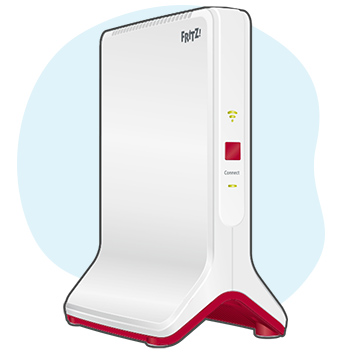
I use one of these with my Fritzbox, connected via Ethernet:

https://en.avm.de/products/mesh-wi-fi/fritzrepeater-3000/

Works seamlessly.

ANglEAUT
altered-ego
2436 posts

Uber Geek
+1 received by user: 842

Trusted
Lifetime subscriber

  #3023011 17-Jan-2023 23:56
Send private message

Hatch: I have my fritzbox connect to the ONT in the garage. ...


If you have a Fritz!Box, are you a 2Degrees customer? You can make your life easier & use the supported option: https://www.2degrees.nz/help/broadband-help/getting-started/setting-up-your-wifi-extender


Please keep this GZ community vibrant by contributing in a constructive & respectful manner.


nzben
44 posts

Geek
+1 received by user: 22


  #3023018 18-Jan-2023 06:58
Send private message

I have the exact same situation as you, Fritz in the basement covers the front part of the house, needed to cover the back of the house and and outdoor shed, had access to an ethernet cable running up and into the basement.


I used a TPlink outdoor access point (there are various ones, this is the Omada one) and set up the wireless ID and password to be the same as the Fritz box.


This is powered over the POE and is able to be managed either via IP, or via a phone app, which is handy as the unit is mounted in the peak of the attic.


I'm not sure how this is different to a Mesh setup, but the network is forced to the same name, if you go to the other end of the house then your device automatically switches to the other stronger network without interruption, which is what Mesh does as well, but in this case I have an outdoor WAP that cost about $150, or something like that.


Also, this allowed me to create a 2nd guest network on the outdoor WAP only that runs simultaneously alongside to service the business running out of the shed. (different network name)


I was able to have the Fritz network replicated on both 2.4 and 5.8Ghz simultaneously but found that the system worked more reliably in terms of "meshing" if I got rid of the 2.4 and ran only 5.8.


Not sure what the difference with Mesh is apart from that it requires manual setup, and seeing as the data is hardwired to the WAP unit it gets really good throughput, up to max that the WAP is capable of from the modem - about 300/100.


Silvrav
477 posts

Ultimate Geek
+1 received by user: 173

ID Verified

  #3023038 18-Jan-2023 08:58
Send private message

short answer to what you want yes, lots of units exist that will use a ethernet cable as a backhaul to create a wireless mesh network. - make sure you get units that have 1gbs lan ports so you not penalise by the second unit being connected at 100mbs only.


I use to use the TP LINK m4 and they worked great - actually have 2 units still sitting in a box if you keen for them. I didn't use the ethernet backhaul as the mesh connection between them (30m apart on ground and first floor) still gave me a reliable 400mbs connection at the second unit. supports 2.4ghz and 5ghz.


 1 | 2 | 3
Filter this topic showing only the reply marked as answer View this topic in a long page with up to 500 replies per page Create new topic


Geekzone Live »

Try automatic live updates from Geekzone directly in your browser, without refreshing the page, with Geekzone Live now.


Are you subscribed to our RSS feed? You can download the latest headlines and summaries from our stories directly to your computer or smartphone by using a feed reader.