Geekzone: technology news, blogs, forums
Guest
Welcome Guest.
You haven't logged in yet. If you don't have an account you can register now.


tim0001

275 posts

Ultimate Geek
+1 received by user: 146


#304392 30-Apr-2023 11:18
Send private message

Someone recently asked me how they could extend the WiFi  into a couple of buildings that are 10-20m from their house.  They are not at all techie, so that rules out a number of options (eg Mikrotik, which I am familiar with).  Had a search on GZ, but didn’t find a solution aimed at a non-techie person…


I’d be interested if there are any plug and play options out there for a reasonable price. (Perhaps I'm asking the wrong crowd.)  Performance required is a reliable >20Mbps.  Anyway, all opinions welcome!


My initial thoughts are that a TP-Link Deco mesh might be enough. (Did some iperf tests a while back on the Deco M4, got 210Mbps with 12m and 4 interior walls between mesh units.)   Easy to setup and around $100 per unit.  Ethernet backhaul would make for some great speeds, but not sure if its practical.


Based on my limited experience, power line adaptors are hit and miss (depending on the mains wiring). 


Grandstream seems to have a following on GZ. Are they super easy to setup?  


Thanks


Filter this topic showing only the reply marked as answer Create new topic
michaelmurfy
meow
13586 posts

Uber Geek
+1 received by user: 10929

Moderator
ID Verified
Trusted
Lifetime subscriber

  #3069485 30-Apr-2023 11:39
Send private message

Non technical. Seriously? Heaps of resources on here even for the non technical including a sticky post that has a lot of valuable information in it.

For starters, you mention other buildings. Draw something to show us what you mean.

Secondary is there any cabling (eg, Ethernet) between each or an ability to run cabling?

Third what ISP are they with and what are they using currently? Many providers offer solutions for this.


Michael Murphy | https://murfy.nz
Referral Links: Quic Broadband (use R122101E7CV7Q for free setup)

Are you happy with what you get from Geekzone? Please consider supporting us by subscribing.
Opinions are my own and not the views of my employer.


nzkc
1634 posts

Uber Geek
+1 received by user: 1041


  #3069488 30-Apr-2023 12:05
Send private message

General consensus seams to be (in order of preference):


  • Run ethernet to the buildings to a switch or wireless access point. Consider PoE here too - although I imagine you have power in the buildings. Its more effort as you'll want to secure the cable (trench, ducting, etc) but will offer the most flexibility and the highest performance
  • Use a wireless bridge. Better for longer distances than a mesh network and you'll get better performance but will be more effort to set up
  • Use a mesh network

I'd be surprised if Powerline adapters would work well, if at all, because its highly likely the buildings are on different circuits


If you're only after a reliable 20Mbps then a mesh may be OK but you're honestly not going to know until you try it.


tim0001:


Grandstream seems to have a following on GZ. Are they super easy to setup?  


I have one as an access point. Yes it was really easy to set up and very reliable. I haven't got experience of setting a couple up in a mesh, however, I'd expect that to also be straight forward.


tim0001

275 posts

Ultimate Geek
+1 received by user: 146


  #3069491 30-Apr-2023 12:51
Send private message

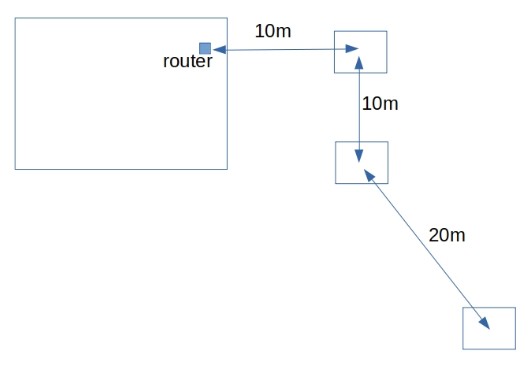
Lets assume something like this picture


The ISP is Starlink.  Their mesh offering is pretty average.


They are just using the SL router (also pretty average)


Not sure whether Ethernet backhaul is practical at this stage.  (Laying 40m of cable is not a trivial exercise anyway)  Also not sure whether the sheds are corrugated iron, but lets assume not.


Just to clarify, I’m asking about something that is almost plug and play.  No typing IP addresses into browsers etc.  It may well be that they will need to get something professionally installed.


networkn
Networkn
32879 posts

Uber Geek
+1 received by user: 15481

ID Verified
Trusted
Lifetime subscriber

  #3069492 30-Apr-2023 12:55
Send private message

The consumer TPLink stuff is about as non techie as you can get and in my experience it's very good considering. 


That being said, there is no where near enough information in your post to make any high quality recommendations, simply because there are too many factors in play. 


michaelmurfy
meow
13586 posts

Uber Geek
+1 received by user: 10929

Moderator
ID Verified
Trusted
Lifetime subscriber

  #3069504 30-Apr-2023 14:03
Send private message

Yeah I think the TP-Link stuff will be OK, not great. Corrugated iron though doesn't do well with WiFi.


The Grandstream stuff is easy(ish) but still requires a bit more technical knowhow. TP-Link is a set up and forget kind of solution. You're better to run Ethernet if you can and just install a mesh unit in the centre shed which should cover the rest with OK coverage.


Michael Murphy | https://murfy.nz
Referral Links: Quic Broadband (use R122101E7CV7Q for free setup)

Are you happy with what you get from Geekzone? Please consider supporting us by subscribing.
Opinions are my own and not the views of my employer.


everettpsycho
668 posts

Ultimate Geek
+1 received by user: 270


  #3069540 30-Apr-2023 16:27
Send private message

Playing devils advocate here, but as much as a good access point set up is it is definitely more technical than off the shelf mesh units and for the vast majority of people who aren't technical and just want wifi that works off the shelf mesh is perfectly fine. I find the technical members of fortune are generally more vocal on what is acceptable to them while most people I know are happy with the likes of deco or orbi units as all they want is internet access that works reliably.

Personally I considered a fancy set up but ultimately settled on a pair of Asus AX1800 routers set up with ai mesh making them in to one network and connected them by a cable. The set up was very simple and since installing it it's just getting on with doing what I need it to do, deliver simple reliable internet access to all my devices.

Ethernet is preferable but power line might be an option to reach the sheds which would probably be more stable than wireless backhaul.


Move to New Zealand's best fibre broadband service (affiliate link). Free setup code: R587125ERQ6VE. Note that to use Quic Broadband you must be comfortable with configuring your own router.
coffeebaron
6306 posts

Uber Geek
+1 received by user: 3569

Trusted
Lifetime subscriber

  #3069659 30-Apr-2023 17:57
Send private message

If they want to go the professional route, then a Point to Multi Point wireless network could be a go. But be prepared to spend a few k.


Rural IT and Broadband support.


Broadband troubleshooting and master filter installs.
Starlink installer - one month free: https://www.starlink.com/?referral=RC-32845-88860-71 
Wi-Fi and networking
Cel-Fi supply and installer - boost your mobile phone coverage legally


Need help in Auckland, Waikato or BoP? Click my email button, or email me direct: [my user name] at geekzonemail dot com


tim0001

275 posts

Ultimate Geek
+1 received by user: 146


  #3069689 30-Apr-2023 20:20
Send private message

Thanks everyone for your input.


As a side note,  I think a lot of people struggle with their WiFi.  The number of times I've heard people say "our fibre is so slow/unreliable".  But I'm guessing its not the fibre...


Jase2985
13742 posts

Uber Geek
+1 received by user: 6226

ID Verified
Lifetime subscriber

  #3069691 30-Apr-2023 20:34
Send private message

tim0001:


Thanks everyone for your input.


As a side note,  I think a lot of people struggle with their WiFi.  The number of times I've heard people say "our fibre is so slow/unreliable".  But I'm guessing its not the fibre...


its because they have a single router behind the TV and are trying to stream stuff through 4 walls in a bedroom, or the router is in a metal network box in the garage and they are trying to use wifi pretty much anywhere in the house.


deadlyllama
1283 posts

Uber Geek
+1 received by user: 476

Trusted

  #3069871 1-May-2023 10:44
Send private message

tim0001:


Not sure whether Ethernet backhaul is practical at this stage.  (Laying 40m of cable is not a trivial exercise anyway)  Also not sure whether the sheds are corrugated iron, but lets assume not.


If your friend doesn't care about aesthetics: aerial ethernet, cable tied to a support wire.  If you don't buy special outdoor ethernet cable it will degrade in sunlight.  Several houses ago I used clothesline as a support wire and indoor rated cable as a temporary (6mo) solution.


This is more work than putting mesh units on windowsills, but a similar amount of work to installing outdoor wifi gear (as you've got to get cabling to it).


K8Toledo
1018 posts

Uber Geek
+1 received by user: 311


  #3070213 2-May-2023 01:09
Send private message

tim0001:


Lets assume something like this picture


The ISP is Starlink.  Their mesh offering is pretty average.


They are just using the SL router (also pretty average)


Not sure whether Ethernet backhaul is practical at this stage.  (Laying 40m of cable is not a trivial exercise anyway)  Also not sure whether the sheds are corrugated iron, but lets assume not.


I would probably go the other way and assume metal cladding until proven otherwise. Best to find out first.


Shop now for Lego sets and other gifts (affiliate link).
nztim
4023 posts

Uber Geek
+1 received by user: 2724

ID Verified
Trusted
TEAMnetwork
Subscriber

  #3070220 2-May-2023 06:49
Send private message

Late to the party here, but can I suggest NOT going for any solution that requires running copper ethernet between buildings.


The reason is that there is a high likelihood that those buildings are on different electrical phases and this can create a potential difference between each building.


The best solution is a running fibre between the buildings, the next best solution is wireless point to point bridges. Both of these solutions will run into the thousands.


Failing that look at mesh solutions but as others have said this will have mixed results.


Any views expressed on these forums are my own and don't necessarily reflect those of my employer. 


CrazyM
110 posts

Master Geek
+1 received by user: 61
Inactive user


  #3070232 2-May-2023 08:04
Send private message

I can recommend the TP Link Deco X60 for this situation. 


I bought the TP-Link X60's primarily because I saw a review where they had particularly strong 2.4GHz radios (important for wifi calling in my no coverage area) but they have been excellent set-and-forget devices.


I have 2 on a wired backhaul inside the house and a third operating wirelessly inside a Totalspan, steel-framed, coloursteel-clad shed approximately 10m away. Performance in the workshop is obviously not as good as in the house but signal is reported as "Strong" and I get consistent >120Mbs on Speedtest which exceeds my needs.


tim0001

275 posts

Ultimate Geek
+1 received by user: 146


  #3070405 2-May-2023 12:32
Send private message

@CrazyM Pretty impressive performance into a steel shed !


I managed to negotiate some downtime on our home network, and did a test with our Tp-Link M4 Deco mesh.   Put one mesh unit in a wooden gib lined shed 15m away from main unit in the house.  No observed packet loss to the home router.  Latency stable.   Around 210Mbps on speedtest.net.  (Starlink may have limited that a bit.)


tim0001

275 posts

Ultimate Geek
+1 received by user: 146


  #3072339 4-May-2023 15:30
Send private message

nztim:


Late to the party here, but can I suggest NOT going for any solution that requires running copper ethernet between buildings.


The reason is that there is a high likelihood that those buildings are on different electrical phases and this can create a potential difference between each building.


Good point.  Are there any industry guidelines/standards that cover inter-building requirements?  Couldn't find anything in https://www.tcf.org.nz/industry/standards-compliance/infrastructure-connections/premises-wiring/ 


Slightly off topic, but I'm also interested in lightning protection guidelines.  I've seen enough PCs and modems taken out locally that I may have developed a slight paranoia.  (I now unplug the important stuff during a thunderstorm.)   The problem appears to be much worse in rural areas (OH power distribution)


Filter this topic showing only the reply marked as answer Create new topic


Geekzone Live »

Try automatic live updates from Geekzone directly in your browser, without refreshing the page, with Geekzone Live now.


Are you subscribed to our RSS feed? You can download the latest headlines and summaries from our stories directly to your computer or smartphone by using a feed reader.