|
|
|
@mentalinc should work fine but I'd say it is the SIP-ALG proxy mucking things up. Look above :)
Michael Murphy | https://murfy.nz
Referral Links: Quic Broadband (use R122101E7CV7Q for free setup)
Are you happy with what you get from Geekzone? Please consider supporting us by subscribing.
Opinions are my own and not the views of my employer.
thanks, confirmed I can now register which is great..
maybe move the SIP stuff into your tutorial if possible...
CPU: AMD 5900x | RAM: GSKILL Trident Z Neo RGB F4-3600C16D-32GTZNC-32-GB | MB: Asus X570-E | GFX: EVGA FTW3 Ultra RTX 3080Ti| Monitor: LG 27GL850-B 2560x1440
Quic: https://account.quic.nz/refer/473833 R473833EQKIBX
michaelmurfy:
Secondary Bug Warning: If you're using VLAN tagging also you'll note you'll have an IP however be unable to access the internet. Go under Firewall/NAT, NAT the under the rule "masquerade for WAN" click Actions - Config. Change the Outbound interface to either your PPPoE connection or your VLAN connection (for IPoE):
I was scratching my head for some time until i came across your setup guide, this little setup step was all I was lacking, thank you very much for posting!
Thanks for this guide.
It took me less than an hour to get up and running.
Also - thanks for running the cloud controller for the AP's.
Thats my next challenge.
Hi Michael,
Awesome guide you have here. I was wondering if you have any any experience with the UniFi Secure Gateways? specifically the Pro.
I currently have Vodafone Fibre and I will be switching to Bigpipe tomorrow and I can not for the life of me get it working.
I have tried using DHCP and entering the VLAN ID = 10
I have tried using DHCP and entering the VLAN ID = 10 and setting the DNS to 203.109.129.67 / 203.109.129.68
I have tried using PPPoE and entering vodafone/vodafone for username and password and same as above with LAN ID and DNS
No luck so far.
Hoping you can help
@NZVengeance Vodafone Fibre (not to be confused with FibreX which is not even fibre, it is damn Cable) is PPPoE over VLAN 10. You need to have the PPPoE details as these are per user however you should be able to pull that out of your existing router.
Michael Murphy | https://murfy.nz
Referral Links: Quic Broadband (use R122101E7CV7Q for free setup)
Are you happy with what you get from Geekzone? Please consider supporting us by subscribing.
Opinions are my own and not the views of my employer.
This is all I can find in my router:
Any opinion on using the USG (Security Gateway) vs. the EdgeRouter?
Regards.
Please keep this GZ community vibrant by contributing in a constructive & respectful manner.
NZVengeance:
This is all I can find in my router:
If you're Vodafone FibreX (Cable) then it is DHCP over VLAN 10.
IcI: Hi. Any opinion on using the USG (Security Gateway) vs. the EdgeRouter? Regards.
I've done a few installs with the USG and it is a great product - more suited towards beginners. It is essentially the Edgerouter but all management is done via the UniFi controller (and is far more basic).
Michael Murphy | https://murfy.nz
Referral Links: Quic Broadband (use R122101E7CV7Q for free setup)
Are you happy with what you get from Geekzone? Please consider supporting us by subscribing.
Opinions are my own and not the views of my employer.
@michaelmurfy, thanks for the guide.
I just got Gigabit UFB, grabbed myself an ERPoe-5, upgraded to 1.9.1 and did the wizard, immediately did the Speedtest and got good results:
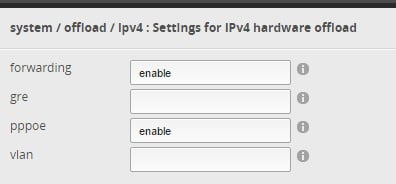
Unsure if this is a change in 1.9.1 but it appears as if the IPv4 hardware offload is either enabled by default, or enabled by the wizard:

So don't need to touch the CLI anymore for best performance, potentially... :)
Thanks @stubbed - yes, I did provide feedback to Ubiquiti regarding the hardware offload and it does appear they've fixed some of the bugs in my guide.
Michael Murphy | https://murfy.nz
Referral Links: Quic Broadband (use R122101E7CV7Q for free setup)
Are you happy with what you get from Geekzone? Please consider supporting us by subscribing.
Opinions are my own and not the views of my employer.
Add me to the list of people who are now set up on ERLs. Thanks heaps @michaelmurfy Set up was a breeze with your guide. I'm still only on ADSL (via a Vigor 120 in bridge mode), but I'm ready for fibre when it eventually arrives. Also, I can now re-purpose (hopefully) my Netgear WNDR 3700 as a 5GHz wireless bridge to our kitchen stereo - which struggles on built inb 2.4 GHz, due to the proximity of our microwave.
Next step on the ERL, is to set up all the dns4me DNSMASQ etc stuff, that I had running (through Gargoyle) on the Netgear.
For those interested in more Ubiquiti / UniFi info, Willie Howe has a YouTube channel covering many topics.
Please keep this GZ community vibrant by contributing in a constructive & respectful manner.
I need help with logging errors (or messages) from an ERL 3 (running 1.9.1).
I have started Log Center on a Synology DS216Play running the latest version of DSM.
I cannot see any messages from the ERL to the Log Center. I did try the Kiwi Syslog program with the same results.
I have turned on logging on my Draytek Vigor 130 and I get messages e.g. Logon, Informational.
I don't get any message from the ERL.
In System (ERL) , I have set:
Log to Remote Server to 192.168.1.11 (the NAS) and currently 192.168.1.11/514.
Log Level has been set to Error and currently Informational.
The ERl has been re-started a few times.
PS I have another post in Geekzone, because I lose all internet connectivity (sometines) several times a week for approx 30-60 seconds and one of the replies was to provide some logs.
PC: Dell Inspiron 16 5640 (Windows 11 Home), Dell Inspiron 7591 2n1 (Windows 11 Pro), HP ProBook 470G1 (Windows 10 Pro), Intel NUC7I5BNH (Zorin)
Net: Grandstream 1 x GWN7062 Router, 1 x GWN7665 Access Point
Storage: Synology DS216play NAS, 2 x 6TB
Media: 3 x Amazon FireTV. Echo, Dot, Spot
TV: 2 x Samsung H6400 55" LED TV, Panasonic TH-P50G10Z 50" Plasma TV
Mobile: Samsung Galaxy A52 5G
Wearable: Gear S3 Frontier
On my ERL, I have syslog messages going to two boxes, both running syslog. One is an ancient OS/2 box, and the other is Mythbuntu 16.04. This is what I have in my config (via CLI):
set system syslog global facility all level notice
set system syslog global facility protocols level debug
set system syslog host inisantg.jsw.gen.nz facility all level debug
set system syslog host mypvr.jsw.gen.nz facility all level debug
erl@erl# show system syslog
global {
facility all {
level notice
}
facility protocols {
level debug
}
}
host inisantg.jsw.gen.nz {
facility all {
level debug
}
}
host mypvr.jsw.gen.nz {
facility all {
level debug
}
}
[edit]
|
|
|