
Geekzone: technology news, blogs, forums
Guest
Welcome Guest.
You haven't logged in yet. If you don't have an account you can register now.


Filter this topic showing only the reply marked as answer View this topic in a long page with up to 500 replies per page Create new topic
1 | 2 
richms
29098 posts

Uber Geek
+1 received by user: 10209

Trusted
Lifetime subscriber

  #2155014 5-Jan-2019 18:25
Send private message

Your router should be able to get a DHCP lease from the neighbours router on its wan interface, so set its WAN as DHCP and see what happens.


I prefer to avoid the same private IP ranges because its so easy to mix them, so I would stick your router on something like 10.0.0.1 or 172.16.10.1 range instead.


Your routers lan IP is usually the first or last in the range that you choose, Im not too familiar with the tp link interfaces since I havent touched their recent routing gear but most routers will work out the DHCP range for you when you change its LAN IP.



Richard rich.ms


rossmcm

111 posts

Master Geek
+1 received by user: 11


  #2155879 7-Jan-2019 15:50

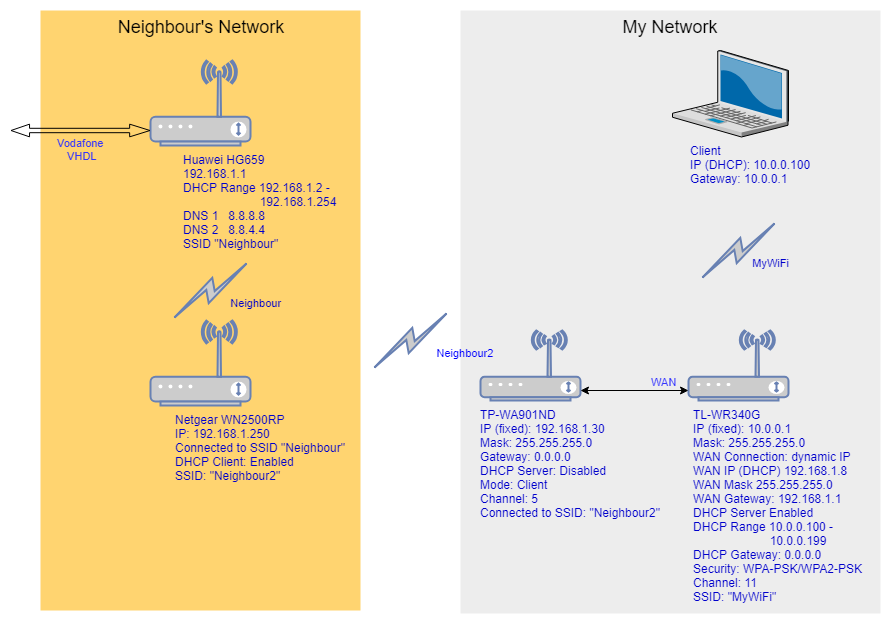
OK, this is what I ended up with, based on the suggestion of  rich.ms.  


The neighbour's extender Netgear WN2500RP is 2-3 walls and 10-15 metres from my TP-WA901ND running in "client" mode, and the TL-WR340G is at the other end of the house and connected with a 20m length of exterior CAT6 cable.


So far it's working with no issues, which is more than I can say for any of the other configurations I've tried.  Many thanks for all the suggestions.


Aredwood
3885 posts

Uber Geek
+1 received by user: 1749


  #2155916 7-Jan-2019 17:00

MadEngineer: Yes, really. I’ve mentioned this on GZ before but your neighbour’s property is on a different mains phase to yours resulting in a potential of 415v if there’s a fault over any conductors on either of the properties.

Low chance of it becoming (x2 properties aside) a problem but very high risk.

Even if the properties are on the same phase you’re providing a perfect opportunity for current to find a return in either an earth or neutral fault.


You can run into issues from this even due to voltage drop.

EG - I get 240V at my switchboard when there is not much electricity being used in my house. But it will easily drop to 230V when there is 30A or so load switched on. This would be enough to cause a current to flow in any wire between me and a neighbors property. (and also a voltage difference between the earth stakes on different properties).

In theory, the little transformers that are used in Ethernet interfaces will isolate any such currents, but I don't know what they are rated to withstand.


rossmcm

111 posts

Master Geek
+1 received by user: 11


  #2155928 7-Jan-2019 17:32

Shouldn't be an issue.  There is no galvanic connection between myself and the neighbour - only a wifi connection.  The 20m cable run is effectively between 2 rooms of my house.  Even if the two TP-link boxes at each end of that cable were on different phases, I would have thought they would be twice isolated by the plug-packs at each end and then by the line transformers on the ethernet interface. 


MadEngineer
4591 posts

Uber Geek
+1 received by user: 2570

Trusted

  #2155969 7-Jan-2019 19:56
Send private message

No, my reply was in response to someone elses suggestion to run a network cable to your neighbour. Do not do this, which you haven't.


You're not on Atlantis anymore, Duncan Idaho.

shk292
2916 posts

Uber Geek
+1 received by user: 2040

Lifetime subscriber

  #2155974 7-Jan-2019 20:06
Send private message

It looks like you've assigned the two wireless link modules IP addresses which are within the DHCP range of the primary router.  If this is the case, it would be better to change them (and the DHCP range) to avoid any chance of duplicate addresses


1 | 2 
Filter this topic showing only the reply marked as answer View this topic in a long page with up to 500 replies per page Create new topic


Geekzone Live »

Try automatic live updates from Geekzone directly in your browser, without refreshing the page, with Geekzone Live now.


Are you subscribed to our RSS feed? You can download the latest headlines and summaries from our stories directly to your computer or smartphone by using a feed reader.