Geekzone: technology news, blogs, forums
Guest
Welcome Guest.
You haven't logged in yet. If you don't have an account you can register now.


Filter this topic showing only the reply marked as answer View this topic in a long page with up to 500 replies per page Create new topic
1 | 2 | 3
Stacy88

84 posts

Master Geek
+1 received by user: 3


  #2423999 19-Feb-2020 13:20
Send private message

Ruphus:


You can remove the ports that you added into your Fritzbox as they don't need to be in there.


The firewall could have been an issue as it was configured to use the Public profile By default, that profile restricts network access to your computer unless specifically allowed. Turing the firewall off is helpful for testing purposes but you might want to consider turning it back on and setting it to Private.


The controller is showing "Needs attention" as a USG hasn't been adopted. This can be ignored and will not stop the adoption process of your switch.


Ah I see. I will remove the ports maybe in a few days when the issue gets fix. Just to be safe :D. 


In regards to the last line of yours "The controller is showing "Needs attention" as a USG hasn't been adopted. This can be ignored and will not stop the adoption process of your switch." are you sure about this because if I ignore it, the adoption process doesn't seem to be able to successfully adopt itself..it keeps disconnecting and re-adopting repetitively. 


Oh and anymore suggestions :) ? 


Sean2842
40 posts

Geek
+1 received by user: 5


  #2424002 19-Feb-2020 13:25
Send private message

Stacy88:


Sean2842:


whoops sorry I meant directly, I had an issue where an access point wasn't adopting because it wasn't connected to the internet but a reset fixed it. 


My next question would be, are you resetting it properly? 


You might not be alone according to this article here. https://community.ui.com/questions/Switch-8-60w-will-not-reset/dbfd7548-b566-4662-8c70-c53b24fe1489?page=1


ah I see. i'l try do a reset again but this time, follow this guide. 


Update: just done the reset twice and problem still persist :( . In your article link, it also suggest "If you can SSH to the switch, with putty, try:" I wasn't able to do this part since I don't know how to do it..would you be able to guide me? still a novice sorry 😅


yeah I'm kind of a novice myself too, could be an issue with the actual switch itself. 


Stacy88

84 posts

Master Geek
+1 received by user: 3


  #2424017 19-Feb-2020 13:42
Send private message

@sean2842


No worries. Thanks for your help.  Hopefully someone here is able to help me find a solution. 


Sean2842
40 posts

Geek
+1 received by user: 5


  #2424023 19-Feb-2020 13:48
Send private message

No problem, best of luck :)


sittingduckz
689 posts

Ultimate Geek
+1 received by user: 288

ID Verified

  #2424025 19-Feb-2020 13:49
Send private message


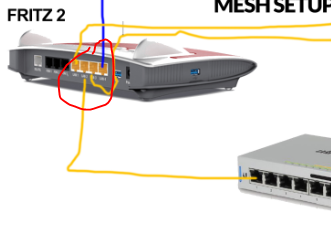
There is a gap in your connection!


Sorry, slow day at work 😋


I'm not a complete idiot, I still have some parts missing.


Stacy88

84 posts

Master Geek
+1 received by user: 3


  #2424035 19-Feb-2020 14:01
Send private message

sittingduckz:


There is a gap in your connection!


Sorry, slow day at work 😋


😂


Support Geekzone with one-off or recurring donations Donate via PressPatron.
Stacy88

84 posts

Master Geek
+1 received by user: 3


  #2424036 19-Feb-2020 14:02
Send private message

Tagging @Ruphus as this might give him a idea of what I was talking about 😃


dfnt
1553 posts

Uber Geek
+1 received by user: 1036

Trusted
Lifetime subscriber

  #2424054 19-Feb-2020 14:30
Send private message

Download putty https://www.chiark.greenend.org.uk/~sgtatham/putty/latest.html


Enter IP address of unifi switch


Login and password is probably ubnt/ubnt, otherwise it can also be set via the controller


Type info


What does the status show?


Stacy88

84 posts

Master Geek
+1 received by user: 3


  #2424079 19-Feb-2020 14:46
Send private message

dfnt:


Download putty https://www.chiark.greenend.org.uk/~sgtatham/putty/latest.html


Enter IP address of unifi switch


Login and password is probably ubnt/ubnt, otherwise it can also be set via the controller


Type info


What does the status show?


Hiya dfnt (let me know if you don't like me to refer you this way :D).


I done your advice and here are the result(s). 


Image 1: This was done while my PC Computer is connect to the first port of the US-8-60W POE Switch. While my pc computer was connected to this, the US-8-60W POE Switch device port 3 was connected to the router. 


Image 2: This was done only with the US-8-60W POE Switch device port 3 was connected to the router.  My computer PC was not connected to the POE Switch but instead connected to the router. 


Hope this helped? Thnx


dfnt
1553 posts

Uber Geek
+1 received by user: 1036

Trusted
Lifetime subscriber

  #2424099 19-Feb-2020 15:20
Send private message

Can you type cat /var/log/messages


Paste the output to see if it can show us why its not adopting


Failing that, can you type (assuming your unifi controller is running on .20:


set-inform http://192.168.178.20:8080/inform


Go to the controller, adopt the switch, then back to putty and press the up arrow to get to set-inform http://192.168.178.20:8080/inform and press enter


Stacy88

84 posts

Master Geek
+1 received by user: 3


  #2424108 19-Feb-2020 15:33
Send private message

dfnt:


Can you type cat /var/log/messages


Paste the output to see if it can show us why its not adopting


Failing that, can you type (assuming your unifi controller is running on .20:


set-inform http://192.168.178.20:8080/inform


Go to the controller, adopt the switch, then back to putty and press the up arrow to get to set-inform http://192.168.178.20:8080/inform and press enter


Hey,


Thanks for the reply.


Where do you want me to type the "cat /var/log/messages" command? also where do you want me to type "set-inform http://192.168.178.20:8080/inform" 


Lastly, when you say "controller" are you referring to the Ubiquiti UniFi Controller? whenever I try to select "adapt" for the switch it won't let me. 


HP


Shop now for HP laptops and other devices (affiliate link).
dfnt
1553 posts

Uber Geek
+1 received by user: 1036

Trusted
Lifetime subscriber

  #2424111 19-Feb-2020 15:40
Send private message

In the putty session, and yes the unifi controller


Stacy88

84 posts

Master Geek
+1 received by user: 3


  #2424122 19-Feb-2020 16:00
Send private message

dfnt:


In the putty session, and yes the unifi controller


Okay. Got it. 


Heres the results:


1. First part for the Putty session: 


2. Still unable to click/press/select the adopt button after entering your code "set-inform http://192.168.178.20:8080/inform".  


In regards to the part where you mentioned "Failing that, can you type (assuming your unifi controller is running on .20:" are you talking about the POE Switches IP Address? if so, then the ip address for it is 192.168.178.41.  


EDIT: I've just tried to do my own testing by connecting my computer pc onto the port 1 of the US-8-60W POE Switch while the US-8-60W POE Switch is connected to the router and somehow when I browse the internet, it has internet. However, still unable to adopt and the interface still has that message as shown before: https://i.imgur.com/AtJIGAU.png 


EDIT 2: Lastly, the disconnection from adopting still persist.


Soory for the nuisances


dfnt
1553 posts

Uber Geek
+1 received by user: 1036

Trusted
Lifetime subscriber

  #2424127 19-Feb-2020 16:15
Send private message

you're using ; not : in the set-inform command, just copy/paste the command exactly as I have written it - you use right click on the mouse to paste in the putty session


and no i'm not talking about the switch ip, the set-inform command tells the switch which unifi controller to communicate with


Stacy88

84 posts

Master Geek
+1 received by user: 3


  #2424139 19-Feb-2020 17:01
Send private message

dfnt:


you're using ; not : in the set-inform command, just copy/paste the command exactly as I have written it - you use right click on the mouse to paste in the putty session


and no i'm not talking about the switch ip, the set-inform command tells the switch which unifi controller to communicate with


Done: 


How's this? As stated before, still unable to click the "adopt" button in the controller. Also, after entering the inform command, I did the "


press the up arrow to get to set-inform http://192.168.178.20:8080/inform and press enter" . 


1 | 2 | 3
Filter this topic showing only the reply marked as answer View this topic in a long page with up to 500 replies per page Create new topic


Geekzone Live »

Try automatic live updates from Geekzone directly in your browser, without refreshing the page, with Geekzone Live now.


Are you subscribed to our RSS feed? You can download the latest headlines and summaries from our stories directly to your computer or smartphone by using a feed reader.