Geekzone: technology news, blogs, forums
Guest
Welcome Guest.
You haven't logged in yet. If you don't have an account you can register now.


Filter this topic showing only the reply marked as answer View this topic in a long page with up to 500 replies per page Create new topic
1 | 2 | 3
hio77
'That VDSL Cat'
13036 posts

Uber Geek
+1 received by user: 3896

ID Verified
Trusted
Lizard Networks
Subscriber

  #2836033 20-Dec-2021 15:33
Send private message

sud0:


Jiriteach: BTW - My UDM Pro is connected directly to my ONT. You don’t need another device in the middle. I’m with Orcon as well.


How? Did you see my picture? There is no ethernet port on the device on the left in my picture.


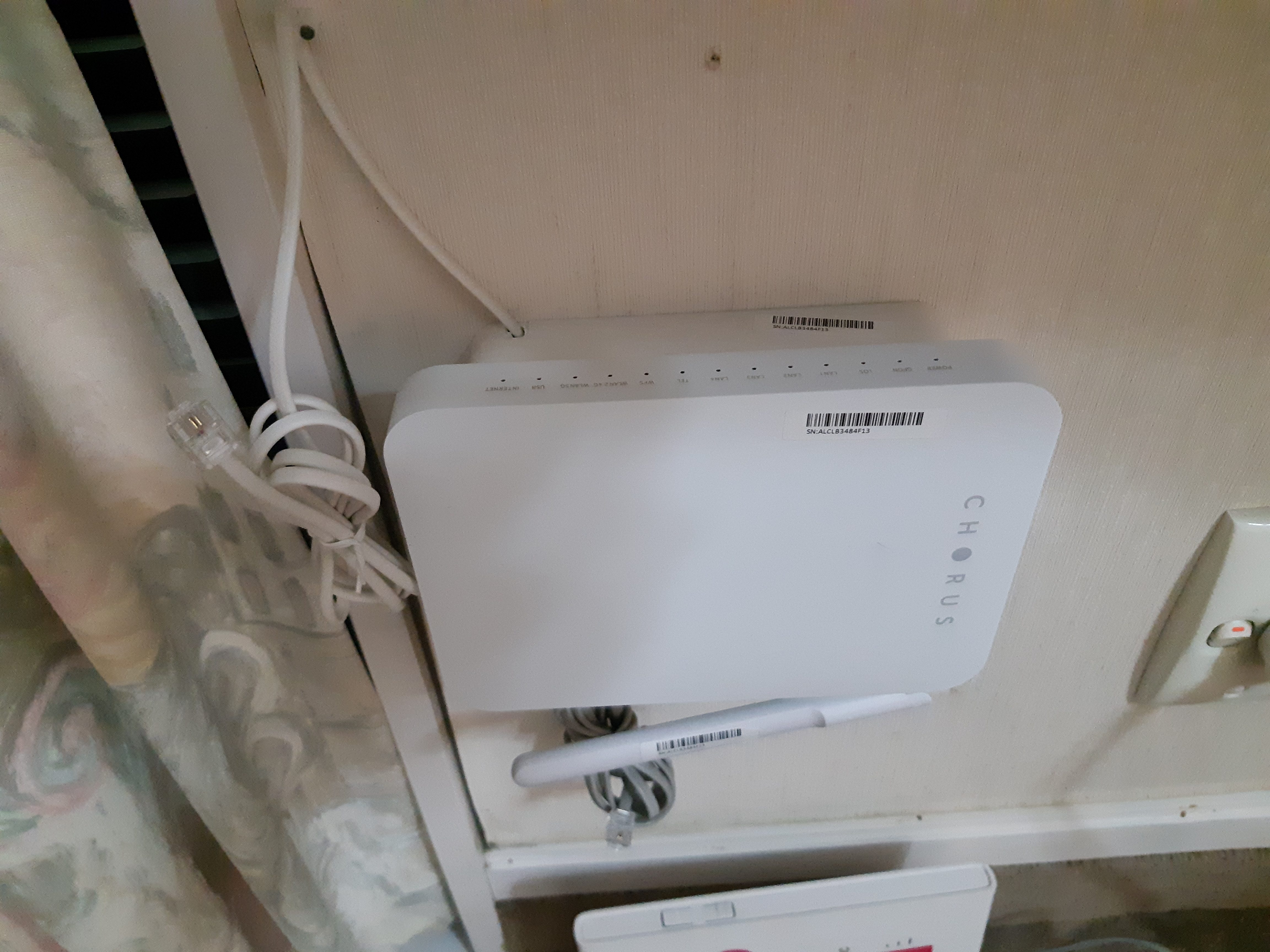
that 'device' is just a termination point.


It's the ITP, Internal Termination Point.


inside it, the fibre is spliced onto a pigtail, which is then terminated in a APC-APC connector - This is a godsend if the pigtail to the ont is ever bent to the point it needs replacing.


a tech can just replace the lead, rather than having to redo all the fibre splicing. 


Here is how it's normally deployed:


#include <std_disclaimer>


Any comments made are personal opinion and do not reflect directly on the position my current or past employers may have. 


sud0

283 posts

Ultimate Geek
+1 received by user: 117

ID Verified
Lifetime subscriber

  #2836034 20-Dec-2021 15:38
Send private message

Well... a full reset fixed the problem!


Lucas


lpossamai.me


wratterus
1687 posts

Uber Geek
+1 received by user: 678


  #2836035 20-Dec-2021 15:40
Send private message

I guess I take back what I said about the UDM speedtest...? Haha. Glad it's working. That was extremely confusing for a bit there...


michaelmurfy
meow
13581 posts

Uber Geek
+1 received by user: 10914

Moderator
ID Verified
Trusted
Lifetime subscriber

  #2836036 20-Dec-2021 15:41
Send private message

Please re-attach the ONT to the Fibre Termination Point - it just clips on like in @hio77's photo. It is stressing me out just flapping around in the breeze like that!


Antenna is facing down along with the Ethernet ports in a normal install.


Michael Murphy | https://murfy.nz
Referral Links: Quic Broadband (use R122101E7CV7Q for free setup)

Are you happy with what you get from Geekzone? Please consider supporting us by subscribing.
Opinions are my own and not the views of my employer.


sud0

283 posts

Ultimate Geek
+1 received by user: 117

ID Verified
Lifetime subscriber

  #2836038 20-Dec-2021 15:46
Send private message

michaelmurfy:


Please re-attach the ONT to the Fibre Termination Point - it just clips on like in @hio77's photo. It is stressing me out just flapping around in the breeze like that!


Antenna is facing down along with the Ethernet ports in a normal install.


Not possible... otherwise UDM-PRO won't fit πŸ˜‚


Lucas


lpossamai.me


sud0

283 posts

Ultimate Geek
+1 received by user: 117

ID Verified
Lifetime subscriber

  #2836039 20-Dec-2021 15:47
Send private message

wratterus:


I guess I take back what I said about the UDM speedtest...? Haha. Glad it's working. That was extremely confusing for a bit there...


Yeah.. sorry about that! It's annoying this happens with such expensive equipment. I WFH all the time and I thought I would buy a good network router to be reliable and not give me issues... :(


Lucas


lpossamai.me


HP


Shop now for HP laptops and other devices (affiliate link).
sud0

283 posts

Ultimate Geek
+1 received by user: 117

ID Verified
Lifetime subscriber

  #2836043 20-Dec-2021 15:57
Send private message

sud0:


Well... a full reset fixed the problem!


Interesting... if I restore the UDM-PRO backup, I get the same issue! 


Lucas


lpossamai.me


Mehrts
1112 posts

Uber Geek
+1 received by user: 984

Trusted

  #2836044 20-Dec-2021 15:58
Send private message

sud0:
Not possible... otherwise UDM-PRO won't fit πŸ˜‚


You keep the UDMP in that wall cabinet?!


Jiriteach
1139 posts

Uber Geek
+1 received by user: 373

ID Verified
Trusted
Lifetime subscriber

  #2836045 20-Dec-2021 15:58
Send private message

sud0:

sud0:


Well... a full reset fixed the problem!


Interesting... if I restore the UDM-PRO backup, I get the same issue! 


Yup so it’s something with the configuration. Sometimes disabling and re-enabling the ports can fix things.


-- opinions expressed by me are solely my own. ie - personal


sud0

283 posts

Ultimate Geek
+1 received by user: 117

ID Verified
Lifetime subscriber

  #2836050 20-Dec-2021 16:03
Send private message

Jiriteach:


Yup so it’s something with the configuration. Sometimes disabling and re-enabling the ports can fix things.


Found the issue!


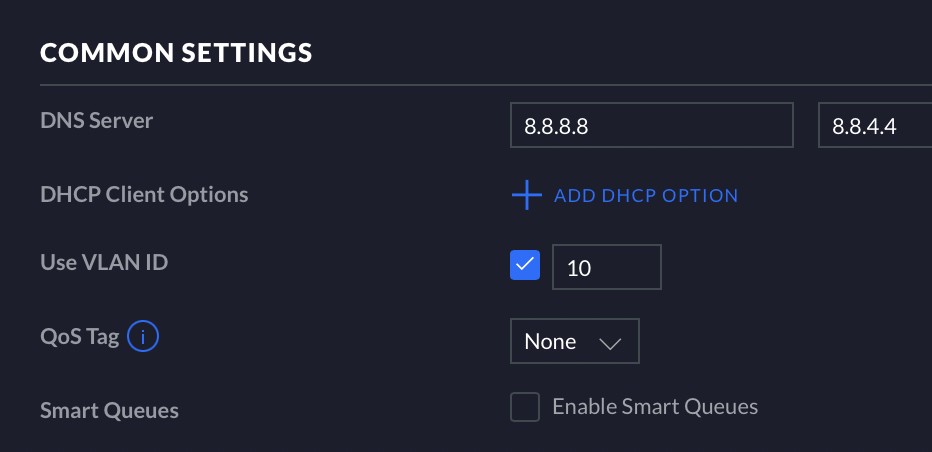
Disabling Smart Queues fixed it! (I don't know why it was enabled in the first place)


Lucas


lpossamai.me


sud0

283 posts

Ultimate Geek
+1 received by user: 117

ID Verified
Lifetime subscriber

  #2836052 20-Dec-2021 16:04
Send private message

Mehrts:


sud0:
Not possible... otherwise UDM-PRO won't fit πŸ˜‚


You keep the UDMP in that wall cabinet?!


Oh yeah!


Lucas


lpossamai.me


Shop now for Lenovo laptops and other devices (affiliate link).
grover1
7 posts

Wannabe Geek
+1 received by user: 3


  #2836601 22-Dec-2021 09:07
Send private message

sud0:


Okay. So, hopefully, I am not talking nonsense stuff here.


On the left you can see the ONT, and on the right Orcon's router. My UDM-PRO is connected to the device on the right.


The device on the left is a fibre termination box. It is completely passive, the ONT is the device on the right, and it "clips" over the termination box.


You do have one of the newer Chorus ONTs which includes a RGW (router function, Wifi).


allio
895 posts

Ultimate Geek
+1 received by user: 529


  #2836702 22-Dec-2021 10:04
Send private message

sud0:


Okay. So, hopefully, I am not talking nonsense stuff here.


On the left you can see the ONT, and on the right Orcon's router. My UDM-PRO is connected to the device on the right.


This makes me glad I chose to go with a 6U rack for my new build rather than a wall cabinet. That looks absolutely awful.


Can you please consider putting the ONT on top of the ITP where it should be, and locating your router somewhere else?! I think you're stressing out all of the geeks on here. It's basically upside down with its butt in the air...


Glad you got your speed issue solved though!


insane
3325 posts

Uber Geek
+1 received by user: 1006

ID Verified
Trusted
2degrees
Subscriber

  #2836703 22-Dec-2021 10:05
Send private message

grover1:


The device on the left is a fibre termination box. It is completely passive, the ONT is the device on the right, and it "clips" over the termination box.


You do have one of the newer Chorus ONTs which includes a RGW (router function, Wifi).


Would those two devices stacked even fit into the box with the lid closed? The box doesn't look very deep, perhaps only a stud depth?


cyril7
9075 posts

Uber Geek
+1 received by user: 2499

ID Verified
Trusted
Subscriber

  #2836708 22-Dec-2021 10:11
Send private message

insane:

grover1:


The device on the left is a fibre termination box. It is completely passive, the ONT is the device on the right, and it "clips" over the termination box.


You do have one of the newer Chorus ONTs which includes a RGW (router function, Wifi).


Would those two devices stacked even fit into the box with the lid closed? The box doesn't look very deep, perhaps only a stud depth?


If it's a standard 90mm deep install then yes it does, even the shallower 70mm one do... Just

Cyril

1 | 2 | 3
Filter this topic showing only the reply marked as answer View this topic in a long page with up to 500 replies per page Create new topic


Geekzone Live »

Try automatic live updates from Geekzone directly in your browser, without refreshing the page, with Geekzone Live now.


Are you subscribed to our RSS feed? You can download the latest headlines and summaries from our stories directly to your computer or smartphone by using a feed reader.