Geekzone: technology news, blogs, forums
Guest
Welcome Guest.
You haven't logged in yet. If you don't have an account you can register now.


View this topic in a long page with up to 500 replies per page Create new topic
1 | 2 
cddt
1965 posts

Uber Geek
+1 received by user: 1904


  #3162361 22-Nov-2023 11:18
Send private message

steve98: Thanks everyone. I took your advice and changed to high transmit (I previously had this set to medium at the advice of someone else) and set RSSI to minimum to -75dB. The difference is immediately noticeable. Whereas I was getting typical speed test results of around 190Mbps it is now around 400Mbps on newer devices. Happy to stick with existing units now as this is likely as fast as I’ll need for the foreseeable.

Thanks again!!


Glad we could help. :) 


raytaylor
4076 posts

Uber Geek
+1 received by user: 1296

Trusted

  #3162568 22-Nov-2023 18:59
Send private message

steve98:


Hey Team, in my single-storey 350m2 house  


The question is not how many square metres, but how many walls one has.    


My rules for designing great wifi    


 - All living "positions" to be considered (bed, couch, desk, office, kitchen bar etc)     


 - No more than 1 wall to any living position   


 - No more than two walls to low-priority areas (bathroom, garage etc)   


 - Reflective or blocking walls then need to be considered as total dead zone creators (tin, tinted glass such as windows or kitchen splashbacks, concrete/cinderblock)   


 - Wifi isnt planned to go through floors, so a second story requires its own consideration based on walls    


 - I try to avoid putting an AP in the bedrooms, usually go for the hallway outside the bedroom doors.   


In a typical situation for most house designs I go   


 - Small House: One AP in lounge end of hallway   
 - Medium House: One AP in lounge, one in hallway   
 - Large House: One AP in lounge, two at each end of hallway   
 - Extra Large House: Add more as required   


Ray Taylor

There is no place like localhost

Spreadsheet for Comparing Electricity Plans Here


steve98

1400 posts

Uber Geek
+1 received by user: 252

Trusted

  #3162595 22-Nov-2023 21:44
Send private message

raytaylor:

steve98:


Hey Team, in my single-storey 350m2 house  


The question is not how many square metres, but how many walls one has.    


My rules for designing great wifi    


 - All living "positions" to be considered (bed, couch, desk, office, kitchen bar etc)     


 - No more than 1 wall to any living position   


 - No more than two walls to low-priority areas (bathroom, garage etc)   


 - Reflective or blocking walls then need to be considered as total dead zone creators (tin, tinted glass such as windows or kitchen splashbacks, concrete/cinderblock)   


 - Wifi isnt planned to go through floors, so a second story requires its own consideration based on walls    


 - I try to avoid putting an AP in the bedrooms, usually go for the hallway outside the bedroom doors.   


In a typical situation for most house designs I go   


 - Small House: One AP in lounge end of hallway   
 - Medium House: One AP in lounge, one in hallway   
 - Large House: One AP in lounge, two at each end of hallway   
 - Extra Large House: Add more as required   


This is very handy and my positioning does fit into these guidelines, so that’s reassuring . The signal and throughput is great all over the house now with the changes suggested here so thanks all again!


olivernz
512 posts

Ultimate Geek
+1 received by user: 177

ID Verified
Trusted
Lifetime subscriber

  #3162727 23-Nov-2023 10:04
Send private message

Oh and I forgot this....


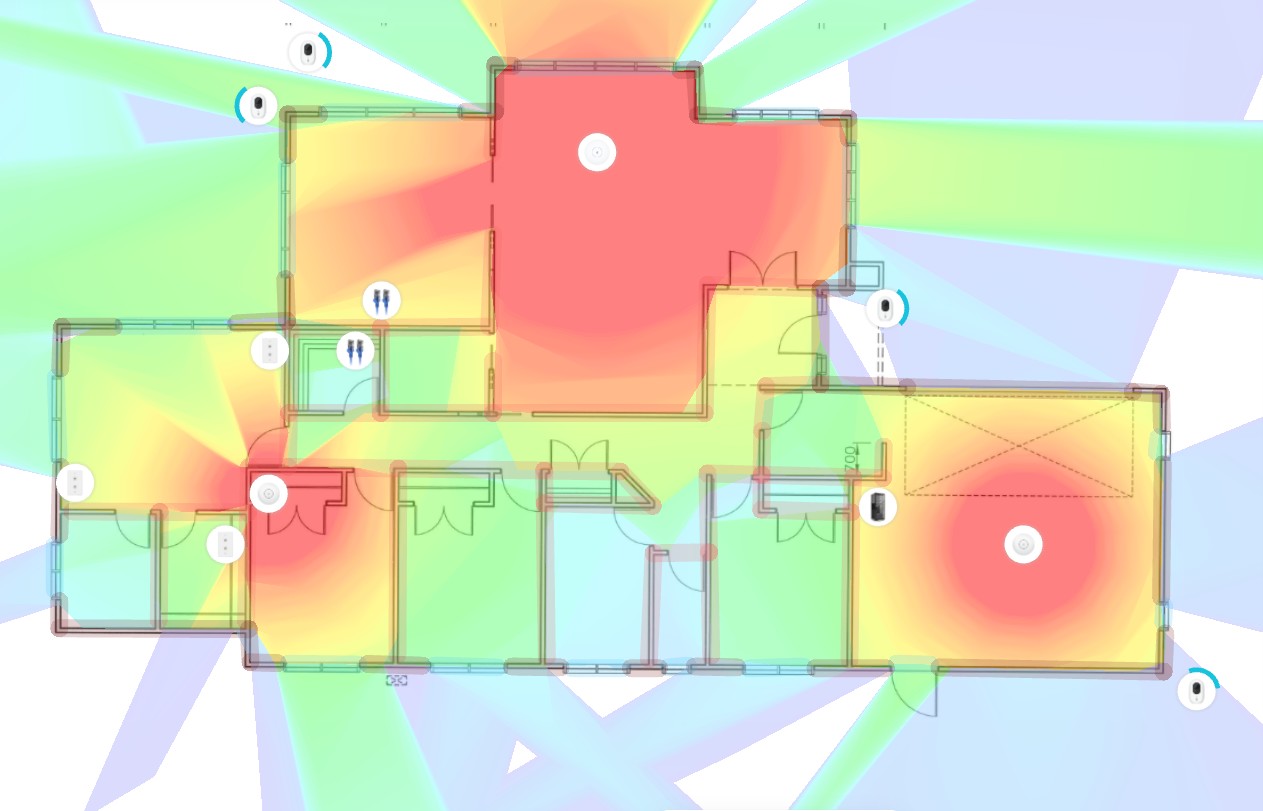
https://design.ui.com/


There you can pretty much plan what you have. Below is what mine looks like. You can see how walls and windows affect signal. But in saying that reception in the whole house is excellent and there are only a few dead spots outside.


1 | 2 
View this topic in a long page with up to 500 replies per page Create new topic


Geekzone Live »

Try automatic live updates from Geekzone directly in your browser, without refreshing the page, with Geekzone Live now.


Are you subscribed to our RSS feed? You can download the latest headlines and summaries from our stories directly to your computer or smartphone by using a feed reader.